

An IP address can affect how websites, online services, and security systems evaluate a connection. That is why terms such as "clean IP" and "IP pure" often appear when people discuss proxies, account access, email delivery, and online privacy. But what makes an IP address clean, and how can you check whether yours has a good reputation?
In this guide, IPFighter explains what a clean IP means, which factors influence IP reputation, how to check an IP address, and what you can do if it appears on a blacklist. It also clarifies the differences between a clean IP, a fresh IP, and a dedicated IP so you can choose an address that suits your needs.
1. What does it mean to have a clean IP?
A clean IP is an IP address with a positive reputation and no known signs of abuse in the reputation databases or security checks relevant to a particular service. The term "IP pure" is often used with a similar meaning, although neither phrase has one universally standardized technical definition.
An IP address may be considered clean when it has a history of legitimate use, does not appear on relevant threat or spam blacklists, and does not show other concerning signals. However, a clean result from one checker does not guarantee that every website or platform will trust the address.
Definition of clean IP
In everyday proxy and networking discussions, "clean IP" and "IP pure" generally describe an address that appears trustworthy and has no known reputation issues. Providers may use these terms to describe IPs intended for activities where reputation matters, such as browsing, account access, or other online workflows.
However, the wording alone does not establish the quality of an IP. One provider might use "IP pure" to describe an address that passes its own checks, while another might use "clean IP" to refer to an address with no listing in selected blacklist databases.
Before choosing an IP based on either label, check what the provider actually verifies. Useful details include blacklist status, IP type, network ownership, reputation history, and whether the address is shared with other users.
Discover more:
-
What is IP reputation? How IP purity shapes trust
-
What is an IP address, and how does it work?
-
IP reputation check: How IPFighter scores your IP
2. What makes an IP address clean or unclean?
An IP address's reputation depends on its history, network environment, and the signals available to security services. A clean result is not determined by the IP address alone, because different databases and platforms may evaluate different types of activity when deciding whether a connection appears trustworthy.
Several factors can influence how an IP address is assessed:
-
IP reputation and abuse history: Previous activity associated with an IP can affect how security services evaluate it. Reports involving spam, suspicious requests, or other abusive behavior may contribute to a negative reputation.
-
Blacklist status: An IP address may appear on a blacklist when its activity meets that database's listing criteria. Different providers maintain different datasets, so a result from one blacklist does not represent every security database.
-
IP type and network ownership: Residential, mobile, datacenter, VPN, and proxy addresses have different network characteristics. Some platforms may apply different levels of scrutiny to certain connection types, but an IP type alone does not prove that an address is clean or unclean.
-
Shared IP usage: Multiple users may connect through the same public IP address. If one user generates abusive traffic, that activity may affect the reputation of other users sharing the address.
Location and network consistency: Differences between an IP's reported location, network provider, and other connection signals may be relevant to security checks. However, geolocation databases are not always precise, so a location mismatch alone does not establish suspicious activity.
These factors should be considered together rather than treated as separate pass or fail rules. For example, a residential IP can still have a poor reputation, while a datacenter IP can have a clean blacklist status.

What makes an IP address clean or unclean
3. Why does having a clean IP matter?
A clean IP can help reduce reputation related connection issues when accessing websites or using online services, particularly when those services consider IP history as part of their security checks. However, a positive IP reputation does not guarantee unrestricted access because platforms can also evaluate account behavior, browser information, and other risk signals.
Here are some situations where IP reputation may matter:
-
Browsing and website access: Websites may use IP reputation as one signal when evaluating incoming traffic. An address associated with suspicious activity may face additional verification, rate limits, or access restrictions.
-
Account registration and login: Some platforms consider network information when assessing account activity. A poor reputation or unusual connection pattern may contribute to additional security checks, although it does not automatically mean an account will be blocked.
-
Email delivery: Sending IP reputation can influence whether messages reach recipients' inboxes or are filtered as spam. Google explains in its Email sender guidelines that activity from users sharing an IP can affect the reputation of that address and its email delivery.
-
Proxy workflows: A proxy's IP reputation can affect its suitability for particular tasks. Checking the address before using it can help identify potential reputation issues and avoid relying only on a provider's clean IP claim.
A clean IP is therefore useful, but it is only one part of a reliable connection. The requirements can differ depending on the website, service, and activity involved.
4. How to check if an IP address is clean
You can check whether an IP address appears clean by reviewing its blacklist status, reputation indicators, connection type, and network information. Using multiple checks gives you a more useful picture than relying on a single score or a provider's claim that an address is "IP pure."
4.1. Check the IP against blacklist databases
Blacklist checks help you find out whether an IP address appears in databases that track spam, abuse, or other suspicious network activity. You can use services such as Spamhaus and IPVoid to review an address against their available datasets. When checking an IP, pay attention to:
-
Whether the address appears on a blacklist.
-
Which database reported the listing.
-
The reason or category associated with the listing, if available.
-
Whether the listing is still active.
-
Whether the database provides instructions for investigation or removal.
Do not assume that one blacklist result tells the whole story. A listing may affect specific services or networks rather than the entire internet. Spamhaus also explains that a user may continue experiencing delivery problems even when an address is not currently found in its own blocklists, because other network or resolver issues may be involved.
4.2. Review IP reputation and fraud indicators
Blacklist status is useful, but it does not cover every factor that can influence how a website evaluates an IP address. Reputation checkers may combine blacklist information with network ownership, connection type, proxy detection, and other available signals to provide a broader assessment.
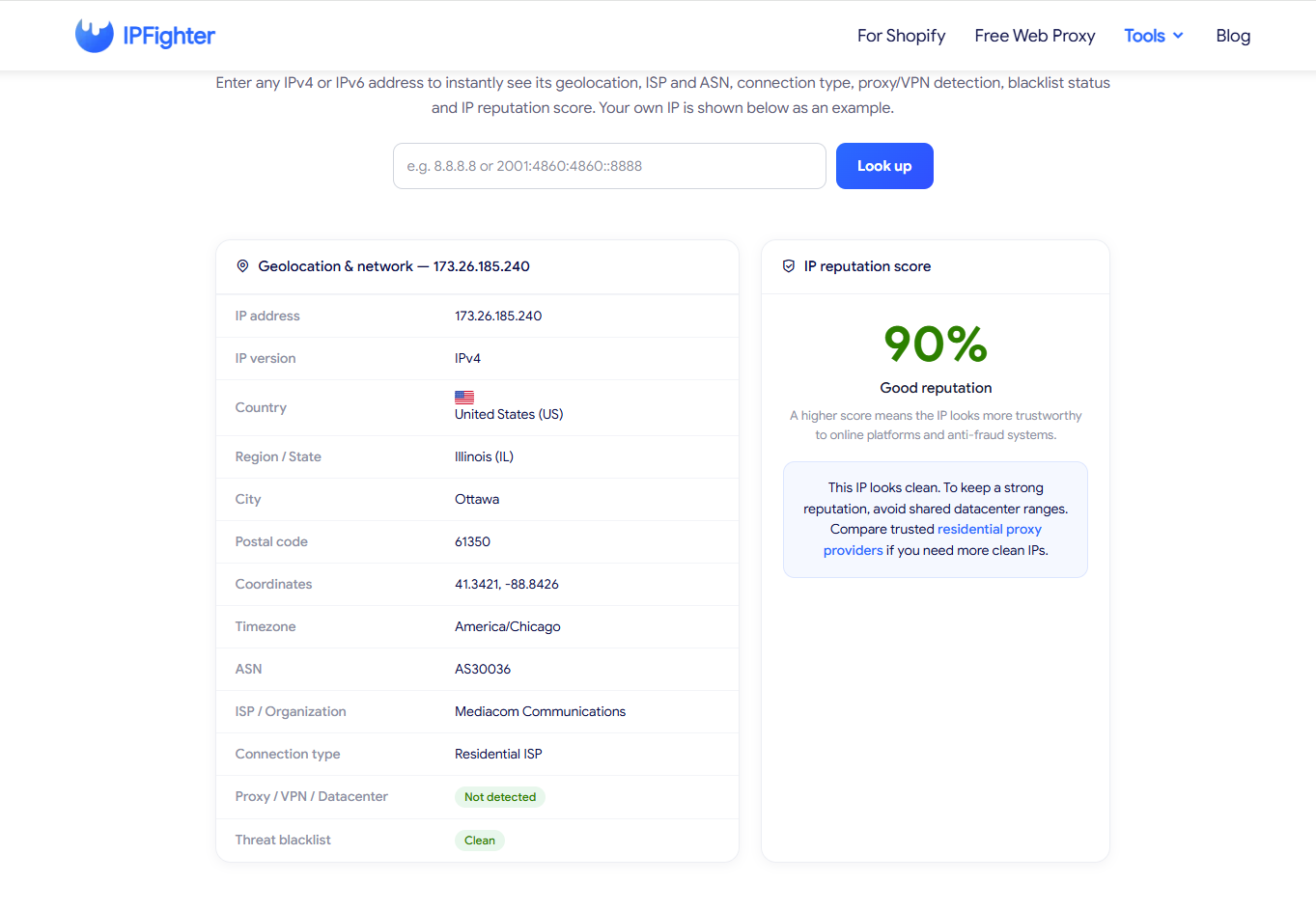
For example, IPFighter is a platform that helps you check and analyze IPs, proxies, and browser fingerprints. You can use its tools to review information such as:
-
IP Lookup: Check an IP address's reported location, ISP, ASN, and connection type.
-
IP Score: Review an overall assessment based on multiple network and security signals.
An IP Score can help you identify signals that may deserve further investigation, but it is not a universal clean IP certificate. A good score does not prove that an address is absent from every blacklist, and a lower score does not necessarily mean that every website will reject it. Always review the individual results alongside your intended use case.
Check IP reputation on IPFighter
4.3. Identify the IP type and network
The type of IP address can help you understand the connection you are using. Check whether the address is identified as residential, mobile, datacenter, VPN, or proxy, and review the associated ISP or network organization.
|
IP type |
What to review |
|
Residential |
ISP information, reputation history, and whether the address is shared |
|
Mobile |
Mobile network identification, reputation, and connection stability |
|
Datacenter |
Hosting provider, network range, blacklist status, and intended use |
|
VPN or proxy |
Proxy detection, exit IP reputation, location, and shared usage |
A particular IP type should not be treated as proof of a clean or dirty address. For example, datacenter IPs are not automatically untrustworthy, and residential IPs are not automatically free from previous abuse.
If you are checking a proxy, compare the reported IP address and location with the details provided by the proxy service. This can help you identify whether the connection is using the expected exit address.
4.4. Check for IP leaks when using a VPN or proxy
A proxy or VPN check should also consider whether your browser exposes network information outside the expected connection. DNS and WebRTC tests can help identify whether requests or browser features reveal an address associated with your original network. When interpreting these results, distinguish between a real leak and a mismatch:
-
A real leak: The test exposes your actual IP address or ISP from your original network while the proxy or VPN is active.
-
A mismatch: The detected DNS or WebRTC information differs from the proxy IP or expected location, but it does not reveal your actual network IP.
A mismatch does not automatically mean your real IP has leaked. Establish your normal network baseline first, then compare the results while connected to the proxy or VPN. If your original IP or ISP appears, investigate the browser, proxy, or VPN configuration rather than immediately assuming the provider is responsible.
4.5. How to interpret IP checker results
Different checkers may return different results because they use different databases, scoring methods, and detection signals. Use the table below as a practical guide to understanding common outputs and deciding what to investigate next.
|
Check result |
What it may indicate |
What to do next |
|
No blacklist listing found |
The IP was not found in the databases checked |
Review other reputation and network indicators |
|
IP appears on a blacklist |
A particular database has listed the address |
Check the listing reason and removal procedure |
|
Good reputation score |
The checker evaluates the IP positively based on its signals |
Verify blacklist status and suitability for your use case |
|
Proxy or VPN detected |
The connection appears to use a proxy, VPN, or hosting network |
Confirm whether this matches your intended connection |
|
Location differs from expected |
The geolocation database reports another location |
Compare the ISP, ASN, and other location sources |
|
DNS or WebRTC mismatch |
Browser network information differs from the expected proxy details |
Establish your baseline and check whether your real IP is exposed |
The most reliable approach is to combine several results and investigate inconsistencies. No single checker can guarantee that an IP will be trusted by every online service.
5. How to clean or improve your IP reputation
You can improve an IP address's reputation by identifying the cause of the problem, stopping the activity responsible, and following the relevant blacklist removal process. If the address is shared or controlled by an ISP or proxy provider, you may need the network owner to investigate or request removal on your behalf. Follow these steps when an IP address appears suspicious or is listed:
-
Identify why the IP was flagged: Check the blacklist entry, reputation report, or service notification to understand what issue was detected. Do not assume that every listing has the same cause.
-
Stop suspicious or abusive activity: If the IP is associated with spam, compromised devices, unauthorized automation, or unusual traffic, address the underlying problem before requesting removal.
-
Request blacklist removal: Follow the removal instructions provided by the database that listed the address. Some databases require the registered IP owner or network provider to submit the request.
-
Contact your ISP or proxy provider: If you do not control the IP address, ask the provider to investigate its history and handle any necessary removal request. Spamhaus, for example, advises end users to contact their system administrator, ISP, or email service provider when they need help with certain listings.
-
Replace the IP if necessary: If the address cannot be restored to a suitable reputation or does not meet your requirements, ask your provider about assigning another IP. A replacement address should still be checked because a new assignment is not automatically a clean one.
-
Monitor the IP over time: Recheck the relevant reputation databases and connection details after the issue has been addressed. Reputation data may not update immediately across every service.
You can read the Spamhaus listing removal guidance for details about checking listings and submitting removal requests. Remember that changing an IP address does not resolve the underlying cause if the same abusive activity continues.
How to clean or improve your IP reputation
Read more:
-
What is IP trust score? How to know if an IP is safe
-
What is Abuse IP? Understanding the mechanics of IP misuse
-
How to warm up IP address: Why new IPs need reputation building
6. Clean IP vs. Fresh IP vs. Dedicated IP: What's the difference?
A clean IP describes an address's reputation, a fresh IP describes how recently it has been assigned or introduced into a service, and a dedicated IP describes how the address is allocated to a user. These terms refer to different characteristics, so a fresh or dedicated IP is not necessarily clean.
|
Term |
What it describes |
Does it guarantee good reputation? |
|
Clean IP |
An IP address with a generally positive reputation |
No, reputation depends on the databases and services checked |
|
IP pure |
A commonly used term for an IP presented as having good reputation |
No, the provider's verification criteria should be checked |
|
Fresh IP |
An IP address that has recently been assigned, added, or made available |
No, it may have a previous usage history |
|
Dedicated IP |
An IP address reserved for one customer or account |
No, its reputation still depends on past and current activity |
|
Shared IP |
An IP address used by multiple customers or users |
No, other users' activity may affect its reputation |
For example, a dedicated IP may have a poor reputation because of previous activity, while a shared IP may have a positive reputation if its users maintain responsible practices. Similarly, a fresh IP may have been used before it was assigned to you.
When choosing an IP for a specific task, look beyond labels such as "fresh," "dedicated," or "IP pure." Ask how the provider checks reputation, whether the address is shared, and what information is available about its network history.
7. Conclusion
A clean IP is an address with a generally positive reputation and no known issues in the checks relevant to your intended use. The term "IP pure" is often used in the same context, but neither label guarantees that an address will be accepted by every website or online service.
To evaluate an IP properly, check its blacklist status, reputation indicators, network type, and connection information. If you use a proxy or VPN, also review DNS and WebRTC results to make sure your original network IP is not exposed. Combining these checks gives you a clearer picture of the address than relying on a single score or provider claim.
8. FAQ
What does it mean to have a clean IP?
A clean IP is an address with a generally positive reputation and no known issues in the reputation databases or security checks being used. It does not guarantee that every website will trust the address, because each platform can apply its own security rules.
How can I clean my IP address?
Start by checking whether the address appears on a blacklist and identifying the reason for the listing. Stop the activity responsible, follow the database's removal process, and contact your ISP or proxy provider if they control the address. If necessary, request a replacement IP and check its reputation before using it.
How can I flush my IP?
Running commands like ipconfig /flushdns only clears your local DNS cache—it does not change your public IP or reset its reputation. To get a new public IP, you need to restart your router, release/renew your connection, or contact your ISP, though address reassignment ultimate depends on your provider's network setup.
What is 100.64.0.0/10 used for?
The 100.64.0.0/10 block is a Shared Address Space reserved for Carrier-Grade NAT (CGNAT) under RFC 6598. It is not a globally routable public IP range; seeing this address on your network simply means your ISP shares a single public IPv4 address across multiple subscribers.
Read more
What is a clean IP address and how does it work?

DNS blacklist: How to check and remove your IP

Why Google says "Unusual traffic from your computer network"
Anonymous proxy detected: Causes and how to fix it

"Before we continue… Press & Hold": Why you see this check
Cloudflare human verification bypass extension: What to know