

A Japan proxy routes your traffic through a Japanese IP address, so websites treat you as a visitor in Japan. In our provider reviews we tested two Japanese IPs, from RapidProxy and Geonix, with IPFighter. Both scored 85–90/100 with no proxy flag, but our request for an Aichi IP came back from neighbouring Shizuoka, and both connections were modest on speed.
Written by Valerie Thorne · Updated: Nov 20, 2026
IPFighter earns a commission if you buy through some links on this page. It does not affect our test results.
1. Japanese IPs we tested
The results below come from our individual provider reviews, where each IP was loaded into Chrome and checked with IPFighter IP lookup, a speed test and a Google search. These are single-IP spot checks, not averages of each provider's Japanese pool.
|
Provider |
Proxy type |
Requested location |
Detected location |
IP score |
Proxy flag |
Download / upload (Mbps) |
Latency (ms) |
Full review |
|
RapidProxy |
Residential |
Aichi |
Shizuoka (IPFighter and Google) |
90 |
No |
10.54 / 11.27 |
159 |
|
|
Geonix |
Residential |
Japan |
Nagano (Google) |
85 |
No |
28 / 2.4 |
530 |
What the results show
Both IPs were clean. RapidProxy's IP scored 90/100 and Geonix's 85/100, and neither was detected as a proxy.
A prefecture request landed next door. We asked RapidProxy for Aichi, home to Nagoya, and both IPFighter and Google placed the IP in Shizuoka, the neighbouring prefecture. Geonix's IP, requested only for Japan, appeared in Nagano. If your work depends on Tokyo, Osaka or another specific city, check every IP before relying on it.
Speed was modest, latency mixed. Geonix downloaded faster at 28 Mbps but uploaded at only 2.4 Mbps; RapidProxy was balanced at about 10–11 Mbps each way. RapidProxy answered in 159 ms, far quicker than Geonix's 530 ms.
2. Other providers with Japan coverage
The providers below publish Japanese proxy options, but we have not tested their Japanese IPs. The details come from each provider's own Japan or pricing page; prices and coverage change often, so confirm them before buying.
|
Provider |
Japan proxy types |
Starting price (provider) |
Japan targeting (provider) |
Trial |
IPFighter test |
|
Oxylabs |
Residential, dedicated datacenter |
Residential from $8/GB |
Country, state, city, ZIP, ASN; Tokyo, Yokohama listed |
For eligible customers |
Not tested |
|
Bright Data |
Residential, mobile, ISP, datacenter |
Residential from $4/GB pay as you go |
City, state, ZIP |
Free trial, no card |
Not tested |
|
IPRoyal |
Residential, ISP, datacenter, mobile |
Residential from $7/GB |
Country, state, city; Tokyo and Osaka pages |
Not specified |
Not tested in Japan (our review) |
|
SOAX |
Residential, mobile |
About $5/GB on smaller plans |
Region, city, carrier |
$1.99 for 3 days, 400 MB |
Not tested |
|
NodeMaven |
Residential, mobile |
Residential from $4.25/GB |
City, ZIP, ISP; Tokyo, Osaka, Yokohama, Nagoya, Sapporo |
Paid trial |
Not tested in Japan (our review) |
|
Byteful |
Residential, static ISP, datacenter |
Residential from $3.25/GB |
Country level; city to confirm |
1 GB residential after ID check |
Not tested in Japan (our review) |
|
Webshare |
Rotating residential, datacenter, ISP |
Residential from $3.50/GB |
Varies by plan |
10 free proxies |
Not tested |
|
NiuProxy |
Dynamic residential, static ISP |
Residential from $0.35/GB on the 10,000 GB plan; static ISP from $3/IP |
Country and city (global network) |
Not specified |
Not tested in Japan (our review) |
|
HydraProxy |
International mobile, ISP, residential |
Mobile from $5/GB; ISP from $4/IP |
Country and ISP (mobile) |
24-hour money-back on residential and ISP |
Not tested |
Providers that publish Japanese city lists (Oxylabs, IPRoyal, SOAX, NodeMaven) suit city-level work best on paper. Since our Aichi request came back from Shizuoka, check each IP's location even when a provider lists city targeting.
3. How to choose a Japan proxy
A Japanese IP is only useful if it fits the sites you need and the way they check visitors. Three things matter most in Japan.
Pick the network type for the target site. Japanese shoppers and users rely on platforms such as Amazon Japan, Rakuten, Yahoo! Japan, Mercari and LINE, alongside Google for search. Residential IPs suit browsing, price checks and SEO research on these sites. Mobile IPs from Japan's main carriers, NTT Docomo, KDDI (au), SoftBank and Rakuten Mobile, suit mobile apps and stricter account checks. Static ISP or datacenter IPs suit long sessions and high-volume collection where a home-network identity matters less.
|
Need |
Proxy type to start with |
What to check |
|
Price, product and search research on Japanese sites |
Residential |
IP score and location on Google |
|
Mobile apps and carrier-sensitive checks |
Mobile (Docomo, au, SoftBank, Rakuten Mobile) |
Carrier name and speed |
|
Long account sessions |
Static ISP |
ISP name and stability over time |
|
High-volume public data collection |
Datacenter or rotating residential |
Cost per GB or per IP |
Decide whether you need a city or prefecture. Most provider coverage centres on Tokyo and Osaka, with Yokohama, Nagoya and Sapporo next. Neighbouring prefectures can blur together: our Aichi request, where Nagoya is, came back from Shizuoka. If your local search or ad check depends on one area, choose a provider that names Japanese cities, and confirm each IP on Google.
Compare cost on your real usage. Published starting prices among the providers above range widely, from very low per-GB rates on large plans to $8/GB, and several of the lowest rates apply only to large orders. Per-IP ISP plans from about $3–4 per IP can be cheaper for long sessions that move a lot of data.
4. How to check a Japan proxy with IPFighter
The checks below are the same ones we ran on the two Japanese IPs above.
- Run IP Lookup. Confirm the country is Japan, note the prefecture, city and ISP, and check that the IP is not flagged as a proxy or hosting connection. Both of our Japanese IPs passed this step.
- Check the IP score and platform scores. Our Japanese IPs scored 85 and 90/100; an IP well below that is worth replacing before you use it on accounts.
- Search Google from the proxy. Scroll to the location at the bottom of the results page. This confirmed our Aichi request had landed in Shizuoka.
- Run the DNS Leak Test and WebRTC Leak Test. DNS servers or a WebRTC address outside Japan can reveal that the connection is not local.
- Test speed and upload. Our Japanese IPs downloaded at 10.54 and 28 Mbps, and one uploaded at only 2.4 Mbps, too slow for posting media.
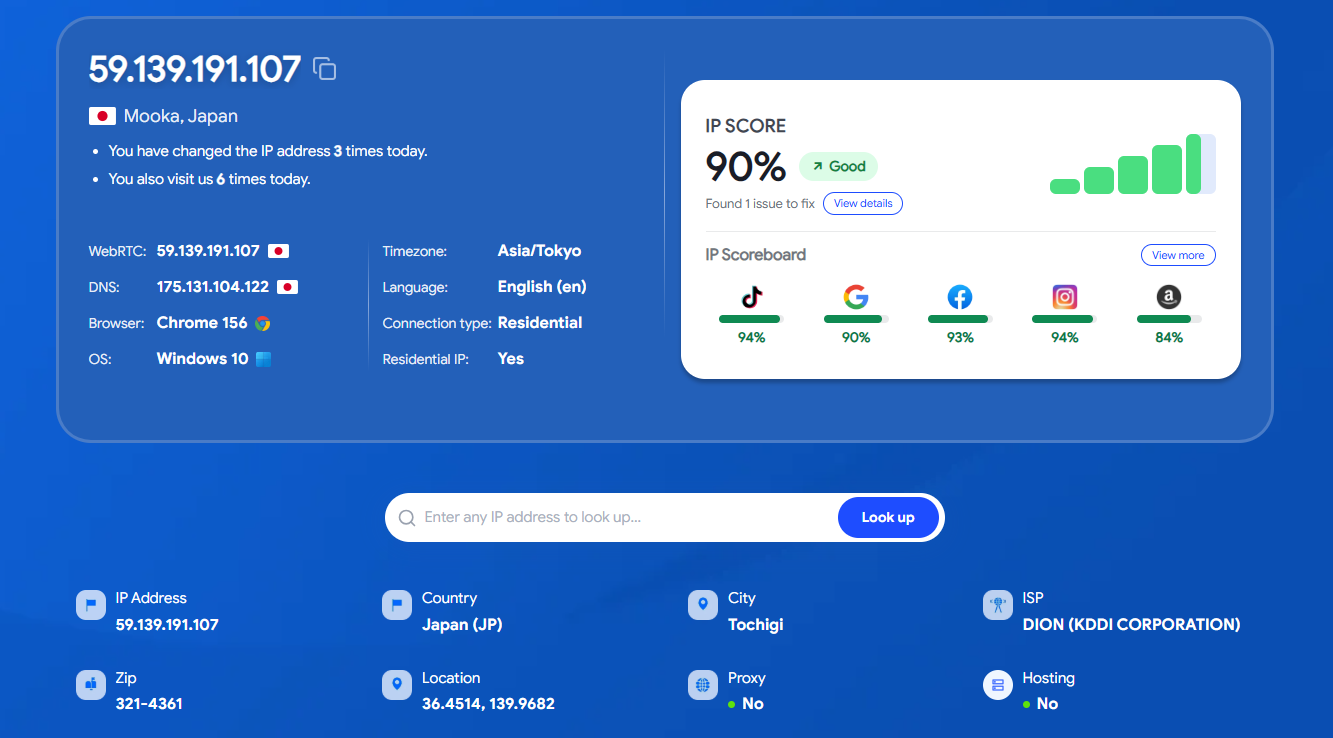
Checking a Japanese proxy IP on IPFighter
5. Conclusion
The two Japanese IPs we tested were clean, scoring 85 and 90/100 with no proxy flags, but neither was fast, and a prefecture request landed next door. For most Japanese research and browsing, start with a residential proxy, choose a provider that names Japanese cities or carriers if you need them, and verify every IP with IPFighter before you rely on it.
6. FAQ
Which Japan proxy performed best in your tests?
RapidProxy's Japanese IP scored higher, 90/100, and answered much faster at 159 ms, though it downloaded only 10.54 Mbps and landed in Shizuoka instead of the Aichi we requested. Geonix's IP scored 85/100 and downloaded faster at 28 Mbps, but uploaded at just 2.4 Mbps with 530 ms latency.
Can I get a Tokyo or Osaka IP?
Several providers publish Tokyo and Osaka coverage, including Oxylabs, IPRoyal and NodeMaven, according to their own pages. In our tests, a prefecture-level request landed in the neighbouring prefecture, so check every IP's location on Google before relying on it for city-level work.
Do I need a mobile proxy for Japanese apps?
For mobile-first apps and services that weigh carrier traffic, a mobile IP from NTT Docomo, au (KDDI), SoftBank or Rakuten Mobile is the closest match to a real user. Providers such as Bright Data, SOAX and NodeMaven list Japanese mobile proxies. We have not tested a Japanese mobile IP, so check speed and DNS before committing.
Are free Japan proxies worth using?
For a quick, non-sensitive check, maybe; for regular work, rarely. Free Japanese proxies are often offline, slow or already abused, and you do not know who runs them. Never send passwords or personal data through one, and test any free IP with IPFighter before use.
Read more
DuoPlus review: Convincing Android fingerprints, but mixed proxy and DNS results


IPPeak review: Clean, fast residential IPs with high latency and a weaker ISP result
LegionProxy review: 82.5% average IP score, but inconsistent city targeting
Aproxy review: Japan residential IP scores fell to 40%, while ISP speeds reached 200 Mbps
AstroProxy review: 90% IP scores, but slow speeds

FlashProxy review: Very fast and cheap, but low IP scores and DNS mismatches