

Every time you surf the web, send emails, or make calls over the Internet, a unique identifier helps devices connect to each other - the “IP address.” So, what is an IP address? How do you look up an IP address? This article will explain everything about IP addresses, including how they work, how they are classified, how to use them, and how to protect or hide your IP address to ensure safety while using the network. Let’s dive in!
1. What is an IP Address?
An IP address (Internet Protocol Address) is a unique series of identification numbers assigned to each device connected to the Internet. Just like your home address determines your physical location, an IP address identifies the location of devices in the digital world, enabling them to “communicate” with each other.
Every time you visit a website, your device sends its IP address to the website’s server, which uses it to send data back to your device. IP addresses are essential for connecting and routing data on the Internet.

How devices connect using IP
2. What is the use of an IP Address?
Beyond serving as device identifiers, IP addresses play many other essential roles:
-
Routing and networking: IP addresses determine the path and route for data to reach the correct device, ensuring that information gets to its intended destination.
-
Security and management: Network administrators use IP addresses to manage devices, enabling protections against unauthorized access.
-
Traffic analysis and optimization: IP addresses help analyze user behavior on websites, allowing websites to optimize and improve the user experience.
-
Resource sharing: IP addresses enable devices on a local network or the Internet to share data and resources seamlessly.
Together, these roles show that an IP address is far more than just a technical label - it's the foundation that keeps devices connected, secure, and able to exchange data reliably across the Internet.
3. What are IPv4 and IPv6?
IP addresses have two main versions: IPv4 and IPv6. These represent different addressing methods, each with its own structure and capacity to provide unique address spaces.
3.1. IPv4 version
IPv4 is the most widely used version today. It has a structure comprising four groups of decimal numbers, with each group representing an 8-bit sequence (1 byte). These groups are separated by dots, and each group has a value ranging from 0 to 255. For example: 192.168.1.1.
An IPv4 address is 32 bits in total, allowing for approximately 4.3 billion unique addresses. However, this number is becoming insufficient due to the rapid increase in Internet-connected devices.
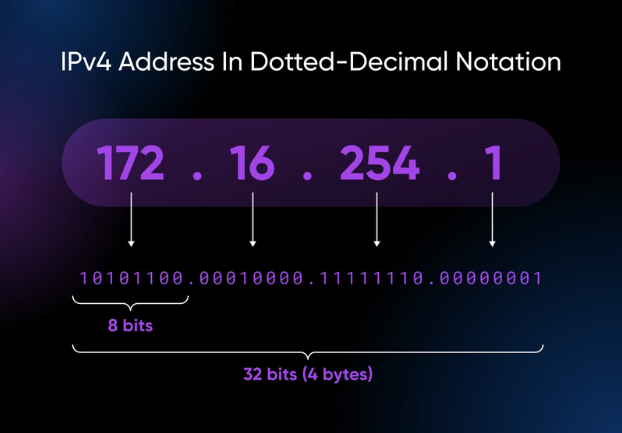
IPv4 version
3.2. IPv6 version
IPv6 was developed to expand the address space, accommodating the rapid growth of the Internet. It uses eight groups of hexadecimal characters (0-9 and A-F), separated by colons. For example: 2001:0db8:85a3:0000:0000:8a2e:0370:7334.
With a total of 128 bits, IPv6 can provide up to 2^128 addresses - approximately 340 undecillion addresses - effectively eliminating the address limitations of IPv4.
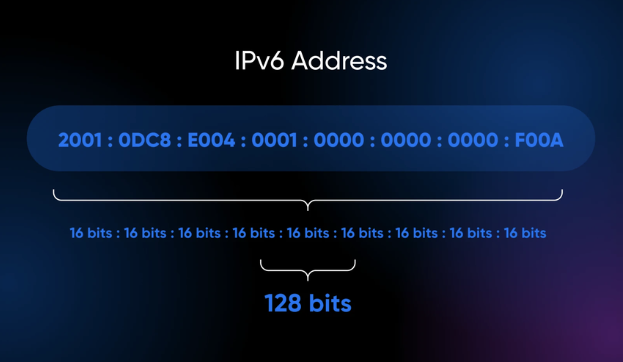
IPv6 version
4. How are IP addresses classified?
In addition to the two main versions (IPv4 and IPv6), IP addresses are classified based on their scope and functionality.
4.1. Public IP and Private IP
Public IP: A Public IP address is used by a device to connect directly to the Internet. This address allows websites and online services to identify your device when accessing them from outside the network.
Private IP: A Private IP address is used within an internal network, such as a home or corporate Wi-Fi network. This type of address is not accessible from outside the Internet, providing an extra layer of security by protecting devices from unauthorized access.
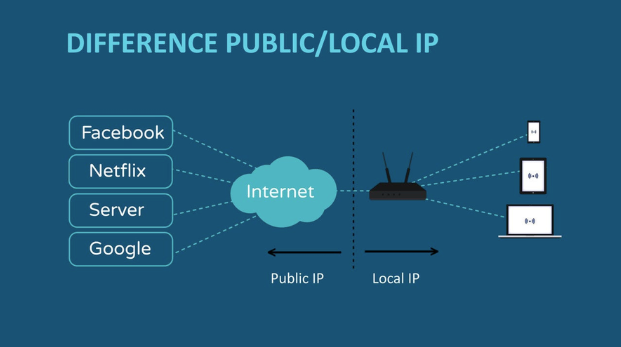
Public IP and Private IP
4.2. Static IP and Dynamic IP
A Static IP address remains fixed and does not change each time the device connects to the network. This type of IP is ideal for devices requiring a consistent IP address, such as web servers, email servers, or services needing a stable connection. With a static IP, remote access to your device becomes easier, as the IP address stays the same.
In contrast, a Dynamic IP address changes with each network connection. When a device connects to a network (usually via Wi-Fi or a home network), it is assigned a new IP address from the network system. Dynamic IPs are more suitable for devices like personal computers and mobile phones that do not require a fixed IP address.
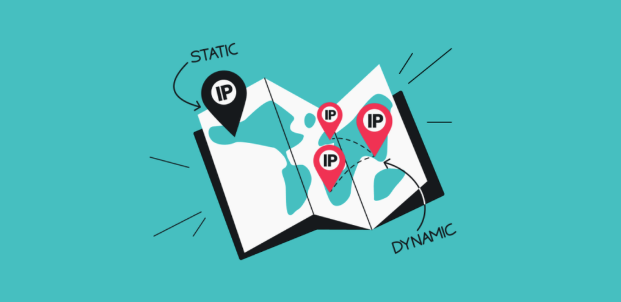
Static IP and Dynamic IP
5. How to look up IP Address on device
Looking up a device’s IP address is a simple yet essential task when you need to check your connection or determine your device’s address.
5.1. Look up IP Address on Android phones and iPhones
On mobile devices, you can find your local IP address directly in the Wi-Fi settings:
-
On Android: Go to Settings > Wi-Fi > Select the currently connected Wi-Fi network > Find the section labeled IP Address.
-
On iPhone: Navigate to Settings > Wi-Fi > Tap the currently connected Wi-Fi network > View the information under IP Address.
Either way, this shows the local IP address assigned to your phone on that Wi-Fi network - not your public IP as seen by the wider Internet.
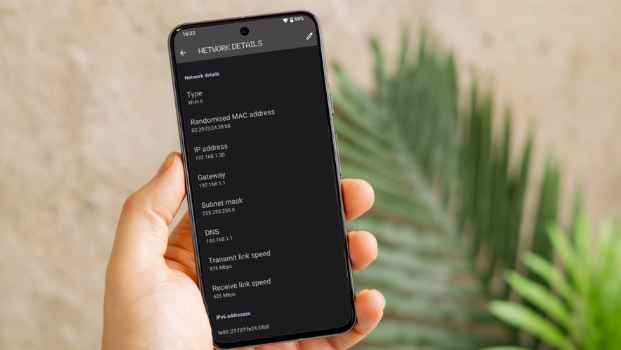
Look up IP Address on Android phones and iPhones
5.2. Look up IP Address on Windows and MacOS computers
On desktop, the process is just as quick through your system settings:
-
On Windows: Open Command Prompt (CMD), type the command ipconfig, and press Enter. The IP address will be displayed next to the "IPv4 Address" line.
-
On MacOS: Go to System Preferences > Network > Select the network connection you are using. The IP address will appear in the Status section.
Like the mobile steps above, both methods show your device's local network IP, which is different from your public IP.
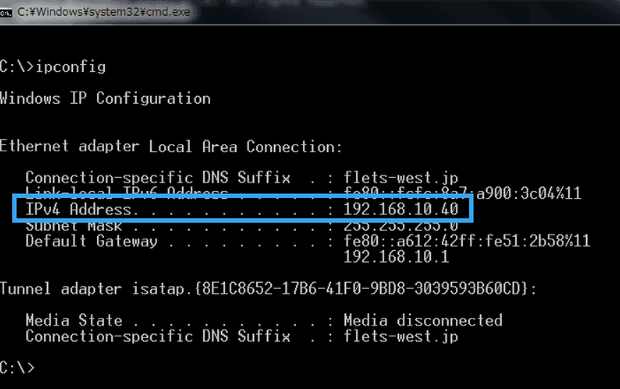
Look up IP Address on Windows computers
5.3. Look up public IP Address through online tools
To look up a public IP address, you can use online tools or websites like IPFighter. These tools help identify the public IP address your device is using to connect to the Internet.
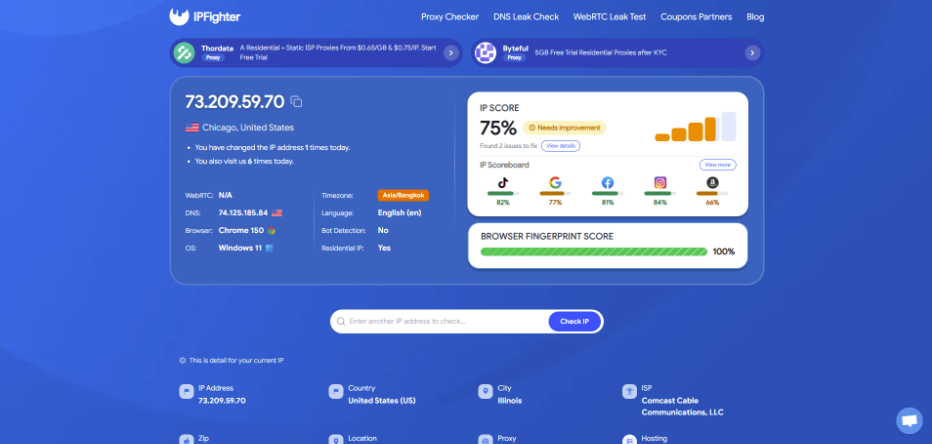
Look up your public IP address using IPFighter
6. How to hide and protect IP Address?
Hiding your IP address is an essential way to safeguard your personal information while using the Internet.
6.1. How to hide your IP Address using a VPN
A VPN (Virtual Private Network) allows you to hide your real IP address by replacing it with the IP address of the VPN server. When you connect through a VPN, all your Internet traffic is encrypted and routed through the VPN server. This not only protects your personal information but also enables access to region-restricted content.
6.2. How to hide your IP Address using a proxy
A Proxy server acts as an intermediary between your device and the Internet. When using a Proxy, your connection requests are routed through the Proxy server before reaching their destination, effectively hiding your real IP address. Proxies are ideal for accessing geo-restricted content and protecting your privacy while browsing the web.
Do VPNs and proxies really hide your IP address? Not always. Some VPNs and proxies can still expose your real IP address through WebRTC or DNS requests. Run a free WebRTC Leak Test and DNS Leak Check on IPFighter to make sure your VPN and proxy are protecting your privacy.
How to hide and protect IP Address
Discover more:
-
What is an IP pool? How proxy IP pools work
-
What is Abuse IP? Understanding the mechanics of IP misuse
7. Conclusion
IP addresses are indispensable in every Internet connection, serving to locate, manage, and secure your device. Clearly understanding “what is an IP address”, how to look it up, and how to hide it when necessary will help you use the Internet more safely and effectively.
We hope this article has provided you with the essential knowledge about IP addresses, enabling you to browse the Internet with greater confidence and security.
8. FAQ
Does using 4G have an IP address?
Yes, when using a mobile network like 4G, your device is assigned a dynamic IP address by the telecommunications service provider.
Where is the IP address located?
An IP address is a digital identifier assigned to a device by the network or service provider. You can find it in your device's network settings.
How to identify a valid IP address?
A valid IP address must follow the standard IPv4 or IPv6 format. If it doesn't match either format, it isn't a valid IP address. You can also use an IP lookup or validation tool to verify whether an address is correctly formatted.
Why can the same device have multiple IP addresses?
A device can have multiple IP addresses when connected to different networks. For instance, a device connected to Wi-Fi and a mobile network simultaneously will receive separate IP addresses from each network.
Does my IP address reveal my identity?
Not directly. An IP address doesn't expose your name or personal details on its own, but it can reveal your approximate geographic location and your Internet Service Provider. That's also why tools like IPFighter exist - so you can check exactly what your IP is exposing before you go online for sensitive tasks.
Can two devices have the same public IP address?
Yes. Multiple devices on the same network can share a single public IP address while using different private IP addresses internally.
Read more

Why do I keep getting CAPTCHA? Here's what may be triggering it


What is a CAPTCHA? The check that separates people from bots
What is a mesh network and when should you use one?
What is an IP2 network? How it works, uses, and benefits
Explaining how to know if you have a DNS leak

How to know if you have a WebRTC leak: Reading your results