

Every new IP address starts with little or no reputation. Because security systems have no historical data to evaluate, new IPs are often treated more cautiously than established ones.
This is why many organizations choose to warm up IP address before using it for large-scale email campaigns, account management, or other online activities. By gradually increasing activity over time, an IP can build trust and develop a positive reputation. In this guide, IPFighter explains what it means to warm up an IP address, why it matters, and how to do it safely.
1. What does it mean to warm up IP address?
IP warming (or IP warm-up) is the process of gradually increasing the amount of email activity or network traffic associated with a new IP address over time. The goal is to demonstrate to reputation systems that the IP is being used legitimately and responsibly. Instead of suddenly generating large volumes of traffic, the IP slowly builds a positive history through consistent and natural activity patterns.
IP warming is most commonly associated with email infrastructure, where organizations gradually increase email sending volumes to build sender reputation. However, similar principles can also apply to proxy usage, account management, and other online activities where IP trust plays an important role.
Warm up IP address
Discover more:
-
What is an IP Address? Everything you need to know
-
How to find IP address on Windows, Mac, iPhone, and Android devices
-
What is IP reputation? How IP purity shapes trust
2. Why do new IP addresses have no reputation?
A new IP address is similar to a new user account with no activity history. Reputation systems simply do not have enough information to determine whether the IP is trustworthy. For example, systems may not know:
-
Who owns the IP
-
What the IP is being used for
-
Whether previous traffic was legitimate
-
Whether the IP is associated with spam or abuse
Because of this uncertainty, many platforms take a cautious approach when evaluating traffic from newly assigned IP addresses. This is especially important for organizations using a new server, proxy, or dedicated email infrastructure. Without a history of legitimate behavior, the IP may face additional scrutiny until trust is established.
3. Why is warming up an IP address important?
IP warming helps new IP addresses build credibility and establish a positive reputation over time.
3.1. Build IP reputation
One of the primary goals of IP warming is to improve an IP's reputation. By gradually generating legitimate activity, an IP begins to build a trustworthy history. Over time, reputation systems become more confident that the address is being used responsibly.
A strong reputation can improve acceptance rates across many online services and reduce the likelihood of restrictions.
3.2. Reduce spam and abuse risks
Major platforms such as Gmail, Outlook, and Cloudflare use aggressive threat-detection algorithms to monitor incoming traffic spikes. If a fresh address throws thousands of simultaneous requests at their servers, it flags the traffic as potential network abuse. A careful warm-up introduces your signature to these filters gradually, preventing automated blocks.
3.3. Improve email deliverability
For email marketing and transactional email systems, IP warming is especially important. Email providers evaluate sender reputation when deciding whether a message should be delivered to: The inbox, the promotions folder or the spam folder.
A properly warmed IP has a better chance of achieving strong deliverability rates and maintaining long-term email performance.
3.4. Improve long-term stability
IP addresses with a good reputation history tend to be more stable over time. Benefits can include a reduced risk of being blacklisted, fewer speed limits, reduced security challenges, and more consistent network performance. Recovering from a damaged reputation is often significantly more difficult than building a good reputation from the start.

Improve email deliverability is one of the important reasons
4. How to warm up IP address safely for email sending
Email sending remains the most common use case for IP warming. Because email providers evaluate sender reputation carefully, organizations should gradually increase email volume instead of sending large campaigns immediately from a new IP.
4.1. Start with small email volumes
The safest approach is to begin with a relatively small number of emails and gradually increase volume over time.
For example:
-
Day 1: 50 emails
-
Day 2: 100 emails
-
Day 3: 200 emails
The exact schedule will vary depending on business needs, but the overall principle remains the same: gradual growth is safer than sudden spikes.
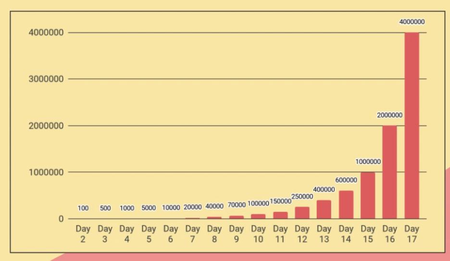
IP warm-up Email schedule
4.2. Send to highly engaged recipients first
During the initial phases of your warm-up cycle, route your outbound traffic exclusively to your most active, engaged users such as internal corporate test accounts, partners, or customers who frequently open your messages and interact with your links. This high engagement sends a strong signal to inbox algorithms that your traffic is valued and legitimate, accelerating your reputation-building process.
4.3. Monitor performance metrics closely
Keep a close eye on your performance data throughout the entire warm-up window. Track your open rates, bounce logs, and network trust indicators daily. If you notice a sudden drop in open rates or see temporary rate-limiting flags in your delivery logs, pause your volume increases immediately. Maintain your current volume tier or scale it back by 50% for a few days to let the security filters adjust before trying to increase your traffic again.
4.4. Maintain consistent sending behavior
Automated security systems flag irregular traffic spikes, such as sending 10,000 messages on a Monday, remaining completely silent for two weeks, and then blasting 20,000 messages as typical spam behavior. To maintain a clean profile, distribute your traffic evenly over time.
5. How to warm up IP address safely for traffic and account activities
While IP warming is most commonly discussed in the context of email, the same trust-building principles can apply to general network activity. New IP addresses used for proxies, automation systems, or account management often benefit from gradual usage patterns as well.
5.1. Simulate normal user behavior
When using a new IP address, avoid immediately performing high-risk activities such as:
-
Mass account registration
-
Large-scale automation
-
High-volume scraping
-
Unusual traffic bursts
Instead, begin with activities that resemble normal user behavior:
-
Browsing websites
-
Reading articles
-
Watching videos
-
Performing searches
-
Navigating common online services
These activities help establish a more natural usage profile.
5.2. Increase activity gradually
Just as email volume should increase gradually, overall traffic patterns should also scale progressively. If your goal is to manage multiple digital assets, start by syncing a single account during the first few days. Gradually increase the number of active sessions, query frequencies, and data requests over several weeks.
Real internet users rarely focus 100% of their bandwidth on a single automated task, so a gradual approach keeps your connection looking natural and prevents automated spam flags.
6. Common mistakes when you warm up IP address
Even a well-planned warm-up process can fail if common mistakes are ignored.
-
Increasing activity too quickly: Increasing your data output or message volume too quickly is the most frequent cause of warm-up failures, as sudden spikes easily trigger automated anti-bot and anti-spam filters.
-
Sending low-quality traffic: Running unverified data lists, sending unoptimized message templates, or running poorly configured automation scripts through a fresh connection will drive up bounce rates and trigger spam complaints, ruining your reputation early on.
-
Ignoring reputation monitoring: Failing to check global blacklists or missing critical delivery alerts means minor configuration issues can spiral into permanent blocklists before you can adjust your setup.
-
Inconsistent activity patterns: Long periods of inactivity followed by sudden traffic increases often appear suspicious. Maintaining stable, predictable activity generally produces better long-term results.
Avoiding these mistakes is just as important as following the warm-up process itself. A gradual, consistent approach combined with regular reputation monitoring gives a new IP the best chance of building long-term trust and stability.
Common mistakes during IP warming
7. How to monitor IP reputation during warming
Monitoring reputation is an essential part of any successful warm-up strategy. Even if traffic volume is increasing gradually, reputation metrics should still be reviewed regularly.
Using IPFighter as your primary network testing platform allows you to monitor your conditioning progress through a centralized diagnostic dashboard:
-
IP reputation & trust scores: You can check your active IP trust score, and scores across major platforms, ensuring your metrics are increasing as you increase traffic.
-
Blacklist status: Confirm that your address isn't being added to any threat registry lists, allowing you to pause traffic volume if issues arise.
Monitoring an ip trust score over time can help identify potential issues before they impact performance. It is also important to watch for signs of abuse ip classifications or blacklist entries. If an IP begins appearing on warning lists, corrective action should be taken immediately.
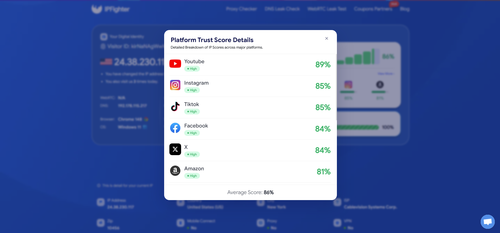
Check IP on IPFighter
Read more:
-
How to check IP reputation using IPFighter
-
What is WebRTC? Exploring its architecture, use cases, and benefits
-
What is DNS? How the DNS system works on the internet
8. Conclusion
IP warming is the process of gradually building trust and reputation for a new IP address. While it is most commonly associated with email infrastructure, the same principles can also apply to traffic generation, proxy usage, and account management activities.
If you plan to warm up IP address, the key is to increase activity gradually, maintain consistent behavior, and monitor reputation throughout the process. Following these practices can help reduce the risk of spam filtering, blacklisting, and rate limiting. Whether you're working with a new mail server, proxy network, or dedicated infrastructure, regularly monitoring IP reputation remains one of the most important parts of a successful IP warming strategy.
9. FAQ
What is IP warming?
IP warming is the process of gradually increasing email activity or network traffic from a new IP address to build reputation and trust over time.
Why do new IP addresses need warming?
New IP addresses have little or no historical reputation. Warming helps establish credibility and reduces the risk of being flagged as suspicious.
How long does IP warming take?
The timeframe varies depending on the use case, traffic volume, and reputation goals. Many email warm-up processes take several weeks.
Can IP warming improve email deliverability?
Yes. Proper IP warming can improve sender reputation and increase the likelihood that emails reach inboxes instead of spam folders.
What happens if I skip IP warming?
Sudden high-volume activity from a new IP can trigger spam filters, reputation penalties, rate limits, or blacklisting.
How do I monitor IP reputation during warming?
You can use IP analytics platforms like IPFighter to monitor reputation, blacklist status, trust signals, and other IP quality metrics.
Is IP warming only used for email marketing?
No. While email marketing is the most common use case, the concept of gradually building trust can also apply to proxy usage, automation systems, and other network activities.
Read more

Why do I keep getting CAPTCHA? Here's what may be triggering it


What is a CAPTCHA? The check that separates people from bots
What is a mesh network and when should you use one?
What is an IP2 network? How it works, uses, and benefits
Explaining how to know if you have a DNS leak

How to know if you have a WebRTC leak: Reading your results