

Have you ever sent an email that never reached your customer's inbox, even though its content was completely legitimate? Your IP address or domain may have been listed on a DNS Blacklist, causing receiving mail servers to reject your emails. This not only affects email deliverability but can also disrupt your business operations.
In this article, IPFighter will show you how to check your IP against popular DNS Blacklists, interpret the results, and resolve blacklist issues. You'll learn how to identify the underlying causes and submit a delisting request to have your IP removed from a blacklist.
1. What is a DNS Blacklist (DNSBL)?
A DNS Blacklist (DNSBL), also known as a DNS Blocklist, is a list of IP addresses or domains associated with spam, phishing, malware, and other suspicious activities. These lists help receiving mail servers identify and control untrustworthy email sources.
DNSBL data is published through the Domain Name System (DNS), allowing mail servers and security software to perform queries and determine whether an IP address or domain appears on a particular list.
When an email arrives, the receiving mail server can retrieve the sending server's IP address and check it against its configured DNSBLs. If the IP address is listed, the receiving server may reject the email, mark it as spam, or perform additional checks before accepting it.
DNSBLs are primarily used to support email filtering and assess sender reputation. However, an IP being listed does not mean that it is automatically blocked across the entire Internet. The actual impact depends on which DNSBL is involved and the policies of individual receiving mail servers.
Definition of DNS Blacklist
Read more:
-
DNS leak: The silent threat to your online privacy
-
DNS records - The ultimate blueprint for website & email routing
2. Related terms and organizations that operate DNS Blacklists
DNS Blacklists are known by several different names and are operated by various organizations. Understanding these terms and providers helps you identify the specific system being used to check your IP address.
2.1. Are DNSBL, RBL, and Blocklist the same thing?
DNSBL, RBL, and Blocklist all refer to systems that maintain lists of blocked resources, but their scope and usage differ:
-
DNSBL (DNS-based Blacklist): A list of IP addresses or other information published as a DNS zone so that systems can query it.
-
RBL (Realtime Blackhole List): A historical term originating from real-time spam-blocking lists. Today, it is commonly used in the context of email filtering.
-
Blocklist: A broader term referring to lists of IP addresses, domains, or other resources that have been flagged. Not all blocklists are distributed through DNS.
In general, DNSBL and RBL are closely associated with email spam filtering, while Blocklist has a broader scope and is used across various blocking systems.
2.2. Organizations that operate DNS Blacklists
DNSBLs are operated by various security organizations and providers that monitor spam activities across the Internet. Each organization has its own data sources, listing criteria, and IP delisting policies.
Some notable DNSBL providers include:
-
Spamhaus: Provides lists such as SBL, XBL, CSS, PBL, and DBL to identify IP addresses or domains associated with spam, malware, and suspicious activities.
-
SpamCop: Operates the SpamCop Blocking List (SCBL), which collects spam reports to identify IP addresses distributing unsolicited emails.
-
Barracuda Reputation Block List (BRBL): Provides IP reputation data to support email filtering through Barracuda's systems.
Not all DNSBLs have the same data coverage or impact. Therefore, you should identify the specific blacklist that has listed your IP before taking corrective action.
3. How does a DNS Blacklist work?
A DNS Blacklist (DNSBL) uses DNS queries to check whether an IP address or domain sending emails appears on a blocklist. The results help mail servers evaluate the sender and apply appropriate email handling policies.
3.1. How mail servers perform DNSBL lookups
The lookup process typically involves five steps:
-
Identify the sender's IP address: The mail server records the sending server's IP address during the SMTP connection process.
-
Reverse the IP address: For IPv4, the system reverses the order of the four octets. IPv6 uses a different query format.
-
Create a DNS query: The reversed IP address is combined with the domain name of the DNSBL being checked.
-
Read the results: The DNSBL returns a response indicating whether the IP address is listed. Some systems return error codes if a query is invalid or unsupported.
-
Process the email: The receiving mail server applies its own policies to accept, reject, or send the email to the spam filter.
Receiving systems can be configured to query multiple DNSBLs simultaneously and set their own filtering thresholds. As a result, the same IP address may be treated differently by different mail servers.
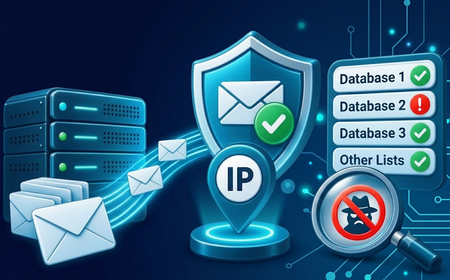
A receiving mail server checking the sender’s IP against multiple DNSBLs
3.2. Common types of DNS Blacklists
Depending on their purpose and the resources being checked, DNSBLs can categorize IP addresses or domains based on their association with spam, malware, and other suspicious activities.
Below are some notable Spamhaus lists:
|
List type |
Target |
Main purpose |
|
SBL (Spamhaus Blocklist) |
IP |
Identifies IP addresses or network ranges associated with spam, malicious infrastructure, or abusive activities. |
|
XBL (Exploits Blocklist) |
IP |
Identifies IP addresses of compromised devices, malware-infected systems, or devices being exploited by third parties. |
|
CSS (Combined Spam Sources) |
IP |
Identifies IP addresses involved in low-quality email sending or spam, often detected through automated signals. |
|
PBL (Policy Blocklist) |
IP |
Identifies end-user IP ranges that are not permitted to send email directly to receiving mail servers under the policies of an ISP or IP address administrator. |
|
DBL (Domain Blocklist) |
Domain |
Identifies domains associated with spam, phishing, or malicious activities. |
One important point to remember is that each list has its own criteria, so the same corrective action cannot be applied to every listing.
4. Why are IP addresses or domains added to a DNS Blacklist?
An IP address or domain may be listed when it exhibits behavior that violates the policies of the organization operating the DNSBL. Identifying the exact cause is an important step in choosing the right corrective action.
4.1. Bulk email sending and high spam complaint rates
Sending large volumes of unsolicited emails is one of the most common reasons why an IP address or domain gets added to a DNS Blacklist.
Some behaviors that increase the risk of being listed include:
-
Sending bulk emails to recipients who have not consented to receive them.
-
Using purchased or unverified email lists.
-
Sending emails to a large number of invalid addresses.
-
Receiving numerous spam complaints from recipients.
-
Distributing emails containing phishing links or malicious content.
In addition, some DNSBLs use spam traps (email addresses specifically created to identify spam sources) to detect senders who fail to follow proper email list management practices.

Unverified bulk emailing increases DNSBL listing risk.
4.2. Servers or devices infected with malware
A compromised server can become a source of spam distribution without its owner's knowledge. Attackers may take control of a mail server to send bulk emails, install malware on websites, or exploit IoT devices and incorporate them into botnets.
Stolen email accounts can also be exploited to send spam or distribute malicious links.
In these situations, you should review server logs, scan for malware, change compromised login credentials, and fix security vulnerabilities. Submitting a blacklist removal request before addressing the underlying cause may result in the IP being listed again.
4.3. Using shared IP addresses with a poor reputation
A shared IP is an IP address used by multiple individuals or services. Because they share the same address, one user's email sender reputation can be affected by the activities of others.
This situation commonly occurs with services such as shared hosting, shared proxies, or servers that allow multiple accounts to use the same IP address. In addition, some IP addresses may be reassigned by providers after previous users stop using them, potentially carrying a history of poor activity.
For example, if a previous user used an IP address to send spam emails and caused it to be listed on a DNS Blacklist, a new user assigned that same IP may still experience sender reputation issues, even if they have not engaged in any abusive activities.
If you discover that a shared IP is listed on a DNSBL, check the listing details and the reason provided by the blacklist operator. Then, contact your service provider for assistance or request a different IP address if necessary.
4.4. Missing or incorrect email configurations
Incomplete email authentication configurations can make it difficult for receiving systems to verify the sender's identity and reduce email deliverability.
Some key components to check include:
-
SPF (Sender Policy Framework): Specifies which mail servers are authorized to send emails on behalf of a domain.
-
DKIM (DomainKeys Identified Mail): Uses digital signatures to verify the integrity and origin of emails.
-
DMARC (Domain-based Message Authentication, Reporting and Conformance): Defines how emails that fail SPF or DKIM checks should be handled and supports email authentication reporting.
-
rDNS/PTR (Reverse DNS): Allows a reverse lookup from an IP address to its hostname, helping identify the sending mail server.
These components support email authentication and improve the trustworthiness of your sending infrastructure. However, missing SPF, DKIM, or DMARC records does not automatically cause an IP to be listed on every DNSBL. You still need to identify the specific reason through the blacklist that has flagged your address.
5. How does being listed on a DNS Blacklist affect your IP?
An IP address listed on a DNS Blacklist can affect certain Internet-related activities, particularly email delivery and access to some online services. The extent of the impact depends on the type of DNSBL, the receiving system's filtering policies, and how the IP address is used.
-
Email sending: This is the activity most directly affected. If a receiving mail server uses DNSBLs for email filtering, messages from a listed IP may be rejected, sent to the Spam folder, or returned with a bounce error. If the issue persists, it can disrupt business communications, affect email marketing campaigns, and damage the reputation of your sending infrastructure.
-
Proxy usage and website access: DNSBLs do not directly control website access. However, some platforms may use IP reputation data to evaluate incoming connections. If an IP has a poor reputation, users may encounter CAPTCHAs, additional verification requests, or access restrictions on certain services.
DNS Blacklists and Proxy Blacklists are two different systems. An IP address that does not appear on a DNSBL may still be identified as a proxy or VPN by websites through mechanisms such as proxy detection, browser fingerprinting, and access behavior analysis.
6. How to check whether an IP address or domain is on a DNS Blacklist
To check the status of an IP address, you can use IPFighter to review connection information, blacklist status, and other signals related to IP reputation. If you want to determine whether an IP address or domain appears on a specific DNSBL, you should also use dedicated DNSBL Checker tools.
6.1. Check IP information with IPFighter
IPFighter provides tools that help you check IP information and assess the status of an IP address. This is a useful first step for identifying unusual signals before conducting more detailed checks with DNSBL Checkers.
To get started, simply visit IPFighter and review the information and blacklist status of your current IP address directly on the homepage. You can also use the DNS Leak Test to check for potential DNS leaks.
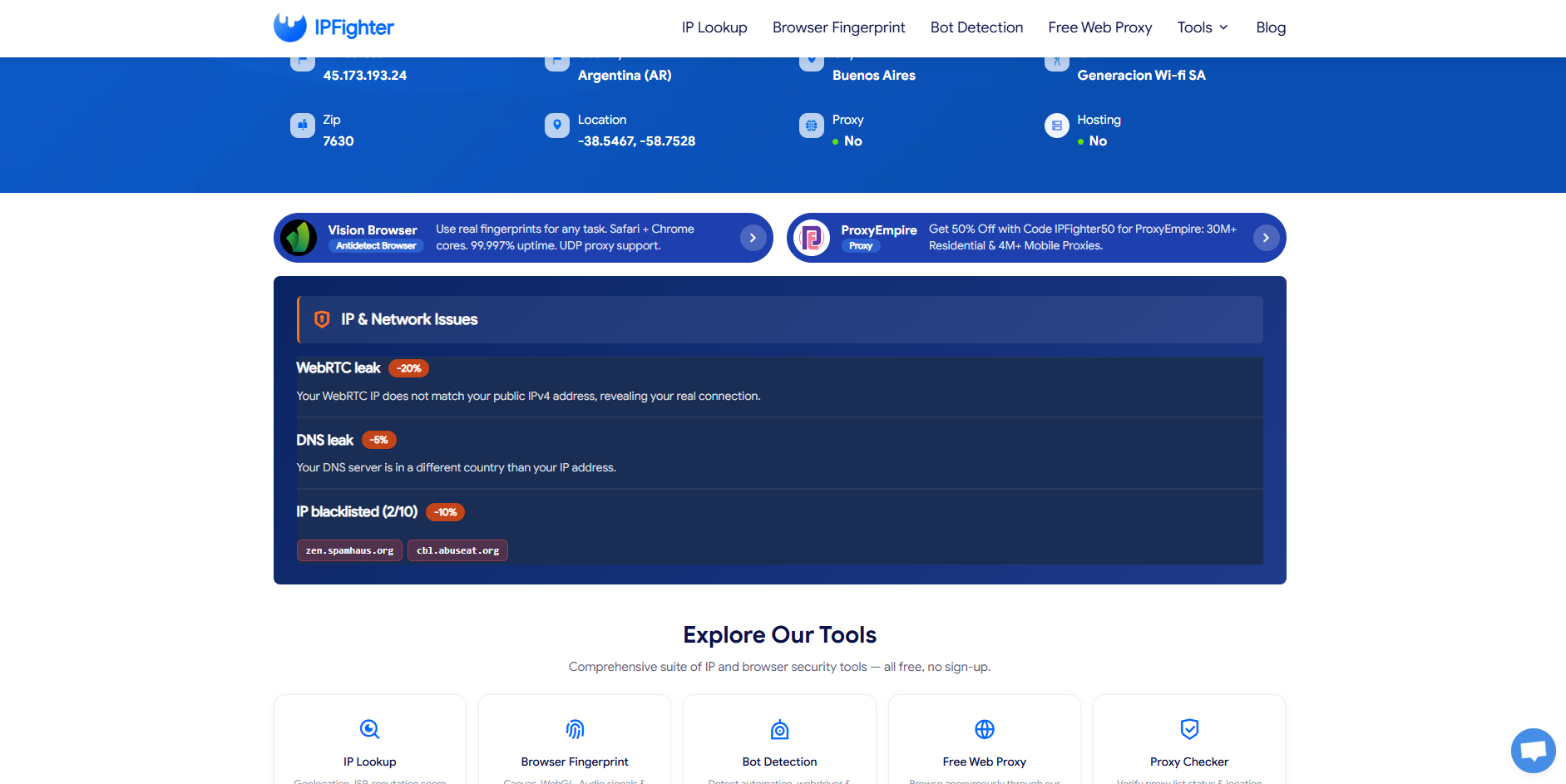
IP information and IP Blacklist Status displayed on the IPFighter homepage.
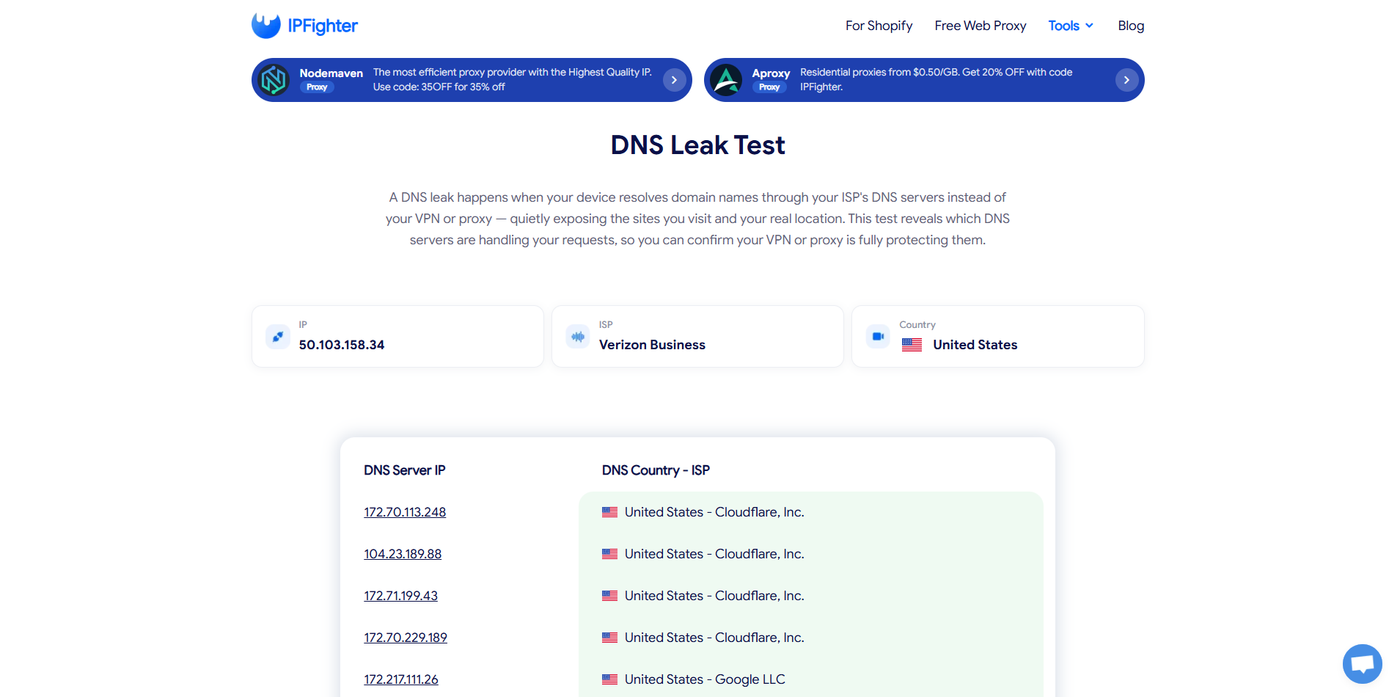
DNS check results displayed in the DNS Leak Test interface.
6.2. Check using online DNSBL tools
DNS Blacklist Checkers can query multiple lists simultaneously, helping you determine whether an IP address or domain has been listed.
Some popular options include:
|
Tool |
Best for |
Key features |
|
MXToolbox Blacklist Check |
Checking mail server IP addresses against multiple DNSBLs |
Displays the lists that have flagged an IP address and their corresponding statuses. |
|
Mailmeteor Blacklist Checker |
Checking IP addresses, domains, or email sending servers |
Supports checks against multiple blacklists and provides information about the results. |
|
Spamhaus Reputation Checker |
Verifying listings on Spamhaus |
Provides information about the relevant list, listing reasons, and recommended actions. |
|
nslookup / dig |
Administrators who want to perform direct DNS queries |
Allows users to check an IP address against a specific DNSBL through Command Prompt or Terminal. |
If the results show that your IP address or domain is listed, check the name of the specific DNSBL and investigate the reason before taking corrective action.
7. How to reduce the risk of being listed on a DNS Blacklist
Prevention is always more effective than dealing with a blacklist listing after it occurs. Email administrators and proxy users should maintain appropriate practices based on their specific usage requirements.
7.1. Checklist for email senders
To reduce the risk of your IP address or domain being added to a DNSBL, build your recipient list using only people who have explicitly opted in to receive your emails. You should also regularly remove invalid email addresses.
In addition, configure SPF, DKIM, and DMARC correctly, set up rDNS/PTR records according to your hosting provider's requirements, and provide recipients with a clear unsubscribe option.
While sending emails, monitor bounce rates and spam complaints to identify potential issues early. If you are using a new IP address, control your sending rate and gradually increase email volume instead of sending large batches immediately.
7.2. Keep your IP clean when using proxies
For proxy users, IP reputation can affect access to certain services and connection stability. Therefore, you should:
-
Check IP reputation before using an address for important tasks.
-
Check proxy status to understand the type of connection you are using.
-
Prioritize dedicated IP addresses if you want to minimize the impact of other users' activities.
-
Choose providers with clear IP management policies and reliable support.
-
Monitor IP status if you encounter CAPTCHAs or access restrictions.
-
Avoid using proxies for spam or activities that violate service policies.
Overall, maintaining a good IP reputation depends not only on proxy quality but also on how you use and manage your connections.
Read more:
What is DNS? How the DNS system works on the internet
How to flush DNS on Windows, Mac, and Linux in simple steps
What is Cloudflare DNS and how does it work?
8. Conclusion
A DNS Blacklist (DNSBL) is a system designed to identify IP addresses and domains associated with spam, malware, or malicious activities, primarily to support email filtering.
If your IP address gets listed, you need to identify the specific DNSBL, investigate the underlying cause, and follow the appropriate delisting process. In addition, regularly checking DNS Blacklists and IP reputation can help protect your sender reputation and maintain connection quality when using proxies.
9. FAQ
Is a DNS Blacklist the same as a spam filter?
No. A DNS Blacklist is a list of IP addresses or domains with a poor reputation, while a spam filter is a system that analyzes emails using multiple signals, including message content, sender information, email authentication, and DNSBL data.
How long does it take to get removed from a DNS Blacklist?
The removal time depends on the policies of each DNSBL. Some listings automatically expire after a certain period, while others require you to submit a delisting request after resolving the underlying issue.
Can I still use a proxy if its IP address is blacklisted?
Yes, but an IP address with a poor reputation may face restrictions on certain services. You should identify the type of blacklist involved and check the proxy status before using the IP.
Does being listed on one DNSBL mean my emails will definitely be blocked?
No. Your emails will only be affected if the receiving mail server uses the corresponding DNSBL and applies blocking or filtering policies to the listed IP address.
Does it cost anything to remove an IP address from a DNS Blacklist?
Many DNSBL providers offer free delisting processes. However, their policies vary. You should submit removal requests directly through official websites and be cautious of third-party services that promise quick blacklist removal.
Do DNS Blacklists automatically remove IP addresses?
Some DNSBLs automatically expire listings when the conditions that caused the violation are no longer present. Other lists require the IP owner or administrator to submit a delisting request.
Will changing my proxy IP address fix a DNS Blacklist issue?
Changing your IP address may help you avoid a listing associated with the old address, but it does not resolve the root cause if spam-sending activities or security issues continue. You should check the reputation of the new IP address before using it.
Read more
DNS blacklist: How to check and remove your IP

Why Google says "Unusual traffic from your computer network"

Anonymous proxy detected: Causes and how to fix it

"Before we continue… Press & Hold": Why you see this check

Cloudflare human verification bypass extension: What to know

CAPTCHA vs reCAPTCHA: What’s the difference?