

Scaling multi-account operations across e-commerce, affiliate marketing, and crypto campaigns requires far more than just multiple windows - it demands complete isolated digital environments. An antidetect browser solves this by compartmentalizing profiles with unique hardware fingerprints, cookies, and proxy configurations to prevent cross-account association and security bans.
In this Vision Browser review, IPFighter examines the platform's primary features, pricing structures, and account creation workflows. We also run hands-on tests to assess its fingerprint authenticity and operational stability, giving you a clear look at whether Vision is the right tool for your multi-accounting needs.
1. General information
Vision combines browser fingerprint management with tools for organizing profiles, configuring proxies, and automating repetitive work. The following table summarizes the main product details based on its official website and documentation.
|
Website |
|
|
Founded |
N/A |
|
Platform |
Windows, macOS, Linux |
|
Fingerprint engine |
Chromium and Safari |
|
Team/profile sharing |
Team workspaces, folders, access permissions, and additional user seats |
|
Proxy integration |
HTTP, HTTPS, SOCKS5 and SSH |
|
Pricing model |
Subscription plans with profile limits and additional user fees on eligible plans |
|
Trial |
Four days trial |
|
Refund |
Discretionary prorated refunds for unused balances via email in USDT (TRC-20, SOL, BSC) within 7 business days; network fees apply under $50. |
|
Best for |
Affiliate marketing, e-commerce, SEO, social media management, and multi-account workflows |
Discover more:
-
Best free antidetect browsers: Are they worth using?
-
Browser fingerprint testing tools: Which one should you use?
-
What is a browser fingerprint? How websites identify you online
2. Vision Browser's core features
Vision focuses on more than creating separate browser windows. Its feature set combines fingerprint configuration, profile organization, proxy management, and automation, allowing users to manage multiple browser environments from one application.
2.1. Fingerprint spoofing
Browser fingerprinting uses a combination of browser and device characteristics to help websites distinguish one environment from another. Vision allows users to configure these characteristics for individual profiles and offers a Smart Fingerprint feature intended to select a suitable fingerprint from its database.
One of Vision's main differentiators is its support for both Chromium and Safari browser cores. The provider also advertises Android fingerprints collected from real devices, giving users additional options beyond standard desktop profiles. Key technical details:
-
Smart fingerprint: Selects a fingerprint based on parameters that match the chosen search mode and the available fingerprint database.
-
Browser engines: Offers Chromium and Safari-based profiles.
-
Canvas and WebGL: Provides configurable fingerprint parameters for graphics-related browser signals.
-
Audio and other signals: The fingerprint configuration includes audio-related settings, WebRTC preferences, screen parameters, and navigator properties.
-
Hardware and device parameters: Profiles can include values such as hardware concurrency, device memory, screen resolution, and user-agent information.
-
Language and timezone: Browser settings can be configured to maintain consistency with the intended profile environment and proxy location.
-
Android fingerprints: Supports mobile profiles using fingerprint data collected from real Android devices.
The Smart Fingerprint feature is particularly relevant because fingerprint uniqueness alone is not necessarily desirable. A plausible combination of parameters that fits a broader device population may be more useful than an unusual fingerprint that stands out.
Best for: This feature may suit affiliate marketers, social media teams, and e-commerce operators who need to maintain separate browser environments for different accounts or workflows. However, fingerprint customization does not guarantee that a website will accept a profile or that an account will avoid restrictions.
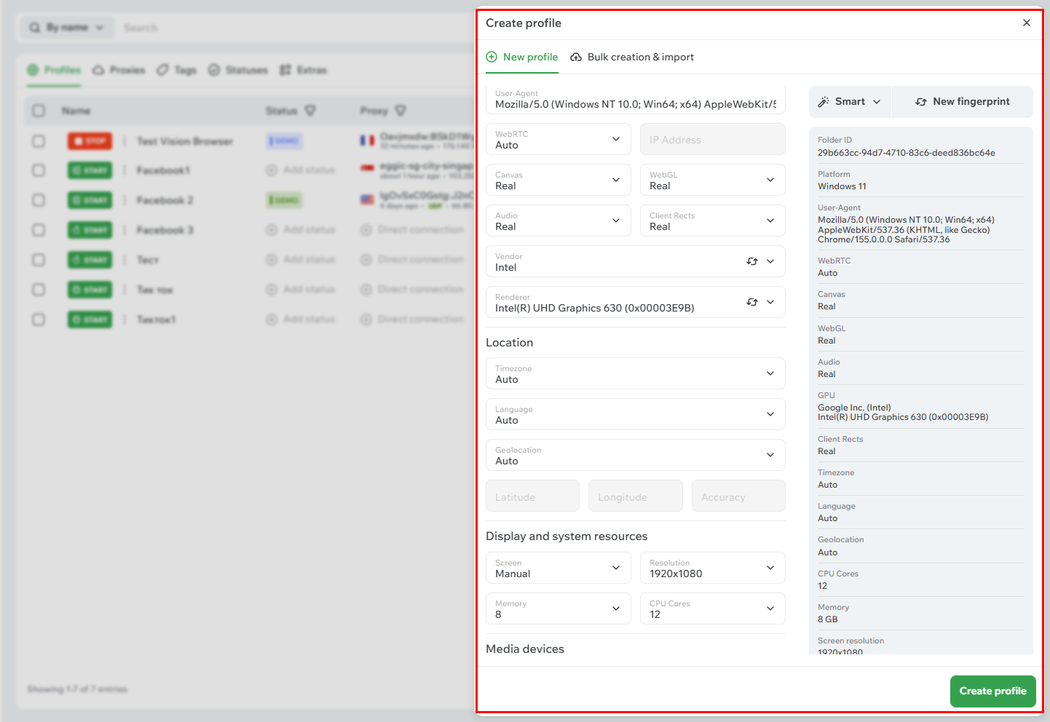
Fingerprint spoofing
2.2. Profile management
Vision treats each browser profile as a separate working environment. According to its documentation, profiles maintain their own browser settings, extensions, bookmarks, and related data, helping users keep account sessions and project configurations organized.
The application also uses folders to group profiles and related resources. Users can customize extensions, bookmarks, and start pages for individual folders, which is useful when managing several projects or teams. Key technical details:
-
Profile isolation: Each profile maintains its own browser environment and session-related data.
-
Folder organization: Create folders and move profiles between them.
-
Profile metadata: Manage names, notes, tags, statuses, and associated proxies.
-
Proxy organization: Store proxies within folders and transfer them between folders when needed.
-
Team collaboration: Create teams, invite additional users, and configure access permissions.
-
Migration: Vision documents an automated migration process from Dolphin Anty that can transfer supported profile data.
Vision also advertises Instant Profiles, a faster profile option that operates without synchronization and data saving. This may be useful for temporary tasks, although users should understand the trade-off before using it for work that depends on persistent sessions.
Best for: Profile management is useful for agencies, e-commerce operators, and affiliate teams that need to separate client accounts, campaigns, and responsibilities without mixing browser data.
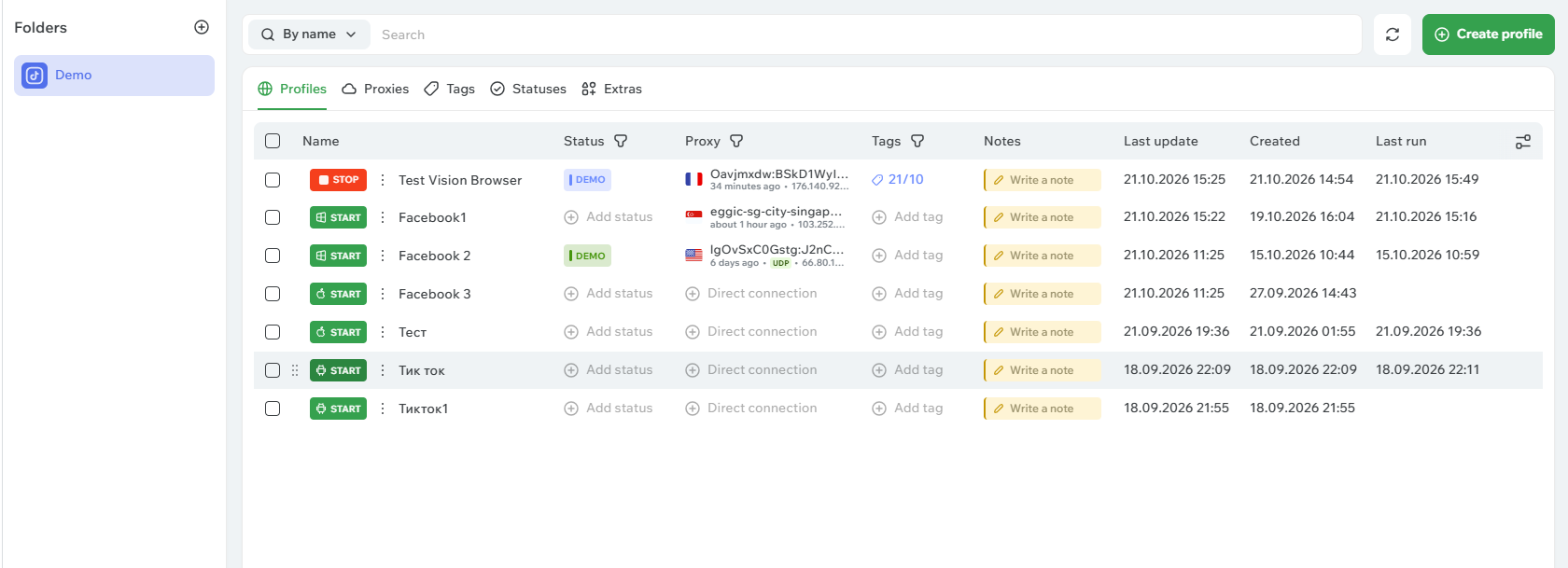
Profile management
2.3. Proxy integration
A separate browser profile does not automatically provide a separate IP address. Users who need different network locations must configure an appropriate proxy and ensure that its location and other network characteristics are consistent with the intended profile.
Vision supports several common proxy protocols and lets users add proxies through the proxy management section, during profile creation, or when changing a profile's assigned proxy. Bulk import is also available. Key technical details:
-
HTTP/HTTPS: Supported for standard proxy connections.
-
SOCKS5: Supported, with SOCKS5 also used for the provider's advertised UDP/QUIC functionality.
-
Proxy authentication: Proxy configuration supports connection details such as host, port, username, and password.
-
Bulk import: Add multiple proxies through the interface or by importing a text file in a supported format.
-
Proxy assignment: Associate a proxy with a profile and manage proxy information within the relevant folder.
-
Proxy encryption: The application includes a proxy encryption setting.
-
Traffic caching: Vision advertises potential proxy traffic savings of up to 80% when caching is enabled.
The 80% figure is a vendor claim rather than a guaranteed result. Actual savings will depend on browsing patterns, cached content, and the way the feature is configured. Similarly, the availability of UDP/QUIC depends on the relevant proxy connection and settings.
Vision does not need to be treated as a proxy provider simply because it includes proxy management. Users should verify whether they need to purchase proxies separately and choose a provider that offers the locations, IP types, and session controls their workflows require.
Best for: Proxy integration is useful for users who already have proxy subscriptions and want to manage their connections alongside browser profiles. It may also help teams that need to keep proxy assignments organized across many accounts.
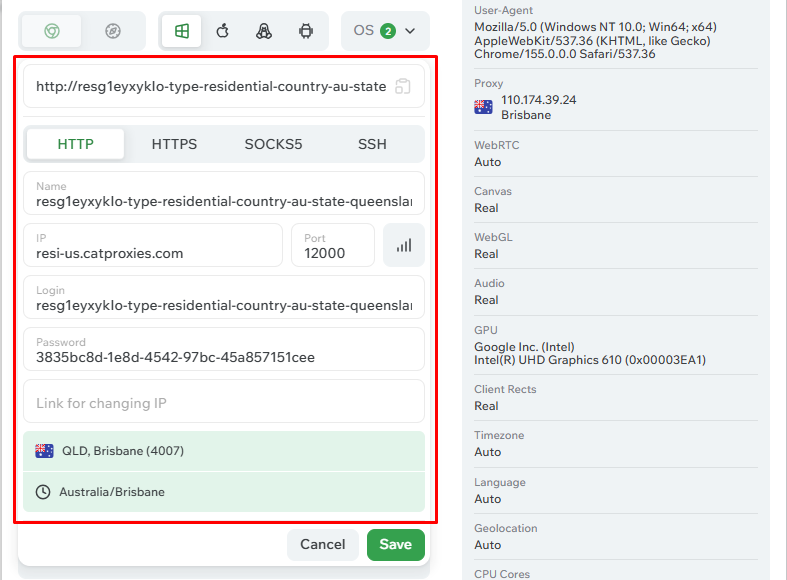
Proxy integration
2.4. Automation and API
Vision provides automation capabilities at two levels: managing resources in the application and controlling a running browser profile. This allows users to automate repetitive setup tasks as well as browser interactions.
The official documentation describes an HTTP API for creating, editing, listing, and deleting profiles, folders, and proxies. It also explains how to start and stop profiles through the API and connect automation libraries to running profiles through the DevTools Protocol. Key technical details:
-
Application API: Supports HTTP requests for profile, folder, and proxy management.
-
Authentication: Uses API tokens, including a separate team token for relevant team workflows.
-
Puppeteer: Can connect to running profiles for browser automation.
-
Playwright: Supported through the documented browser connection workflow.
-
Selenium: Listed by Vision as an automation option.
-
Bulk operations: API workflows can help automate repetitive profile and resource management tasks.
-
Synchronizer: Repeats supported actions across multiple browser windows simultaneously.
There is an important implementation detail: according to Vision's documentation, browser automation through third-party libraries requires the profile to have been started through the API. Users should follow the documented connection workflow rather than assume that any manually opened profile is immediately available to an automation script.
Vision also states that its documentation is optimized for use with popular AI models. This may help developers use documentation in their coding workflow, but it is not a substitute for testing scripts and verifying API behavior.
Best for: Automation and API access are most useful for developers, performance marketers, and teams that need repeatable profile creation, browser testing, or large-scale operational workflows.
3. Key features
Vision's main selling points extend beyond fingerprint customization. The following features are particularly relevant to users comparing antidetect browsers for daily work.
Smart Fingerprint: Helps select a suitable fingerprint from Vision's database rather than requiring users to configure every parameter manually. The quality of the resulting profile still needs to be assessed through testing.
-
Chrome and Safari cores: Offers two browser-engine options, giving users more flexibility when creating browser environments.
-
Android mobile fingerprints: Provides profiles based on fingerprint data collected from real Android devices, which may be useful when a mobile-style environment is required.
-
UDP/QUIC support and proxy caching: Vision advertises UDP support through SOCKS5 and caching that can save up to 80% of proxy traffic under suitable conditions.
-
Built-in productivity tools: Includes HumanType for simulating manual text input, Vision Autofill for filling fields from saved notes, in-profile 2FA tools, and Vision FB+ for Facebook Ad Library creative-related workflows.
-
Teamwork and synchronization: Supports multiple teams, access permissions, organized folders, and actions repeated across multiple profiles.
-
Dolphin Anty migration: Offers a documented migration workflow designed to transfer supported profiles and associated data from Dolphin Anty.
These features make Vision worth considering for workflows that combine profile separation, repetitive tasks, and team collaboration. Which capabilities matter most will depend on the number of profiles required, the type of automation involved, and whether users need desktop or mobile-style fingerprints.
4. Vision Browser pricing overview
Vision offers subscription plans with different profile limits and additional user pricing for eligible plans. The website also advertises monthly, six-month, and twelve-month billing options, with discounts displayed for longer commitments.
The following figures reflect the prices and profile limits by 12 months displayed on the official website at the time of research. Pricing and promotions can change, so check the current Vision pricing page before purchasing.
|
Plan |
Displayed price per month |
Profile limit |
Additional user fee |
|
Micro |
$20 |
50 |
Not separately listed on the pricing card |
|
Base |
$55 |
150 |
$9 per additional user |
|
Standard |
$90 |
300 |
$9 per additional user |
|
Pro |
$132 |
500 |
$15 per additional user |
|
Max |
$202 |
1,000 |
$15 per additional user |
|
Ultra |
$272 |
1,500 |
$15 per additional user |
The website also displays reference prices of $29, $79, $129, $189, $289, and $389 alongside the respective plans. Because the displayed pricing can depend on the selected billing period or current promotion, confirm the final checkout amount before subscribing.
If you're planning to purchase Vision Browser, don't miss the Vision Browser promo code available on IPFighter, which gives new customers 20% off their first payment on any plan.
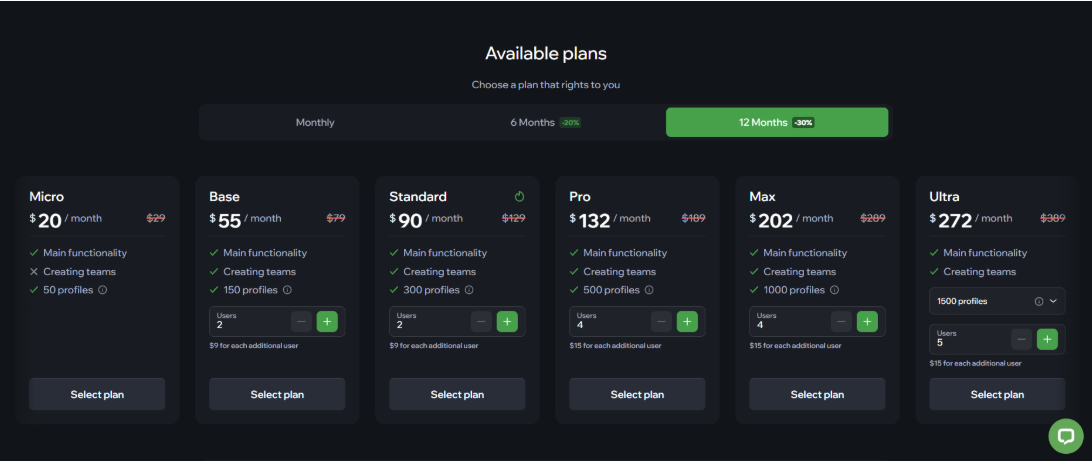
Pricing tiers and subscription plans available on Vision Browser
5. Performance test
After creating a profile with Vision Browser, we evaluated its real world performance using several testing methods. We tested it using IPFighter's browser fingerprint tool, Bot detection tool, DNS leak test, and WebRTC leak test to examine its fingerprint uniqueness, automation detection risk, and leak protection.
5.1. Preparation
Before running the tests, we set up a Vision browser profile with a selected running on Windows, using the OS Windows 11 fingerprint with default settings. After attaching a residential HTTP proxy located in France. We then opened the IPFighter testing tools inside that profile so the results would reflect the browser environment being evaluated.
5.2. Test results
After creating a profile with Vision Browser, we evaluated its real world performance using several testing methods. We tested it using IPFighter's browser fingerprint tool, Bot detection tool, DNS leak test, and WebRTC leak test to examine its fingerprint uniqueness, automation detection risk, and leak protection.
Browser fingerprint test
We tested Vision Browser using IPFighter’s browser fingerprint tool, where it achieved a 100% Browser Fingerprint Score. The tool also reported no fingerprint masking detected and identified the browser environment as Chrome 155 running on Windows 11.
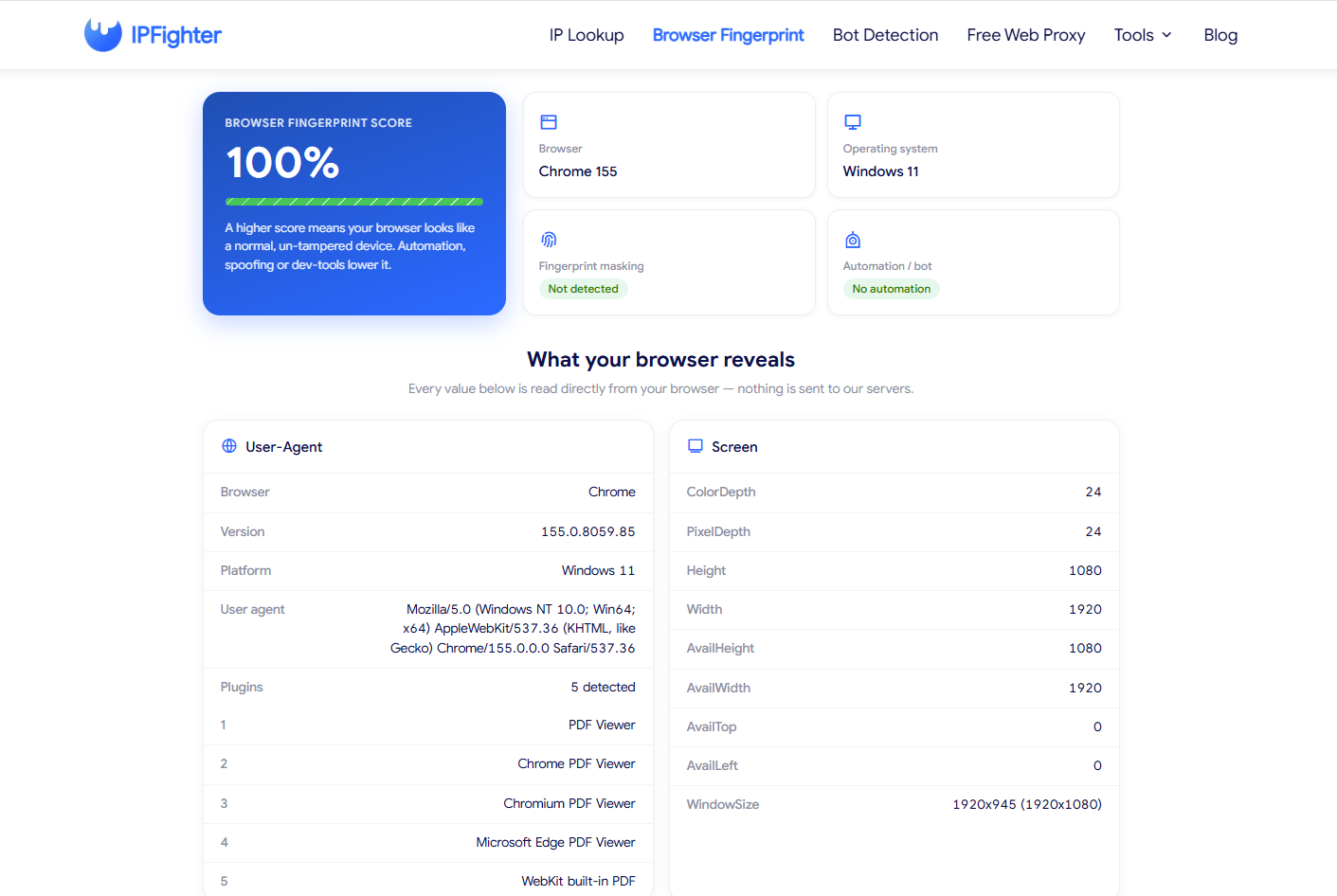
IPFighter browser fingerprint test score showing 100%
The result suggests that the tested profile presented browser characteristics that IPFighter considered consistent with a normal, untampered browser environment. The detected user agent was consistent with Chrome 155 on Windows 11, and the reported screen resolution was 1920 × 1080, with a color depth and pixel depth of 24 bits.
Deeper fingerprint checks showed no anomalies in the Canvas hash, WebGL vendor and renderer, or Audio hash. Overall, the tested fingerprint appeared consistent with a regular Windows device under the checks performed.
Bot detection test
Vision also achieved a positive result in IPFighter's Bot Detection test, passing all 51 checks with zero flagged signals. The tool reported a 100% Human result and displayed the status “No Bot Signals Detected.”
IPFighter's bot detection tool evaluates 51 checks across six categories:
-
Web Drivers & Automation
-
Headless & Environment
-
DevTools & Debugging
-
API Integrity
-
Browser Consistency
-
Behavior & Timing
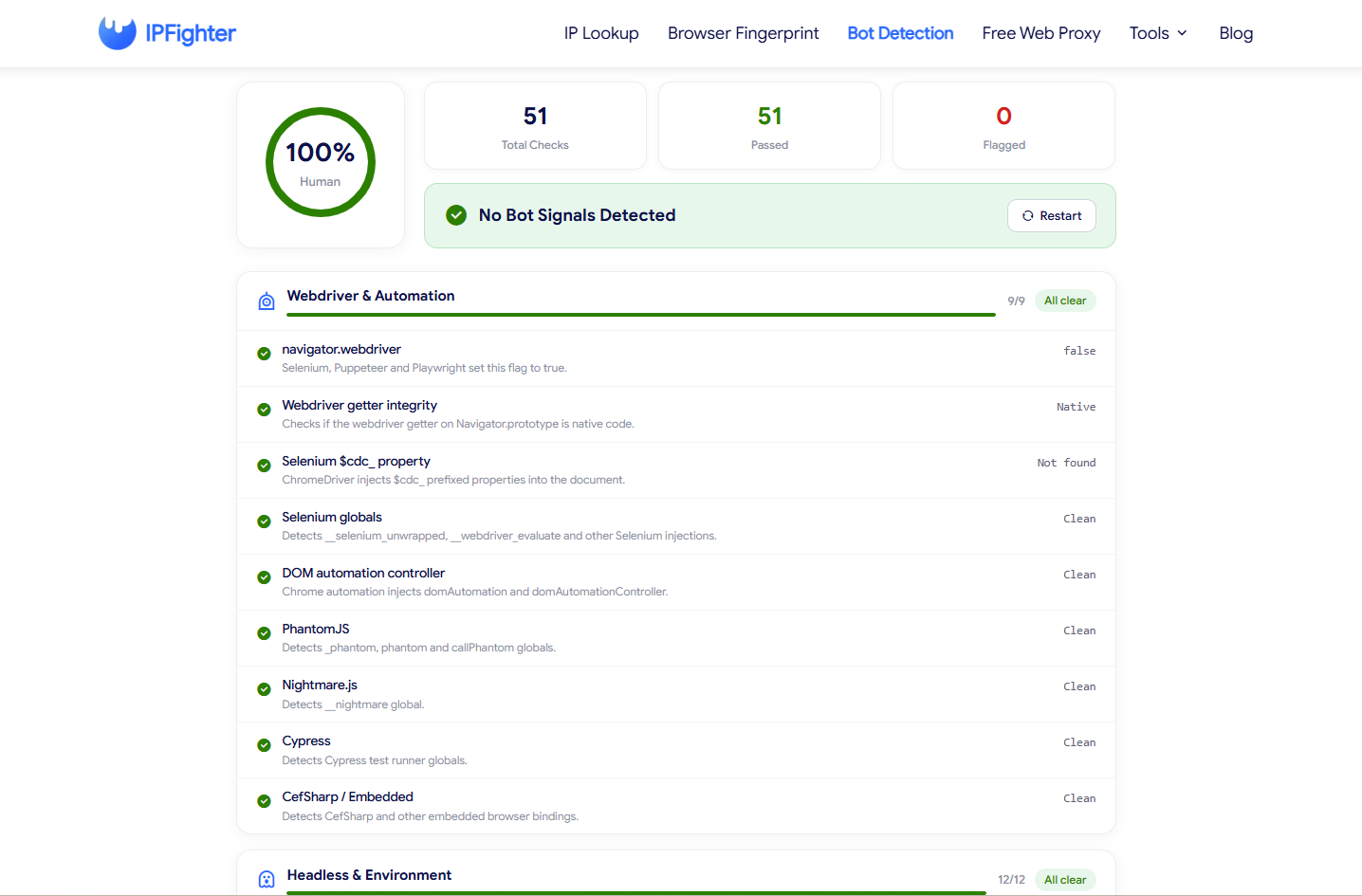
Vision Browser bot detection results on IPFighter.
The WebDriver and automation section passed all nine checks. In particular, navigator.webdriver was reported as false, the WebDriver getter was identified as native, and the test did not find Selenium's $cdc_ property. The results also showed clean statuses for Selenium globals, DOM automation controllers, PhantomJS, Nightmare.js, Cypress, and CefSharp or embedded-browser bindings.
These findings indicate that the tested Vision profile did not expose the automation indicators checked by IPFighter during this test. This is a positive sign for the profile's browser-level automation fingerprint, especially when compared with environments that expose common WebDriver or automation-related properties.
DNS leak and WebRTC leak test
The DNS leak test detected 9 DNS servers, all located in France and operated by Cloudflare, Inc. and The Constant Company, LLC. None of the servers exposed our real IP address or local ISP location, confirming that no DNS leak occurred. Although the DNS resolvers belong to third-party providers rather than the proxy’s direct ISP (BOUYGUES Telecom), they remain perfectly aligned with the target country (France) and reflect standard, high-trust network routing.
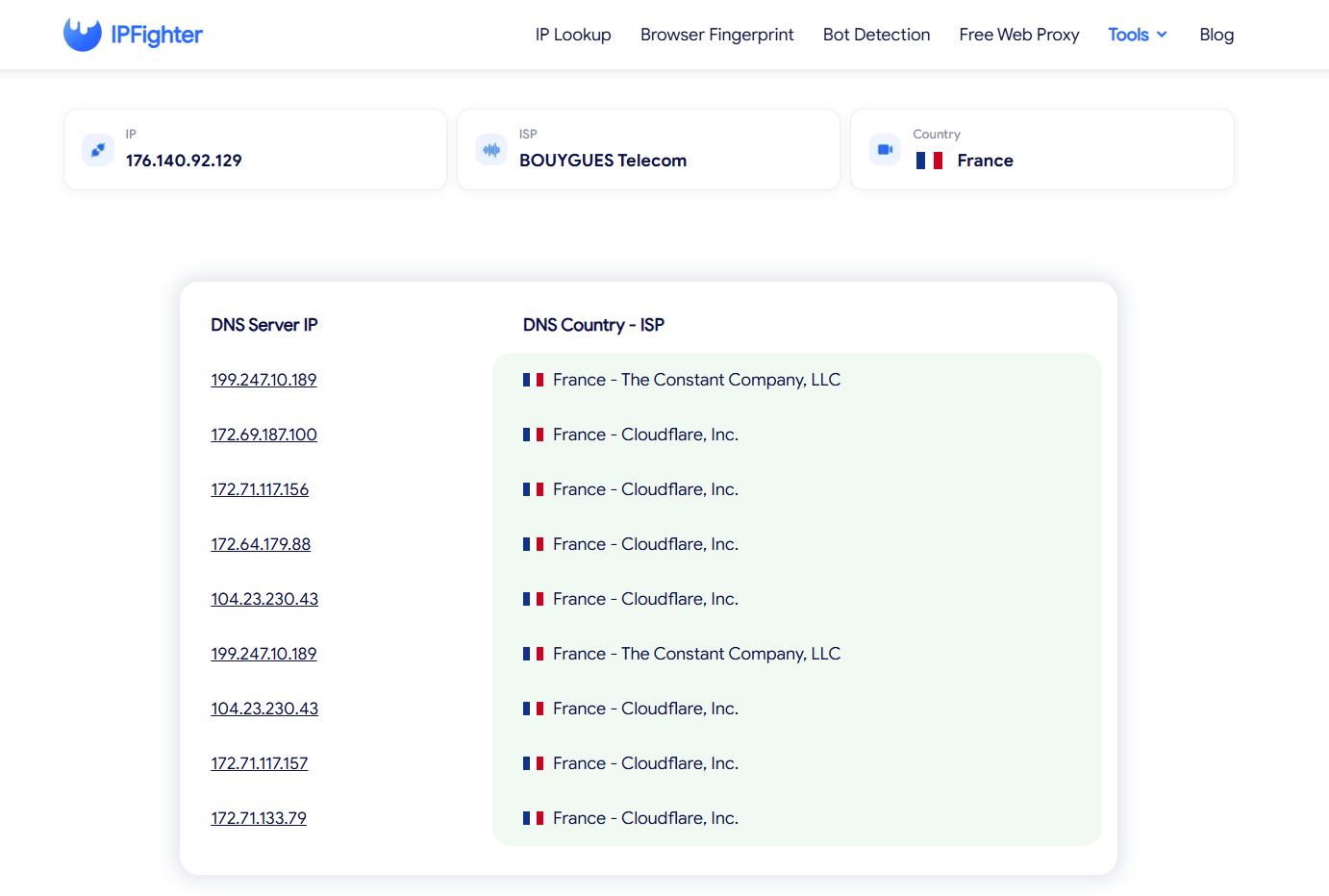
DNS leak test results showing servers located in France on IPFighter
The WebRTC leak test returned a "No Public IP leak" status, with all test servers displaying the proxy IP (176.140.92.129) in France as both the Local IP and Public IP. This demonstrates that Vision Browser successfully spoofed WebRTC parameters to match the proxy connection without leaking real network endpoints. Overall, the profile effectively isolated both DNS and WebRTC traffic within the proxy environment, preventing potential multi-account cross-linking.
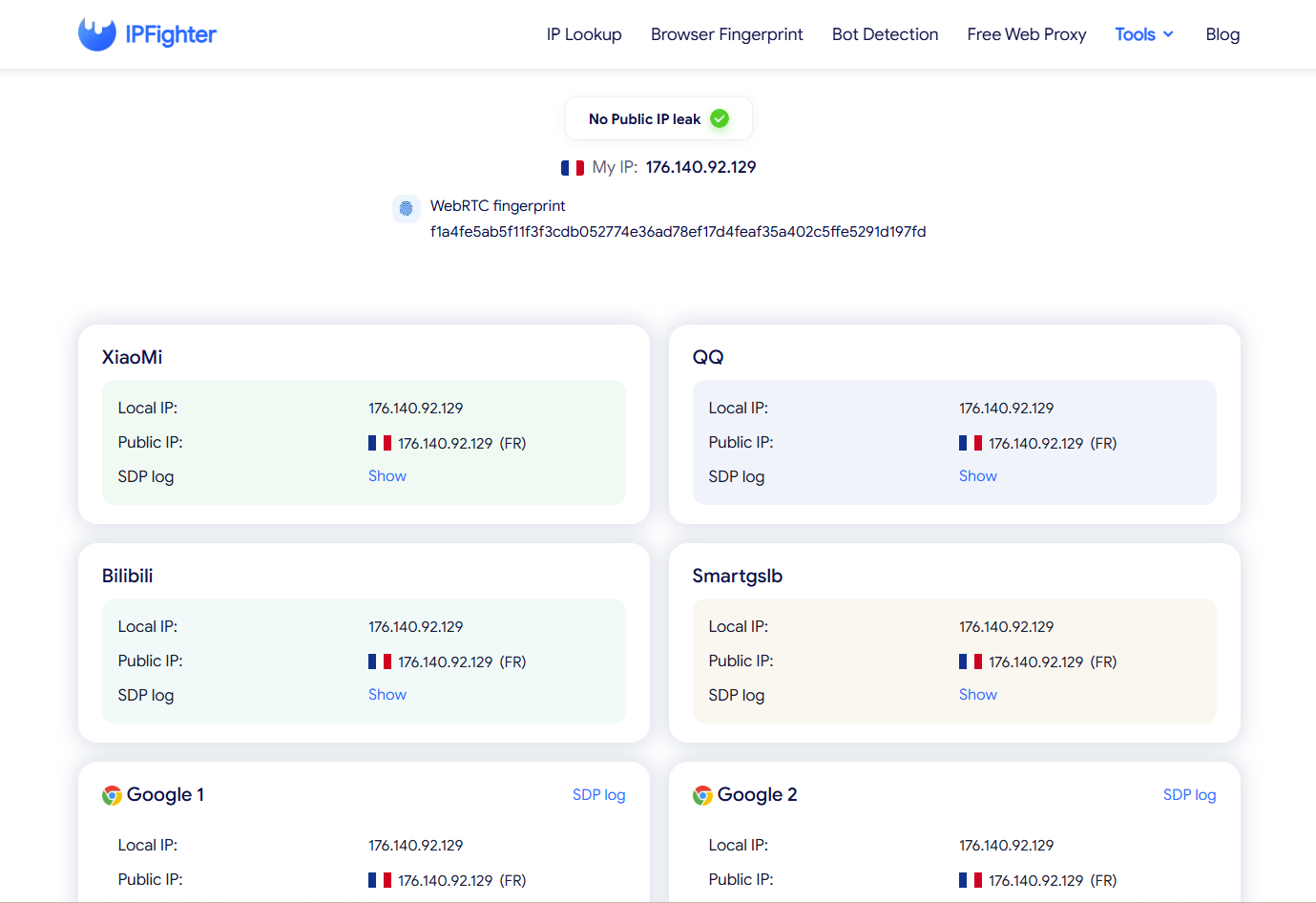
WebRTC leak test results on IPFighter
Read more:
-
What is a spoofer? How identity masking actually works
-
What is a virtual machine? How it works and when to use one
-
How to check browser fingerprint for spoofing signs with IPFighter
-
How to pass bot detection test and avoid getting flagged
6. How to create a profile in Vision Browser
Vision's workflow begins with installing the desktop application and signing in. Users can then create a profile, select a browser environment, configure fingerprint settings, and assign a proxy if required.
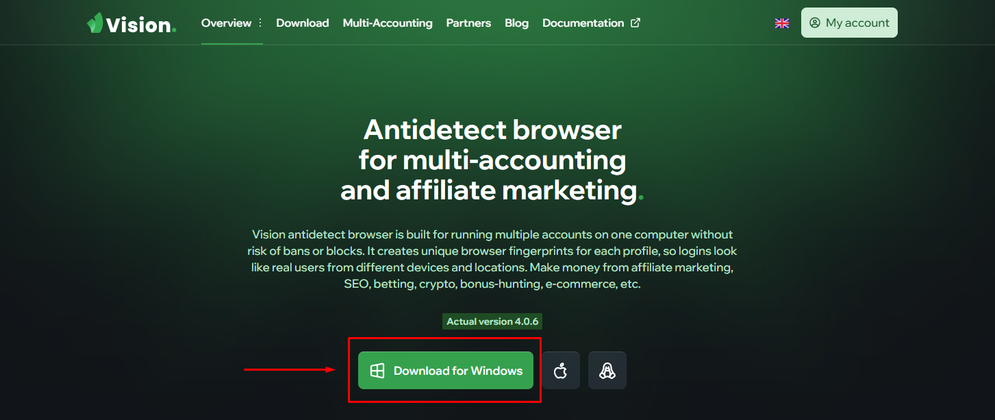
Step 1: Register and install Vision Browser
Visit the official Vision website and create an account. Download the version for your operating system, install the application, and sign in.
Vision supports Windows, macOS, and Linux. Check the official installation documentation for the current operating-system requirements and platform-specific installation instructions.
Register and install Vision Browser
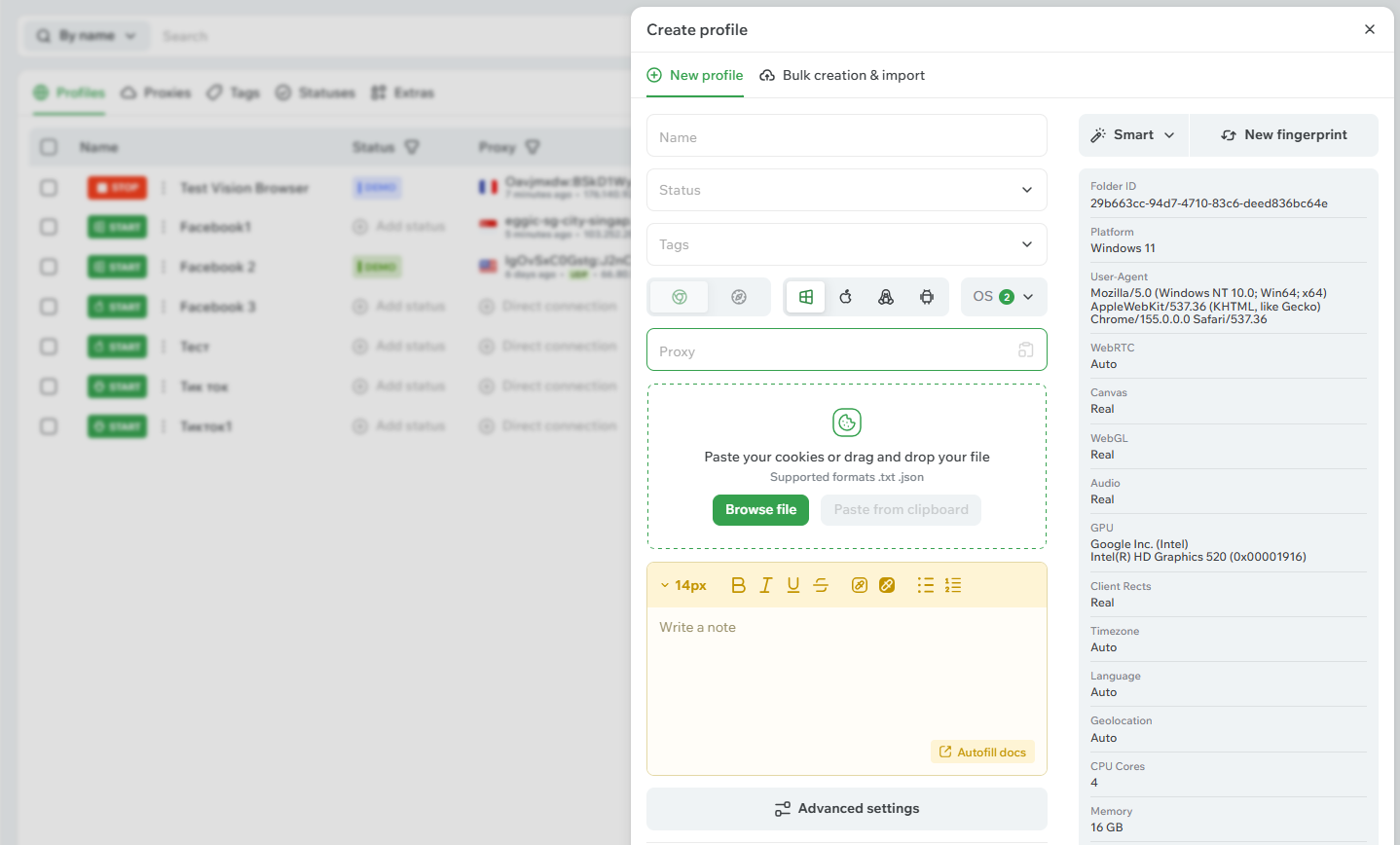
Step 2: Create a profile and configure its fingerprint and proxy
Open the profile management interface and choose the option to create a new profile. Enter a profile name, select the appropriate browser engine and platform, and configure the fingerprint settings.
If you plan to use a proxy, add its protocol, host, port, and authentication details where required. You can also select an available proxy from the relevant folder. Check that the proxy connection and intended location are correct before opening the profile.
For a more automated workflow, Vision's Smart Fingerprint feature can help select a suitable fingerprint from its database. Avoid changing unrelated parameters without understanding how those changes affect the consistency of the profile.
Create a profile and configure its fingerprint and proxy
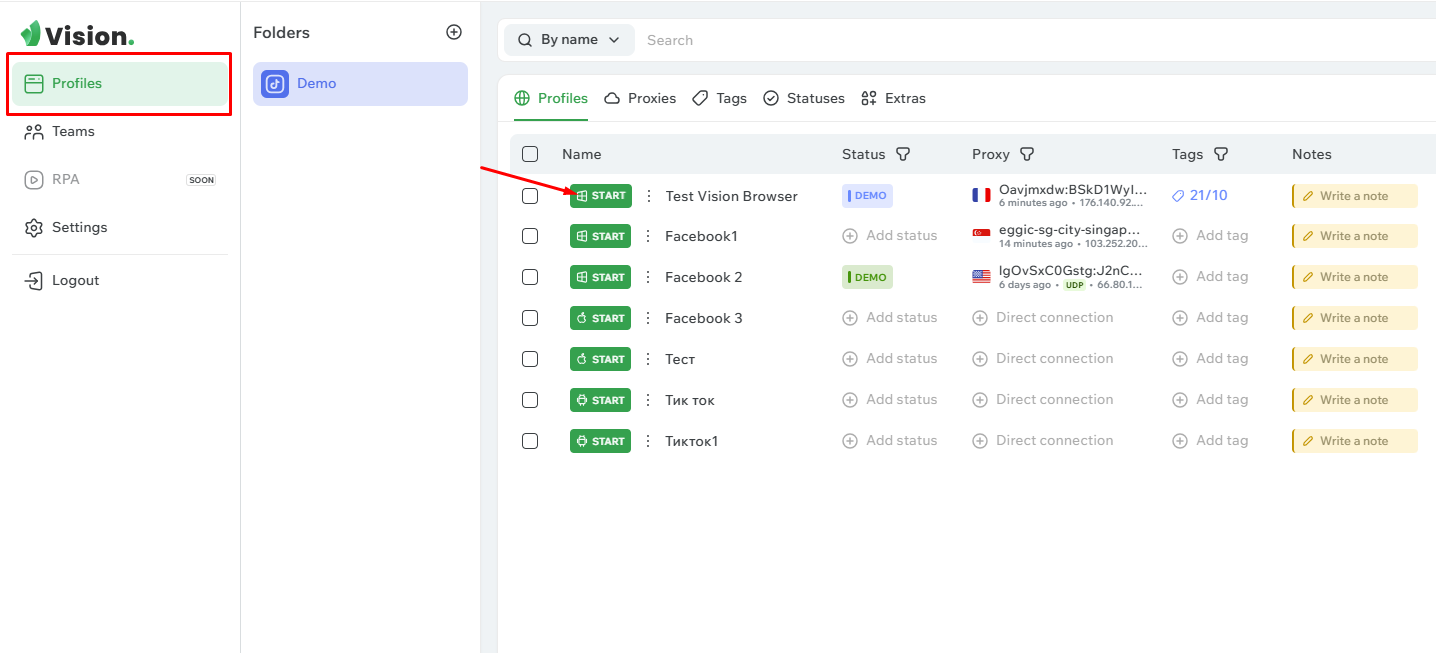
Step 3: Save and launch the profile
Review the configuration and save the new profile. Return to the profile list and start it using the corresponding launch control.
Once the browser opens, visit IPFighter to check the detected IP information, browser fingerprint, automation signals, and potential DNS or WebRTC leaks. If a result does not match the intended setup, review the profile and proxy configuration before using it for your workflow.
Save and launch the profile
Ready to get started? Use the Vision Browser promo code on IPFighter to get 20% off your first paid plan.
7. Alternatives
Vision is not the only antidetect browser available. Depending on your budget, profile requirements, and preferred workflow, it may be worth comparing it with other established tools before making a decision. Besides Vision Browser, you can also consider other antidetect browsers offering similar features.
Hidemyacc: A useful comparison for users evaluating fingerprint management, profile organization, team features, and pricing across different subscription tiers.
8. Conclusion
Vision Browser combines flexible fingerprint management, Chrome and Safari browser cores, proxy integration, and automation tools in one platform for multi-account workflows. In our IPFighter tests, the profile achieved a 100% Browser Fingerprint Score, passed all 51 Bot Detection checks with zero flagged signals, and showed no DNS or public WebRTC IP leaks. These results suggest that Vision maintained consistent browser signals and effectively routed DNS and WebRTC traffic through the tested proxy configuration.
However, Vision's pricing, available profile limits, and additional team-seat costs should still be considered before choosing a plan. Keep in mind that these findings reflect a single profile and configuration; actual performance may vary depending on proxy quality, browser settings, and the environment used.
If Vision fits your requirements, new users can use the Vision Browser promo code on IPFighter for 20% off their first purchase of any plan, subject to the offer terms. Before subscribing, review the current pricing and trial conditions, then test the browser with your own profile and proxy configuration.
9. FAQ
Is Vision Browser free?
Vision advertises a four-day free trial that lets users try its features before purchasing a subscription. Check the current trial conditions, including any restrictions on profile transfers, on the official website.
Which operating systems does Vision Browser support?
Vision supports Windows, macOS, and Linux desktop systems. It also supports Android-based mobile fingerprints for browser profiles, which is different from offering a standalone Android version of the desktop application.
Which proxy protocols does Vision Browser support?
According to its documentation, Vision supports HTTP/HTTPS, SOCKS4, and SOCKS5 proxies. The provider also advertises UDP/QUIC support through SOCKS5, while SSH is listed in the documentation as a future addition rather than an already supported protocol.
Does Vision Browser support browser automation?
Yes. Vision provides an API for managing profiles, folders, and proxies, and documents browser automation using Puppeteer, Playwright, Selenium, and other tools. Automation through third-party libraries connects to running profiles through the DevTools Protocol, and the documented workflow requires profiles to be started through the API.
Does Vision Browser guarantee that accounts will not be banned?
No. Although Vision is designed to maintain separate browser profiles and manage fingerprint settings, no antidetect browser can guarantee that accounts will never be restricted. Results depend on multiple factors, including proxy reputation, fingerprint consistency, account activity, and each platform's detection systems. Testing a profile with IPFighter can help identify certain configuration issues, but it cannot guarantee acceptance by every website.
Read more
Vision Browser review: A clear view of its fingerprint quality

Hidemyacc review 2026: Features, pricing and real fingerprint test results

What is anonymous browsing and how does it work?
Is Pixelscan any good? A full review and alternative

How to check browser fingerprint for spoofing signs with IPFighter

How to pass bot detection test and avoid getting flagged