

Nowadays, virtual machines are widely used for software testing, cybersecurity, cloud computing, and even multi-account management. But can a virtual machine really replace an antidetect browser, and is it enough to protect your online identity?
In this guide, IPFighter explains what a virtual machine is, how it works, its pros and cons, and when a VM is the right choice. You'll also learn how virtual machines compare with antidetect browsers for account management and privacy.
1. What is a virtual machine?
A virtual machine (VM) is a virtual computing environment that runs inside a real, physical computer. It has its own operating system (OS), and its own allocated CPU, RAM, storage, and network card, all carved out from the real machine (the Host Machine). Once it's set up, you can install Windows, Linux, or another OS on it and use it just like a standalone computer.

Definition of virtual machine
Discover more:
-
What is a browser fingerprint? How websites identify you online
-
Best free antidetect browsers: Are they worth using?
-
Mastering Selenium browser fingerprints to avoid anti-bot detection
2. How does a virtual machine work?
A virtual machine relies on three core components working together:
-
Host machine (the real computer): Provides the actual physical hardware such as CPU, RAM, and storage.
-
Hypervisor (the virtualization manager): Acts as the bridge, pulling resources from the host machine and allocating them to each virtual machine, either evenly or on demand.
-
Guest machine/Guest OS (the virtual machine): Runs its own operating system and applications as if it were a fully separate computer.
In short the hypervisor divides up the host's resources, the VM uses that share of CPU, RAM, and disk space, and from the inside, the VM thinks it's running on its own dedicated hardware - which is what allows several VMs to run side by side on a single physical machine.
3. Common types of virtual machines
Virtual machines generally fall into two main categories, depending on what exactly they virtualize
3.1. System virtual machine
A system virtual machine lets you run a complete operating system - including its apps and programs on a single physical machine. You can run multiple operating systems at once while keeping each one as a fully separate environment. Examples: Oracle VirtualBox, VMware Workstation, Microsoft Hyper-V.
3.2. Process virtual machine
A process virtual machine lets you run individual processes or programs on top of the host operating system, rather than a full OS. A common example is the Java Virtual Machine (JVM). Process virtual machines are also known as application virtual machines or managed runtime environments (MREs).

Common types of virtual machines
4. Common uses of virtual machines
Virtual machines are used across a wide range of scenarios, from personal projects to enterprise infrastructure:
-
Software testing: Run and test applications on different operating systems without needing separate physical machines for each one.
-
Malware analysis: Open suspicious files or programs inside an isolated VM so that any malicious code can't reach the real host machine.
-
Software development: Develop and debug applications across multiple environments (Windows, Linux, macOS) from a single physical computer.
-
Cloud infrastructure: Power cloud computing services, where providers run many isolated VMs on shared physical servers.
-
Running legacy software: Keep older operating systems or discontinued software running safely, separate from your main system.
-
Multi-account management: Isolate hardware-level signals when managing multiple accounts on social media or e-commerce platforms.
Across all these cases, the common thread is isolation. A VM lets you run something risky, outdated, or resource-heavy without it ever touching your main machine.
5. Virtual machine vs. Antidetect browser: Which one fits multi-account work?
Before comparing the numbers, it helps to understand why these two tools work so differently in the first place. It comes down to which layer each one isolates.
5.1. The underlying technology
The two tools take fundamentally different approaches to hiding your real environment:
-
Virtual machine (isolates at the OS/hardware layer): Creates an entirely new "computer" running its own operating system.
-
Antidetect browser (spoofs at the browser layer): Runs on a single operating system but modifies or fakes browser fingerprint parameters such as Canvas, WebGL, Audio, User-Agent,... for each individual profile.
That single difference in approach isolating a whole system versus spoofing just the browser layer is what drives nearly every gap in the comparison below.
5.2. Side-by-side comparison
Here's how the two options stack up across the factors that matter most for multi-account work:
|
Criteria |
Virtual Machine |
Antidetect Browser |
|
Resource usage (CPU/RAM) |
Very heavy - a single VM typically uses 2-4GB of RAM plus real disk space. |
Very light - a single profile uses roughly as much RAM as a Chrome tab. |
|
Scalability |
Low - a typical PC can usually run around 3-8 VMs smoothly. |
High - a typical PC can run around 50-100+ profiles at once. |
|
Hardware isolation & malware protection |
Excellent - protects the real machine from malware and malicious software. |
Isolation is limited to the browser environment; it doesn't protect against OS-level malware. |
|
Bypassing browser fingerprinting |
Weak - modern detection systems (Facebook, Google, TikTok) can often spot virtual drivers from VMware or VirtualBox ("VM artifacts"). |
Purpose-built - specifically optimized to get past browser fingerprint filters. |
|
Proxy management & teamwork |
Configured manually per VM; hard to share across a team. |
Centralized proxy management; profiles can be shared with teammates in a click. |
5.3. Why VM is no longer the top choice for account farming
The table above shows where VMs fall short on fingerprinting. Here's specifically why that happens:
-
VM artifacts: Detection scripts used by Facebook, Amazon, or Google Ads can often identify virtual graphics drivers (VirtIO, VMware SVGA), VirtualBox's default BIOS values, or a virtualized CPU.
-
Signal mismatch: A VM changes hardware-level parameters, but it doesn't automatically sync the browser fingerprint (User-Agent, Canvas, WebGL) to match the proxy being used.
Together, these two issues explain why even a correctly configured VM can still get flagged by major platforms faster than a carefully set up Antidetect Browser.
6. Which one should you choose for your workflow?
The right choice comes down to what kind of isolation your workflow actually needs:
6.1. Choose a virtual machine when
A VM makes the most sense when what you need is isolation at the hardware or OS level:
-
Run software outside the browser: Requires standalone applications, .exe automation tools, or software that needs its own operating system.
-
Absolute isolation and security: Useful for testing unfamiliar software or malware, or protecting your main computer from system-level risks.
-
Change your entire environment: Lets you simulate a completely different OS (Windows, Linux) rather than just changing browser-level information.
In all of these cases, you're protecting or replacing the whole machine, not just what a website sees through your browser.
6.2. Choose an antidetect browser when
An antidetect browser fits better when the isolation you need is at the browser and account level:
-
Managing multiple social media or e-commerce accounts: Needed when working with dozens or hundreds of Facebook, TikTok, or Amazon accounts to avoid device-matching detection.
-
Browser fingerprint control: Lets you customize User-Agent, canvas, WebRTC, fonts, and timezone separately for each profile.
-
Save on hardware resources: Runs many independent tabs or profiles at once without the RAM and CPU cost of multiple virtual machines.
In short, this path is built for scale managing many accounts at once without the hardware overhead a VM would require.
Between the two, the deciding factor almost always comes down to what you're isolating: hardware and OS-level risk calls for a VM, while browser-level detection calls for an antidetect browser. Some popular antidetect browsers today include Hidemyacc, AdsPower, and Linken Sphere,...
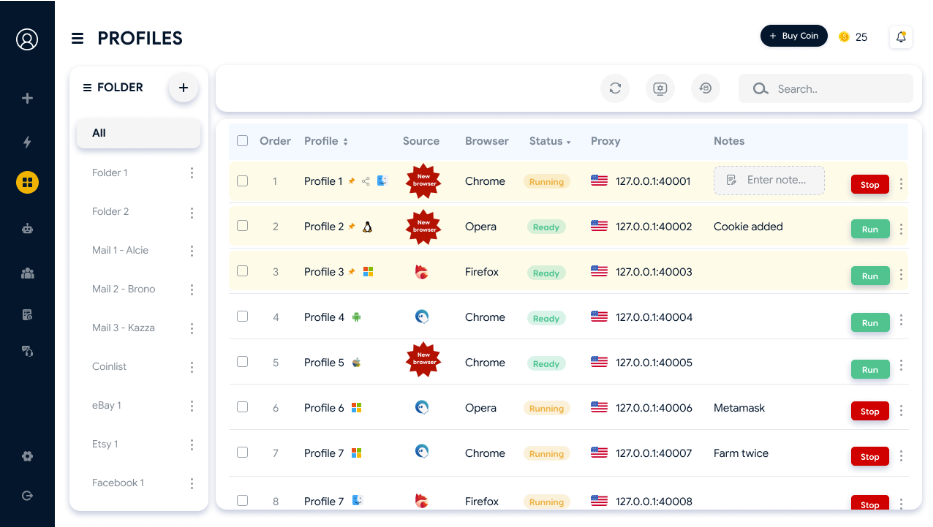
Use antidetect browser to manage multiple profiles
Read more:
-
Browser fingerprint testing tools: Which one should you use?
-
Is Tor browser safe? The biggest myths about Tor privacy
7. Conclusion
A virtual machine is a solution for isolating hardware and OS-level infrastructure; it was never designed to be a complete anti-detection solution. For multi-account management, VMs and Antidetect Browsers serve two different purposes. For web-based MMO tasks specifically, Antidetect Browsers have a clear edge in speed, cost, and the ability to get past modern anti-fraud AI.
8. FAQ
What is a virtual machine used for?
Virtual machines are commonly used for software testing, malware analysis, software development across multiple environments, cloud infrastructure, running legacy software, and isolating hardware-level signals for multi-account management.
Does a Virtual Machine automatically change my IP address?
No. A VM changes your hardware and OS environment, but your IP address still comes from whatever network connection or proxy you're using. You need to pair it with a proxy to change your IP.
Can websites detect a virtual machine?
Yes, in many cases. Modern detection systems can spot "VM artifacts" telltale signs like virtual graphics drivers, default BIOS values, or virtualized CPU signatures especially from common hypervisors like VirtualBox or VMware.
Is antidetect browser more expensive than Virtual Machine?
Not usually. Antidetect browsers are typically priced per profile or subscription and run efficiently on modest hardware, while running many VMs in parallel often requires much more RAM, storage, and sometimes more powerful hardware overall.
Virtual machine vs. antidetect browser: Which is better?
Neither is universally better ; it depends on what you're isolating. A VM is stronger for OS/hardware-level isolation and running non-browser software; an Antidetect Browser is purpose-built for managing multiple accounts and bypassing browser fingerprinting.
Does a virtual machine change your browser fingerprint?
Not automatically. A VM changes hardware-level signals, but the browser fingerprint inside it (Canvas, WebGL, User-Agent, etc.) isn't automatically adjusted to match, which is exactly the mismatch that can get a VM flagged.
Read more

Vision Browser review: A clear view of its fingerprint quality


Hidemyacc review 2026: Features, pricing and real fingerprint test results

What is anonymous browsing and how does it work?

Is Pixelscan any good? A full review and alternative

How to check browser fingerprint for spoofing signs with IPFighter


How to pass bot detection test and avoid getting flagged