

Could you really browse the internet without revealing who you are? With websites, advertisers, and network providers able to collect information about your IP address, browser, and online activity, staying anonymous online is not as simple as opening an Incognito window.
In this article, IPFighter explains what anonymous browsing means, how VPNs, Tor, privacy-focused browsers, and web proxies can help, and what these tools cannot hide. You’ll also learn how to reduce online tracking and identify the information your browser and network may still expose.
1. What is anonymous browsing?
Anonymous browsing refers to browsing the web in a way that reduces how easily websites, advertisers, ISPs, or other network observers can link your online activity to your real identity or location. During normal browsing, websites can see your public IP address and collect information about your browser, device, cookies, and other tracking signals.
Anonymous browsing aims to reduce this linkability by limiting or changing the information exposed during a session. For example, a VPN or Tor can hide your normal IP address, while privacy-focused browsers can reduce tracking and browser fingerprinting. However, hiding your IP does not make you completely anonymous - logging into a personal account or sharing identifying information can still link the activity to you.
Anonymous browsing is also different from Incognito or private browsing. Incognito mainly limits the browsing data saved locally on your device; it does not automatically hide your IP address or prevent websites and network operators from observing your activity.

Definition of anonymous browsing
Discover more:
-
What is a browser fingerprint? How websites identify you online
-
Best free antidetect browsers: Are they worth using?
-
Browser fingerprint testing tools: Which one should you use?
2. How does anonymous browsing work?
Anonymous browsing works by changing how your device connects to websites and limiting the identifying information exposed during a session. Instead of connecting directly to a website, your traffic may first pass through a VPN server, Tor network, or proxy. This creates an additional layer between your device and the website. A simplified connection looks like this:
Your device → Privacy tool → Intermediary server/network → Website
Depending on the tool and configuration, this setup can hide your normal public IP address, reduce some DNS exposure, and limit cookies or other tracking mechanisms. However, your browser and device can still reveal identifying signals through browser fingerprinting, so changing your IP alone does not guarantee anonymous browsing.
3. Anonymous browsing vs private browsing: What's the difference?
Anonymous browsing and private browsing are often used interchangeably, but they solve different problems.
3.1. Private or Incognito browsing
Private browsing is primarily designed to limit the information stored locally on the device. For example, Chrome's Incognito mode starts a separate browsing session and does not retain a record of visited sites or certain site data after all Incognito windows are closed. However, downloaded files and bookmarks can remain on the device.
Incognito mode does not automatically:
-
Hide your public IP address
-
Make you anonymous to websites
-
Prevent your ISP from observing network activity
-
Prevent an employer or school from monitoring its network
-
Prevent websites from collecting information about your activity
Google explicitly states that Incognito does not make users invisible and that websites, organizations managing the network, and ISPs may still be able to observe activity.
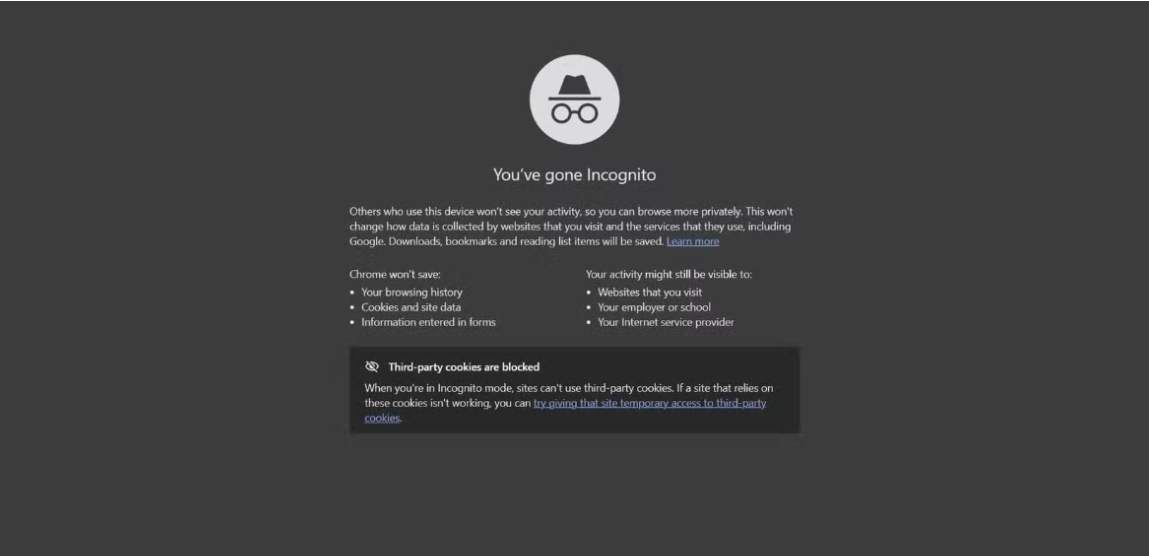
Browsing in Incognito mode on Chrome
3.2. Anonymous or privacy-focused browsing
Anonymous browsing focuses more on reducing the ability to connect online activity with your real identity. Depending on the setup, this can involve:
-
Hiding or changing your public IP
-
Routing traffic through an intermediary network
-
Reducing tracking
-
Limiting browser fingerprinting
-
Avoiding unnecessary personal information
-
Isolating browsing sessions
The goal is therefore broader than simply removing local browsing history.
Popular anonymous browsing options
3.3. Quick comparison: Incognito vs. Anonymous browsing
The key difference is simple: Incognito primarily provides local privacy, while anonymous browsing aims to reduce online linkability.
|
Feature |
Incognito |
Anonymous/privacy-focused browsing |
|
Hide local history |
Yes |
Usually |
|
Hide IP |
No |
Can |
|
Reduce ISP visibility |
No |
Can |
|
Resist fingerprinting |
Limited |
Depends on setup |
|
Prevent account-based identification |
No |
No |
4. What tools can you use for anonymous browsing?
There is no single tool that provides every type of privacy protection. VPNs, Tor, privacy-focused browsers, and web proxies operate at different layers and are suited to different use cases.
4.1. VPN
A VPN routes your internet traffic through a VPN server instead of sending it directly to the destination. In general, this means:
-
The website sees the VPN server's IP address rather than your normal public IP.
-
Traffic between your device and the VPN server is encrypted.
-
Your ISP does not see the contents of that encrypted VPN traffic in the same way it would see a direct connection.
-
You place a degree of trust in the VPN provider because the provider operates the VPN server.
A VPN can therefore be useful when you want a convenient combination of privacy and IP masking across your device. However, a VPN does not automatically make you anonymous. It does not necessarily change your browser fingerprint, and logging into a personal account can still identify you to the website.
4.2. Tor
Tor is designed specifically to improve privacy and anonymity by routing traffic through the Tor network rather than directly to the destination. Tor Browser also includes privacy protections intended to reduce tracking and make users' browser characteristics more difficult to distinguish from one another.
However, using Tor does not mean that every application on your device is automatically protected. It is also important to distinguish Tor Browser from simply routing another browser through Tor.
Tor Project strongly recommends against using Tor with another browser because browsers without Tor Browser's privacy protections can expose information through DNS, WebRTC, operating-system details, fonts, plugins, cookies, or cache.
If you are considering Tor for private browsing, see Is Tor Browser safe for a closer look at its protections and limitations.
Tor browser
4.3. Privacy-focused browsers
Privacy-focused browsers attempt to reduce tracking directly at the browser level. Depending on the browser, privacy features may include: Tracker blocking, cookie isolation, anti-fingerprinting mechanisms, reduced telemetry, stronger control over permissions. These features can reduce the amount of information websites collect about your browsing environment.
However, browser privacy features do not necessarily hide your public IP address. You may still need a VPN or another network-level privacy tool if IP masking is part of your goal.
Antidetect browsers like Afina, Hidemyacc, Multilogin, etc. take a more specialized approach by allowing users to manage separate browser profiles and customize fingerprint-related settings. While they can help control browser identity and reduce fingerprint-based linkability, they are primarily designed for managing distinct browsing environments rather than general privacy protection.
4.4. Web proxies
A web proxy acts as an intermediary between your browser and the destination website. The destination may see the proxy's IP address instead of your normal public IP. Web proxies can be convenient because they often require little or no configuration. They can be useful for simple browsing or testing how a website responds from another network location.
However, a web proxy generally provides a narrower layer of protection than a properly configured VPN or Tor setup. The exact privacy level depends on how the proxy is implemented, what it logs, and whether browser-level signals such as WebRTC or fingerprinting remain exposed.
If you only need a simple browser-based proxy for low-risk browsing, you can try IPFighter's Free Web Proxy. For guidance on choosing the right use case and checking for potential leaks, see How to use web proxy safely.
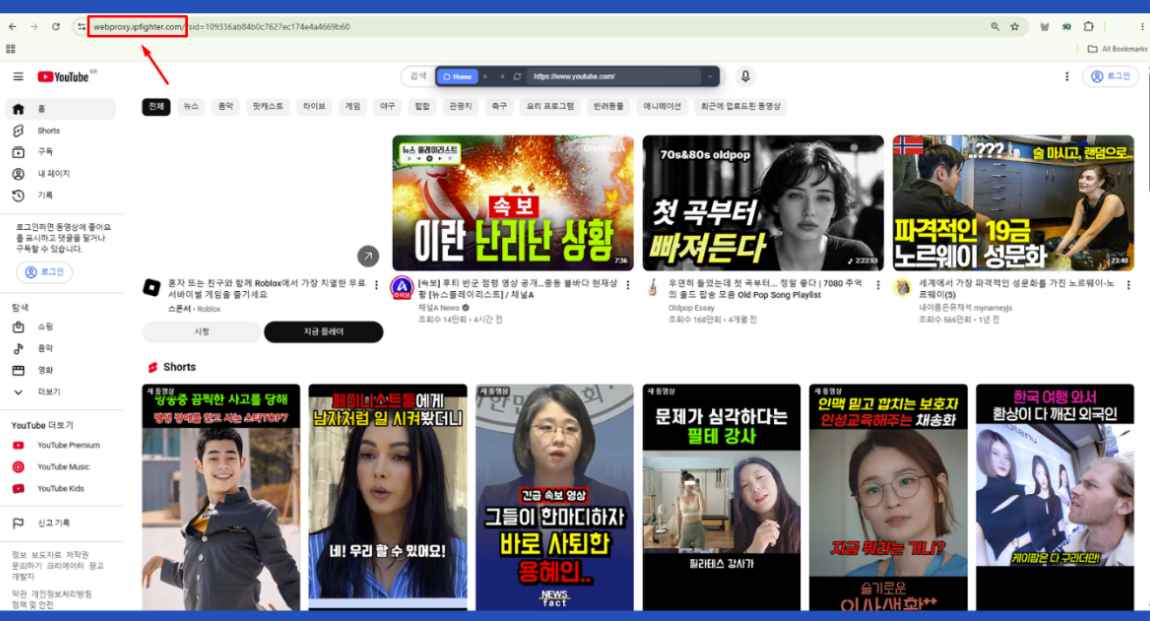
Use IPFighter's free web proxy to access YouTube
Read more:
-
What is a virtual machine? How it works and when to use one
-
How to check browser fingerprint for spoofing signs with IPFighter
5. Can websites still track you while browsing anonymously?
Yes. Anonymous browsing can reduce some forms of tracking, but it does not eliminate every way a website can recognize or link a visitor. The main factors include:
-
Browser fingerprinting: Websites can collect browser and device characteristics such as user-agent, operating system, screen settings, timezone, language, and graphics signals to distinguish one browsing environment from another. Changing your IP address alone does not change these characteristics.
-
Cookies and trackers: Cookies and other tracking technologies can help websites recognize returning visitors or connect activity across sessions. Privacy-focused browsers can limit some of these mechanisms, but protection depends on the browser, website, and configuration.
-
Logged-in accounts: Signing into a personal account can directly link anonymous browsing activity to your identity. For example, using a VPN or Tor does not prevent Google, Facebook, Amazon, or other services from associating activity with an account you have logged into.
-
User behavior: Search patterns, browsing habits, clicks, and navigation behavior can create recognizable patterns. While these signals may not identify you individually, they can help websites link activity across sessions.
As a result, anonymous browsing is better understood as reducing linkability rather than making every browsing session completely unidentifiable.
6. What are the limitations of anonymous browsing?
Anonymous browsing can improve privacy, but it cannot guarantee complete anonymity. Several factors can still weaken your privacy:
-
Personal information: Sharing your name, email, phone number, address, or other identifying details can directly connect a private browsing session to you.
-
Identifiable accounts: Logging into personal accounts can link your browsing activity to an existing identity, regardless of whether you use a VPN, Tor, or proxy.
-
Browser fingerprinting: A unique browser or device configuration can help websites distinguish your activity from other visitors, meaning that changing your IP alone may not be enough.
-
Misconfigured software: Privacy tools only protect what they are designed and configured to cover. Incorrect setups can leave risks related to DNS, WebRTC, cookies, cache, or fingerprinting.
-
Malware and compromised devices: Malware, malicious extensions, and unsafe downloads can expose information independently of your browser's privacy protections.
-
CAPTCHAs and access restrictions: Websites may show CAPTCHAs, request additional verification, or restrict access when traffic comes from VPN, Tor, or proxy IP ranges. This can reflect how the website treats the network or IP reputation rather than a failure of the privacy tool.
Ultimately, anonymous browsing should be treated as one layer of privacy protection, rather than a guarantee that your identity and activity can never be linked back to you.
7. How can you improve anonymous browsing?
Anonymous browsing works best when you combine the right privacy tools with sensible browsing habits. Here are some practical ways to strengthen your privacy:
-
Choose the right privacy tool: Use a VPN for convenient IP masking and encrypted traffic, Tor Browser for stronger anonymity needs, a privacy-focused browser to reduce browser-level tracking, or a web proxy for simple, low-risk browsing.
-
Combine an antidetect browser with a proxy: A proxy can mask your public IP address, while an antidetect browser can help manage separate browser profiles and fingerprint-related settings. Together, they can reduce the signals websites use to link different browsing sessions, although they do not guarantee complete anonymity.
-
Keep your software updated: Regularly update your browser and operating system to apply security patches and privacy improvements that can reduce exposure to known vulnerabilities.
-
Limit personal information: Avoid providing unnecessary identifying details, and remember that logging into a personal account can immediately link your browsing activity to that account.
-
Check your browser fingerprint: Use browser and network testing tools to understand what your environment exposes, including your fingerprint, IP and location, DNS configuration, WebRTC behavior, and proxy status. IPFighter can help check these signals and identify potential exposure.
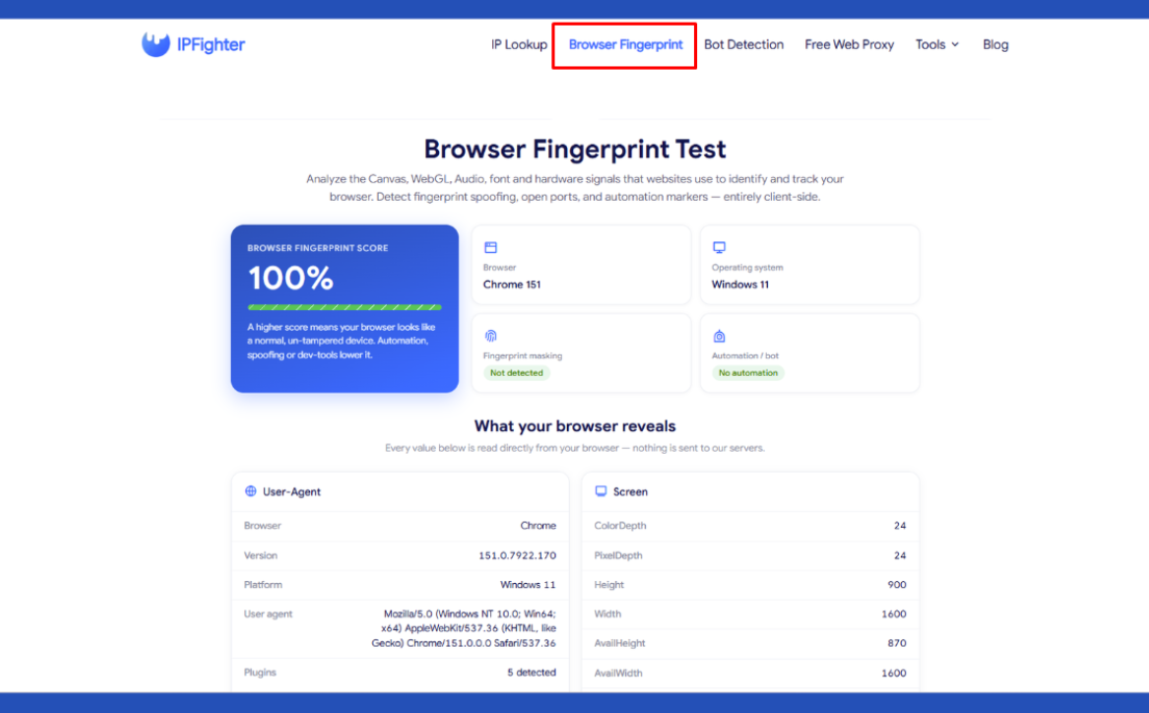
Check browser fingerprint on IPFighter
-
Avoid unnecessary customization with Tor: Tor Browser is designed to make users' browser environments more similar. Adding unusual extensions or heavily modifying its settings can make your fingerprint more distinctive and introduce additional privacy risks.
Overall, improving anonymous browsing is less about relying on a single tool and more about combining privacy technologies with careful browsing habits to reduce unnecessary exposure.
8. Anonymous browsing vs VPN vs Tor vs proxy
Different privacy tools solve different problems, so it is useful to compare them before choosing one.
|
Method |
Hides IP |
Encrypts traffic |
Anti-fingerprinting |
Main purpose |
|
Incognito |
No |
No |
No |
Local privacy |
|
Web proxy |
Usually |
Depends |
No |
Basic IP masking |
|
VPN |
Yes |
Yes, to VPN server |
Usually limited |
Privacy + IP masking |
|
Tor Browser |
Yes |
Multi-layer Tor routing |
Yes |
Stronger anonymity |
The table should not be interpreted as a ranking of which tool is always “best.” A VPN can be more convenient for everyday device-wide privacy, while Tor Browser is designed around stronger anonymity. A web proxy can be useful for simple browser-based tasks, while Incognito is primarily intended to limit local browsing data.
The right choice depends on what you are trying to protect and which limitations you can accept.
9. Conclusion
Anonymous browsing is not a single tool or browser mode, but a combination of technologies and habits that can reduce how easily your online activity is linked to your identity.
Incognito mode only limits certain local browsing data, while VPNs, Tor, privacy-focused browsers, and web proxies provide different levels of network and browser privacy. However, IP masking alone is not enough - fingerprinting, cookies, account logins, personal information, and browsing behavior can still expose or link your activity.
The practical goal is not complete invisibility, but reducing unnecessary exposure and understanding what your browser and network reveal about you. If you want to check your IP address or browser fingerprint, IPFighter can help you identify the information your browsing environment exposes.
10. FAQ
Is there a way to browse anonymously?
You can improve online anonymity with tools like Tor Browser and by limiting the personal information you share. However, no method can guarantee complete anonymity.
Is there a truly anonymous browser?
No browser guarantees complete anonymity. Tor Browser is designed to improve anonymity through the Tor network and protections against tracking and fingerprinting, but perfect anonymity is not generally possible.
What is the difference between anonymous browsing and Incognito mode?
Incognito mode mainly limits the browsing data saved locally on your device. It does not hide your IP address or prevent websites and network operators from monitoring your activity.
How can I browse more anonymously?
Choose a privacy tool that fits your needs, limit personal information and account logins, keep your software updated, and check whether your IP, DNS, WebRTC, or browser fingerprint exposes identifying signals.
Can you browse without being traced?
No. Tor and other privacy tools can make certain forms of tracking more difficult, but account logins, personal information, fingerprinting, and other signals can still link activity to you.
Does a VPN make browsing anonymous?
A VPN can hide your public IP address and encrypt traffic to the VPN server, but it does not provide complete anonymity. Websites can still use fingerprints, cookies, account information, and other signals to recognize you.
Can browser fingerprinting identify you during anonymous browsing?
Yes. Fingerprinting can help websites recognize or link a browsing session based on browser and device characteristics. Tor Browser includes protections to reduce fingerprint uniqueness, but it cannot guarantee perfect anonymity.
Read more
Vision Browser review: A clear view of its fingerprint quality

Hidemyacc review 2026: Features, pricing and real fingerprint test results

What is anonymous browsing and how does it work?
Is Pixelscan any good? A full review and alternative

How to check browser fingerprint for spoofing signs with IPFighter


How to pass bot detection test and avoid getting flagged