

Running several accounts on Facebook, Amazon, TikTok or ad platforms from one computer is easy to start and hard to keep alive. Platforms link accounts through browser fingerprints, cookies and network signals, and one linked account can drag the rest down with it.
A multi-accounting browser solves this by giving every account its own isolated browser profile. Hidemyacc is one of the tools built for this job. In this review, we look at what Hidemyacc offers, what it costs, and how a fresh profile actually performs when we run it through IPFighter’s fingerprint and leak tests.
1. General information
Before looking at specific features, it helps to understand who is behind Hidemyacc and what kind of service it offers. The table below summarizes the key details, from supported platforms and proxy options to pricing and trial terms.
|
Website |
|
|
Founded |
2021, Vietnam |
|
Platform |
Windows, macOS, Ubuntu (coming soon) |
|
Fingerprint engine |
Marco, Hidemyacc's own Chromium based browser core |
|
Team/profile sharing |
Yes, and free/paid sub accounts from Base plan |
|
Proxy integration |
HTTP, SOCKS4, SOCKS5, SHH |
|
Pricing model |
By number of profiles (5 tiers), plus a $5 per month Share seat |
|
Trial/Refund |
7 day free trial with 30 profiles, no credit card; no cash refunds, compensation as extra usage days only |
|
Best for |
Ecommerce sellers, affiliate marketers, media buyers, social media managers, agencies, airdrop and Web3 users |
2. Hidemyacc's core features
Hidemyacc brings fingerprint control, profile management, proxy handling and automation together in one desktop app. In this section, IPFighter breaks down each of these areas to see what users can configure and which features depend on the plan they choose.
2.1. Fingerprint spoofing
Each Hidemyacc profile runs on the Marco core with its own fingerprint. You can choose the operating system the profile presents (Windows, macOS, Linux, and iOS or Android on Base and above), set a custom user agent, and decide which fingerprint surfaces get masked with a simple toggle for each.
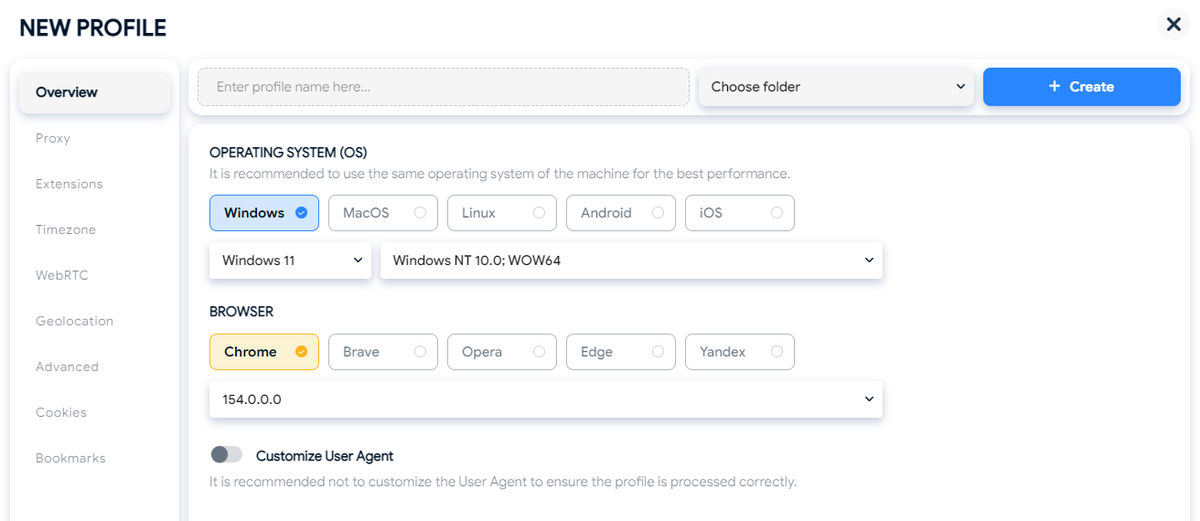
Profile creation and fingerprint spoofing interface on Hidemyacc.
When a proxy is attached, timezone, language and the WebRTC public IP can all be set to follow the proxy IP, so the profile's location signals stay consistent with its network.
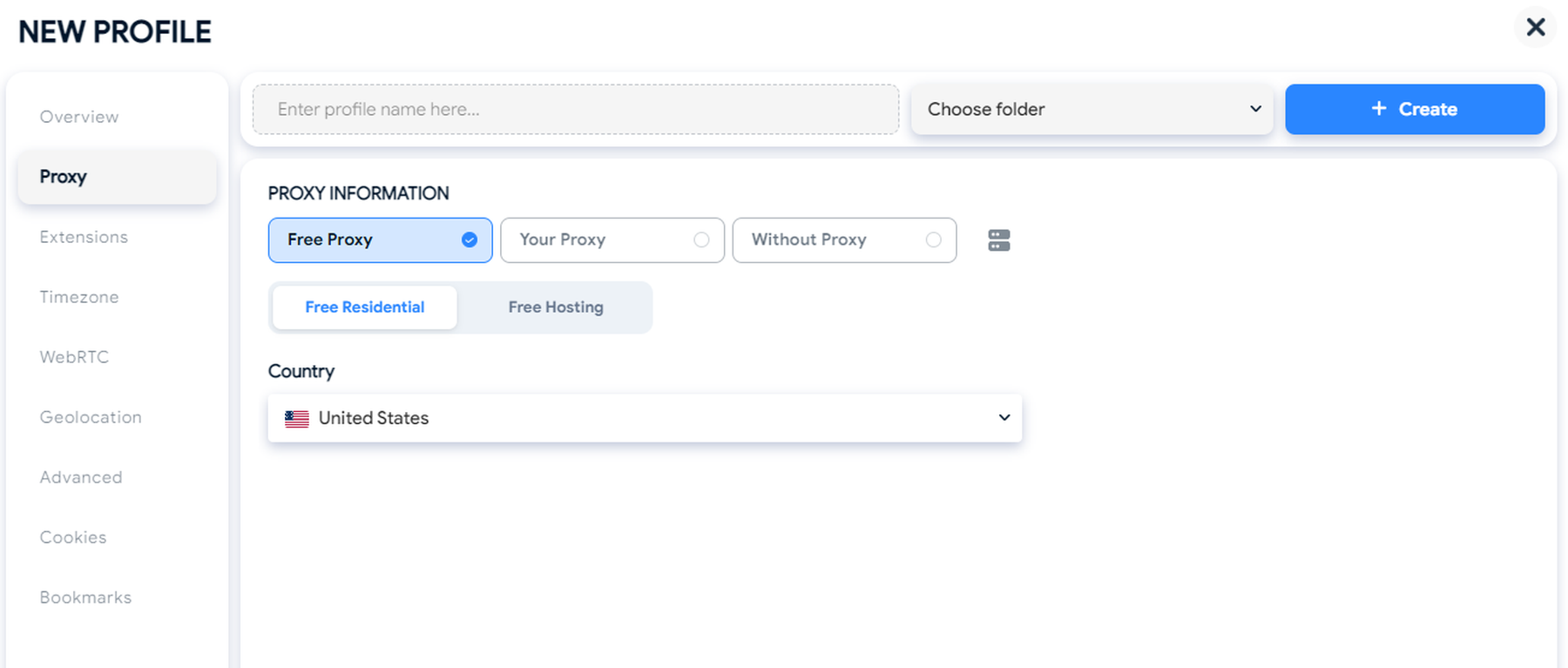
Proxy configuration interface on Hidemyacc.
Key fingerprint customization features include:
-
Fingerprint masking: Toggle Canvas, AudioContext, WebGL Image, WebGL Metadata, and Client Rects masking individually for each profile. AudioContext and WebGL Metadata are enabled by default.
-
WebRTC: Choose between Altered, Disabled, and Real modes, with an option to use the proxy IP as the WebRTC public IP.
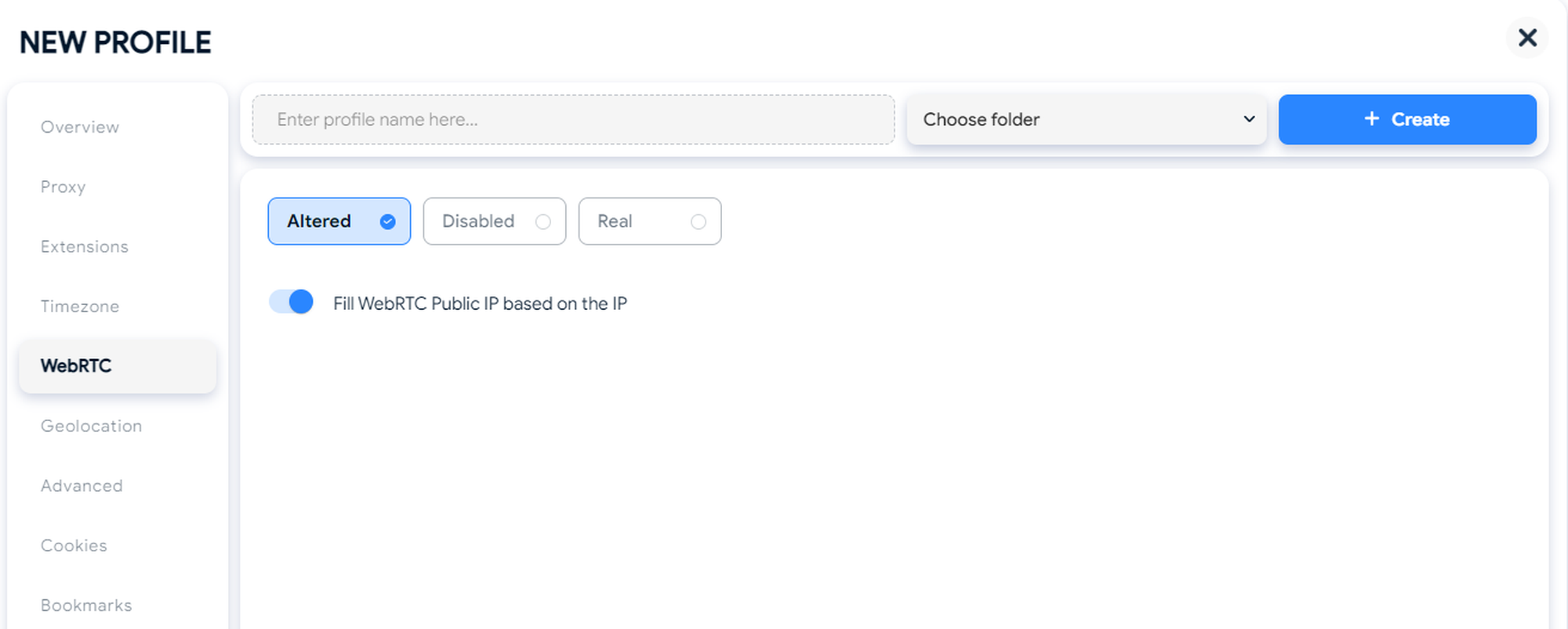
Managing WebRTC options during profile setup in Hidemyacc.
-
Hardware settings: Customize CPU threads (Hardware Concurrency), device memory, screen resolution, and optionally set a custom MAC address.
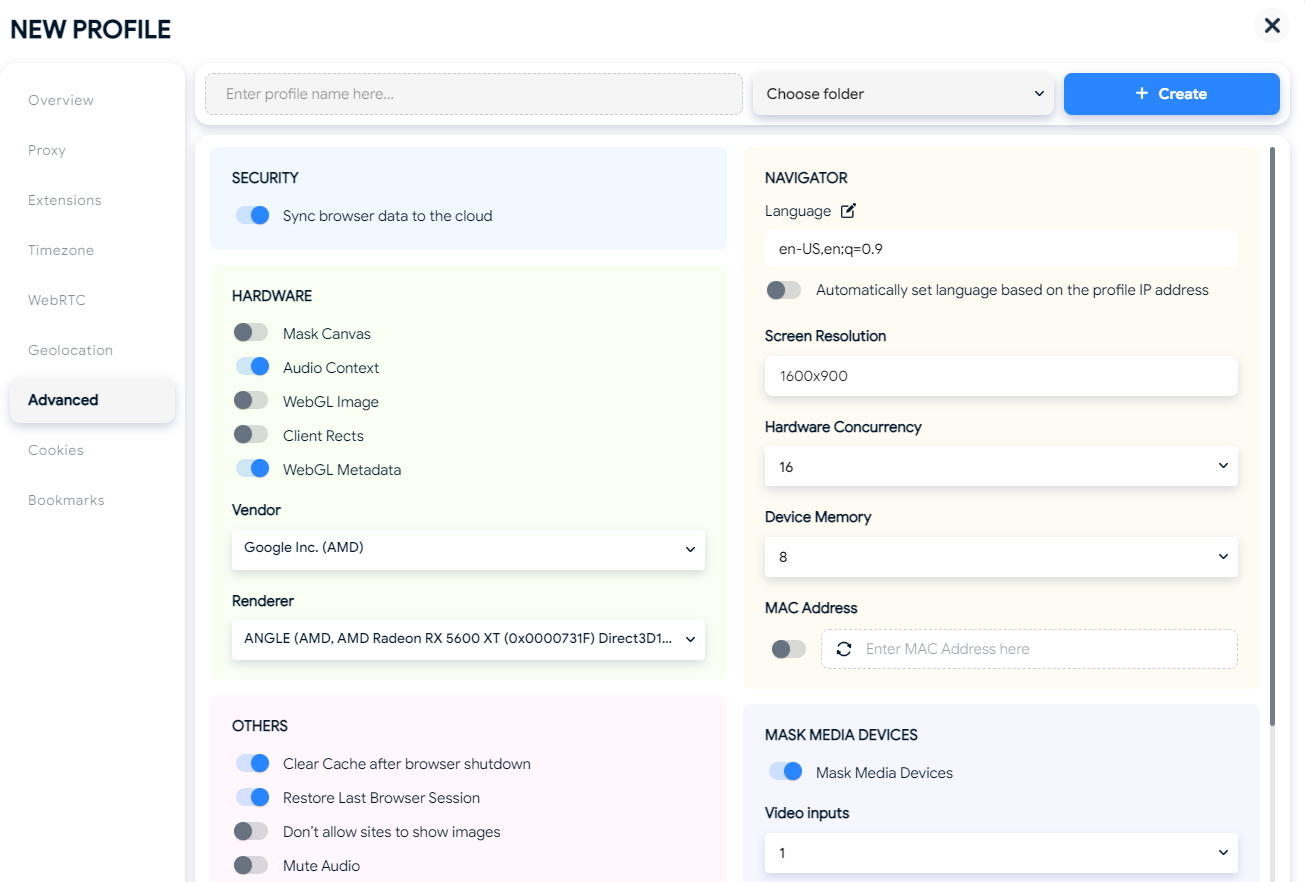
Advanced hardware settings interface on Hidemyacc.
-
Media devices: Control the number of video inputs, audio inputs, and audio outputs reported by the browser profile.
-
Language and timezone: Set these manually or configure them to follow the proxy IP, helping maintain consistent location signals.
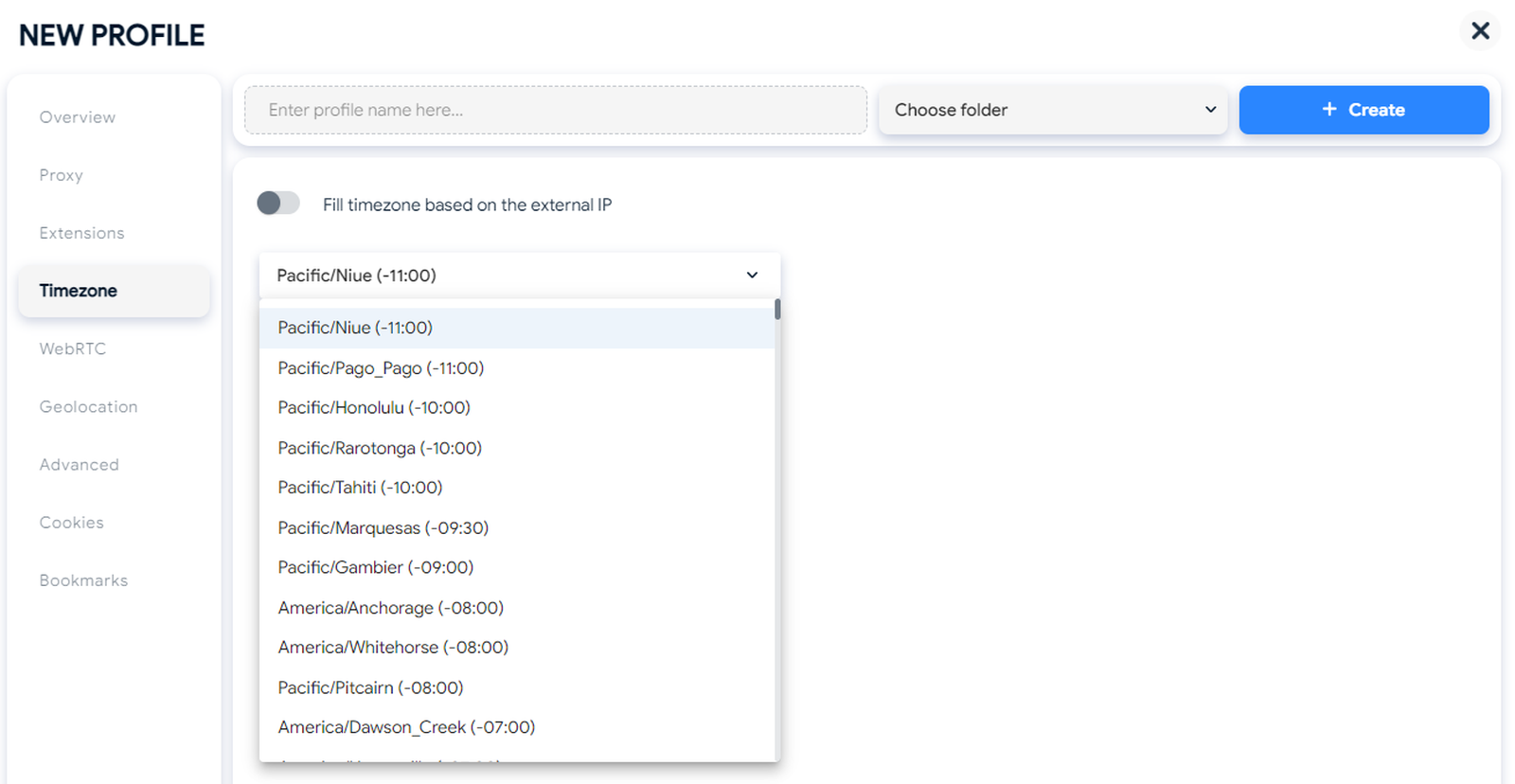
Timezone settings and selection menu in Hidemyacc.
-
Operating system emulation: Choose Windows, macOS, or Linux on all plans, with iOS and Android available from the Base plan onward.
Hidemyacc also includes practical browser settings, such as clearing the cache on exit, restoring the previous session, blocking images, muting audio, and adding profile notes, tags, and startup URLs.
Best for: Users who need multiple browser profiles that appear as distinct devices while maintaining consistent fingerprint and network settings without manually configuring every parameter.
2.2. Profile management
Hidemyacc offers profile management features for both individual users and teams. Profile limits depend on the subscription plan, ranging from 5 to 1,000 profiles, with custom quantities available on request. There is no fixed limit on simultaneously open profiles; actual capacity depends on the computer's RAM and CPU. Each profile can only be open in one place at a time, helping prevent conflicting sessions when multiple team members access the same account.
Key profile management features include:
-
Profile creation and organization: Create profiles individually, in bulk using Create Multi Profiles, or as temporary Quick Profiles (Base and above). Users can also duplicate, pin, and organize profiles into folders, with folder management available from Base.
-
Cookie and profile import/export: Import cookies and bookmarks on all plans. Full profile import/export, including fingerprints, cookies, history, bookmarks, and local storage, is available on Business; proxy settings are excluded.
-
Profile transfer: Use Magic Link to transfer profiles from another browser or antidetect browser.
-
Cloud synchronization: Sync profiles across devices on every plan.
-
Session backup and recovery: Keep the 10 most recent sessions through Session Backup, and restore deleted profiles from Trash within 24 hours.
-
Activity history: Track who opened, edited, or deleted each profile, with timestamps for accountability.
-
Team collaboration: Share profiles and folders from Base onward. Free sub-accounts are included according to plan: 1 on Base, 3 on Team, and 5 on Business. Additional paid sub-accounts are available without a fixed limit.
Best for: Solo operators who need organized profiles with cloud synchronization and recovery options, as well as teams that require shared access and activity tracking for account management.
2.3. Proxy integration
Hidemyacc does not sell proxies directly, so users can connect proxies from their preferred providers. Proxies can be entered manually when creating a profile or managed centrally through Proxy Manager, which stores proxy lists and displays how many profiles are assigned to each proxy. A built-in Check Proxy feature lets users verify the connection and location before launching a profile.
Key proxy integration features include:
-
Supported protocols: HTTP, SOCKS4, and SOCKS5.
-
Proxy checking: Test proxy connectivity and check its location before use.
-
Bulk proxy import: Import multiple proxies through Proxy Manager for easier management.
-
Proxy Store: Access discount codes from over 100 partner proxy providers on all plans.
-
Free proxies: Access free datacenter and residential proxies on Base and above.
Best for: Users who already have a proxy provider or want discounts on proxy services, and need a straightforward way to manage proxy assignments across multiple browser profiles.
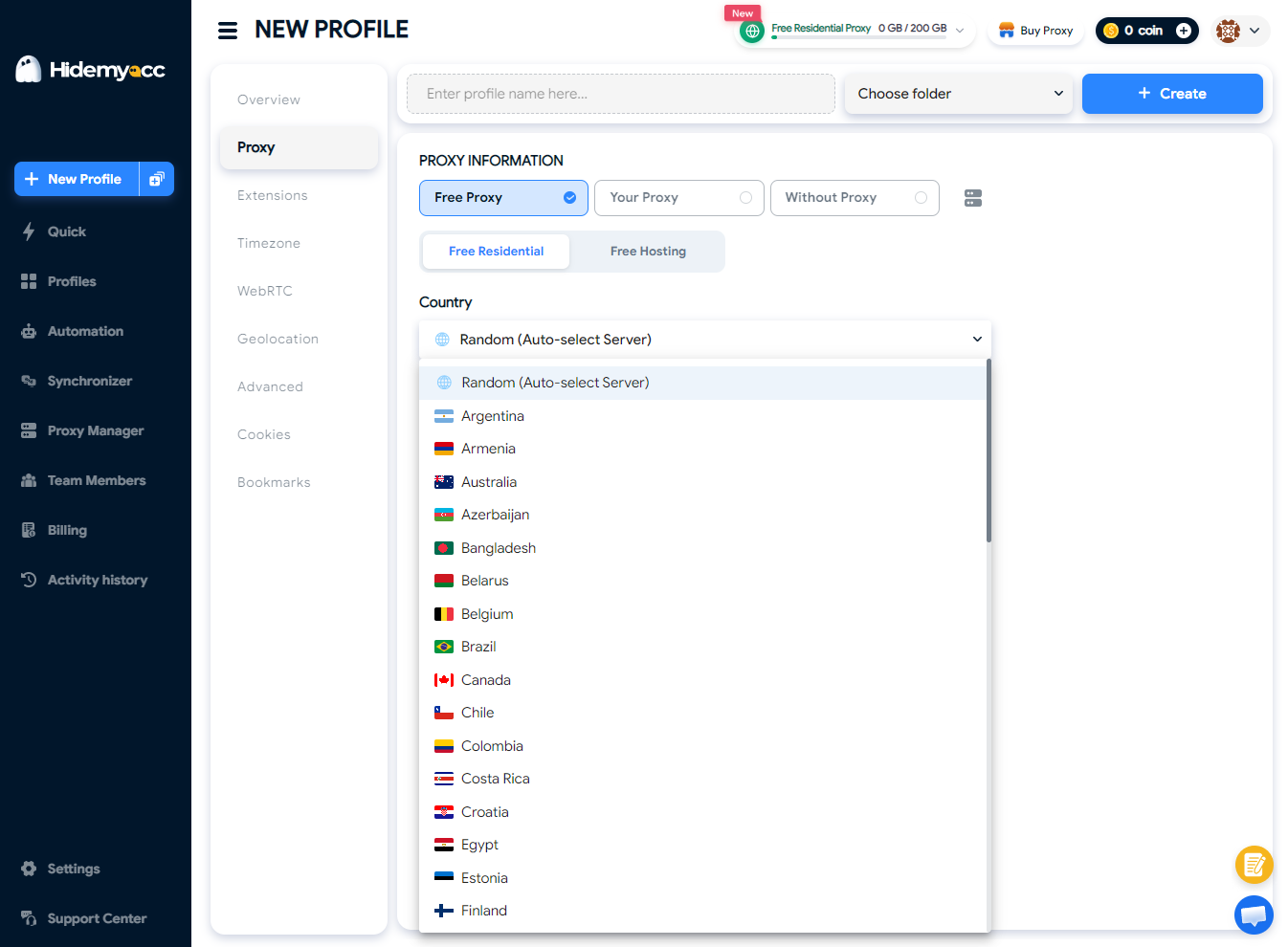
Choosing country servers for proxy setup in Hidemyacc.
2.4. Automation and API
Hidemyacc supports both no-code automation and developer-driven workflows. Users without coding experience can build scripts using drag-and-drop commands, record browser actions, or use free system scripts for platforms such as Facebook and Amazon. Scripts can also be scheduled to run automatically. Developers can import custom scripts or use the API to manage browser profiles programmatically.
Key automation and API features include:
-
No-code automation: Use the drag-and-drop script builder, Record Action, Import Script, and free system scripts on all plans.
-
Scheduled automation: Configure scripts to run automatically at scheduled times.
-
Synchronizer: Replicate actions performed in one main profile across multiple profiles, with customizable browser window layouts.
-
API access: Available from the Base plan, allowing users to create profiles in bulk and start or stop profiles programmatically.
-
Puppeteer integration: Officially supported, with assistance from the support team for integration.
-
Selenium integration: Available through code examples on Hidemyacc's GitHub, but direct setup support is not provided.
Best for: Teams automating repetitive account management tasks, such as account warming and engagement, and developers who need to integrate browser profiles with custom Puppeteer workflows.
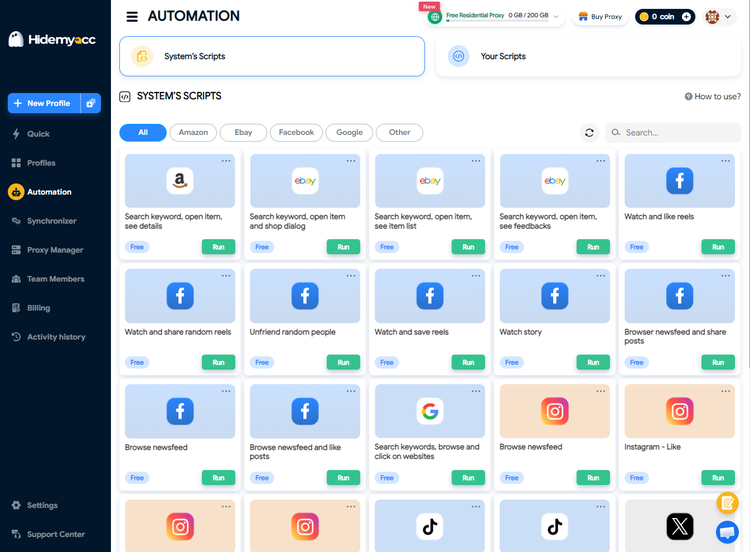
Automation scripts dashboard in Hidemyacc.
3. Key features
Hidemyacc combines fingerprint customization, multi-profile control, and session management to support users running multiple browser profiles. Its key features include:
-
Marco browser core: Hidemyacc runs profiles on its own browser core instead of a stock browser, which is what keeps fingerprints consistent across sessions.
-
Mobile fingerprints: From the Base plan, profiles can present as iOS or Android devices, useful for platforms that treat mobile traffic differently.
-
Synchronizer: Control many open profiles from one window and mirror actions across them, with custom layouts for monitoring.
-
Session backup and restore: The 10 latest sessions of each profile are kept, and accidentally deleted profiles can be recovered within 24 hours.
-
Activity history: Every open, edit and delete is logged per member, which matters once several people share the same profiles.
Together, these features make Hidemyacc a practical option for users who need consistent browser fingerprints, efficient multi-profile workflows, and basic tools for team collaboration and session recovery.
4. Pricing overview
Hidemyacc offers five subscription plans based on the number of browser profiles, with annual billing reducing the monthly price by approximately 50%. Payments are made directly through the software. The plans differ in profile limits, collaboration features, and automation capabilities.
-
Mini: $10/month or $5/month with annual billing, including 5 browser profiles. It does not support folders, profile sharing, API access, or mobile fingerprints. Best for individuals testing a small number of accounts.
-
Starter: $29/month or $15/month with annual billing, including 30 browser profiles. It offers the same feature set as Mini, making it suitable for solo sellers or affiliates managing a small account portfolio.
-
Base: $49/month or $25/month with annual billing, including 100 browser profiles. It adds folders, Quick Profile, Share Profile, Free Proxy, iOS and Android fingerprints, API access, and one free sub-account. Best for small teams and users who need API-based automation.
-
Team: $99/month or $49/month with annual billing, including 300 browser profiles and three free sub-accounts. Best for agencies and teams with multiple operators.
-
Business: $199/month or $99/month with annual billing, including 1,000 browser profiles and five free sub-accounts. It is the only standard plan supporting full profile import and export, making it suitable for larger operations that need to archive or transfer profiles in bulk.
-
Share seat: $5/month or $3/month with annual billing. This account type cannot create profiles and can only access profiles or folders shared with it.
-
Customized: Offers custom profile quantities, deployment on your own server, and unlimited shareable profiles and folders. Contact Hidemyacc support for pricing.
Overall, Mini and Starter suit individual users with modest profile requirements, while Base offers a broader feature set for users who need mobile fingerprints, profile sharing, and API access. Team and Business are better suited to larger operations, particularly those requiring multiple sub-accounts or bulk profile transfers.
If you're planning to purchase Hidemyacc, don't miss the Hidemyacc promo code available on IPFighter, which gives new customers 10% off their first payment on any plan.
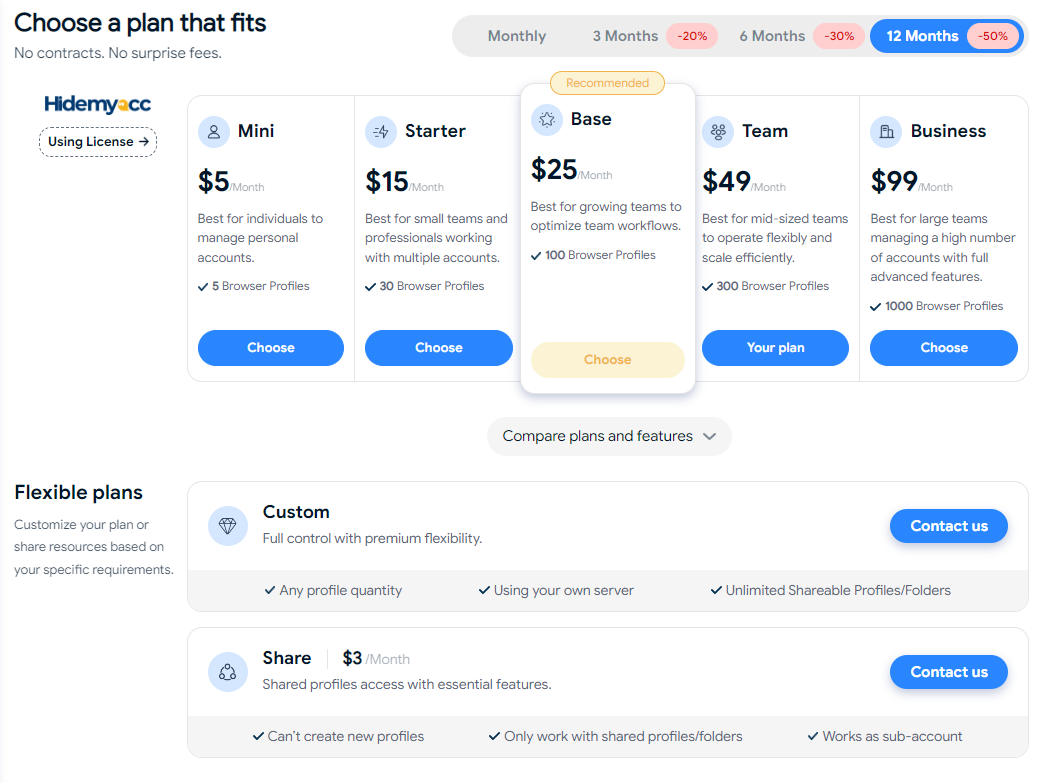
Pricing tiers and subscription plans available on Hidemyacc.
5. Performance test
After creating a profile with Hidemyacc, we evaluated its real world performance using several testing methods. We tested it using IPFighter's browser fingerprint tool, Bot detection tool, DNS leak test, and WebRTC leak test to examine its fingerprint uniqueness, automation detection risk, and leak protection.
5.1. Preparation
We created a new profile on Hidemyacc ver 3.1.11 running on WINDOWS, using the OS Windows fingerprint with default settings. We attached a residential HTTP proxy located in the US, with a timezone set to follow the proxy IP. We then launched the profile and opened IPFighter's tools inside it.
5.2. Test results
The following results show how the configured Hidemyacc profile performed across IPFighter's tests. We examined the reported fingerprint signals, automation-related indicators, DNS and WebRTC leak protection, and the reputation of the bundled residential proxy IP.
Browser fingerprint test
The profile received a Browser fingerprint score of 100% on IPFighter's browser fingerprint tool, indicating that the test detected no signs of browser alteration or automation.
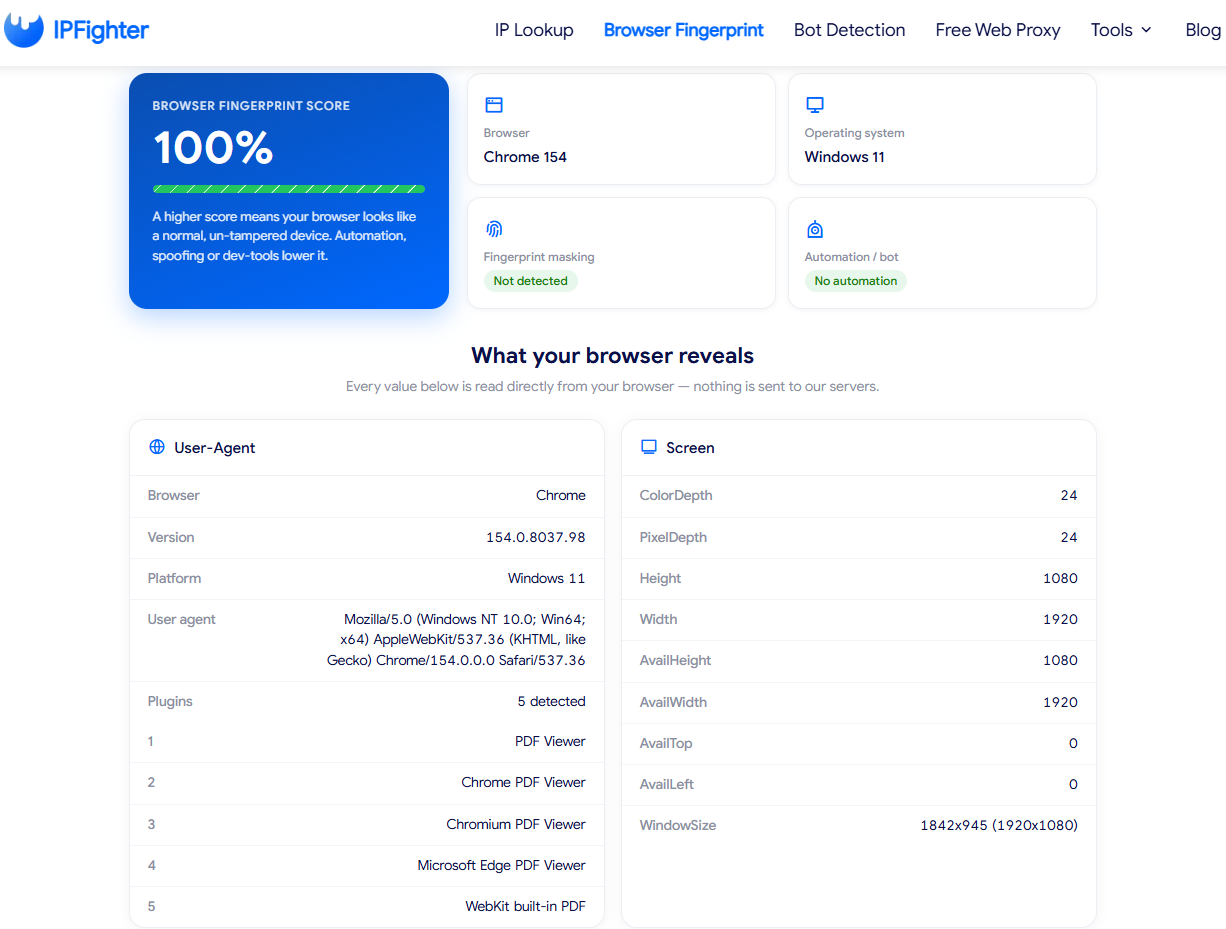
IPFighter browser fingerprint test score showing 100%
The profile identified itself as Chrome 154 (version 154.0.8037.98) on Windows 11, with consistent user agent, platform, and browser version information. It also reported five standard PDF viewer plugins, consistent with a typical Chrome installation.
Deeper fingerprint checks showed no anomalies in the Canvas hash, WebGL vendor and renderer, or Audio hash. Overall, the tested fingerprint appeared consistent with a regular Windows device under the checks performed.
Bot detection test
IPFighter's bot detection tool evaluates 51 checks across six categories:
-
Web Drivers & Automation
-
Headless & Environment
-
Developer Tools & Debugging
-
API Integrity
-
Browser Consistency
-
Behavior & Timing
Hidemyacc passed nearly all checks during our test. In the Web Drivers & Automation category, navigator.webdriver returned false, the WebDriver getter appeared native, and the test detected no traces of Selenium, ChromeDriver ($cdc_ properties), DOM automation controllers, PhantomJS, Nightmare.js, Cypress, or CefSharp.
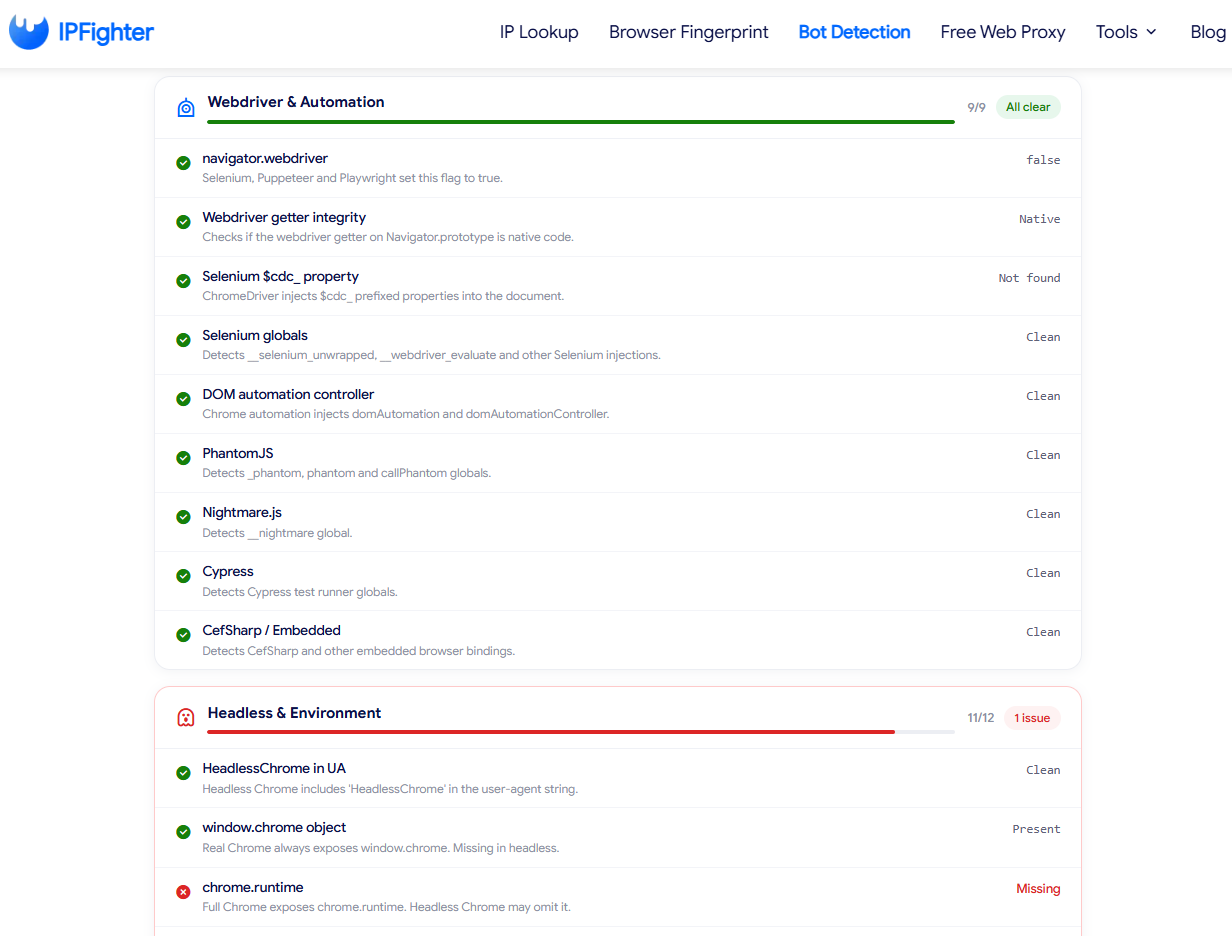
Hidemyacc bot detection results on IPFighter.
In the Headless & Environment category, the profile passed 11 of 12 checks. The user agent contained no HeadlessChrome string, and the window.chrome object was present. However, chrome.runtime was reported as missing, making it the only flagged issue in this category.
These results indicate that the profile exposed few automation-related signals during manual browsing. However, the missing chrome.runtime property may be relevant because some detection systems use browser API inconsistencies as part of their checks. This result alone does not establish whether a website would identify the profile as automated.
DNS leak and WebRTC leak test
The DNS leak test detected 9 DNS servers, all located in the United States and operated by Google LLC. None of them pointed to our real location or local internet provider, so no DNS leak was found. The DNS servers belong to Google rather than the proxy's ISP, but since Google DNS is widely used by regular users, this setup is generally common and consistent with the proxy's country.
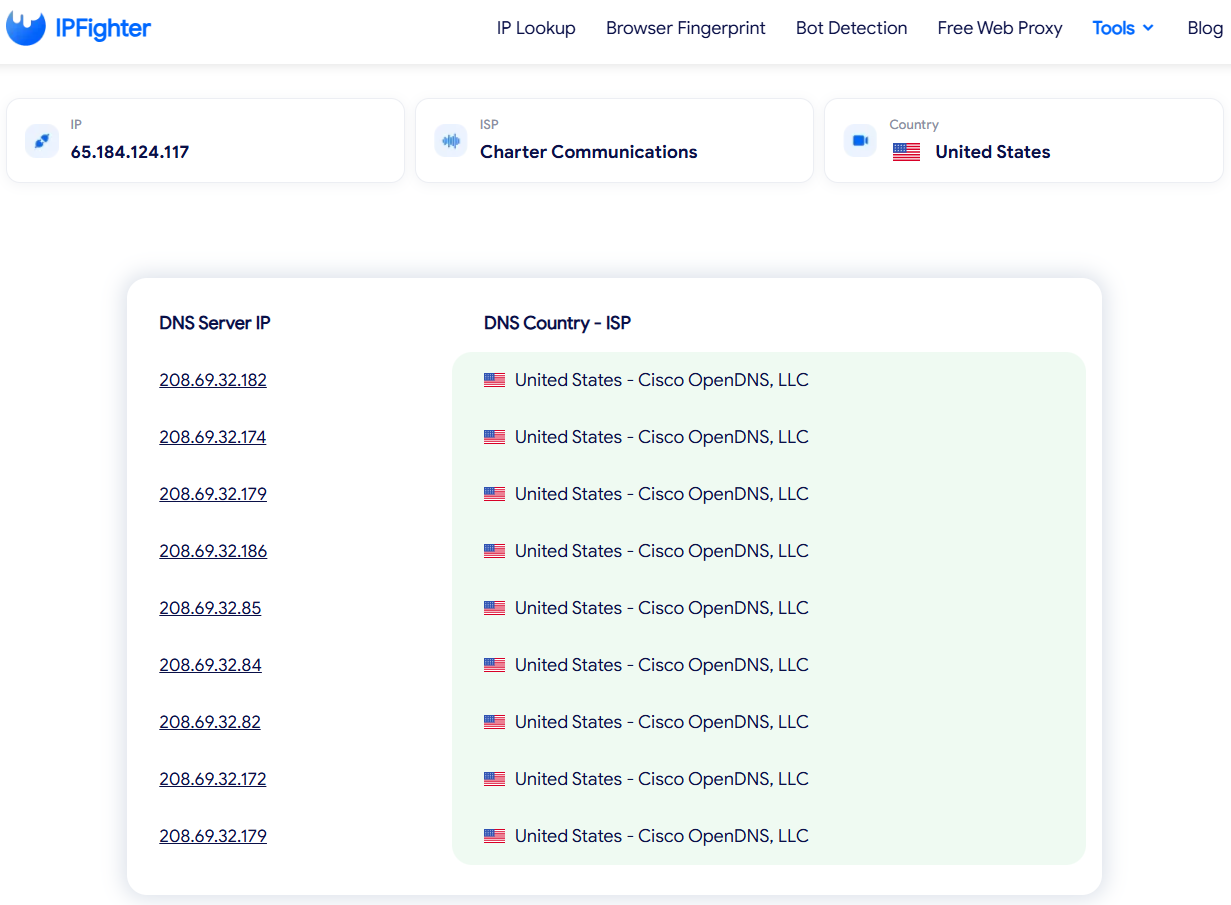
DNS leak test results showing servers located in the United States on IPFighter.
The WebRTC leak test returned a "No Public IP leak" result. Across all servers checked, the public IP shown was the proxy IP in the United States, not our real IP. This is consistent with Hidemyacc's Altered WebRTC mode, which fills the WebRTC public IP based on the proxy IP. Overall, the profile kept both DNS and WebRTC traffic aligned with the proxy, which is essential for keeping accounts from being linked to the same device.
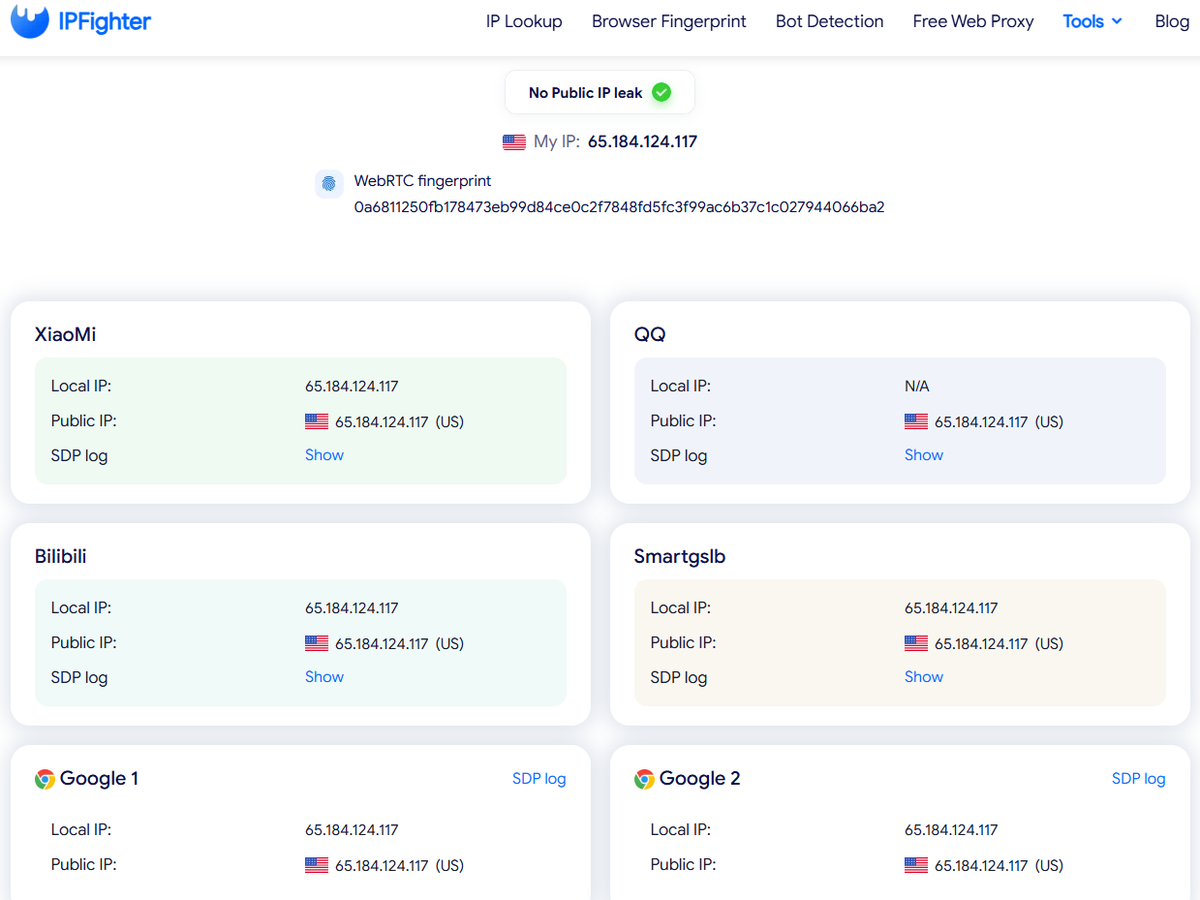
WebRTC leak test results on IPFighter.
IP lookup and IP score
Hidemyacc does not sell proxies, but paid plans come with free residential and datacenter proxies (residential traffic is capped and resets every month). Since many users will start with these bundled proxies before buying their own, we also tested Hidemyacc's free residential proxy with IPFighter's IP lookup
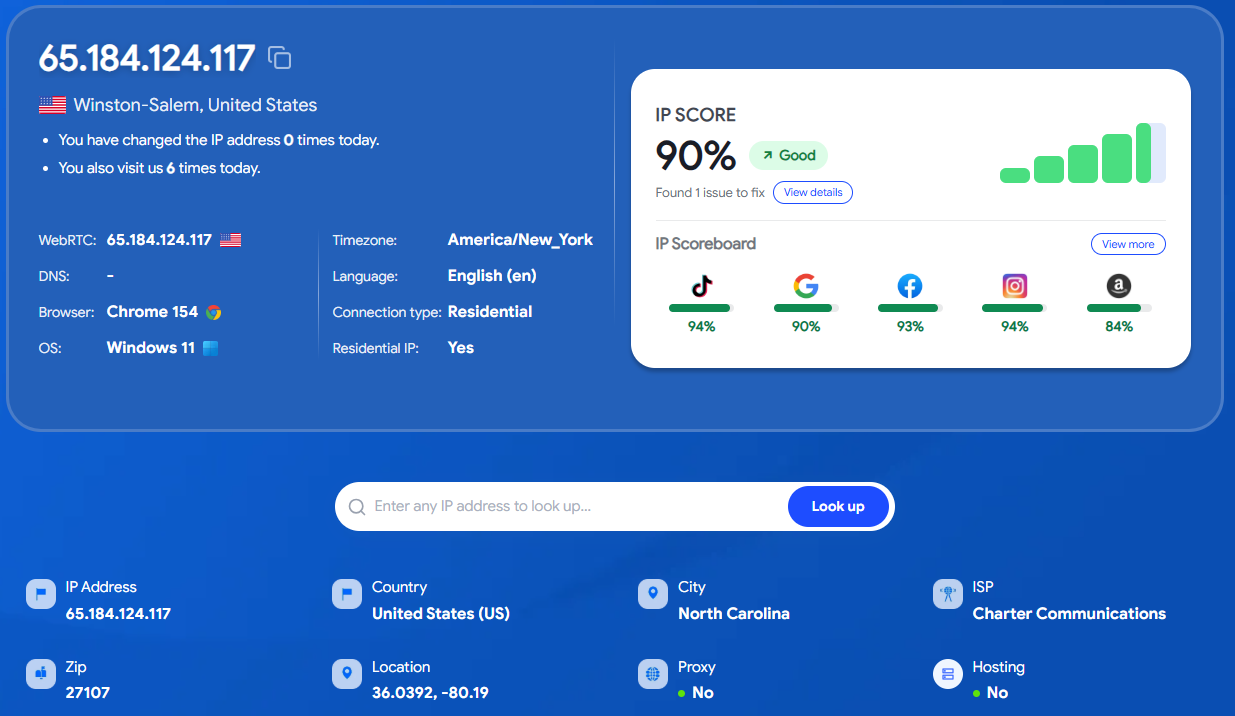
IP lookup and IP score results on IPFighter.
For a free bundled proxy, this is a strong result. The IP reads as a regular home connection rather than a proxy, and it is clean on blacklists. Amazon gave the lowest score at 84%, so Amazon sellers may still want a dedicated paid residential proxy for their most valuable accounts. Keep in mind that this is one IP from a shared pool, so quality can vary from IP to IP and over time.
Overall, Hidemyacc performed well across the fingerprint, bot detection, and leak tests conducted on this profile. The main observations were the missing chrome.runtime property and the Amazon score of 84% for the tested free residential IP. Since this was a quick test of one profile and one proxy, actual results may differ depending on proxy quality, operating system template, fingerprint settings, and browsing environment.
6. How to create a profile from Hidemyacc
Follow these three steps to create a browser profile, configure its fingerprint, and connect a proxy in Hidemyacc.
Step 1: Sign up and log in
Download Hidemyacc from hidemyacc.com/download, install it, create an account and log in. New accounts start with a 7 day free trial and 30 profiles.
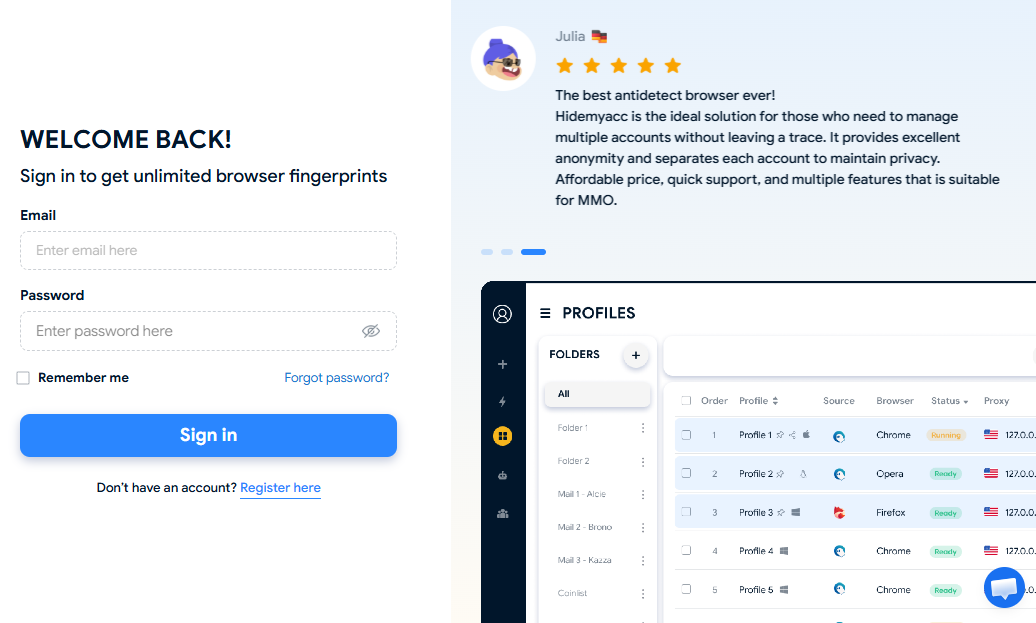
Hidemyacc login screen and main dashboard interface.
Step 2: Create a new profile and configure fingerprint and proxy
Click to create a new profile and give it a name. Choose the operating system and browser settings, then review the fingerprint parameters. Under Proxy, enter your proxy details or select a saved proxy from Proxy Manager. Click Check Proxy to verify the connection and displayed location, then set the timezone to follow the proxy IP.
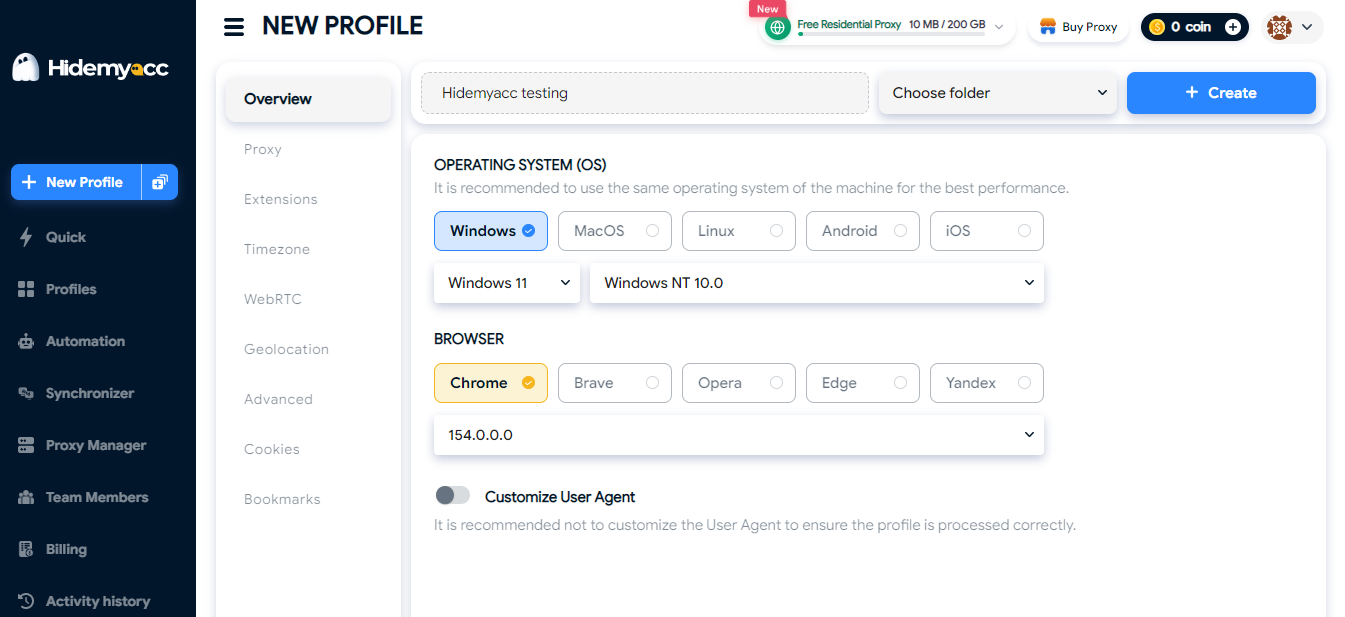
Configuring OS and browser options for a new profile in Hidemyacc.
Step 3: Save and open the profile
Click Create, then Run. The profile opens in a separate browser window with its own fingerprint, cookies and proxy.
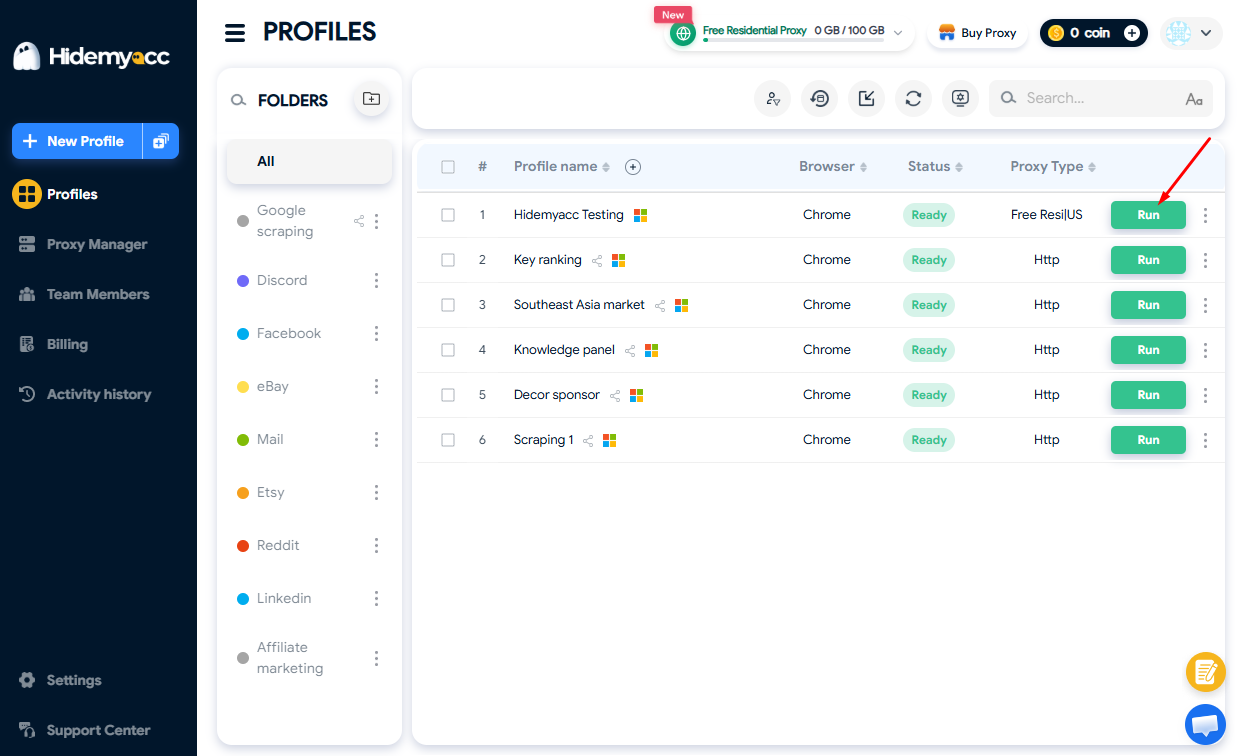
Running a profile from the main dashboard in Hidemyacc.
Ready to get started? Use the Hidemyacc promo code on IPFighter to get 10% off your first paid plan.
7. Conclusion
Hidemyacc stands out for offering a broad set of features at lower price tiers, including cloud sync, Session Backup, Synchronizer, and a visual automation builder across all plans. Annual billing also reduces subscription costs by approximately 50%.
However, some features are restricted to higher tiers: API access, profile sharing, and folders require Base or above, while full profile import/export is exclusive to Business. The lack of a Linux app and a refund policy that offers usage days instead of monetary refunds are also worth considering, so make the most of the 7-day free trial before committing.
As with any antidetect browser, results depend heavily on proxy quality and configuration. If Hidemyacc suits your needs, use the Hidemyacc promo code on IPFighter to get 10% off your first paid plan.
8. FAQ
Is Hidemyacc free?
No, but it offers a 7 day free trial with 30 profiles and no credit card required. The cheapest paid plan is Mini at $10 per month, or $5 per month billed annually.
Does Hidemyacc offer refunds?
Not in cash. Hidemyacc only compensates with extra usage days, and only for service problems on its side that stay unresolved for 7 consecutive days, with a request sent within 7 days of the issue.
Does Hidemyacc work on Mac and Linux?
The app runs on Windows and macOS. A Linux version is coming soon. Separately, any profile can present a Windows, macOS or Linux fingerprint regardless of your own system.
Can I share Hidemyacc profiles with my team?
Yes, from the Base plan. You can share profiles and folders with sub accounts, control access, and see an activity log of who opened or changed each profile. Only one person can have a given profile open at a time.
Does Hidemyacc support Selenium and Puppeteer?
Puppeteer is officially supported, and Hidemyacc's support team helps with Puppeteer integrations. Selenium works through code examples on Hidemyacc's GitHub. API access requires the Base plan or higher.
Read more
Hidemyacc review 2026: Features, pricing and real fingerprint test results

Whitecloakproxy review: What to know before you buy
Geonix review: What makes its proxy services stand out?
Floppydata review: A closer look at its proxy network

Japan proxy: Find the right provider for Japanese IPs

Best proxy Vietnam providers: Compare 10 services