

RapidProxy is a residential proxy provider focused on large-scale web data collection, automation, market research, and other location-sensitive workflows. With a widespread ip pool network, but a large IP pool alone does not determine whether a proxy network is suitable for real-world use.
In this review, IPFighter examines its proxy types, features, pricing, setup process, and performance considerations to help you assess whether the service matches your needs.
1. General information
Before diving into the details, here's a quick overview of Rapidproxy and its core specifications.
|
Website |
|
|
Founded |
2024 |
|
Proxy types |
Rotating Residential / Static Residential / Unlimited Residential |
|
IP pool |
90M+ residential IPs in 200+ locations |
|
Protocol |
HTTP(S) / SOCKS5 |
|
Pricing model |
Per GB / Per IP |
|
Payment |
Alipay / Alipay HK / Crypto and other supported methods |
|
Trial |
500MB |
|
Refund |
Non-refundable, except for unresolved technical defects reported within the first 24 hours. |
|
Best for |
Web scraping, market research, ad verification, e-commerce intelligence |
Discover more:
-
Best proxy providers in 2026: Compare top 6 services
-
What is a Proxy? Benefits, usage, and everything you need to know about proxies
2. Proxy types available at Rapidproxy
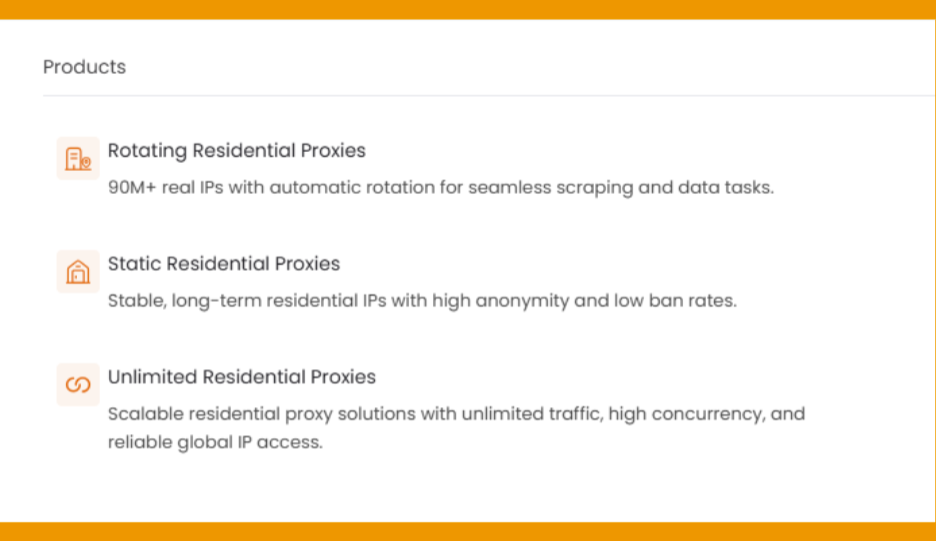
RapidProxy currently groups its services around three residential proxy options. The main difference between them is how the IP is rotated, how long it remains available, and how traffic is priced.
2.1. Rotating residential proxies
RapidProxy's rotating residential proxies provide access to 90M+ real residential IPs with automatic rotation. Users can also switch to sticky sessions for longer connections, while location controls allow targeting at the country, region, or city level.
-
Advertised proxy pool: 90M+ residential IPs
-
Coverage: 220+ locations
-
Filtering: Country, region, and city
-
Rotation: Automatic rotation or sticky sessions up to 180 minutes
-
Concurrent sessions: Unlimited
-
Protocols: HTTP, HTTPS, SOCKS5
The combination of broad residential coverage, flexible rotation, precise geo-targeting, and non-expiring traffic makes this option particularly suitable for web scraping, market research, SERP monitoring, and other workflows where IP diversity matters.
2.2. Static residential proxies
RapidProxy's static residential proxies are designed for users who need a persistent residential IP rather than frequent rotation. The provider offers 30-day access with unlimited traffic, positioning these proxies for account management and other long-running workflows.
-
Validity: 30 days
-
Traffic: Unlimited
-
IP usage: Dedicated/private
-
Infrastructure: Tier-1 ASN providers
-
Protocols: HTTP(S), SOCKS5
With persistent IPs, unlimited traffic, and long-term connections, the static residential option is better suited to workflows where session consistency is more important than frequent IP changes.
2.3. Unlimited residential proxies
RapidProxy's unlimited residential proxies are aimed at larger operations that need high-volume access without a conventional traffic cap. Instead of a fixed public price, the provider builds custom plans around bandwidth, concurrency, target regions, and business requirements.
-
Traffic: Unlimited
-
Coverage: 200+ regions
-
Bandwidth: Customizable
-
Concurrency: Designed for high-concurrency workloads
-
Protocols: HTTP, HTTPS, SOCKS5
This model is more suitable for large-scale scraping, ad verification, price monitoring, social media automation, and other business workloads where predictable access and high traffic capacity are more important than pay-as-you-go pricing.
Overall, RapidProxy keeps its residential lineup relatively straightforward: rotating proxies prioritize IP diversity, static proxies focus on persistent connections, while unlimited plans target high-volume and enterprise workloads.
Proxy types available at Rapidproxy
3. Key features of Rapidproxy proxies
Beyond the proxy pool itself, RapidProxy includes several controls designed to simplify residential proxy management.
-
Country, server, state and city targeting: Select proxies based on specific geographic locations and ISP for more precise GEO targeting.
-
Flexible IP rotation: Rotating residential proxies can automatically change the IP between requests, while sticky sessions allow users to retain the same IP for up to 180 minutes.
-
Unlimited concurrent sessions: RapidProxy states that its residential proxy service supports unlimited concurrent sessions, allowing users to run multiple projects or accounts simultaneously.
-
Authentication and API access: Users can connect through username/password authentication, while API extraction is available for compatible applications. RapidProxy also provides documentation and integration guidance for developers.
-
IP whitelist authentication: Authenticate proxies by whitelisting trusted IP addresses instead of using usernames and passwords.
Together, these features make RapidProxy particularly focused on scalable residential proxy deployment rather than manual proxy management.
4. Rapidproxy pricing overview
RapidProxy uses different pricing models depending on the proxy type.
|
Proxy type |
Starting price |
Traffic |
Main use |
|
Rotating Residential |
$1.20/GB |
Non-expiring |
Scraping and data collection |
|
Static Residential |
$5/IP/month |
Unlimited |
Long-term sessions |
|
Unlimited Residential |
Custom |
Unlimited |
High-volume workloads |
The rotating residential plan currently starts at $1.20/GB, with purchased traffic that does not expire. Static residential proxies start at $5/IP/month with unlimited traffic for the 30-day period. Unlimited residential plans are customized according to bandwidth, concurrency, regions, and business scale.
RapidProxy also advertises 500MB of free traffic for new users, allowing customers to test the service before purchasing a larger plan.
The current checkout supports payment methods including Credit / Debit cards, PayPal, Cryptocurrency and other regional payment options
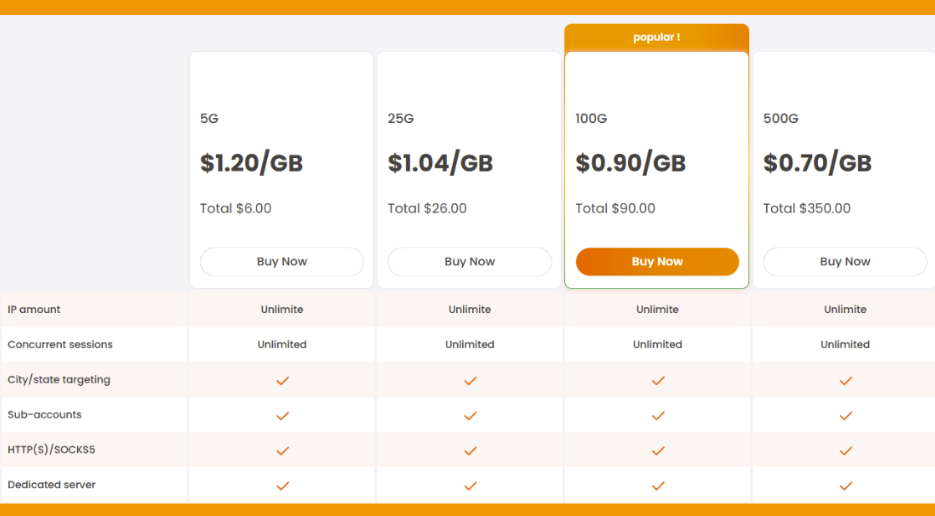
Prices for rotating residential proxies plan at Rapidproxy
If you're planning to purchase proxies from Rapidproxy, don't miss the Rapidproxy promo code available on IPFighter. You can save on your proxy purchase with exclusive discounts while choosing the plan that best suits your needs.
5. Performance test
To evaluate Rapidproxy beyond its advertised features and pricing, IPFighter will test a proxy from the provider under real-world conditions. The test will focus on IP quality, geolocation accuracy, connection speed, and overall usability. We tested some IP addresses taken from the rotating residential package using IPFighter, Speedtest, and Google Search.
5.1. Preparation
Before evaluating the proxy, we first added it to our browser using the IPFighter Proxy Manager extension. This extension makes it easy to import, manage, and switch between multiple proxies directly within your browser, eliminating the need for manual proxy configuration.
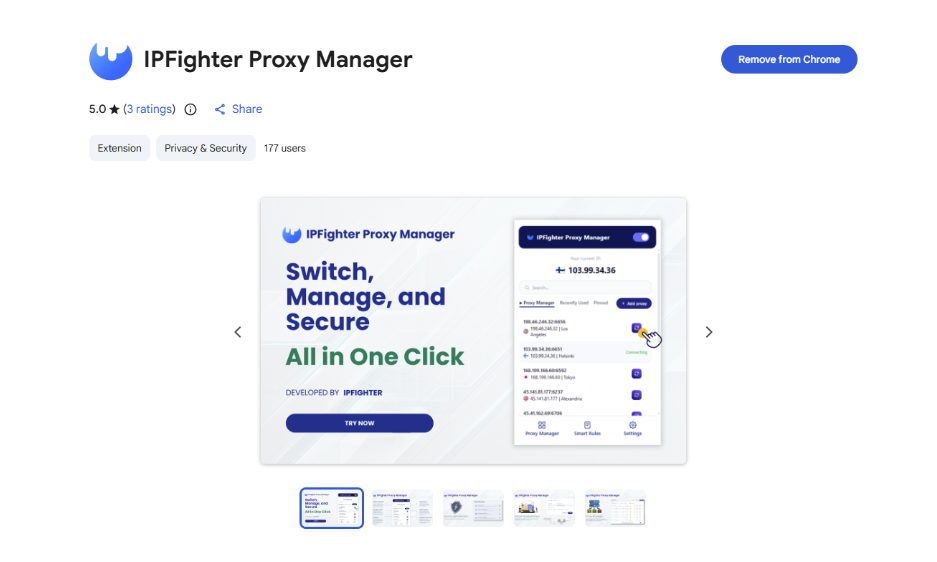
IPFighter Proxy Manager extension on Chrome
If you'd like to learn how to set it up, check out our detailed guide: A complete guide to the IPFighter Proxy Manager extension.
5.2. Test results
To evaluate RapidProxy's network from different perspectives, we tested multiple rotating residential IPs across different countries. Each IP was checked in three areas: IP quality on IPFighter, connection speed on Speedtest, and location consistency through Google Search.
|
Proxy location |
IPFighter |
Speedtest |
Google Search |
Overall assessment |
|
|
IP 1 |
United States |
Score: 75% Proxy: Not detected Blacklist: Clean Detects location: Pennsylvania, US Timezone mismatch |
Download: 1.18 Mbps Upload: 1.61 Mbps Ping: 319 ms |
Detected: Reading, PA, US Target: Virginia, US |
Clean IP with moderate quality, but slow speed and a location mismatch at the state level. |
|
IP 2 |
United States |
Score: 85% Proxy: Not detected Blacklist: Clean Detects location: Jacksonville, FL, US |
Download: 8.97 Mbps Upload: 10.50 Mbps Ping: 373 ms |
Detected: Jacksonville, FL Target: Eustis, Florida, US |
Clean IP with good overall quality and solid speeds, while the detected location is close to the target area. |
|
IP 3 |
South Korea |
Score: 85% Proxy: Not detected Blacklist: Clean Detects location: Jeollanam-do, Korea |
Download: 32.93 Mbps Upload: 6.02 Mbps Ping: 199 ms |
Detected: Dong-gu, Gwangju Target: Daegu, Korea |
Clean IP with good quality and strong download speed, though the detected city differs from the target. |
|
IP 4 |
Germany |
Score: 85% Proxy: Not detected Blacklist: Clean Detects location: Hamburg, Germany |
Download: 30.69 Mbps Upload: 26.96 Mbps Ping: 379 ms |
Detected: Deutschland, Hamburg Target: Hamburg, Germany |
Clean IP with good quality and strong speeds, with the detected location matching the target city. |
|
IP 5 |
Japan |
Score: 90% Proxy: Not detected Blacklist: Clean Detects location: Shizuoka, Japan |
Download: 10.54 Mbps Upload: 11.27 Mbps Ping: 159 ms |
Detected: Shizuoka, Japan Target: Aichi, Japan |
High-quality, clean IP with balanced speeds, although the detected prefecture differs from the target. |
|
IP 6 |
Canada |
Score: 100% Proxy: Not detected Blacklist: Clean Detects location: Alberta, Canada |
Download: 0.15 Mbps Upload: 3.96 Mbps Ping: 2467 ms |
Detected: Alberta, Canada Target: Alberta, Canada |
Excellent IP quality and accurate location, but extremely high latency makes this IP unsuitable for speed-sensitive tasks. |
|
IP 7 |
HongKong |
Score: 90% Proxy: Not detected Blacklist: Clean Detects location: Tuen Mun, HongKong |
Download: 2.84 Mbps Upload: 3.54 Mbps Ping: 244 ms |
Detected: Victoria Peak, HongKong Target: Tuen Mun, HongKong |
Clean, high-quality IP with moderate speeds and a location match at the district level despite Google's different locality label. |
|
IP 8 |
France |
Score: 90% Proxy: Not detected Blacklist: Clean Detects location: Occitanie, France |
Download: 0.31 Mbps Upload: 2.88 Mbps Ping: 433 ms |
Detected: 81000, France Target: Occitanie, France |
Clean, high-quality IP with an accurate regional match, but low download speed and high latency. |
|
IP 9 |
Vietnam |
Score: 85% Proxy: Not detected Blacklist: Clean Detects location: Hanoi, Vietnam |
Download: 36.68 Mbps Upload: 14.73 Mbps Ping: 156 ms |
Detected: Hanoi, Vietnam Target: Hanoi, Vietnam |
Clean IP with good quality, strong speeds, and an exact location match with the target city. |
|
IP 10 |
Singapore |
Score: 85% Proxy: Not detected Blacklist: Clean Detects location: North West, Singapore |
Download: 12.56 Mbps Upload: 11.27 Mbps Ping: 108 ms |
Detected: Hougang, Singapore Target: Singapore |
Clean IP with good quality and low latency, with the detected location broadly matching the target. |
Across the 10 randomly selected residential IPs, RapidProxy delivered consistently clean connection profiles. All tested IPs received 85% or higher on IPFighter, with no proxy detection and clean blacklist status. This suggests that the tested addresses had generally solid IP quality, although the scores varied by location.
Performance was more mixed when looking at connection speed and latency. Vietnam, South Korea, Germany, and Singapore recorded relatively strong download speeds, while Canada and France showed particularly high latency or low download speeds. During the testing process, the connection also occasionally became unstable and dropped unexpectedly, requiring the proxy to be disconnected and reconnected before the connection was restored. CAPTCHA challenges were also encountered several times during testing; in most cases, they could be cleared after around two or three attempts.
Location consistency also varied: some IPs matched the target location closely, such as the Vietnam and Germany tests, while others showed differences at the city, region, or state level. Overall, the results indicate that IP quality was relatively consistent across the sample, while connection stability, speed, and location accuracy depended more on the individual IP and target location.
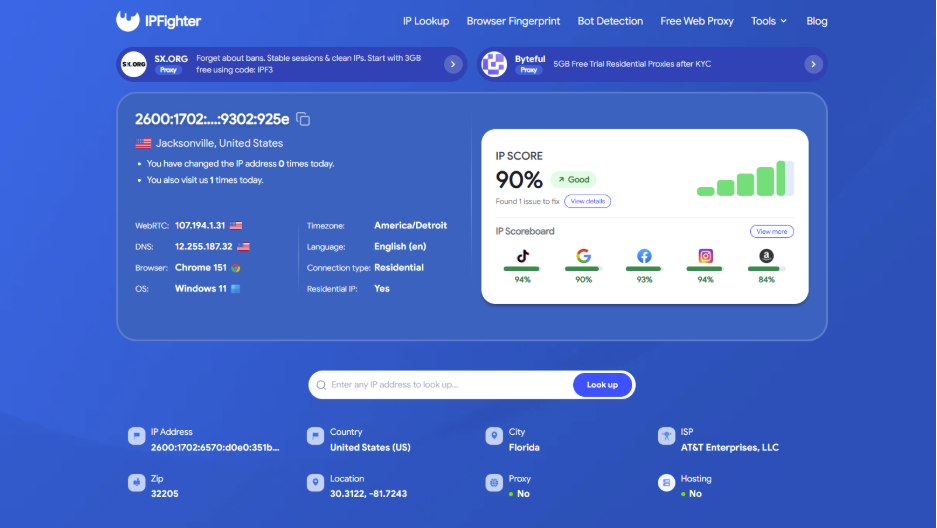
US rotating residential IP test results
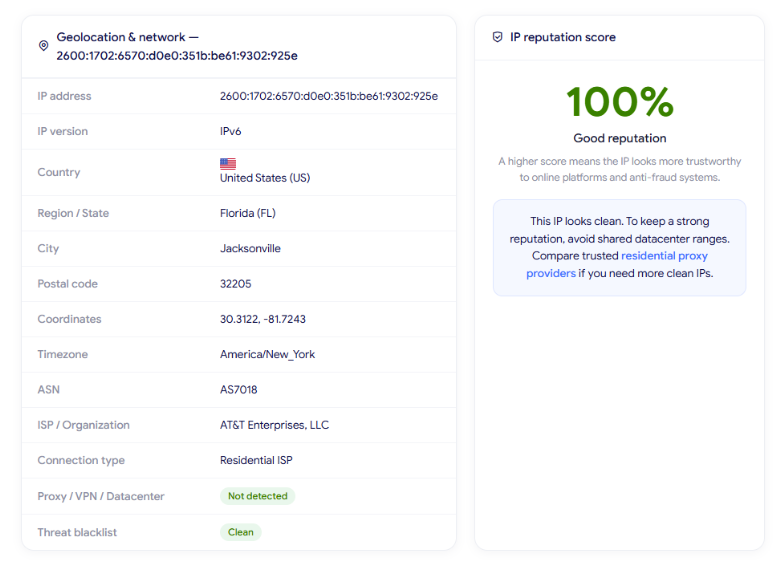
IP Lookup results on IPFighter
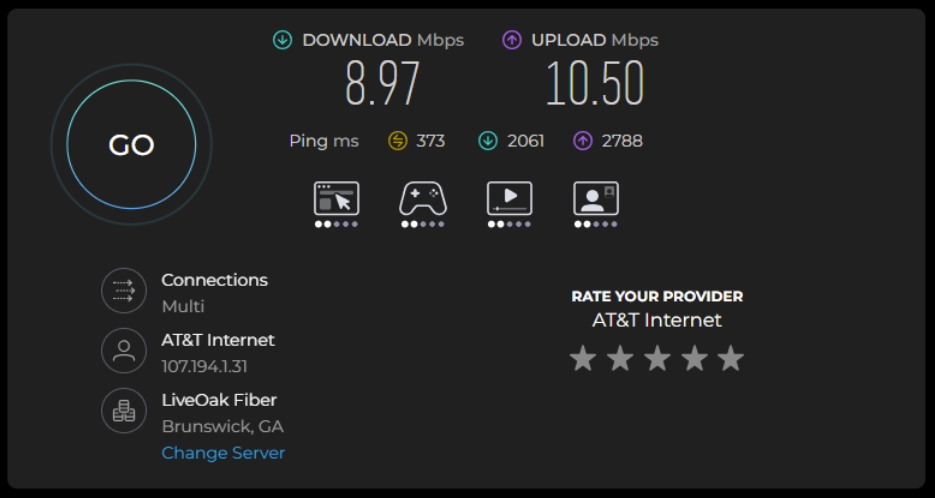
Check proxy on Speedtest
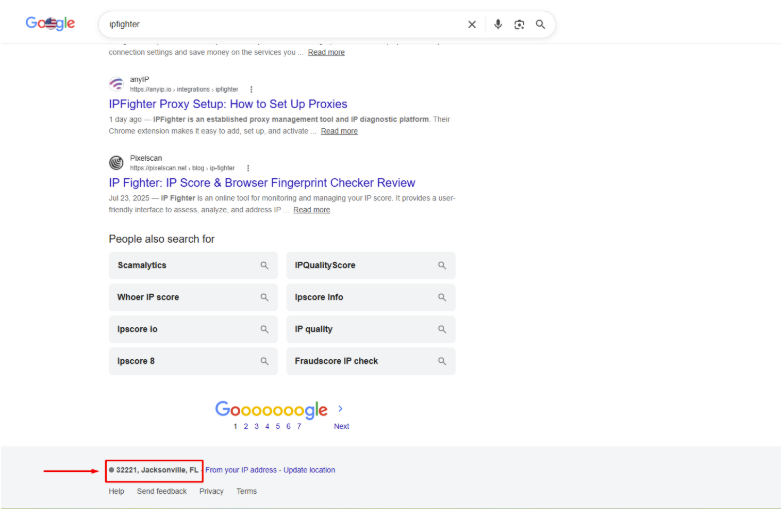
Check on the Google search bar
These results are based on randomly selected IPs during the testing process, so actual performance may vary depending on the specific IP, geographic location, network conditions, and time of use. Therefore, individual IPs may deliver different speeds, latency, and geolocation results in real-world use.
Read more:
-
IP reputation check: How IPFighter scores your IP
-
How to use web proxy safely: A practical guide
-
How to check if a proxy is working and read your results
6. How to get proxy from Rapidproxy
Getting started with Rapidproxy is relatively straightforward: create an account, choose a proxy plan, configure the required targeting and session settings, and generate the proxy credentials.
Step 1. Create or log in to your account
Go to the Rapidproxy dashboard and create an account or log in. After activation, you can access the available proxy plans and trial options.
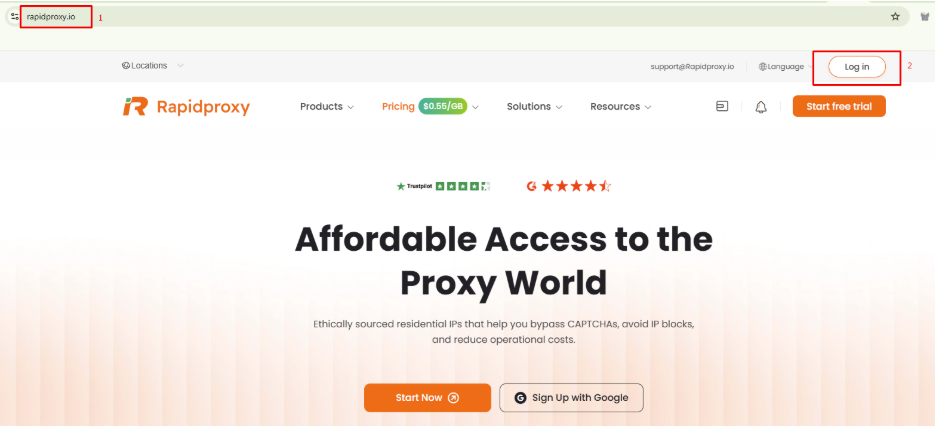
Create or log in to your account
Step 2. Purchase a proxy plan
After successfully logging into the Rapidproxy dashboard, you can select and purchase a proxy package that suits your needs.
Before completing your purchase, don't forget to check for Rapidproxy promotional codes with a 20% OFF coupon code on IPFighter. Applying an existing discount code can significantly reduce your costs.
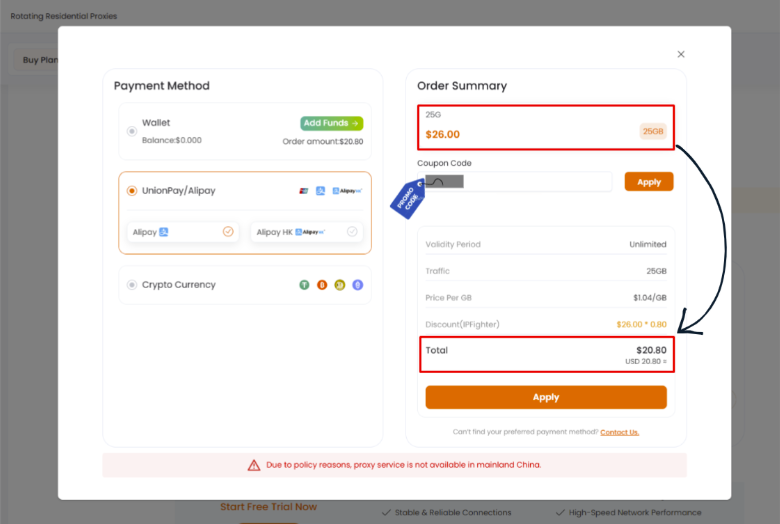
Purchase a proxy plan
Step 3. Configure your proxy
After the package is active, open the relevant proxy section in the dashboard and configure the connection settings. You need to create a sub account first. Then depending on the proxy type, you may be able to choose: Server, country, state, city, protocol, session type, quantity, output format.
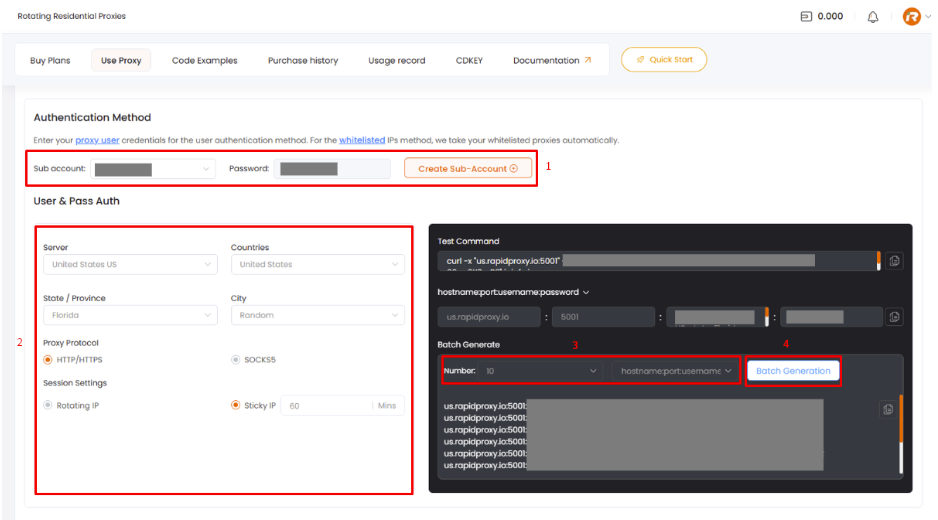
Configure your proxy
Step 4. Generate and copy your proxy
Once configuration is complete, copy the generated proxy credentials and enter them into your browser, scraping tool, automation software, or custom application. RapidProxy also provides documentation for developer integration.
7. Alternatives
Besides Rapidproxy, you can also consider other providers offering similar residential proxy services.
-
ProxyEmpire: Offers residential, mobile, and datacenter proxies, making it a flexible alternative for users who need multiple IP types and targeting options.
-
NodeMaven: Provides residential, mobile, and ISP proxies, suitable for workflows that require different proxy types within one service.
-
NiuProxy: Offers residential and mobile proxies, giving users flexibility across location-based and data-focused tasks.
You can also check out reviews of our other partners here:
-
Proxy001 review: Exploring its 100M+ residential proxy network
-
711Proxy review: Is it the right proxy provider for your needs?
-
Byteful review: An AI-driven proxy network powered by Smartpath technology
-
Sx.org review: A closer look at its global proxy network
8. Conclusion
RapidProxy takes a focused approach to residential proxies, with rotating, static, and unlimited options, flexible geo-targeting, multiple protocols, and non-expiring traffic. The IP checks also showed generally clean connection profiles, with proxy detection absent and blacklist status remaining clean across the tested addresses.
However, connection speed, latency, and location precision can vary between individual IPs. This makes RapidProxy a flexible option for location-based and data-oriented workflows, while testing specific IPs remains useful when consistent speed or precise targeting is important.
If you're planning to try Rapidproxy, check out the Rapidproxy promo code on the IPFighter page to get up to 20% off your purchase.
9. FAQ
Does RapidProxy support sticky sessions?
Yes. Its rotating residential proxies support sticky sessions for up to 180 minutes, allowing users to maintain the same IP for longer-running sessions.
Can RapidProxy target a specific city?
Yes. RapidProxy supports location targeting by country, region, and city, which is useful for location-sensitive tasks such as SERP checking, ad verification, and market research.
Does RapidProxy offer a free trial?
Yes. New users receive 500MB of free residential proxy traffic, and the traffic does not expire.
Which protocols does RapidProxy support?
RapidProxy supports HTTP, HTTPS, and SOCKS5, giving users flexibility when connecting different tools and applications.
Does RapidProxy provide an API?
Yes. Users can obtain proxies through username/password authentication or API-based extraction, with documentation and integration examples available for developers.
Read more
Aproxy review: Proxy options, pricing, and performance

AstroProxy review: Uncovering real speeds & IP quality

FlashProxy review: Is this proxy network worth it?
PrivateProxy review: Is it worth your investment?

IPFoxy review: Are its pure rotating residential proxies worth it?

CatProxies review: What do its five proxy types offer?