

711Proxy is a residential proxy provider offering flexible pricing models, including pay-per-GB, pay-per-IP, unlimited rotating proxies, and static residential proxies. With over 100 million IPs across 200+ countries, it aims to serve everyone from individual users to enterprise-scale data collection projects.
But does its performance live up to its feature list? In this review, IPFighter takes a closer look at 711Proxy's proxy types, pricing, key features, and real-world performance to help you decide whether it's the right provider for your workflow.
1. General information
Before exploring each proxy product in detail, here's a quick overview of 711Proxy and its core specifications.
|
Website |
|
|
Founded |
Unknown |
|
Proxy types |
Residential (Pay per IP/GB), Unlimited Rotating, Static Residential, SOCKS5 |
|
IP pool |
100M+ residential IPs in 200+ countries |
|
Protocol |
HTTP, HTTPS, SOCKS5 |
|
Pricing model |
Per IP / per GB / per Port |
|
Payment |
Cryptocurrency / Alipay / UnionPay / Alternative / PayPal |
|
Trial |
Trial available for selected plans |
|
Refund |
Refunds are currently not supported for orders placed after they have been created or a proxy has been used |
|
Best for |
Web scraping, AI data collection, automation, business intelligence |
Discover more:
-
What is a Proxy? Benefits, usage, and everything you need to know about proxies
-
Best proxy providers in 2026: Compare top 6 services
-
What is bandwidth? Why does bandwidth affect website speed?
2. Proxy types available at 711Proxy
One of 711Proxy's biggest strengths is the variety of residential proxy products it offers. Instead of providing only a single residential proxy package, the provider separates its services into multiple billing models designed for different workloads and budgets.
Let's take a closer look at each proxy type below:
2.1. Residential proxies (Pay per GB)
Residential proxies are the flagship product offered by 711Proxy. These proxies use real residential IP addresses assigned by Internet Service Providers (ISPs), making them highly trusted and suitable for websites with strict anti-bot protection.
Some of the key characteristics of this residential proxy service include:
-
Advertised proxy pool: 100M+ residential IPs
-
Countries: 200+
-
Filtering: Country/region, state, ASN
-
Rotation: Timed sticky & rotating
-
Protocols: HTTP, HTTPS, SOCKS5
These residential proxies are well suited for web scraping, market research, price monitoring, AI data collection, and other projects that require a high level of anonymity.
2.2. Residential proxies (Pay per IP)
Unlike traditional residential proxy providers that charge based on bandwidth, 711Proxy also offers a unique pay-per-IP model. With this service, users pay for the number of residential IPs rather than the amount of traffic consumed. Each purchased IP remains available for up to six hours before requiring another credit if you wish to continue using the same IP.
Some notable features include:
-
Advertised proxy pool: 100M+ residential IPs
-
Countries: 200+
-
Filtering: Country/region, state, ASN
-
IP Duration: 6 hour
-
Protocols: HTTP, HTTPS, SOCKS5
This pricing model is particularly useful for users who need stable residential identities without worrying about bandwidth consumption.
2.3. Unlimited rotating proxies
For users undertaking large-scale data collection or automation projects, 711Proxy offers unlimited rotating proxies for traffic or port usage. Some of the key features include:
-
Filtering: Country/region
-
IP Duration: 3-30 minutes (for per port plan)
-
Rotation: Timed sticky & rotating (for per high unlimited plan)
-
Protocols: HTTP, HTTPS, SOCKS5
These proxies are designed for users who prioritize unlimited traffic and continuous large-scale operations over precise geo-targeting.
2.4. SOCKS5 proxies
711Proxy also provides standalone SOCKS5 proxies for users who require a lightweight protocol with broad software compatibility. Some highlights include:
-
Filtering: Country/region
-
Highlight: Daily IP refresh
-
Protocols: HTTP, HTTPS, SOCKS5
Compared with standard HTTP proxies, SOCKS5 offers greater protocol flexibility and is compatible with many desktop applications.
2.5. Static residential proxies
Static residential proxies combine the stability of datacenter infrastructure with the reputation of residential IP addresses. Ethically-sourced unique IPs from 30+ countries, combined with speed and reliability. Some notable characteristics include:
-
Countries: 30+
-
Authentication: Username/Password
-
Highlight: Purchased IP addresses do not require manual configuration. Simply copy the generated proxy login information and use it.
This proxy type is particularly suitable for account management, long-running sessions, and applications that require consistent IP identities.
Overall, 711Proxy offers one of the most diverse residential proxy portfolios among current providers. Whether you prefer paying by bandwidth, IP, or unlimited traffic, there is a plan tailored to different usage scenarios.
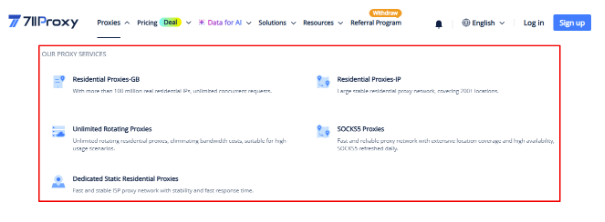
711Proxy proxy plan
3. Key features of 711Proxy proxies
Beyond offering multiple proxy types, 711Proxy also provides several useful features that make proxy management more flexible and efficient. Some of the platform's most notable features include:
-
Country targeting: Allows you to select proxy IPs from specific countries for localized browsing or scraping tasks.
-
State targeting: Enables more precise filtering by individual states where supported.
-
Rotation: Supports automatic IP rotation depending on the selected proxy product, helping reduce detection risks during long-running operations.
-
API integration: Allows developers to generate and manage proxies programmatically without accessing the dashboard manually.
-
Authentication methods: Supports both username/password authentication and IP whitelist authentication for flexible access control.
Overall, these features provide users with good control over proxy sessions while making 711Proxy suitable for both individual users and enterprise-scale automation projects.
4. 711Proxy pricing overview
711Proxy offers several pricing models depending on how you intend to use the service. Instead of relying solely on bandwidth-based billing, the provider also supports pricing by IP, port, and unlimited traffic, allowing users to choose the most cost-effective option.
4.1. Residential proxies (Pay per GB)
The standard residential proxy service is billed based on traffic usage. Available plans include:
-
Starter plans from approximately $1.198/GB
-
Enterprise plans from $0.55/GB
These plans are ideal for users whose proxy consumption varies depending on project size. Packages tend to offer significant discounts when purchased in bulk. Suitable for scraping, AI datasets, and business intelligence
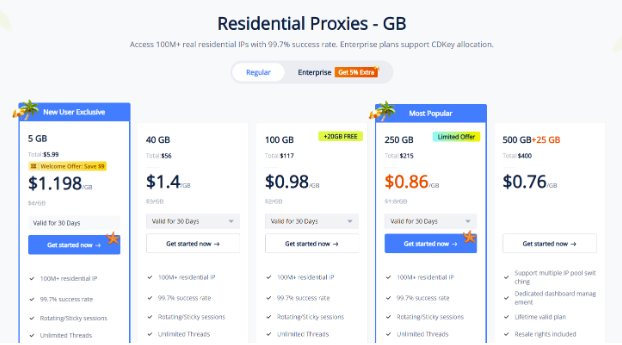
Prices for residential proxies (pay per GB) plans
4.2. Residential proxies (Pay per IP)
If bandwidth usage is difficult to estimate, the pay-per-IP model may be a better option. Some pricing examples include:
-
Starting from $0.03/IP
-
Each IP remains available for up to 6 hours
-
No additional bandwidth charges
This pricing structure makes cost estimation much easier for users who need stable residential identities.
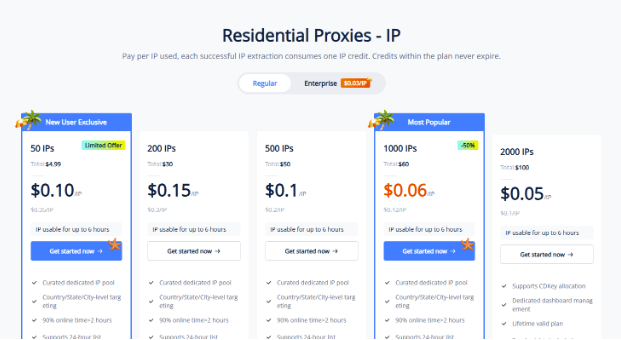
Prices for residential proxies (pay per IP) plans
4.3. Unlimited rotating proxies
Unlimited Residential offers various options based on Port or Bandwidth. Users can experience:
-
Unlimited proxies - High bandwidth from $15 per hour
-
Unlimited proxies - By port approximately $1 per port
These service packages are ideal for enterprise users performing continuous data collection or large-scale automation. They also offer better pricing when scaling up.
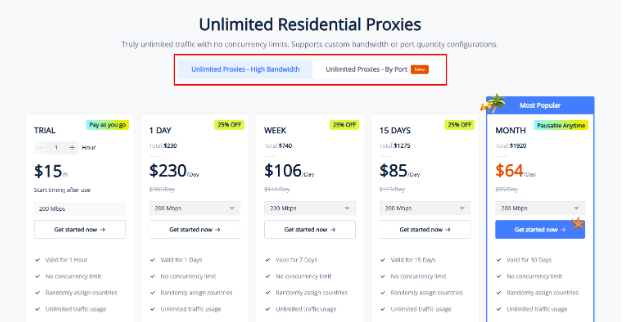
Prices for unlimited rotating plans
4.4. Static residential proxies
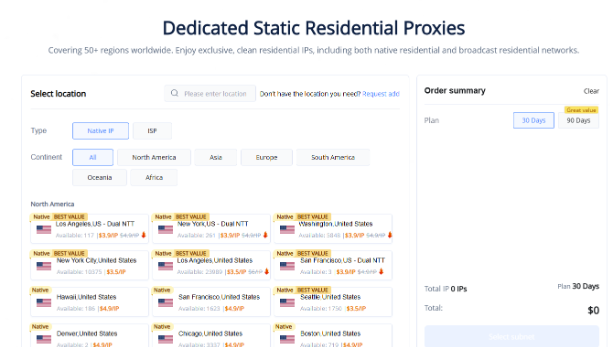
For long-term projects requiring stable IP addresses, ISP proxy servers are a viable option. Typical pricing starts at around $3.50/IP with unlimited traffic. This option offers a good balance between home-based reliability and data center-level stability.
Prices for static residential plans
4.5. SOCKS5 proxies
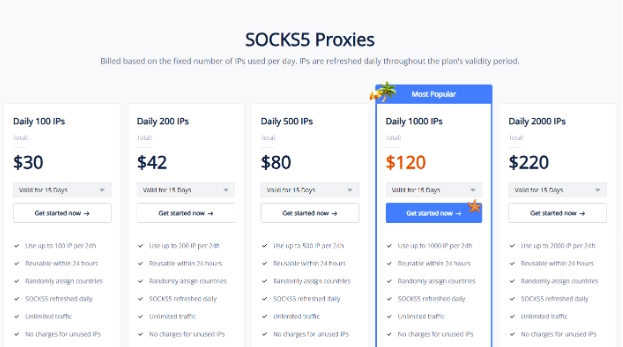
Billed based on the fixed number of IPs used per day. IPs are refreshed daily throughout the plan's validity period. SOCKS5 Proxies are priced from around $30 for 100 IPs for 15 days and $54 for 30 days, with many options to suit different usage scales.
Overall, 711Proxy offers one of the most flexible pricing structures among residential proxy providers. Whether you prefer paying by traffic, IP address, or unlimited usage, you can choose a pricing model that best fits your workflow.
Prices for SOCKS5 plans
If you're planning to purchase proxies from 711Proxy, don't miss the 711Proxy promo code available on IPFighter. You can save on your proxy purchase with exclusive discounts while choosing the plan that best suits your needs.
5. Performance test
Choosing the right proxy provider isn't just about pricing or features. Before using any proxy for important tasks, it's worth checking whether the IP is clean, the location is accurate, and the connection performs as expected.
To evaluate 711Proxy, we tested one of its residential proxy IP addresses in GB using IPFighter, Speedtest, and Google Search.
5.1. Preparation
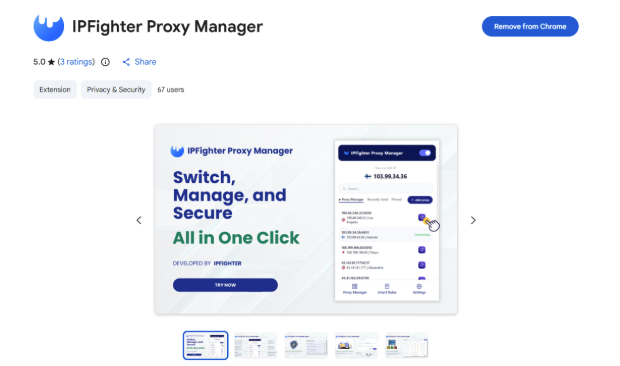
Before evaluating the proxy, we first added it to our browser using the IPFighter Proxy Manager extension. This extension makes it easy to import, manage, and switch between multiple proxies directly within your browser, eliminating the need for manual proxy configuration.
IPFighter Proxy Manager extension on Chrome
If you'd like to learn how to set it up, check out our detailed guide: A complete guide to the IPFighter Proxy Manager extension.
5.2. Test results
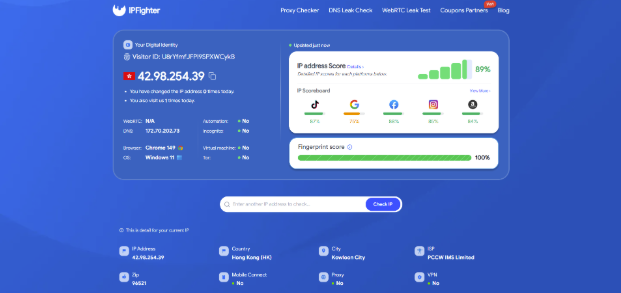
After connecting the residential proxy to Chrome using the IPFighter Proxy Manager extension, we verified the proxy on IPFighter before running any further tests. In terms of reputation, the proxy received an IP Address Score of 89/100, indicating a healthy residential IP with a good level of trust across major online platforms.
The location information also matched the proxy configuration selected from the 711Proxy dashboard. Another positive result is that the Proxy status is displayed as "No". This means IPFighter did not detect obvious signs that the connection was coming from a proxy server, suggesting that the residential IP appears more like a regular user connection.
Check proxy on IPFighter
Combined with the correct location information and strong reputation score, the proxy performed well in this initial quality check before moving on to speed testing on Speedtest.
The results showed a download speed of 15.26 Mbps and an upload speed of 67.07 Mbps. While the upload performance was slightly better, the relatively low download speed will affect tasks requiring fast download speeds. One drawback is the relatively high latency (ping), up to 584 ms, which can cause significant delays in real-time operations or when connecting to remote servers. However, for tasks that don't require extremely high speeds, it's still a viable option.
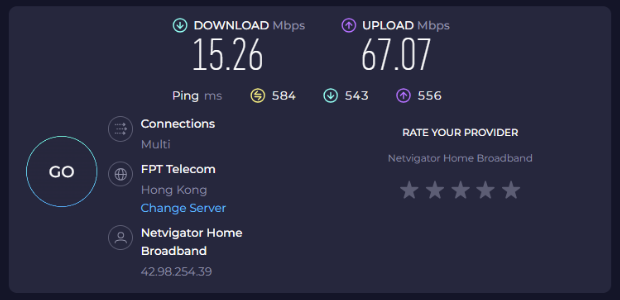
Check proxy on Speedtest
As a final check, we searched on Google to verify whether the detected location matched the proxy configuration. While the proxy was configured as a Hong Kong residential IP, Google displayed the approximate location as New York at the bottom of the search results page.
This indicates that the location detected by Google did not fully match the configured proxy location. Such discrepancies can occur because different services rely on different geolocation databases, which may not always be updated at the same time. As a result, the same IP address may be mapped to different locations depending on the platform being used.
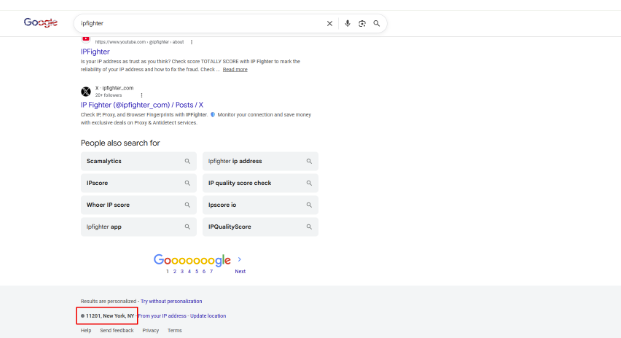
Check on the Google search bar
Of course, this is just the result of a single IP randomly selected from the GB-based residential proxy plan during testing. Actual performance may vary depending on the specific IP, geographic location, and time of use. For more specialized needs, you may also consider other proxy lines offered by 711Proxy to best suit your specific use case.
Read more:
- How to check if a proxy is working and read your results
- How to improve IP score: A complete guide
- How to pass bot detection test and avoid getting flagged
6. How to get proxy from 711Proxy
Now that you've seen the performance of 711Proxy, let's walk through how to purchase, generate, and use a proxy from its dashboard. The overall process is straightforward and only takes a few minutes.
Step 1. Create an account and log in
First, visit the 711Proxy website and create an account if you're a new user. If you already have an account, simply log in using your email address and password.
After signing in, you'll be redirected to the 711Proxy dashboard, where you can view available proxy products, manage your account, and access other platform features.
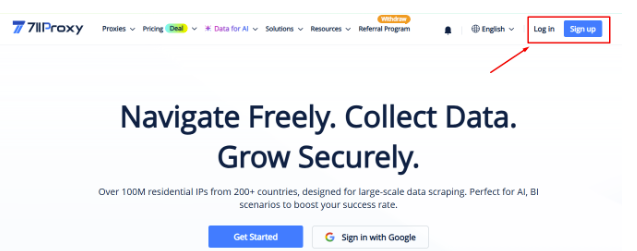
Create an account and log in
Step 2. Choose and purchase a proxy plan
From the dashboard, select the proxy type that best fits your needs. In this review, we purchased the Residential proxy (Pay per GB) plan.
Choose your desired traffic package, complete the payment process, and don't forget to apply the latest 45% OFF coupon code from IPFighter before checkout. Using a discount code can significantly reduce your costs, especially if you're purchasing larger traffic packages.
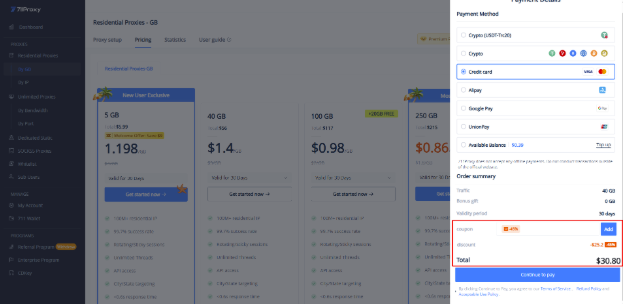
Choose and purchase a proxy plan
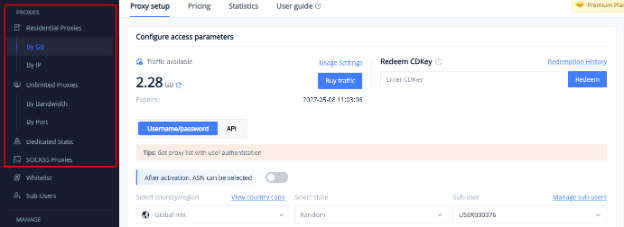
Step 3. Open the proxy setup page
Once your purchase is complete, go to the Proxies section and open the proxy package you purchased.
The “Proxy Setup” page allows you to configure your proxy before generating it. Here, you'll find information about your remaining traffic as well as all available configuration options.
Open the proxy setup page
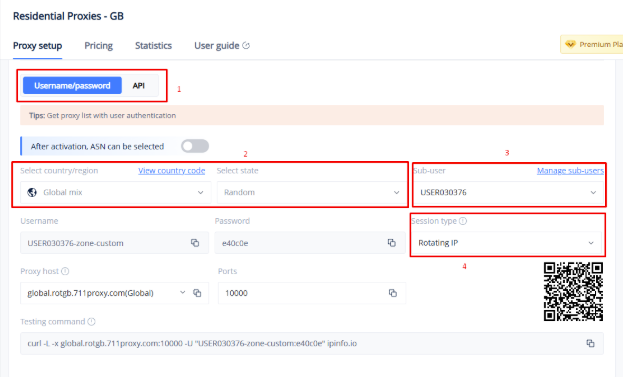
Step 4. Configure your proxy settings
Next, customize the proxy according to your requirements. Depending on the proxy type, you can configure options such as: Authentication method, country and state targeting, session type, etc.
711Proxy also provides a sample cURL testing command, allowing you to quickly verify your proxy configuration before using it in your applications.
Configure your proxy settings
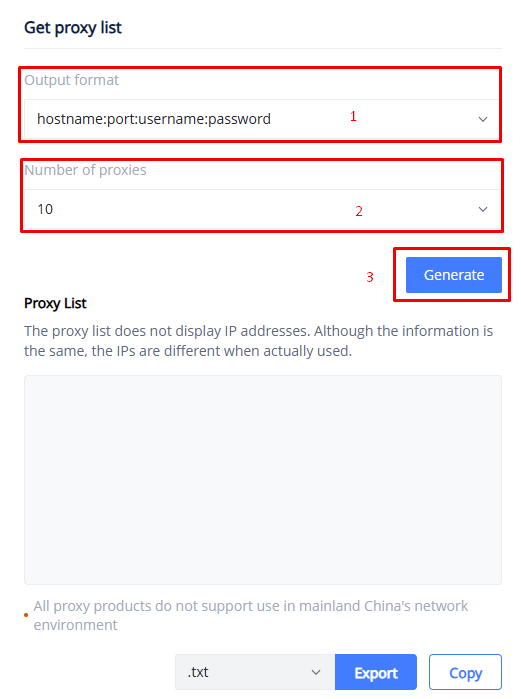
Step 5. Generate and copy your proxy
Finally, choose your preferred output format (such as hostname:port:username:password) and specify how many proxies you want to generate.
Click Generate, and 711Proxy will create your proxy list based on the settings you've selected. You can either copy the generated proxies directly or download them as TXT or CSV files for later use.
Generate and copy your proxy
7. Alternatives
If 711Proxy doesn't fully meet your requirements, there are several other providers that offer similar residential proxy services.
-
Novada: A proxy provider offering residential, mobile, ISP, and datacenter proxies with a global network of over 100 million IPs.
-
SimplyNode: A proxy service that unlocks data access with over 8 million IPs, offering rotating and sticky options alongside city-level targeting.
-
Byteful: A provider offering static ISP, residential, and datacenter proxies built on a 100 Gbps network across more than 195 countries.
You can also check out reviews of our other partners here:
-
LightningProxies review: Is it worth your investment?
-
Proxys.io review: Features, pricing, performance
-
MoMoProxy review: Is this residential proxy provider worth using?
-
Coproxy review: Are these the best cheap IPv4 proxies on the market?
8. Conclusion
Overall, 711Proxy is a versatile proxy provider offering multiple residential proxy options with flexible pricing models, including pay-per-GB, pay-per-IP, and unlimited plans. During our testing, the proxy achieved a strong reputation score on IPFighter and showed no obvious signs of proxy detection, although the tested IP did not accurately match the selected location in Google Search. However, actual performance will still depend on your specific IP address, geographical location, and the type of proxy you choose.
If you're planning to try 711Proxy, check out the 711Proxy promo code on the IPFighter page to get up to 45% off your purchase.
9. FAQ
Is 711Proxy a legitimate proxy provider?
Yes. 711Proxy offers multiple proxy products, including residential, ISP, datacenter, and mobile proxies. Its services are designed for various use cases such as web scraping, automation, ad verification, and social media management.
Does 711Proxy support SOCKS5?
Yes. Depending on the proxy type you purchase, 711Proxy supports both HTTP(S) and SOCKS5 protocols, making it compatible with most browsers, automation tools, and proxy management software.
Can I choose a specific country or city?
Yes. Most residential proxy plans allow you to target specific countries, and many locations also support city-level targeting. Some plans additionally provide ASN filtering for more precise IP selection.
Does 711Proxy support rotating proxies?
Yes. 711Proxy supports both rotating and sticky sessions. You can configure automatic IP rotation or keep the same IP for up to 180 minutes, depending on your selected session settings.
Is 711Proxy suitable for web scraping and automation?
Yes. With its large residential IP pool, rotating sessions, and geo-targeting features, 711Proxy is well suited for web scraping, automation, market research, and other tasks that require reliable proxy connections. However, actual performance may vary depending on the IP assigned and the target website.
Read more

Proxy for trading: Can it improve your connection and privacy?

Anonymous Proxies review: What its proxy network offers

Web scraping proxy: How to collect web data more efficiently

Can a gaming proxy improve your gaming experience? What to know

Proxy server for streaming: Can it improve your experience?
Rapidproxy review: A closer look at its residential proxy network