

Proxy001 claims a massive global footprint with over 100M+ residential IPs in 200+ countries, offering everything from rotating and sticky residential proxies to datacenter and unlimited plans with flexible geo-targeting.
While an impressive IP count looks good on paper, practical performance is what ultimately matters. In this review, IPFighter breaks down Proxy001’s proxy types, pricing, and benchmark test results to determine its actual quality in practice.
1. General information
Before looking at the different proxy types and testing results, here is a quick overview of Proxy001 and its core specifications.
|
Website |
https://proxy001.com/?ppf=mona_ipfighter |
|
Founded |
N/A |
|
Proxy types |
Residential / Static Residential / Static Datacenter / Static Shared / Unlimited Residential |
|
IP pool |
100M+ residential IPs in 200+ countries |
|
Protocol |
HTTP(S) và SOCKS5 |
|
Pricing model |
Per GB / Per IP |
|
Payment |
Cryptocurrency / Credit Card / Google Pay / Alipay / Account Balance |
|
Trial / Refund |
500MB free trial data for new users; contact support to claim / Refund eligibility depends on the product type |
|
Best for |
Web scraping, e-commerce monitoring, SEO monitoring, market research, social media, and data collection |
Discover more:
-
Best proxy providers in 2026: Compare top 6 services
-
Best residential proxy providers in 2026: Real-world tested
2. Proxy types available at Proxy001
Proxy001 organizes its products around both traffic-based and IP-based proxy solutions, covering rotating residential proxies, static residential IPs, datacenter IPs, shared static proxies, and unlimited residential traffic.
2.1. Residential proxies
Proxy001's residential proxy network is its main offering, with 100M+ real residential IPs across more than 200 countries and regions.
-
Advertised proxy pool: 100M+ residential IPs
-
Coverage: 200+ countries and regions
-
Filtering: Country, state/province, and city
-
Rotation: Per request or custom interval (max 180 mins)
-
Protocols: HTTP(S), SOCKS5
Users can either rotate the IP with every request or maintain the same IP for a selected period. This gives the package flexibility for both large-scale data collection and workflows that require short-term session persistence.
2.2. Static residential proxies
Static residential proxies are designed for users who need a dedicated residential IP with longer-term stability.
-
IP type: Dedicated native residential/ISP IP
-
Sharing: Private, not shared
-
Traffic: Unlimited
-
Concurrency: No stated concurrent limit
-
Coverage: 70+ geos advertised
Because each IP is dedicated and remains assigned to the user, this option is better suited to workflows where maintaining a consistent IP matters more than frequent rotation, such as account management and long-running sessions.
2.3. Static datacenter proxies
For tasks where speed and low operating costs are more important than residential identity, Proxy001 also offers static datacenter proxies.
-
Traffic: Unlimited
-
Sessions: Unlimited
-
Availability: Over 99% advertised
-
Response time: Around 0.6s advertised
-
Protocols: HTTP(S), SOCKS5
These proxies are positioned as a lower-cost option for high-volume tasks that do not require residential IP characteristics.
2.4. Static shared proxies
Proxy001 also provides shared static IPs as a budget-oriented option.
-
Type: Multi-user shared static IP
-
Coverage: across 50+ countries/regions
-
Traffic: Unlimited
-
Positioning: Lower-cost proxy solution
-
Protocols: HTTP(S), SOCKS5
Because the IPs are shared between multiple users, this option is primarily aimed at cost-sensitive workflows where IP exclusivity and purity are less critical.
2.5. Unlimited residential proxies
For high-volume data workloads, Proxy001 offers an unlimited residential plan with no traffic/IP restrictions.
-
Advertised proxy pool: 20M+ real residential IPs
-
Coverage: 100+ countries worldwide
-
Bandwidth: Up to 100Gbps+
-
Rotation: Rotating and sticky sessions
-
Protocols: HTTP(S), SOCKS5
This plan stands out from the standard residential package by shifting the pricing model from pay-per-GB to a daily unlimited-traffic structure.
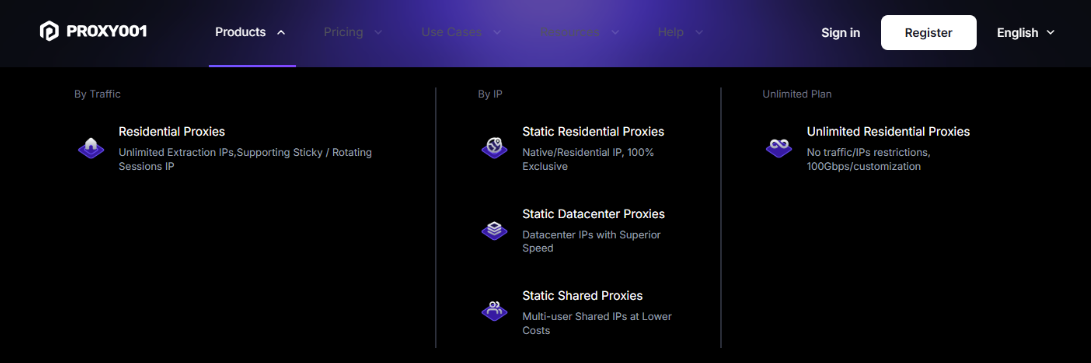
Proxy types available at Proxy001
Overall, Proxy001 offers a relatively broad product range, allowing users to choose between rotating residential IPs, dedicated residential connections, datacenter IPs, shared proxies, and unlimited residential traffic depending on their priorities.
3. Key features of Proxy001 proxies
Beyond its large IP pool, Proxy001 provides several features aimed at improving targeting flexibility, session control, and integration.
-
Precise geo-targeting: Users can filter residential proxies by country, state/province, and city.
-
Flexible IP rotation: Residential proxies can rotate per request or at a custom interval of up to 180 minutes.
-
Unlimited concurrency: The residential network supports unlimited concurrent connections.
-
Developer integration: Proxy001 provides APIs, SDKs, and examples for languages and tools including Python, Node.js, Puppeteer, and Selenium.
-
IP whitelist authentication: Authenticate proxies by whitelisting trusted IP addresses instead of using usernames and passwords.
Together, these features give Proxy001 a fairly flexible setup for users who need to control where their IP comes from, how often it changes, and how the proxy is integrated into their workflow.
4. Proxy001 pricing overview
Proxy001 uses several pricing models depending on the proxy type. Residential proxies are traffic-based, while static products are generally priced per IP.
|
Proxy type |
Starting price |
Billing model |
Key pricing detail |
|
Residential |
$1.2/GB |
Pay-as-you-go |
Non-expiring traffic |
|
Static residential |
$2.90/IP/month |
Per IP |
Dedicated residential IP |
|
Static datacenter |
$1.90/IP/month |
Per IP |
Unlimited traffic |
|
Static shared |
$0.59/IP/month |
Per IP |
Shared static IP |
|
Unlimited residential |
$35/day |
Daily |
Unlimited traffic |
The standard residential package starts at $1.2/GB, with volume pricing available through larger packages. Proxy001 also displays discounted first-recharge offers, including 5GB for $6, 20GB for $24, 100GB for $100, and 5,000GB for $2,750 on its current pricing page.
The static residential package starts at $2.90/IP/month for selected locations, while static datacenter and shared static proxies start at $1.90 and $0.59/IP/month, respectively. The unlimited residential plan starts at $35/day.
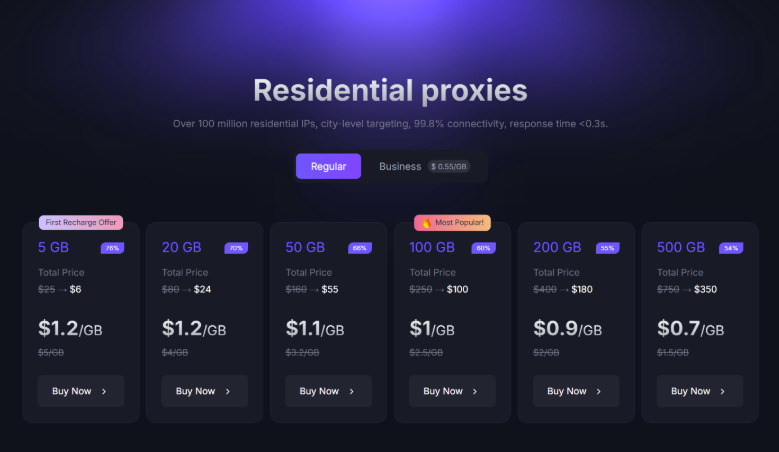
Prices for residential proxies plan at Proxy001
If you're planning to purchase proxies from Proxy001, don't miss the Proxy001 promo code available on IPFighter. You can save on your proxy purchase with exclusive discounts while choosing the plan that best suits your needs.
5. Performance test
To evaluate Proxy001 beyond its published specifications, IPFighter's testing process focuses on three key areas: IP quality, connection performance, and geolocation accuracy. We tested a proxy taken from the residential proxy using IPFighter, Speedtest, and Google Search package.
5.1. Preparation
Before evaluating the proxy, we first added it to our browser using the IPFighter Proxy Manager extension. This extension makes it easy to import, manage, and switch between multiple proxies directly within your browser, eliminating the need for manual proxy configuration.
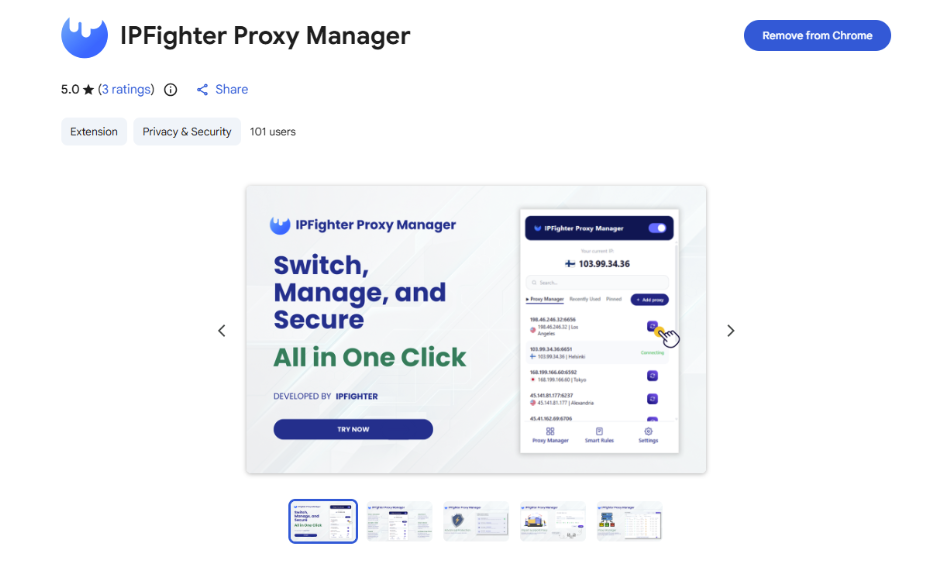
IPFighter Proxy Manager extension on Chrome
If you'd like to learn how to set it up, check out our detailed guide: A complete guide to the IPFighter Proxy Manager extension.
5.2. Test results
First, regarding the results of the IPFighter test, the residential proxy achieved strong trust scores across all major platforms on the homepage, ranging from 90% to 95%, with an average score of 90%. X scored highest at 95%, followed closely by Instagram, YouTube, and TikTok at 94%, while Facebook scored 93% and Google 90%. All platforms rated the IP as High, indicating an exceptionally strong reputation and minimal risk of detection across key social and search channels.
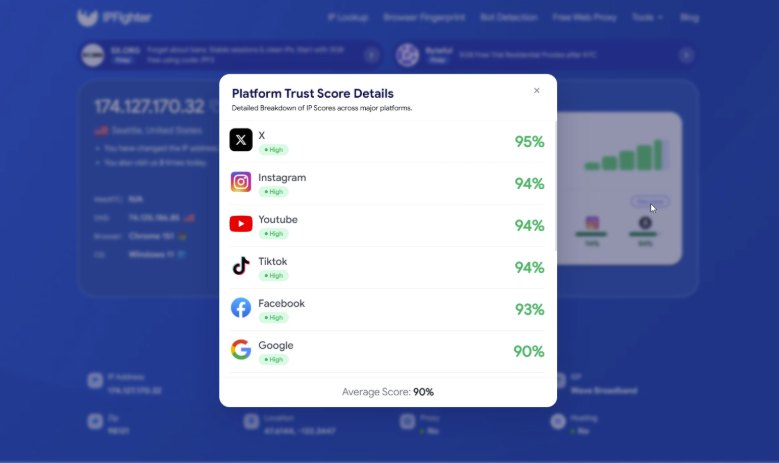
IP scores on major platforms
The IP lookup confirms that the address is a US IPv4 residential IP, located in Seattle, Washington. The connection was classified as Residential ISP. The check detected no proxy, VPN, or datacenter IP, suggesting that the address appears to be a genuine residential IP with no major connection-type red flags. The IP receives a 90% reputation score, suggesting that it appears trustworthy to online platforms and anti-fraud systems, with no major blacklist concerns detected during the check.
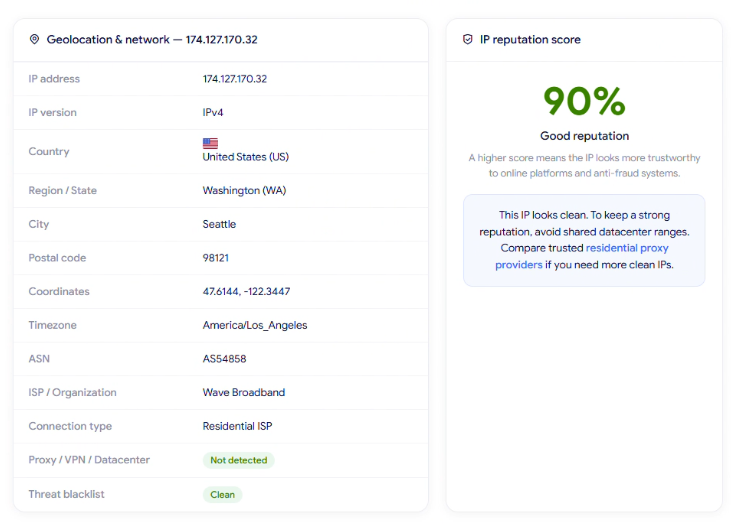
IP Lookup results on IPFighter
Next, IPFighter checked the speed of this proxy on Speedtest. The results show a download speed of 1.36 Mbps and an upload speed of 2.02 Mbps, which are quite modest and reflect a relatively slow connection.
The measured ping was 444 ms. This indicates high latency and potential lag, making it unsuitable for bandwidth-heavy or real-time activities like video streaming, gaming, or high-volume data scraping. However, for basic, low-bandwidth tasks such as lightweight social media account management, simple HTTP API calls, or casual web browsing - this IP can still handle the operational requirements.
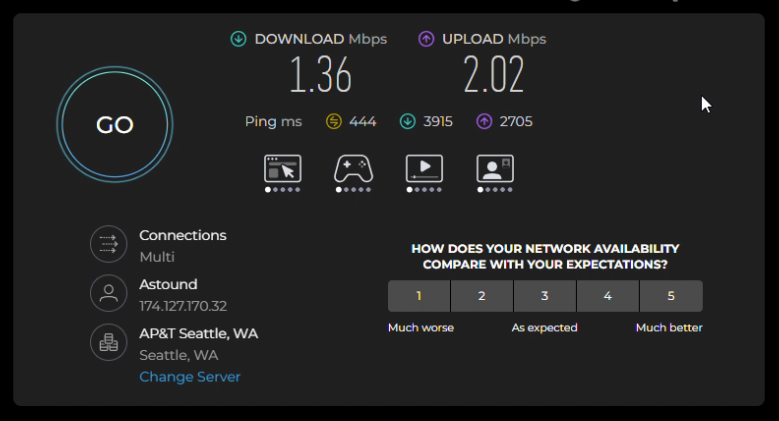
Check proxy on Speedtest
Finally, a location check was conducted via Google search, which detected the location as Seattle, Washington, US. Because the proxy was set to target Washington, US, this result directly matches both the initial setup and the location identified by IPFighter (Seattle, Washington, US). This demonstrates strong geolocation consistency across different detection services down to the city and zip code level.
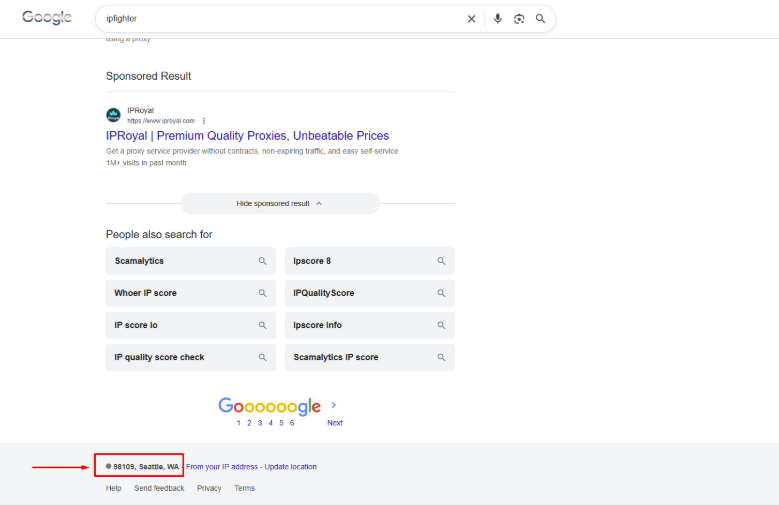
Check on the Google search bar
These results are based on randomly selected IPs during the testing process, so actual performance may vary depending on the specific IP, geographic location, network conditions, and time of use. Therefore, individual IPs may deliver different speeds, latency, and geolocation results in real-world use.
Read more:
-
IP reputation check: How IPFighter scores your IP
-
How to use web proxy safely: A practical guide
-
How to check if a proxy is working and read your results
6. How to get proxy from Proxy001
Once you have created and verified your Proxy001 account, getting a proxy is relatively straightforward. The process can be completed directly from the dashboard, where you can purchase traffic and configure the proxy according to your needs.
Step 1. Create or log in to your account
Visit Proxy001 and create an account or log in to the dashboard.
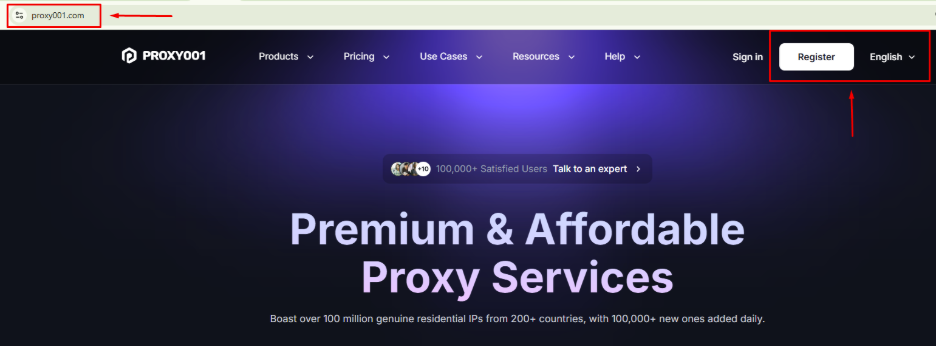
Create or log in to your account
Step 2. Purchase a proxy plan
From the dashboard, select the proxy category that matches your requirements, such as Residential, Static Residential, Static Datacenter, Shared Static, or Unlimited Residential.
Before completing your purchase, don't forget to check for Proxy001 promotional codes with a 10% OFF coupon code on IPFighter. Applying an existing discount code can significantly reduce your costs.
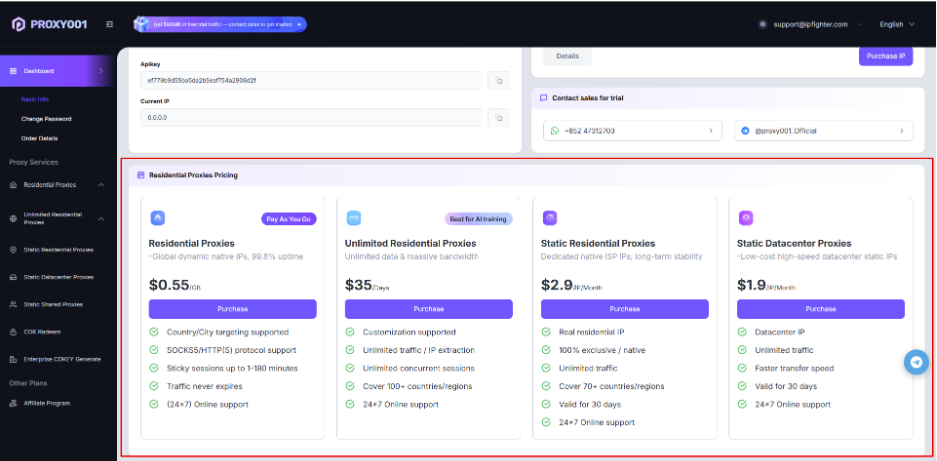
Purchase a proxy plan
Step 3. Configure your proxy
After successful purchase, for residential proxies, configure the desired country, state/province, city, rotation mode, and session duration. Proxy001 supports both per-request rotation and sticky sessions of up to 180 minutes. Next, select the number and output format for the proxy.
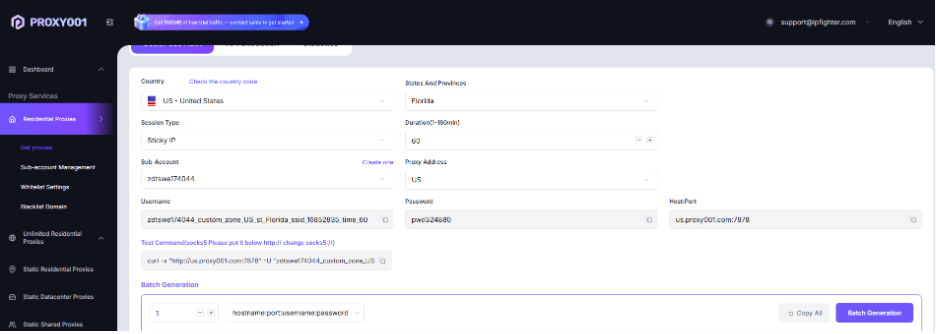
Configure your proxy
Step 4. Generate and copy your proxy
Finally, after completing the proxy setup, simply click Batch Generation. You simply need to copy the proxy details into your proxy manager, scraping tool, or other supported application.

Generate and copy your proxy
7. Alternatives
Besides Proxy001, you can also consider other providers offering similar residential proxy services.
-
IPRoyal: A budget-oriented provider with residential and other proxy types, suitable for users prioritizing flexible pricing.
-
NodeMaven: Offers residential, mobile, and ISP proxies with flexible targeting and a focus on IP quality.
-
Byteful: Provides residential, mobile, static residential, and datacenter proxies with broad global coverage and multiple targeting options.
You can also check out reviews of our other partners here:
-
Mobileproxy.space review: Is its mobile proxy quality really good
-
NiuProxy review: Is this affordable proxy provider worth using?
-
711Proxy review: Is it the right proxy provider for your needs?
-
Thordata review: Is this proxy provider worth your investment?
8. Conclusion
Proxy001 stands out primarily for the scale and variety of its proxy offering, multiple session options, and several pricing models. Its non-expiring residential traffic and low starting price also make the service accessible for users who want to scale gradually.
However, the size of the network alone does not determine proxy quality. The real-world IP reputation, speed, latency, and geolocation consistency observed during testing are what ultimately determine whether the service fits a specific workflow.
If you're planning to try Proxy001, check out the Proxy001 promo code on the IPFighter page to get up to 10% off your purchase.
9. FAQ
Does Proxy001 offer a free trial?
Yes. Proxy001 states that new users can claim 500MB of free trial data by contacting its online support.
Do Proxy001 residential proxy credits expire?
No. Proxy001 states that purchased residential traffic remains valid indefinitely and is only deducted as it is consumed.
What is the difference between Proxy001's residential and static residential proxies?
Residential proxies are designed for dynamic use and support rotating or sticky sessions, while static residential proxies provide dedicated residential IPs intended for longer-term stability and consistent connections.
What payment methods does Proxy001 accept?
Proxy001 supports major credit cards, Google Pay, Apple Pay, Alipay, and several cryptocurrencies, including Bitcoin, Ethereum, USDT, and BNB.
Does Proxy001 offer refunds?
Yes, but it does not provide an unconditional money-back guarantee. Refund eligibility depends on the product, whether the service has been activated or used, and other conditions. Refund requests generally need to be submitted within 7 calendar days.
Read more

IPFoxy review: Are its pure rotating residential proxies worth it?


CatProxies review: What do its five proxy types offer?
Hidemyacc review 2026: Features, pricing and real fingerprint test results

Whitecloakproxy review: What to know before you buy

Geonix review: What makes its proxy services stand out?
Floppydata review: A closer look at its proxy network