

Sx.org positions itself as a proxy marketplace, bringing residential, mobile, and corporate proxies together under one platform, with 12M+ IPs across 235 countries, flexible GEO targeting, and multiple rotation options. But a large proxy network does not always guarantee consistent quality and performance.
In this Sx.org review, IPFighter examines its proxy types, features, pricing, and real-world performance to see how well the network performs in practice.
1. General information
Before looking at the different proxy types and testing results, here is a quick overview of Sx.org and its core specifications.
|
Website |
|
|
Founded |
N/A |
|
Proxy types |
Mobile / Residential / Corporate proxies |
|
IP pool |
12M+ IPs in 235 countries |
|
Protocol |
HTTP(S) / SOCKS5 |
|
Pricing model |
Per GB / per IP |
|
Payment |
Crypto / online payment aggregators / PayPal and other supported methods |
|
Trial |
Free trial available |
|
Best for |
Account management, running ads, SEO, scraping, etc. |
Discover more:
-
Best proxy providers in 2026: Compare top 6 services
-
Best mobile proxy providers in 2026: Hands-on testing results
-
Best residential proxy providers in 2026: Real-world tested
2. Proxy types available at Sx.org
Sx.org currently offers three main proxy categories: residential, mobile, and corporate proxies. Each is positioned for different workloads, from account management and GEO-sensitive tasks to large-scale data collection.
2.1. Residential proxies
Sx.org's residential proxies use IP addresses associated with home internet connections and are designed to resemble regular user traffic.
-
Advertised proxy pool: 7 million IPs
-
Session: Unlimited IP change
-
Filtering: Country, region, city, ASN targeting
-
Rotation: Rotating and sticky sessions
-
Protocols: HTTP(S), SOCKS5
Overall, the residential proxy package offers flexible session and targeting options, making it suitable for workflows that require specific locations or control over how often the IP changes.
2.2. Mobile proxies
Mobile proxies route traffic through IP addresses associated with real mobile devices and carrier networks.
-
Advertised proxy pool: 4 million IPs
-
Connection: Backconnect architecture
-
Filtering: Country, region, city, ASN targeting
-
Rotation: Rotating and sticky sessions
-
Protocols: HTTP(S), SOCKS5
Sx.org also states that its mobile infrastructure uses real 4G modems connected to real SIM cards rather than emulated mobile environments.
2.3. Corporate proxies
Corporate proxies, which Sx.org describes as server-hosted proxies, are designed primarily for speed, large-scale traffic, and automation.
-
Advertised proxy pool: 1 million IPs
-
Connection: Backconnect architecture.
-
Filtering: Country, region, city, ASN targeting
-
Rotation: Rotating and sticky sessions
-
Protocols: HTTP(S), SOCKS5
Overall, the three proxy types give users a choice between higher-trust residential and mobile connections and speed-focused corporate infrastructure.
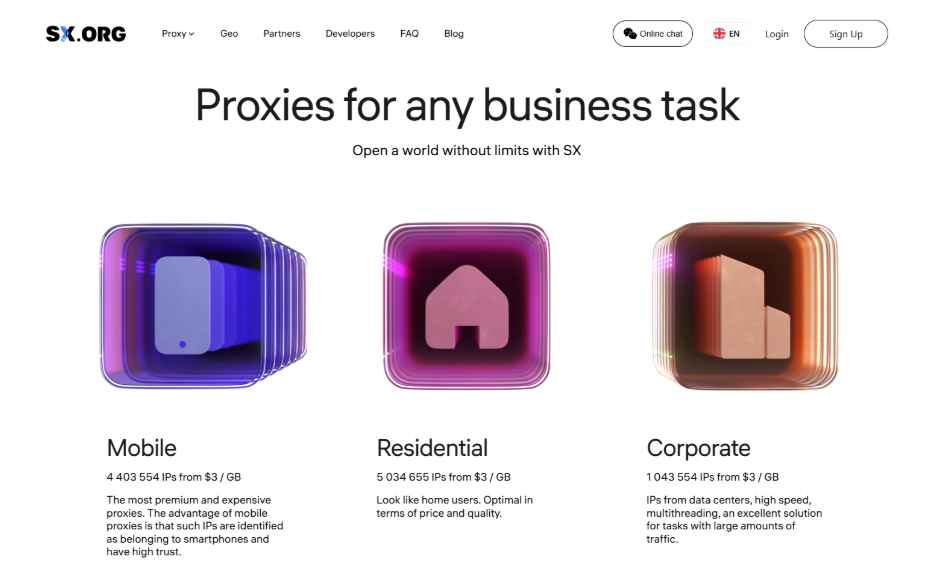
Proxy types available at Sx.org
3. Key features of Sx.org proxies
Beyond its proxy types, Sx.org provides several features designed to give users greater control over proxy selection, sessions, and traffic management.
-
Country, region, city, and ASN targeting: Select proxies based on specific geographic locations and ISP for more precise GEO targeting.
-
Flexible IP rotation: Choose timer-based rotation, per-request rotation, sticky connections, or a break-connection mode depending on the workflow.
-
Unlimited proxy ports: Sx.org states that users can create unlimited ports and run multiple threads, sessions, and connections without technical limits on proxy usage.
-
API integration: Developers can create, update, delete, refresh, and manage proxy ports through the Sx.org API. The API documentation also provides examples for Java, Node.js, PHP, and Python, etc.
-
Traffic analytics: The dashboard provides debit history and traffic consumption statistics, allowing users to monitor usage by day, month, or overall account activity.
These features make Sx.org more than a basic proxy seller, particularly for users who need GEO control, flexible rotation, and centralized proxy management.
4. Sx.org pricing overview
Sx.org uses two main pricing models: pay-per-traffic and unlimited proxies. The current homepage lists the following starting prices.
|
Proxy type |
Pay-per-traffic |
Unlimited plan |
|
Mobile |
$3/GB |
$15/IP/month |
|
Residential |
$3/GB |
$5/IP/month |
|
Corporate |
$3/GB |
$5/IP/month |
The pay-per-traffic model is designed for users who want flexibility and only want to pay for the traffic they actually use. In contrast, the unlimited proxy plans are better suited for users with stable, high-volume needs, offering fixed access without worrying about traffic limits or overage costs.
For unlimited plans, volume discounts are available: 5% from 10 proxies, 10% from 50 proxies, and 15% from 100 proxies.
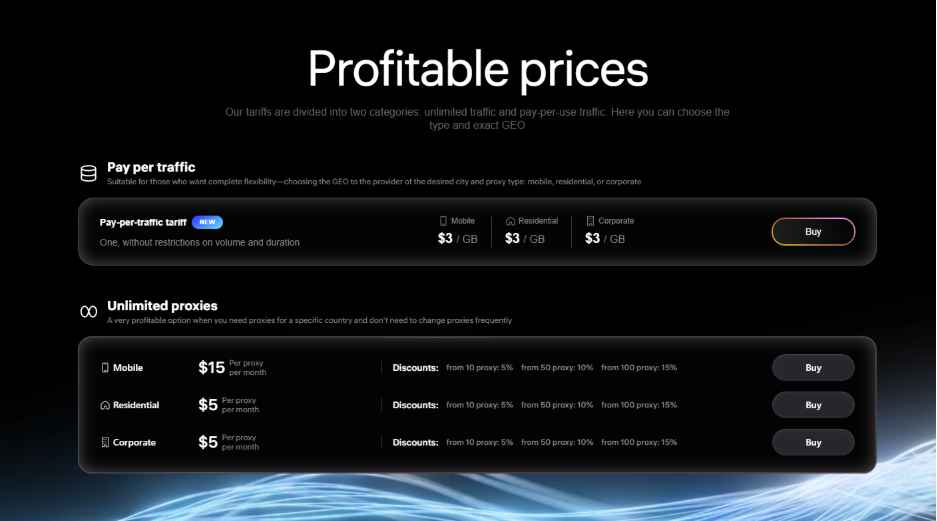
Prices for proxies plan at Sx.org
If you're planning to purchase proxies from Sx.org, don't miss the Sx.org promo code available on IPFighter. You can save on your proxy purchase with exclusive discounts while choosing the plan that best suits your needs.
5. Performance test
To evaluate Sx.org beyond its published specifications, IPFighter's testing process focuses on three key areas: IP quality, connection performance, and geolocation accuracy. We tested a proxy taken from the Pay-per-traffic tariff using IPFighter, Speedtest, and Google Search package.
5.1. Preparation
Before evaluating the proxy, we first added it to our browser using the IPFighter Proxy Manager extension. This extension makes it easy to import, manage, and switch between multiple proxies directly within your browser, eliminating the need for manual proxy configuration.
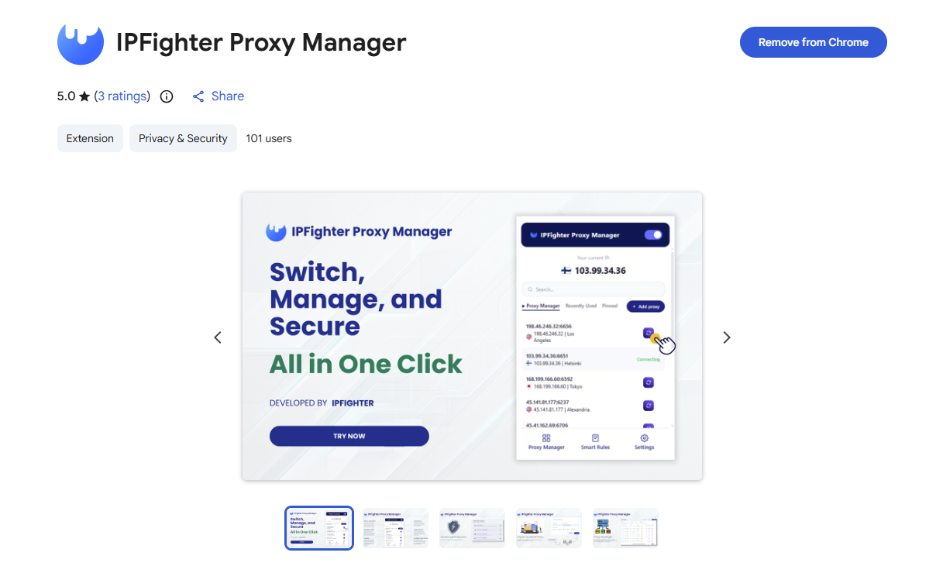
IPFighter Proxy Manager extension on Chrome
If you'd like to learn how to set it up, check out our detailed guide: A complete guide to the IPFighter Proxy Manager extension.
5.2. Test results
First, regarding the test results from IPFighter, the tested IP addresses achieved an overall score of 85% IP score, with platform scores ranging from 77% to 92%. Instagram scored highest at 92%, followed by Youtube at 91%, Facebook at 90%, and Google at 86%. Overall, all platforms rate these IP addresses as highly reputable, indicating a strong standing and suitability for tasks involving leading social media platforms and search engines.
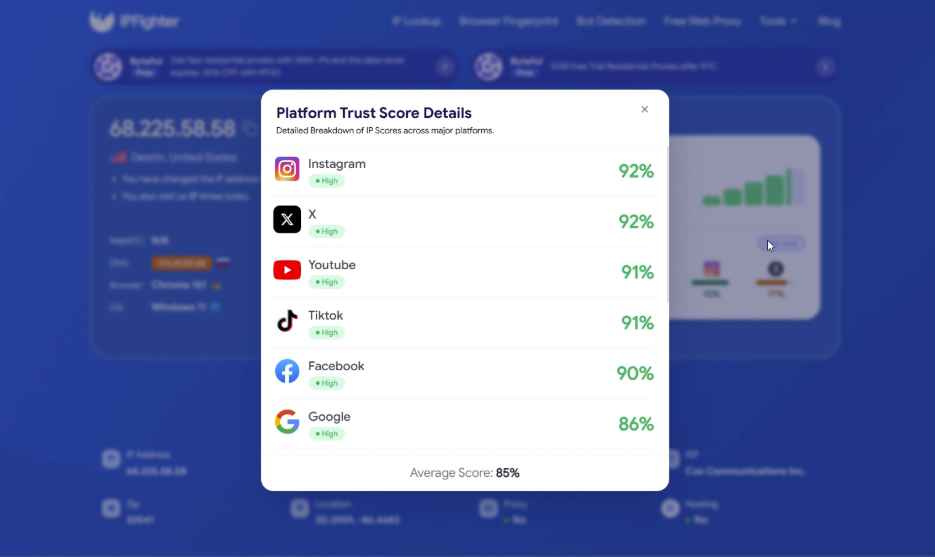
IP scores on major platforms
The IP lookup identifies the address as a U.S. IPv4 residential IP located in Destin, Florida, and associated with Cox Communications Inc. It is classified as a Residential ISP, while the check detected no proxy, VPN, or datacenter IP and showed a Clean threat blacklist status, suggesting a genuine residential connection with no major risk flags. The IP also received a 90% reputation score, categorized as Good reputation, indicating that it appears trustworthy to online platforms and anti-fraud systems.
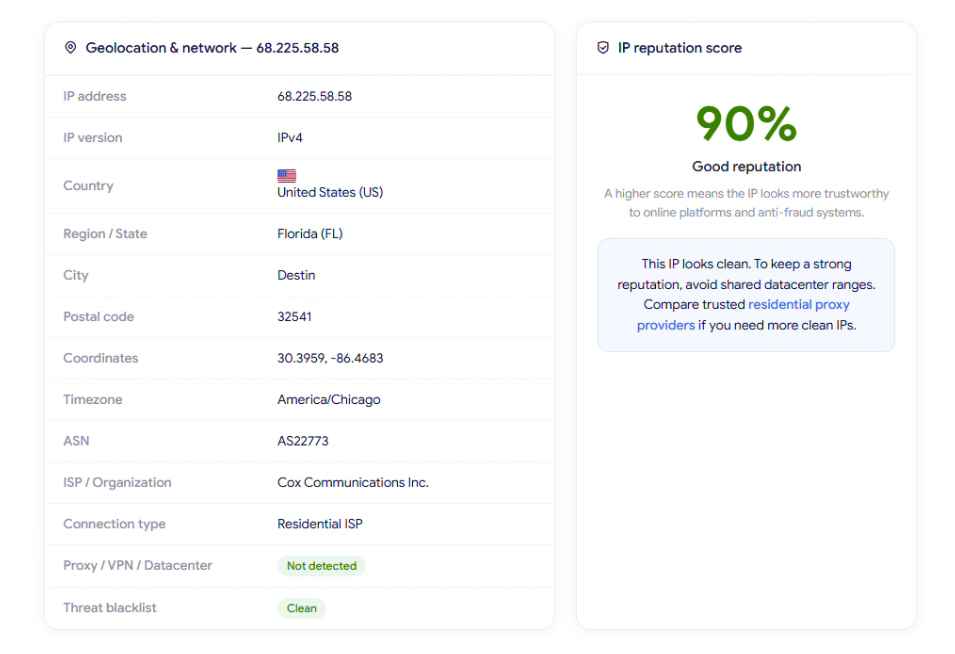
IP Lookup results on IPFighter
Next, a speed check is performed on Speedtest for this proxy from Sx.org's Pay-per-traffic plan. The results show 3.49 Mbps download and 3.50 Mbps upload, which is quite modest for a residential proxy. During testing, this bandwidth is sufficient for basic tasks like light web browsing, text searching, or account management, but may struggle with high-definition streaming or heavy file downloads.
The measured ping was around 511 ms, which is high and may cause noticeable latency during real-time interactions. Overall, for a randomly selected IP from this tariff, the performance is basic but still functional for light, low-bandwidth MMO tasks.
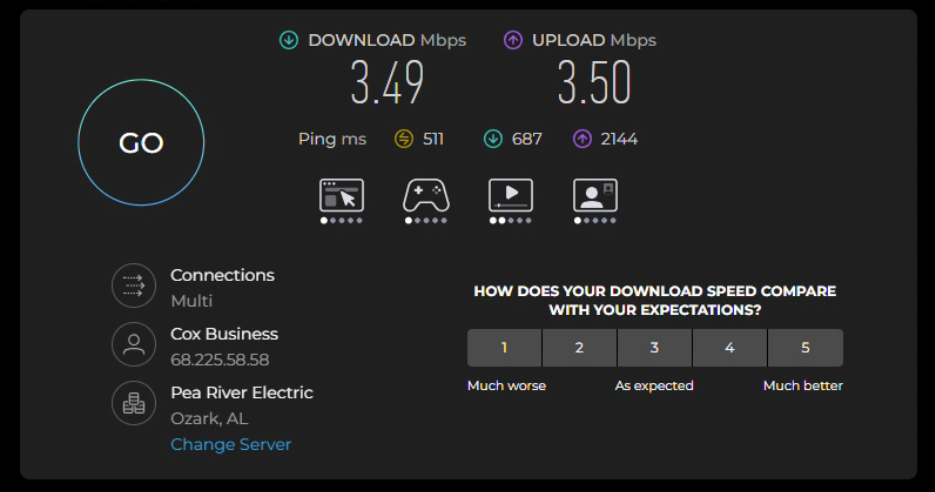
Check proxy on Speedtest
Finally, a location check was conducted via Google search, which detected the location as Destin, Florida, US. Because the proxy was set to target Florida, US, this result directly matches both the initial setup and the location identified by IPFighter (Florida, US). This indicates strong geolocation consistency across different detection services at the state level.
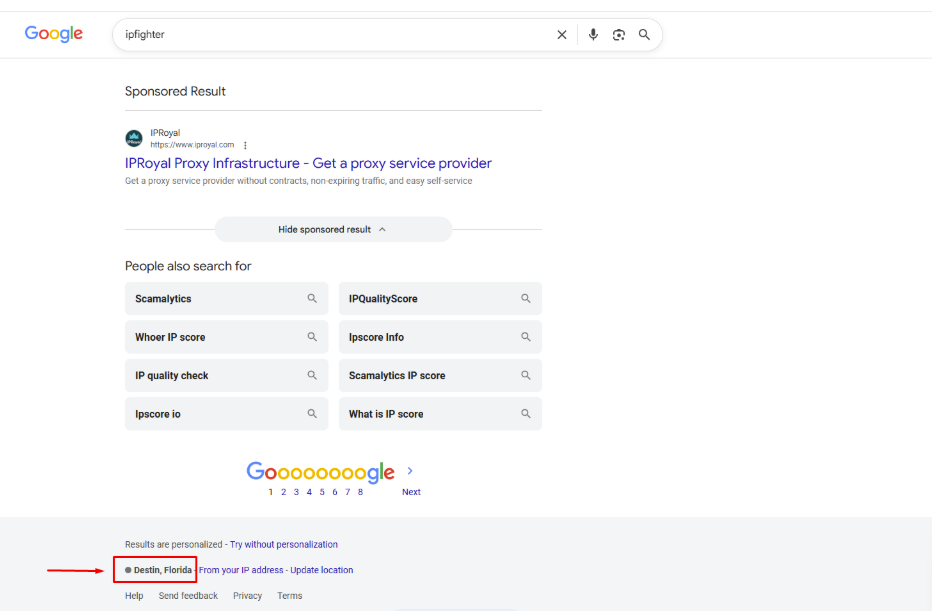
Check on the Google search bar
These results are based on randomly selected IPs during the testing process, so actual performance may vary depending on the specific IP, geographic location, network conditions, and time of use. Therefore, individual IPs may deliver different speeds, latency, and geolocation results in real-world use.
Read more:
-
IP reputation check: How IPFighter scores your IP
-
How to use web proxy safely: A practical guide
-
How to check if a proxy is working and read your results
6. How to get proxy from Sx.org
Getting started with Sx.org involves creating a proxy port and configuring the required connection parameters from the dashboard.
Step 1. Create or log in to your account
Visit the Sx.org website, sign up or log in with your email address and password. After successful login, you can access the dashboard and purchase a proxy plan.
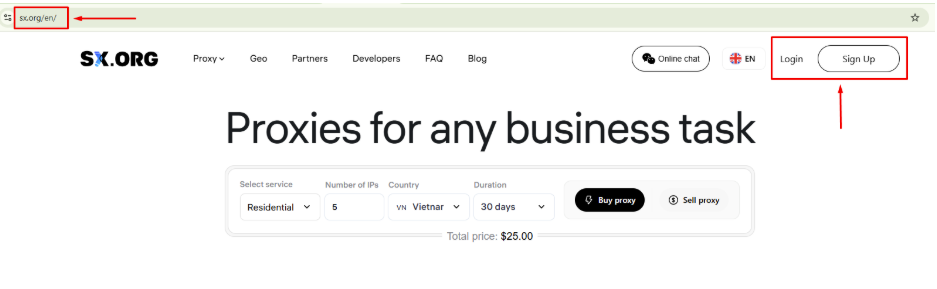
Create or log in to your account
Step 2. Purchase a proxy plan
First, after successfully registering and logging in, you need to deposit at least $10 into your account before selecting and purchasing the appropriate type of proxy. Finally, once the deposit is successful, you can select the proxy type you need - mobile, residential, or corporate - based on either pay-per-traffic pricing or unlimited proxy plans.
In particular, if you are a new user, be sure to enter the code from IPFighter right away to receive an extra 3GB of bonus data with no expiration date on Sx.org!
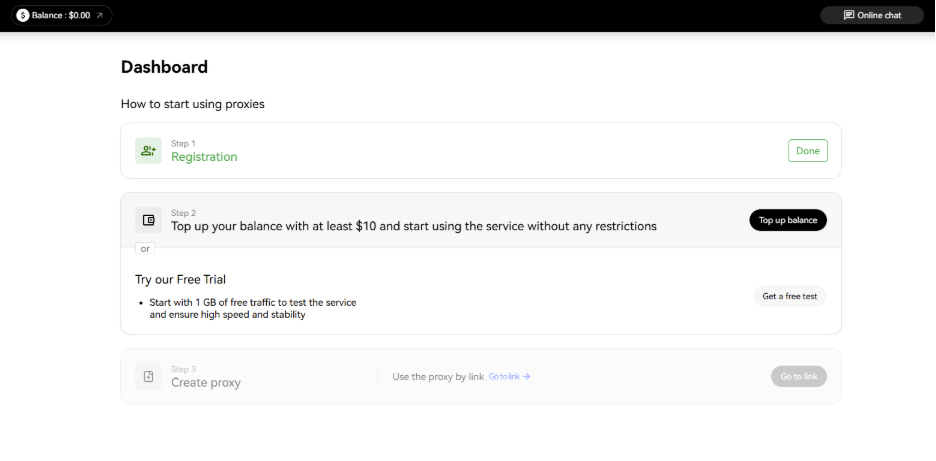
Purchase a proxy plan
Step 3. Configure your proxy
You will need to fully configure your proxy details, such as country, region or city, and ASN (if applicable). Then, in the "Settings" section, you need to select the number of proxies, choose the proxy behavior during your session, and specify the authorization type.
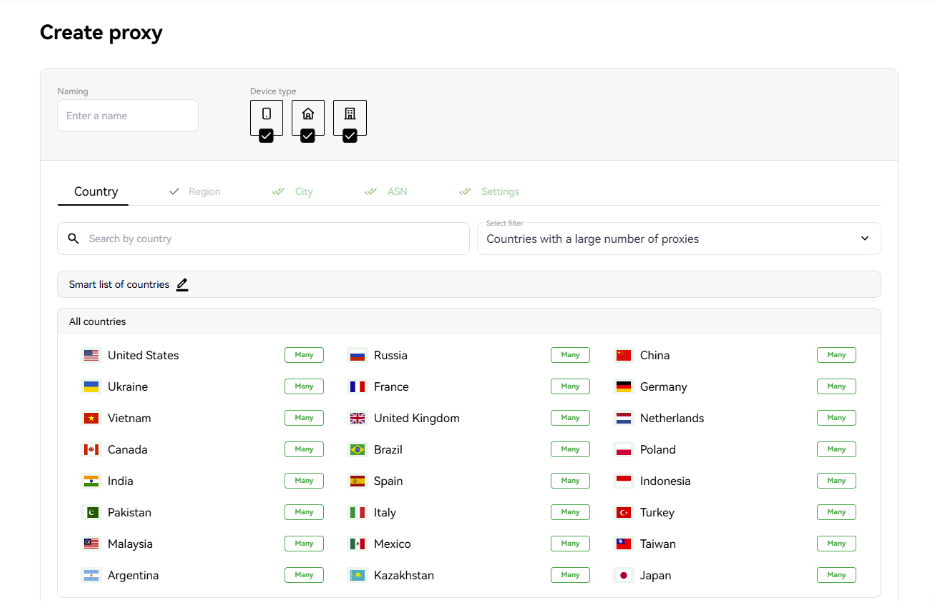
Configure your proxy
Step 4. Generate and copy your proxy
After configuring the required settings, click Create Proxy. Once the proxy has been generated, open the My Proxy section and copy the proxy URL, login, and password. You can then add the credentials to your browser, antidetect browser, proxy manager, scraper, or other supported software.
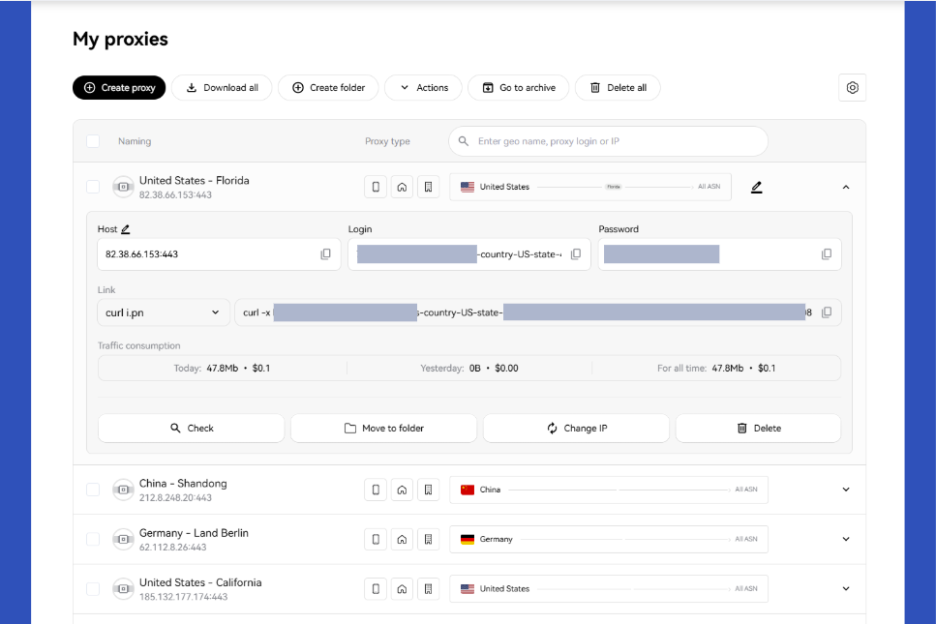
Generate and copy your proxy
7. Alternatives
Besides Sx.org, you can also consider other providers offering similar residential proxy services.
-
NodeMaven: Offers residential, mobile, and ISP proxies with flexible targeting and a focus on IP quality.
-
Byteful: Provides residential, mobile, static residential, and datacenter proxies with broad global coverage and multiple targeting options.
-
NovProxy: Offers residential and ISP proxy solutions with flexible country, state, city, and ASN targeting.
You can also check out reviews of our other partners here:
-
anyIP review: How do its residential and mobile proxies perform?
-
NiuProxy review: Is this affordable proxy provider worth using?
-
711Proxy review: Is it the right proxy provider for your needs?
-
Novada review: Features, pricing, and performance test
8. Conclusion
Overall, Sx.org is worth considering if you need residential or mobile proxies with high IP cleanliness, zero proxy detection flags, and accurate geolocation targeting. While connection speeds on the Pay-per-traffic plan remain basic, its non-expiring bandwidth options and massive pool of over 12 million IPs offer great flexibility for risk-sensitive tasks like account management and scraping.
Please note that these test results are based on a randomly selected IP at a specific time, so actual performance may vary depending on the individual IP, location, network conditions, and time of use.
If you're planning to try Sx.org, check out the Sx.org promo code on the IPFighter page to get an additional 3GB of storage when purchasing a proxy.
9. FAQ
Can I target a specific city or ISP with Sx.org?
Yes. Sx.org supports targeting by country, city, and ASN, allowing users to narrow down their proxy selection according to the location or ISP required for a project.
How often can Sx.org rotate an IP?
Sx.org supports several rotation modes, including timer-based rotation, per-request rotation, sticky connections, and break-connection mode. Its documentation also describes configurations supporting frequent IP changes through the API.
Does Sx.org support SOCKS5?
Yes. Sx.org supports both HTTP and SOCKS5, making its proxies compatible with many browsers, antidetect browsers, automation tools, and custom applications.
Can I use Sx.org proxies with an antidetect browser?
Yes. Sx.org provides setup guides for antidetect browsers such as XLogin, MostLogin, AdsPower, and other supported environments. Its proxies can be configured with HTTP or SOCKS5 credentials inside the browser profile.
Does Sx.org offer a free proxy trial?
Yes. The current proxy pages include a Try for free option for residential, mobile, and corporate proxies. The exact trial allocation or eligibility may vary, so users should confirm the offer shown in their account before starting.
Does Sx.org charge only for used traffic?
For its pay-per-traffic model, yes. Sx.org states that users pay for actually used traffic, rather than paying for unused subscription slots.
Read more

Best proxy Vietnam providers: Compare 10 services


Best India proxy providers in 2026: Find the right Indian IP

Korean proxy service: How to choose one and compare the top providers

Ecommerce proxy: How online sellers use it and what to consider
ProxyCove review: How its traffic-based proxy service works

Best Chinese proxy providers: Compare China proxies