

Pasting a proxy into a checker and seeing a status back doesn't always tell you the full story. This guide walks you through exactly how to check if a proxy is working, how to read every column in your Proxy Checker results, and what to do depending on what you see.
1. How to check if a proxy is working?
The fastest way to check if a proxy is working is to paste it into the IPFighter Proxy Checker and look at its status: Active means the proxy accepted the connection and is usable, while Inactive means it failed to connect.
From there, comparing the exit IP the tool returns against the IP you expected tells you whether the proxy is actually routing your traffic the way you intended. This two part check, first confirming the connection works, then confirming it's routing correctly, is really what "working" means in practice, since a proxy that connects but returns the wrong location or IP isn't fully doing its job either.
2. When should you check if a proxy is working?
There are a few moments when running this check is especially worth it:
-
Before important work: Ahead of using a proxy for logins, scraping, or managing multiple accounts.
-
After buying a new list: Right after purchasing a fresh batch of proxies from a provider.
-
When something feels off: As soon as you run into connection errors, timeouts, or unexpected blocks while using a proxy.
-
On a regular basis: For proxies you rely on long term, so you can catch a "dead" or blacklisted proxy early.
Checking at any of these moments saves you from finding out a proxy has failed only after it's already disrupted your work, rather than catching it ahead of time when it's still easy to swap out.

Reasons to check if a proxy is working
Discover more:
-
What is a Proxy? Benefits, usage, and everything you need to know about proxies
-
Elite proxy: The ultimate level of anonymity
-
Best residential proxy providers in 2026: Real-world tested
3. How to check your proxy on Proxy Checker
Checking a proxy only takes a moment once your list is ready, since the tool handles the rest automatically.
Step 1: Paste your proxy list
Add your proxies into the Proxy Checker. HTTP, HTTPS, SOCKS4, and SOCKS5 are all supported, along with several common formats.
Step 2: Let the tool test everything at once
The checker tests your entire list in parallel rather than one by one, so even a large batch finishes in seconds.
Step 3: Review the results table
Once testing finishes, you'll see the exit IP, country, city, and status for each proxy in your list.
The next section breaks down exactly what each of these results actually means.
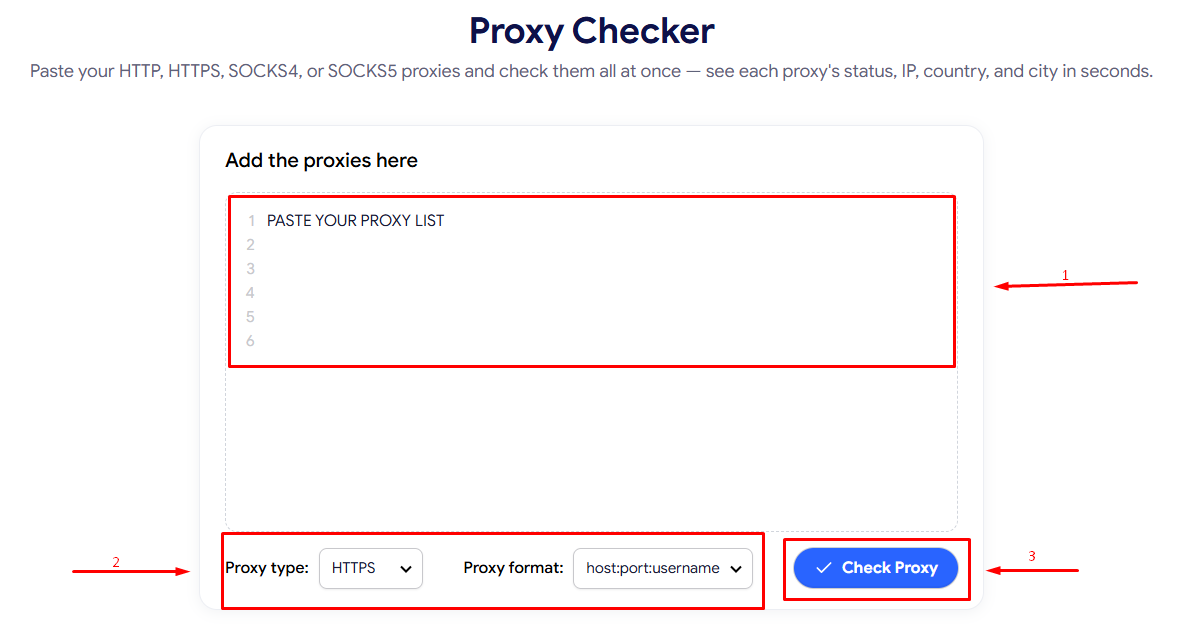
How to check your proxy on Proxy Checker
4. Understanding your proxy checker results
This is where the real value is: once you have a results table in front of you, here's how to read each part of it.
-
IP address: The IP address that showed up as your exit point. If it doesn't match what you expected, it's usually because the proxy uses a rotating pool of IPs, your provider reassigned a different IP, or the proxy simply isn't performing the way it was advertised. Comparing this against the IP the provider promised when you purchased it is one of the quickest ways to catch a mismatch early.
-
Country and city: The detected location tied to that IP. Use this to confirm the proxy is actually routing through the location it claims to, since a mismatch here is one of the clearest signs a proxy isn't behaving as expected. This matters most for tasks tied to a specific region, such as accessing region locked content or managing an account tied to a particular country.
-
Status (Active or Inactive): Whether the proxy successfully connected. Active means it's currently usable, while Inactive means it refused the connection, timed out, or returned an error at the moment of testing. Keep in mind this reflects the proxy's condition at the exact moment you ran the check, not a permanent state.
-
Filter by: Lets you narrow the table down, for example to only Active or only Inactive proxies, which is especially useful when you're working through a long list and only want to focus on the proxies that are still usable.
-
Copy and copy all: Lets you quickly grab a single proxy or your entire list. Filtering to Active first before using Copy All helps make sure you're not accidentally copying dead proxies along with working ones into whatever tool or script you're about to use them in.
-
Re-check: Run the same list through the checker again. Since a proxy's status can change over time, especially with rotating or shared proxies, re-checking periodically is more reliable than trusting a single result indefinitely.
Here's what this looks like in practice. In one real result of 7 proxies, the checker returned a clear mix: four of the proxies came back active, with valid exit IPs and matching country/city fields spanning locations such as the United States, Singapore, Japan, and the United Kingdom.
The other three came back inactive, and notably show no IP, country, or city at all, since the checker never received a valid response to pull that information from. This is a useful pattern to recognize: an Inactive row with blank IP/location fields isn't missing data by mistake, it's simply what a failed connection looks like, and it's a quick way to scan a long list and immediately spot which proxies need attention without reading every status label individually.
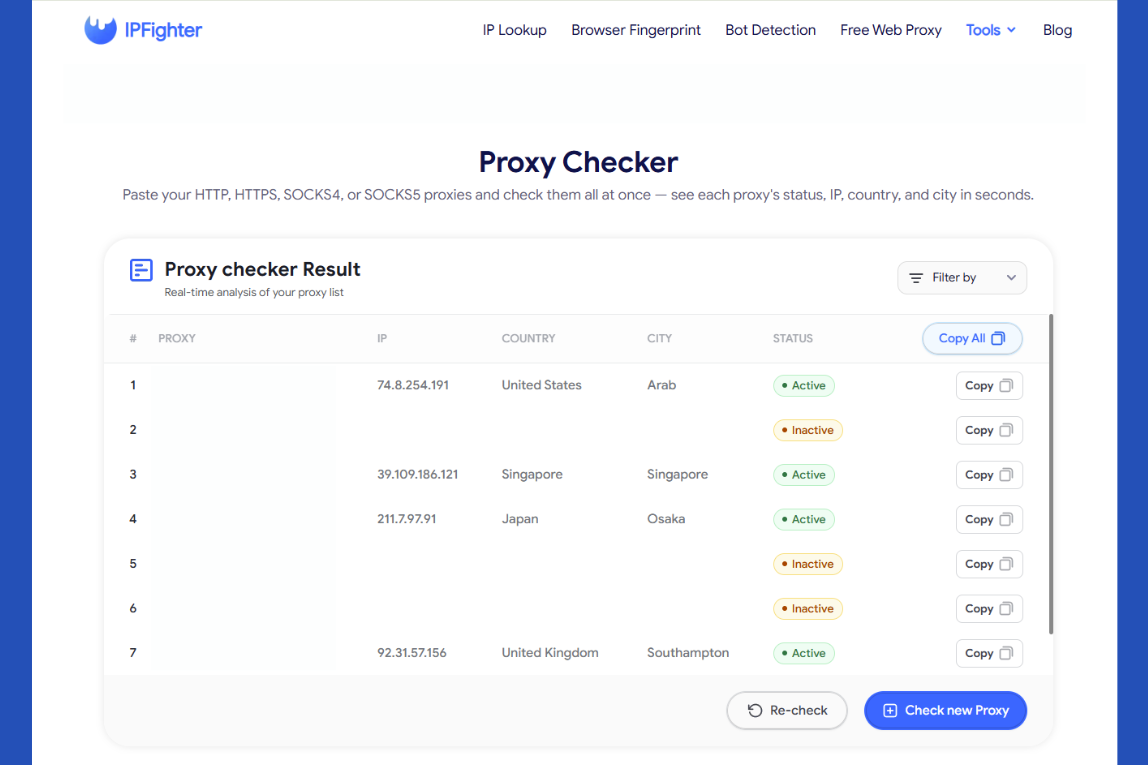
Results after checking the proxy on IPFighter's Proxy Checker
5. Common proxy checker results and what they mean
A few patterns come up often enough to be worth recognizing on their own:
-
Getting an active status with the wrong country: The proxy connects successfully, but the exit IP lands in a different country than you expected. This usually happens when the provider's pool includes IPs from a broader region than what was advertised, or when the specific IP you were assigned has since been reassigned to a different location.
-
Seeing an entire list come back Inactive right after purchase: Every proxy you just bought shows as Inactive, which usually points to an incorrect format when pasting or proxies that were already expired. It's worth checking the exact format your provider gave you against the formats the checker supports before assuming the whole batch is bad.
-
Flipping between active and inactive: The same proxy shows different statuses across repeated checks, which is a sign of an unstable connection rather than a one time error. This is common with overloaded shared proxies, where availability depends on how many other users are connected at that moment.
Each of these has a different explanation and a different next step, which the following section covers.
Read more:
-
Best ISP proxy providers in 2026: Which one is worth buying?
-
How to improve IP score: A complete guide
-
How to pass bot detection test and avoid getting flagged
6. What should you do next?
Once you know what your result actually means, here's how to act on it. Matching your response to the specific pattern you saw, rather than treating every result the same way, is what actually moves you from "checked" to "resolved":
-
If it's active but the exit IP or country is wrong: Consider switching to a different proxy, or check with your provider whether the package you purchased actually covers that location.
-
If a proxy is inactive: Double check that you pasted it in a supported format. If it's still Inactive after that, reach out to your provider, since the issue is likely on their end.
-
If you need to confirm more than just active status: The Proxy Checker tells you whether a proxy is working, but it doesn't show its anonymity level on its own. If your work needs a highly anonymous proxy, check the returned IP on IP Lookup to see whether it's flagged as a proxy or hosting IP.
Working through these steps after each check is what turns a simple active or inactive result into an actual decision about whether to keep using that proxy.
Ready to check your own list? Head back to the Proxy Checker and run a fresh test now.
7. FAQ
A proxy shows active, but I'm still getting blocked on a site. Why?
An Active status only confirms the proxy can connect, not that it's undetected. The site may be blocking it based on its IP reputation, its connection type (datacenter versus residential), or its anonymity level, none of which the Active status alone reflects.
How often should I check proxies I use regularly?
It depends on how critical the proxy is to your work, but checking every few days is a reasonable habit for proxies in active use, since a proxy that worked yesterday can go inactive at any time.
Is an Elite proxy always better than an Anonymous or Transparent one?
For most privacy sensitive tasks, yes, since Elite proxies hide both your real IP and the fact that a proxy is in use at all. If privacy isn't a priority, a lower anonymity level can still work fine.
Are free proxies reliable enough for long term use?
Generally no. They tend to be shared by many users, making them slower and more likely to go inactive or get blacklisted than paid, dedicated proxies.
Why does the exit IP keep changing even though I'm using the same proxy?
This usually means the proxy is backed by a rotating pool rather than a single fixed IP, so each connection (or each check) can return a different exit IP from that pool.
Read more
Aproxy review: Proxy options, pricing, and performance


AstroProxy review: Uncovering real speeds & IP quality

FlashProxy review: Is this proxy network worth it?

PrivateProxy review: Is it worth your investment?

IPFoxy review: Are its pure rotating residential proxies worth it?

CatProxies review: What do its five proxy types offer?