

NodeMaven takes a “quality-first” approach to proxies, focusing on filtering IPs before they are assigned rather than simply maximizing its proxy pool. But does cleaner IP quality actually translate into better real-world performance? In this review, IPFighter explores NodeMaven’s proxy types, pricing, key features, and test results to see whether its proxies are really worth using.
1. General information
Before diving into the details, here's a quick overview of Nodemaven and its core specifications.
|
Website |
|
|
Founded |
2023 |
|
Proxy types |
Residential / Mobile / ISP proxies |
|
IP pool |
30M+ Residential / + 295K Mobile IPs in 190+ countries |
|
Protocol |
HTTP(S) / SOCKS5 |
|
Pricing model |
Per GB / per IP |
|
Payment |
Cryptocurrencies / Visa / Mastercard / American Express / Wire Transfer / MIR / YooMoney |
|
Trial |
$3.50 paid trial with 750 MB |
|
Best for |
Web scraping, automation, multi-accounting, social media, and geo-targeted tasks |
Discover more:
-
Best proxy providers in 2026: Compare top 6 services
-
Best mobile proxy providers in 2026: Hands-on testing results
-
Best ISP proxy providers in 2026: Which one is worth buying?
2. Proxy types available at NodeMaven
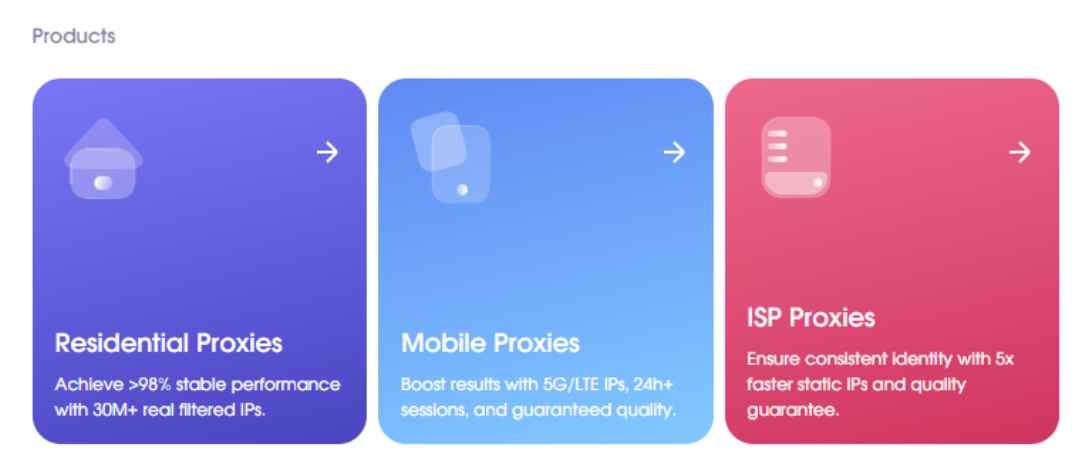
NodeMaven currently offers three main proxy categories: Residential, Mobile, and ISP proxies. Each type is designed for different use cases, from large-scale data collection to tasks requiring stable, dedicated IP addresses.
2.1. Residential proxies
NodeMaven’s residential proxies use real residential IP addresses and are positioned as its main solution for users who need clean IPs with flexible geographic targeting.
-
Advertised proxy pool: 30M+ pre-filtered residential IPs
-
Countries: 190+
-
Filtering: Country, region, city, zip & ISP targeting
-
Rotation: Rotating and sticky sessions
-
Protocols: HTTP, SOCKS5
A key highlight is NodeMaven’s IP quality filter, which screens IPs before assigning them to users to help reduce the chance of receiving low-quality or previously flagged addresses.
2.2. Mobile proxies
NodeMaven provides mobile proxies using 4G, 5G, and LTE IPs, designed for tasks where mobile network identity and IP reputation are important.
-
Advertised proxy pool: 250K+ mobile IPs
-
Countries: 190+
-
Filtering: Geographic targeting options
-
Rotation: Rotating and sticky sessions
-
Protocols: HTTP, SOCKS5
The service focuses on providing cleaner mobile IPs through its filtering system, while allowing users to select locations based on their specific targeting requirements.
2.3. ISP proxies
ISP proxies provide dedicated IP addresses associated with Internet Service Providers, making them more suitable for workflows that require a stable and consistent IP.
-
IP type: Dedicated ISP IPs
-
Traffic: Unlimited
-
Filtering: Country-level targeting
-
Session: Static
-
Protocols: HTTP, SOCKS5
Unlike bandwidth-based residential and mobile proxies, NodeMaven’s ISP proxies are charged per IP and come with unlimited traffic, making them a practical option for users who need to maintain the same IP over an extended period.
Proxy types available at NodeMaven
3. Key features of NodeMaven proxies
Beyond its three proxy types, NodeMaven provides several features focused on IP quality, targeting flexibility, and easier proxy management.
-
Country, region, city, and ZIP targeting: Allows users to select IPs from specific geographic locations for more precise geo-targeting.
-
ISP targeting: Lets users target IPs associated with specific Internet Service Providers where supported.
-
IP quality filter: Filters proxy IPs before assigning them to users, helping reduce the likelihood of receiving low-quality or previously flagged IPs.
-
Rotation: Choose between automatically rotating IPs or maintaining the same IP for a specific session, depending on the workflow.
-
IP whitelist authentication: Authenticate proxies by whitelisting trusted IP addresses instead of using usernames and passwords.
These features make NodeMaven suitable for web scraping, data collection, automation, social media management, multi-account operations, ad verification, and other geo-targeted tasks where IP quality and flexibility are important.
4. NodeMaven pricing overview
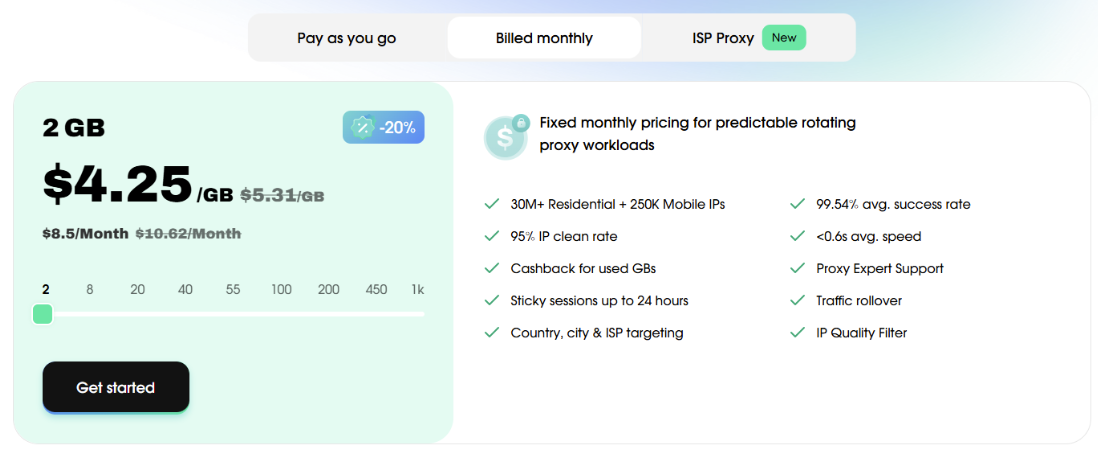
NodeMaven uses different pricing models depending on the proxy type. Residential and mobile proxies are charged by bandwidth, with both pay-as-you-go and monthly options available, while ISP proxies are priced per IP with 30- or 90-day plans.
4.1. Residential proxies
NodeMaven offers both flexible and subscription-based options for Residential proxies, allowing users to choose a plan based on their expected traffic consumption.
-
Starting price: From $4.25/GB for 2GB over one month
-
Pricing models: Pay-as-you-go and monthly subscription
-
Trial: $3.50 for 750 MB
The Pay-as-you-go option is suitable for users with irregular traffic needs, while monthly plans can offer better value for projects with more consistent proxy usage. Traffic rollover and cashback can also help users get more value from their purchased bandwidth.
4.2. Mobile proxies
For Mobile proxies, NodeMaven follows a similar bandwidth-based pricing structure, with options designed for both occasional testing and larger-scale usage.
-
Starting price: From $4.25/GB for 2GB over one month
-
Pricing models: Pay-as-you-go and monthly subscription
-
Trial: $3.50 for 750 MB
This pricing model gives users the flexibility to start with a smaller amount of traffic before scaling up. The shared trial also provides an opportunity to test NodeMaven's Residential and Mobile proxy pools before committing to a larger plan.
Prices for residential & mobile proxies plan
4.3. ISP proxies
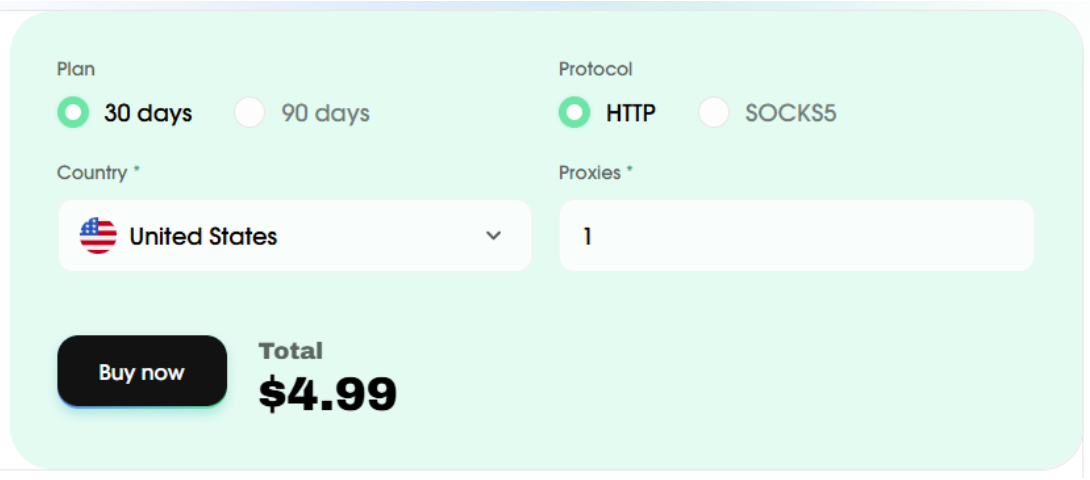
Unlike residential and mobile proxies, NodeMaven's ISP proxies are charged based on the number of IPs rather than bandwidth, making the pricing structure easier to estimate for long-term usage.
-
Starting price: From $4.99/IP for 30 days
-
Plan duration: 30 or 90 days
With unlimited traffic and longer subscription periods, ISP proxies are designed for users who need stable IP addresses for extended sessions without having to monitor bandwidth consumption.
Overall, NodeMaven offers bandwidth-based pricing for Residential and Mobile proxies and IP-based pricing for ISP proxies, giving users several options depending on their traffic requirements and use case.
Prices for ISP proxies plan
If you're planning to purchase proxies from NodeMaven, don't miss the NodeMaven promo code available on IPFighter. You can save on your proxy purchase with exclusive discounts while choosing the plan that best suits your needs.
5. Performance test
To evaluate NodeMaven beyond its advertised features and pricing, IPFighter will test a proxy from the provider under real-world conditions. The test will focus on IP quality, geolocation accuracy, connection speed, and overall usability. We tested one of their residential and ISP proxy IP addresses using IPFighter, Speedtest, and Google Search.
5.1. Preparation
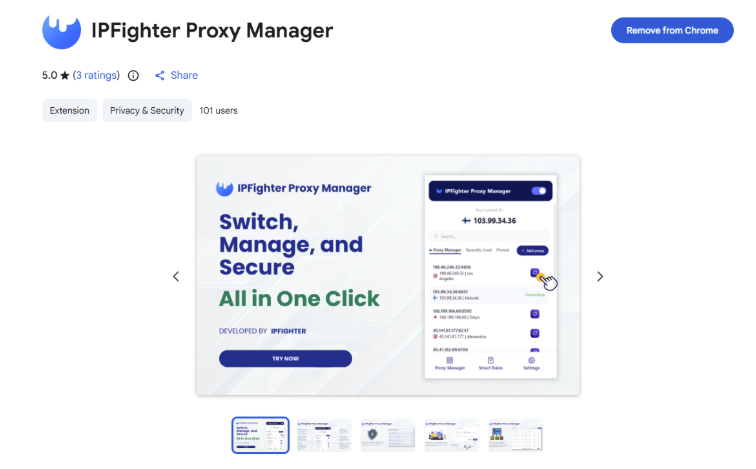
Before evaluating the proxy, we first added it to our browser using the IPFighter Proxy Manager extension. This extension makes it easy to import, manage, and switch between multiple proxies directly within your browser, eliminating the need for manual proxy configuration.
IPFighter Proxy Manager extension on Chrome
If you'd like to learn how to set it up, check out our detailed guide: A complete guide to the IPFighter Proxy Manager extension.
5.2. Test results
Residential proxies
First, regarding the results of the IPFighter test, NodeMaven’s residential IP addresses demonstrate high reputation scores across major platforms: 95% on X, 94% on Instagram, YouTube, and TikTok, and 90% on Google, etc. All platforms rate these IP addresses as highly reputable, indicating a strong standing and suitability for tasks involving leading social media platforms and search engines.

IP scores on major platforms
The IP lookup confirms that the address is a U.S. residential IP, located in California, matching the location configured when the proxy was initially set up. It is associated with Frontier Communications and identified as a Residential ISP connection. The check detected no proxy, VPN, or datacenter IP, suggesting that the address appears to be a genuine residential IP with no major connection-type red flags. The IP receives a 90% reputation score, suggesting that it appears trustworthy to online platforms and anti-fraud systems, with no major blacklist concerns detected during the check.
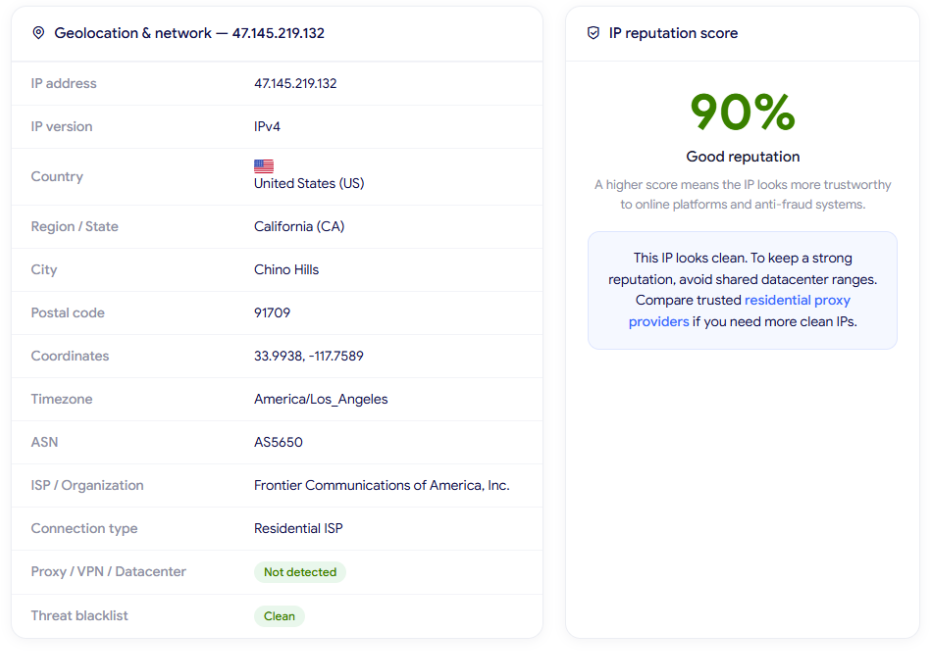
IP Lookup results on IPFighter
Next, IPFighter will check this proxy speed on Speedtest. The results show 151.80 Mbps download and 58.01 Mbps upload, which are strong speeds for a residential proxy. During the test, the connection also remained stable, and regular web searches worked smoothly without noticeable lag.
The measured ping was around 254 ms, which is relatively high compared with a direct connection and may affect latency-sensitive tasks. However, for common activities such as web browsing, scraping, and account management, the overall performance of this randomly selected IP was quite solid.
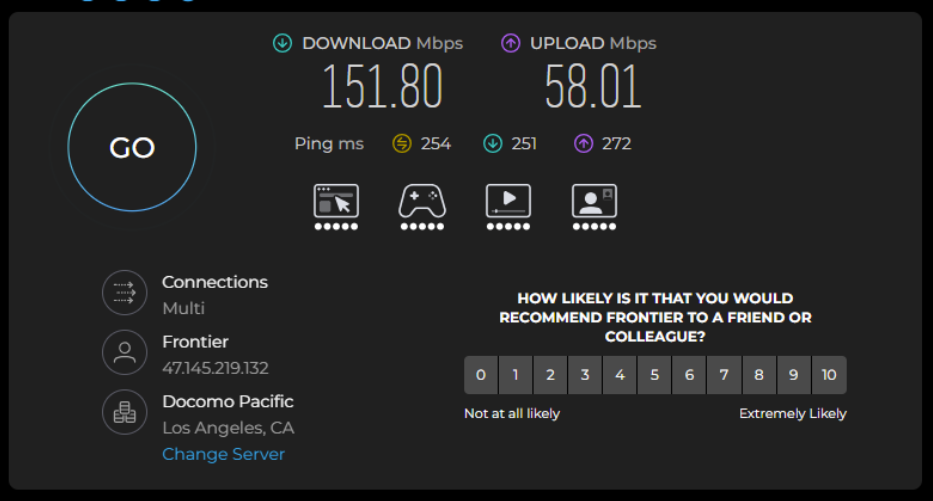
Check proxy on Speedtest
Finally, quickly check whether the proxy location matches by searching Google. The search result shows the location as Jacksonville, Florida, indicating that Google associates the connection with the Florida area. However, Google’s location result can be influenced by account activity and other personalization factors.
Therefore, this check provides only a supporting reference, rather than definitive proof of location accuracy. The IPFighter geolocation result should be considered more reliable when evaluating whether the proxy location matches the original configuration.
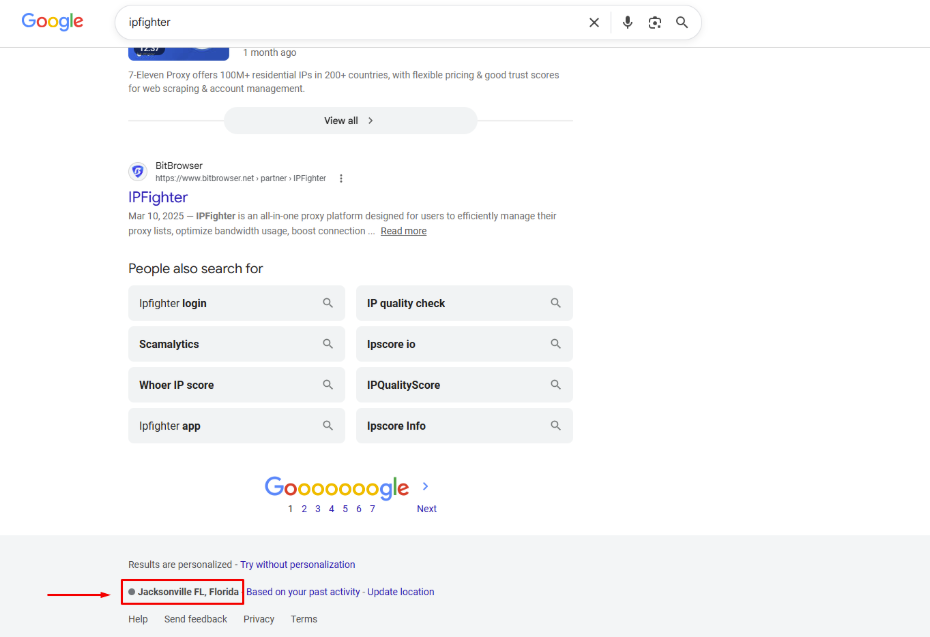
Check on the Google search bar
Want to try NodeMaven’s residential proxies yourself? Use code IPFIGHTER35 to get 35% off your purchase.
ISP proxies
The platform trust scores show that the IP performs strongly across all tested platforms: 95% on X, 94% on Instagram, YouTube, and TikTok, 93% on Facebook, and 90% on Google. This indicates a strong and consistent reputation across major platforms, making the IP suitable for tasks that require a reliable IP, such as social media, account management, and browsing.
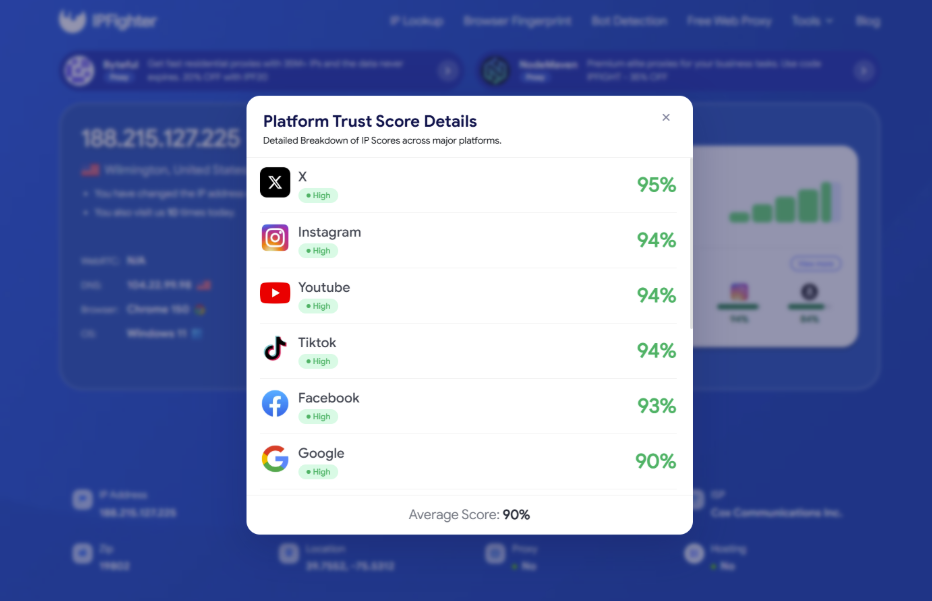
IP scores on major platforms
The tested ISP proxy is identified as a U.S. IP located in Delaware, matching the country selected during the initial proxy setup. It is associated with Cox Communications Inc. and classified as a Residential ISP connection. The check detected no proxy, VPN, or datacenter IP, suggesting that the address appears to be a genuine residential IP without major connection-type red flags.
The IP receives a 90% reputation score, categorized as Good reputation, suggesting that it appears relatively trustworthy to online platforms and anti-fraud systems. Overall, the IP shows a clean profile with no proxy or blacklist flags detected during the check.
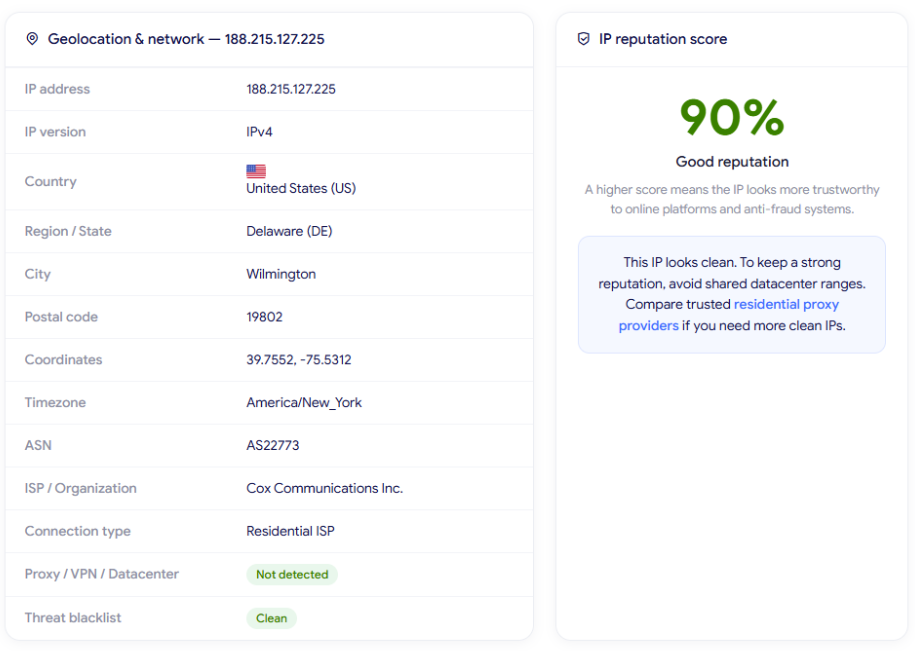
IP Lookup results on IPFighter
The ISP proxy delivered 292.69 Mbps download speed and 22.01 Mbps upload speed. While the upload speed is relatively modest compared with the download rate, the connection remained stable during testing, with smooth browsing and no noticeable interruptions when searching.
The recorded latency was around 273-292 ms, which is relatively high and may affect responsiveness in latency-sensitive tasks. Overall, the proxy provided strong download performance and stable connectivity, while the higher latency and lower upload speed are worth considering depending on the use case.
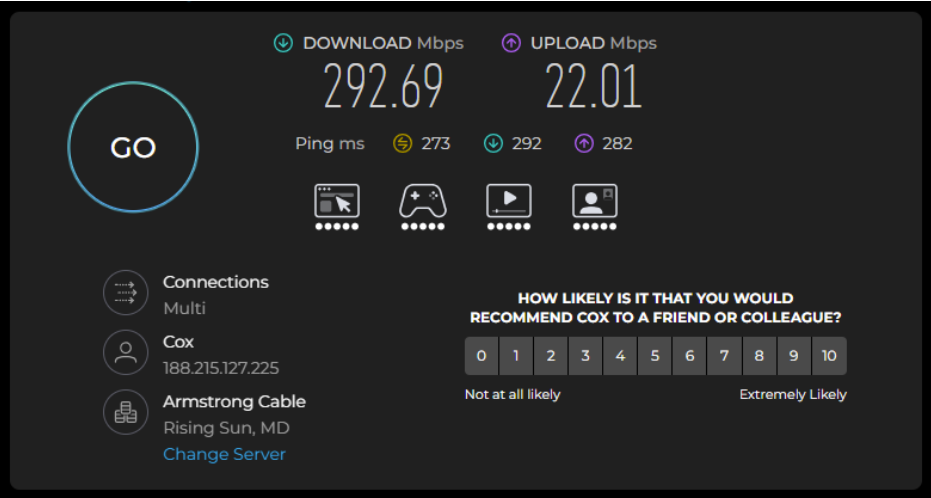
Check proxy on Speedtest
The quick Google location check shows Palestine as the detected location, while the proxy was initially configured for the U.S. This does not match the intended U.S. location, indicating a geolocation discrepancy in this randomly selected ISP proxy IP. However, IPFighter correctly identifies the IP as being in the U.S., so the result varies depending on the geolocation database used.
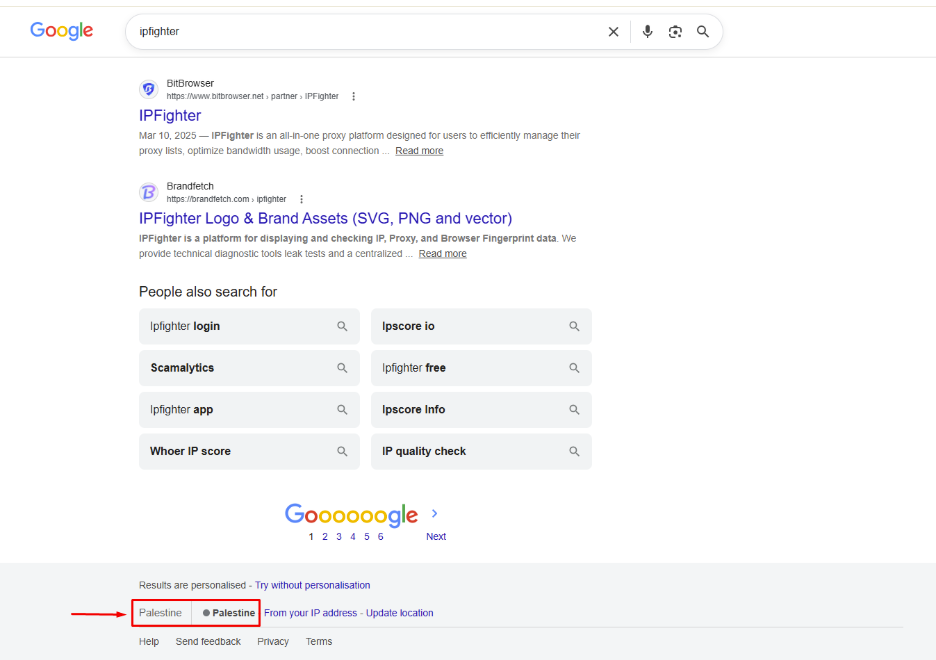
Check on the Google search bar
These results are based on randomly selected IPs during the testing process, so actual performance may vary depending on the specific IP, geographic location, network conditions, and time of use. Therefore, individual IPs may deliver different speeds, latency, and geolocation results in real-world use.
Interested in testing NodeMaven’s ISP proxies? Use code IPFIGHTER40 to get 40% off your purchase.
Read more:
-
How to improve IP score: A complete guide
-
How to check if a proxy is working and read your results
6. How to get proxy from Nodemaven
Once you have created and verified your NodeMaven account, getting a proxy is relatively straightforward. The process can be completed directly from the dashboard, where you can purchase traffic and configure the proxy according to your needs.
Step 1. Create or log in to your account
Visit the NodeMaven website, sign up or log in with your email address and password. After successful login, you can access the dashboard and purchase a proxy plan.
Create or log in to your account
Step 2. Purchase a proxy plan
Go to the pricing section and select the proxy type and traffic package that best fits your needs.
Before completing your purchase, don't forget to check for NodeMaven promotional codes with a up to 40% OFF coupon code on IPFighter. Applying an existing discount code can significantly reduce your costs.
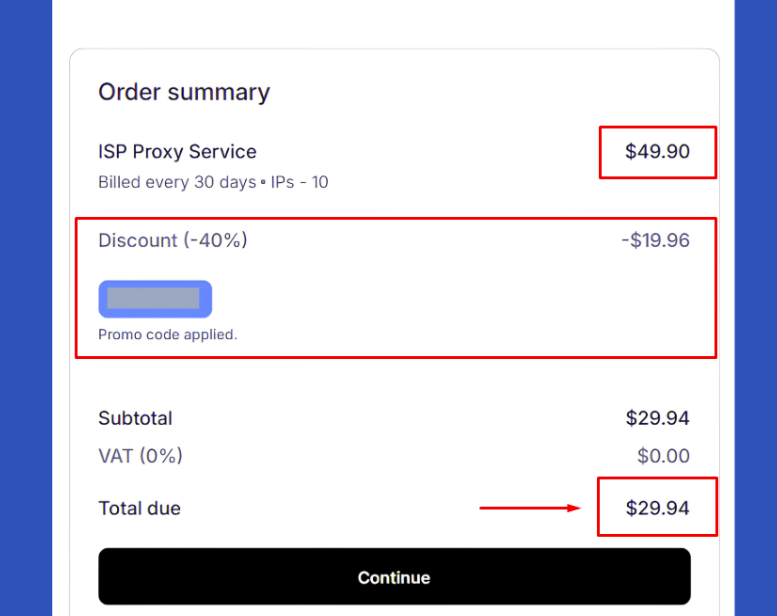
Purchase a proxy plan
Step 3. Configure your proxy
After purchasing traffic, open the Proxy Setup section in the dashboard. You can configure the country, region, city, session type, IP quality filter, protocol, and output format, depending on the proxy type and your requirements.
Step 4. Generate and copy your proxy
Once the configuration is complete, NodeMaven generates a proxy list based on your selected settings. You can specify the number of proxies, copy the list directly, or export it as a CSV/TXT file before using it with your preferred browser, software, or automation tool.
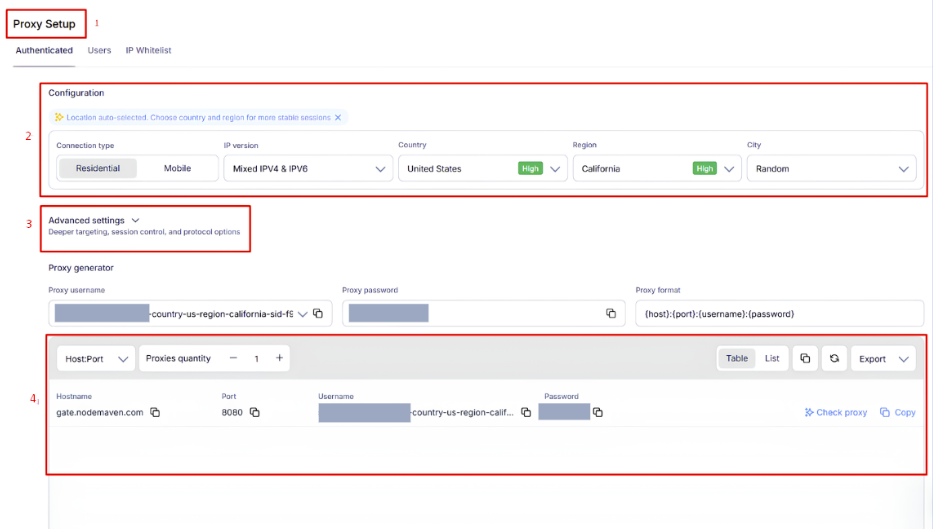
Configure, generate and copy your proxy
7. Alternatives
Besides NodeMaven, you can also consider other providers offering similar residential proxy services.
-
Mobileproxy.space: Focuses on mobile proxies while also offering residential and server proxy solutions for users looking for mobile IPs and flexible proxy configurations.
-
NovProxy: Offers residential and ISP proxy solutions with flexible country, state, city, and ASN targeting.
-
NiuProxy: Provides residential, mobile, ISP, and datacenter proxies across 195+ countries, with both rotating and sticky sessions.
You can also check out reviews of our other partners here:
-
Byteful review: An AI-driven proxy network powered by Smartpath technology
-
IPRoyal review: Does the royal name deliver premium performance?
-
LightningProxies review: Is it worth your investment?
-
Proxys.io review: Features, pricing, performance
8. Conclusion
Overall, NodeMaven is a solid option for users looking for flexible proxy solutions with a focus on IP quality. Our tests showed generally positive results, although actual performance can vary between individual IPs and network conditions.
If you're planning to try NodeMaven, check out the NodeMaven promo code on the IPFighter page to get up to 40% off your purchase.
9. FAQ
Can I test NodeMaven proxies before committing to a larger plan?
Yes. NodeMaven provides a trial option, allowing users to test its proxy service before purchasing a larger package.
Are NodeMaven proxies good for multi-account management?
NodeMaven can work for multi-account workflows where maintaining different IP identities is important. However, the appropriate proxy type and session configuration will depend on the platforms and accounts being managed.
Does NodeMaven offer location targeting?
Yes. NodeMaven supports geographic targeting options that allow users to select specific locations depending on the proxy type and available inventory.
How does NodeMaven compare with other residential proxy providers?
The main factors to compare are IP quality, geographic coverage, targeting options, pricing, rotation controls, and actual performance. NodeMaven may be more attractive for users who value its IP filtering and flexible proxy configuration.
Can I get a refund from NodeMaven if the proxy does not work as expected?
Refunds are only available when applicable under NodeMaven's terms. When eligible, the refund must be returned to the same payment method and wallet or account used for the original payment, and additional verification or compliance requirements may apply.
Read more

Can a gaming proxy improve your gaming experience? What to know


Proxy server for streaming: Can it improve your experience?

Rapidproxy review: A closer look at its residential proxy network

Coronium review: How do its dedicated 4G/5G proxies perform?

ProxyEmpire review: What do its proxy services offer?
Proxy001 review: Exploring its 100M+ residential proxy network