

Opening a web proxy and typing in a URL is easy, but using it safely takes a bit more than that. This guide walks you through how to use web proxy safely with IPFighter's Free Web Proxy, when to reach for it over a VPN or a dedicated residential proxy, and how to confirm your session is actually private rather than just assuming it is.
1. How to use web proxy safely?
Use IPFighter's Free Web Proxy enable the privacy toggles (Block WebRTC, spoof timezone, spoof language) before you start browsing, avoid logging into sensitive accounts through it, and verify your exit IP with IP Lookup once you're connected, so you're confirming your session is protected rather than assuming it.
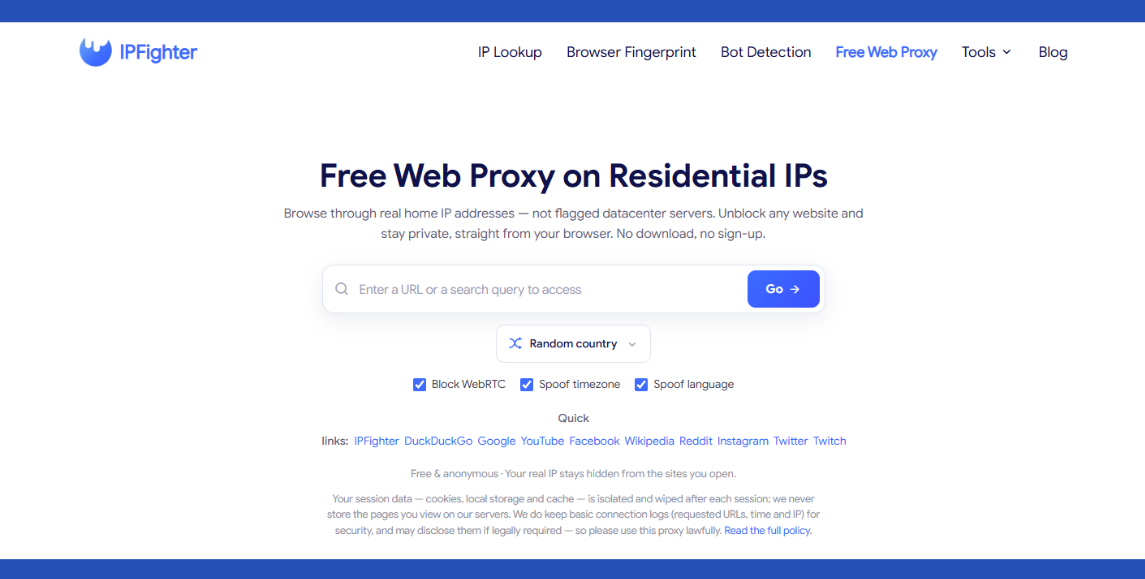
Free web proxy tool on IPFighter
Discover more:
-
What is a Proxy? Benefits, usage, and everything you need to know about proxies
-
What is a residential proxy? Why websites trust these IPs
2. When should you use a web proxy instead of VPN or residential proxy?
The right pick usually comes down to what you're trying to get done in the moment, more than which tool sounds more powerful on paper:
-
Web proxy: When you need to unblock a single site quickly, with nothing to install and no setup beyond opening a page.
-
VPN: When you need to protect your entire device, especially for sensitive work like banking, since it encrypts everything rather than just the page you're viewing.
-
Dedicated residential proxy: When you need to scale, such as automation or managing multiple accounts, where a single shared web proxy session isn't built to handle the volume or stability required.
Matching the tool to the task upfront saves you from relying on a web proxy for something it was never built to handle, and from overpaying for a dedicated proxy plan when a quick, free session would have done the job just as well for that particular moment.
3. How to use the free web proxy safely
Beyond the basic three steps already shown on the tool page, a few habits make a real difference for actually staying safe rather than just technically using the tool:
-
Enable every toggle first: Turn on block WebRTC, spoof timezone, and spoof language before you start browsing, rather than relying on the default settings, since leaving even one off can undo the benefit of the residential exit IP.
-
Avoid reusing sessions for important accounts: Keep sensitive logins, like banking, email, or work accounts, out of any web proxy session entirely, since the tool isn't designed to be a secure tunnel for credentials.
Following these habits doesn't change what the proxy does technically, but it does close the gap between using it and using it safely, which is exactly the distinction most people overlook when they treat any proxy as automatically safe by default.
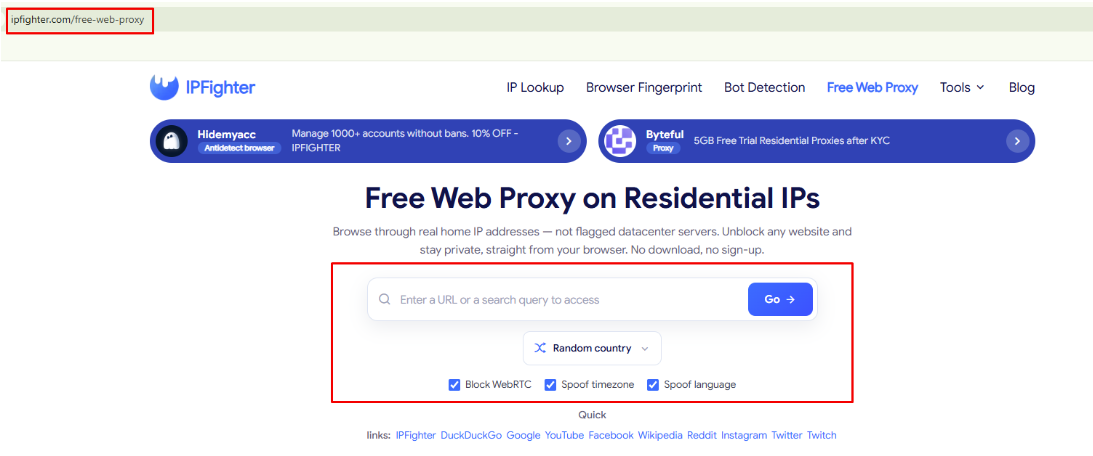
How to use the free web proxy safely
4. Verifying your session is actually private
Turning on a toggle and assuming it worked isn't the same as confirming it did. Since this tool doesn't hand you a score or a pass/fail result the way IPFighter's other tools do, verifying your session takes a bit more initiative on your part. Here's how to actually check.
4.1. Verifying your exit IP
After connecting, check your exit IP with IP Lookup to confirm it shows a residential IP rather than your own. This single check tells you whether the proxy is actually doing its job before you rely on it for anything else, and it only takes a moment to run alongside your browsing session, so there's little reason to skip it.
Here's what that looked like in one real check: after connecting through the proxy, IP Lookup showed an IP Score of 90% (Good), Connection type Residential ISP, Residential IP marked Yes, and Proxy/VPN/Datacenter marked Not detected, with a Clean threat blacklist status.
Worth noting, the same result also included a Proxy Provider History section, showing that this specific IP had previously been associated with a proxy provider on record, even though it read as Not detected for this particular check. That's a useful reminder that a clean result in the moment doesn't erase an IP's past, so it's still worth treating any single check as a snapshot rather than a permanent guarantee.
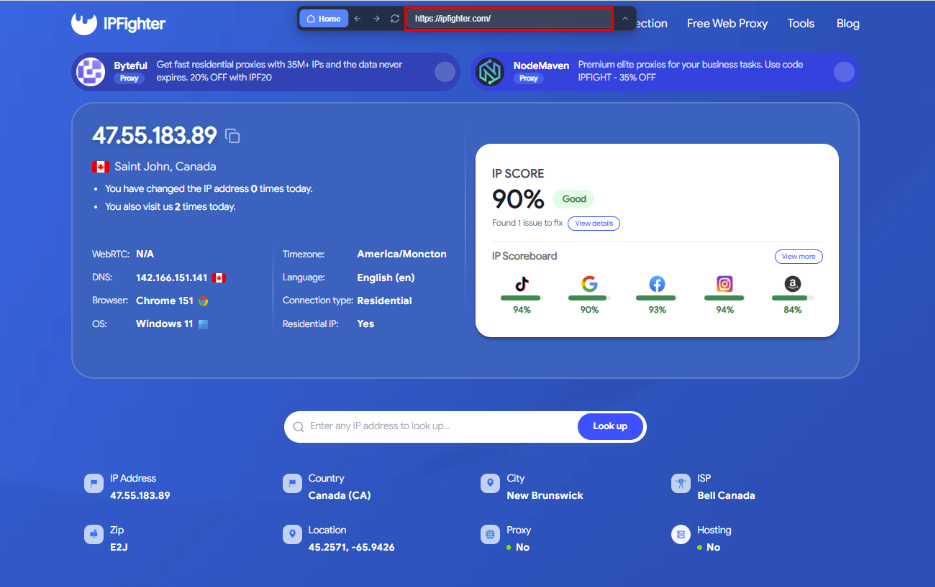
Check IP on IPFighter
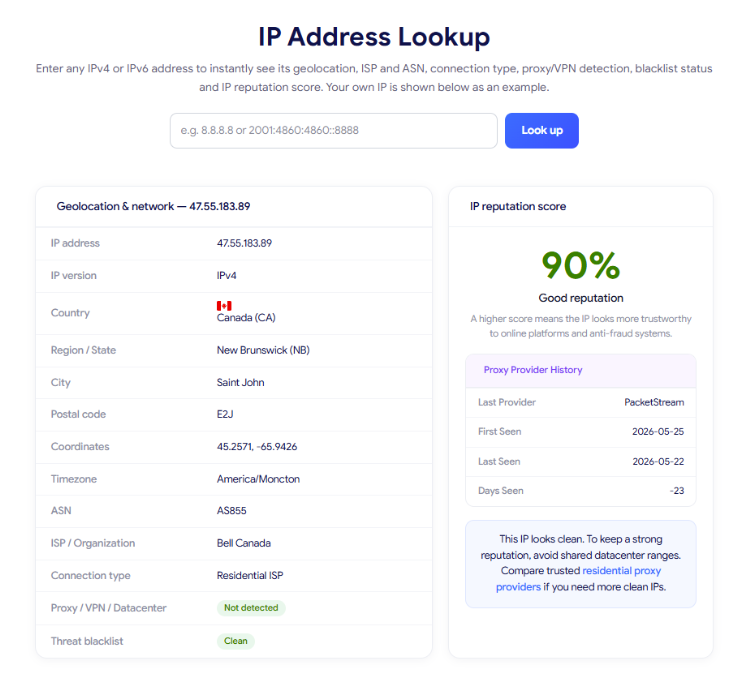
Check the IP using IPfighter's IP lookup tool
4.2. Verifying your privacy toggles are working
Enabling block WebRTC, spoof timezone, and spoof language doesn't guarantee they're behaving as expected, so it's worth confirming each one rather than trusting the toggle label alone. Run WebRTC Leak Test and DNS Leak Test to make sure your real IP isn't leaking through either channel, and check the IPFighter homepage to see whether your timezone and language now line up with the proxy's location instead of showing a mismatch.
4.3. Signs you're still being detected
If you're still hitting CAPTCHAs or getting blocked despite having every toggle enabled, that's a sign something isn't fully masked. This can point to a toggle not applying correctly, a site reading signals the proxy doesn't cover, or simply a site with stricter anti-bot protection than any web proxy can reliably get past, no matter how well configured it is.
4.4. The technical limits of a web proxy
A web proxy only relays the page you're viewing; it doesn't encrypt your device the way a VPN does, and it can't guarantee passing every anti-bot system out there, since those systems increasingly rely on more than just IP type to make a decision. Knowing this upfront sets the right expectations before you rely on it for something it isn't built to handle, which avoids the frustration of assuming a failed unblock attempt means something is broken.
4.5. Privacy and security notes to keep in mind
Beyond the technical limits, there are a few privacy specific points worth understanding. The proxy keeps basic connection logs (requested URLs, timestamps, and IP) even though it doesn't store the actual page content you view, and those logs can be disclosed if legally required.
Each session is wiped once it's closed, but data still exists while that session is active, so treat an open session as live, not already private by default. Use the proxy only for lawful purposes, since it isn't designed as a shield for anything else, and relying on it that way puts the responsibility for what happens back on you.
Read more:
-
Dedicated proxy providers: Best private proxy services compared
-
Private IP: How private IP addresses work in local networks
5. Common safe-use scenarios and mistakes
Knowing where a web proxy fits, and where it doesn't, comes down to recognizing these patterns:
-
Good fits: Unblocking content restricted on a school, office, or public network, casual anonymous browsing you don't want tied to your regular IP, watching video on sites like YouTube that generally play back fine through the proxy, and quickly checking how a site looks or responds from another region.
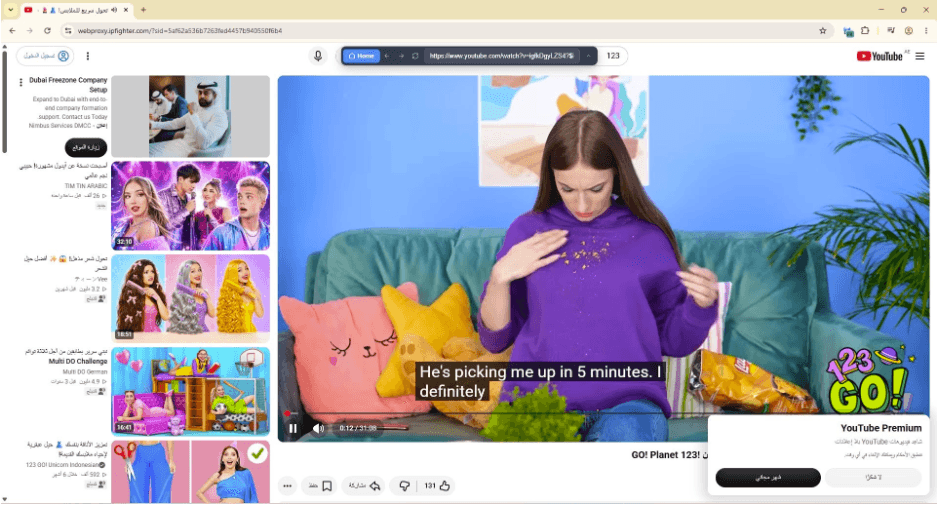
Access YouTube using IPFighter's Free Web Proxy
-
Common mistakes: Logging into banking or other important accounts through it, assuming it makes you completely invisible to every detection system, forgetting to enable the privacy toggles before browsing, or trying to use it to scale automation or multi-account work it was never designed for.
Matching your use case to the right category is what actually determines whether the session serves you well, far more than any single setting you toggle on or off.
6. What should you do next?
Which scenario you fall into from the previous section changes what the right next move actually is, rather than there being one universal answer. Here's how to act depending on where your situation falls:
-
For a good fit: Go ahead and use the web proxy as intended, and verify your session with IP Lookup, leak tests as covered above, so you're confirming rather than assuming it's working.
-
For sensitive work: Switch to a full VPN instead, since a web proxy was never meant to protect an entire device or secure the kind of login credentials that come with banking or important accounts.
-
For scaling up: If you need many stable residential IPs for automation or multiple accounts, look into a dedicated residential proxy plan instead. Check current proxy promo codes rather than trying to stretch a single web proxy session beyond what it's built for.
Ready to browse safely? Head to the Free Web Proxy and start a new session with the privacy toggles enabled from the very first page you open.
7. FAQ
Can I stay logged into an account across multiple web proxy sessions?
No. Each session is isolated and wiped once closed, so any login state doesn't carry over to your next session, even for the exact same site and account.
Does spoofing timezone and language actually change what the site sees, or just my browser?
It changes what the destination site sees, since the proxy reports the spoofed values as part of the connection, not just something displayed locally in your browser.
Is it legal to use a web proxy?
Using one is generally legal, but what you do through it still has to follow the law. Accessing content you're not authorized to view, or using it to attack another system, isn't excused just because it was done through a proxy, and IPFighter's own terms make lawful use a condition of access.
Can I use the free web proxy for streaming video?
You can try, but heavier scripting and DRM protections on many streaming sites often don't render correctly through a web proxy, unlike simpler static pages that load without issue.
What happens to my session data if I close the tab without finishing?
It's still wiped the same way as a normal session close. There's no partial state left behind for the proxy to pick back up later.
Read more

Proxy for trading: Can it improve your connection and privacy?

Anonymous Proxies review: What its proxy network offers

Web scraping proxy: How to collect web data more efficiently

Can a gaming proxy improve your gaming experience? What to know
Proxy server for streaming: Can it improve your experience?
Rapidproxy review: A closer look at its residential proxy network