

Have you ever wondered why traditional WiFi routers struggle to cover every corner of your home, leaving you with frustrating dead zones? That is precisely where a mesh network comes in - connecting multiple nodes to create a seamless, resilient network that eliminates coverage gaps without relying on a single central hub.
In this guide, IPFighter explains what a mesh network does, how it works, its main types and applications, key benefits, potential limitations, and how mesh WiFi compares to a traditional router or WiFi extender.
1. What is a mesh network?
A mesh network is a network topology in which multiple nodes are interconnected and cooperate to transmit data. Unlike a traditional network that may depend heavily on one central device, mesh networks can provide multiple paths between nodes.
Depending on the design, a node may communicate directly with several neighboring nodes. If one connection becomes unavailable, the network may be able to use another available path. This makes mesh topology useful for environments where coverage, redundancy, or network resilience is important.
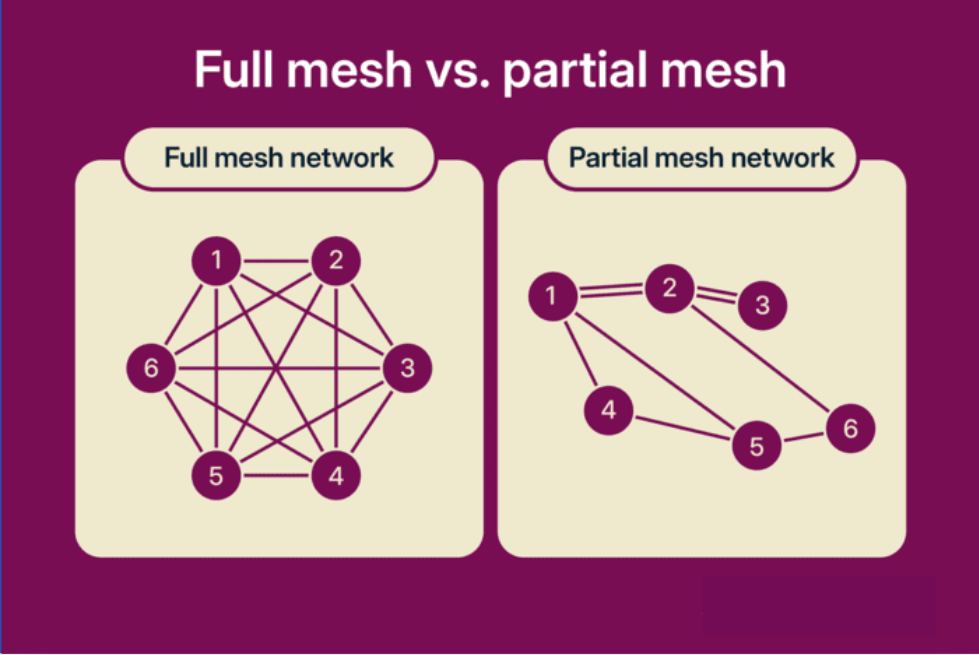
Two Wi-Fi configurations for mesh networks
There are two fundamental forms of mesh topology: full mesh and partial mesh. In a full mesh, every node has a direct connection to every other node. In a partial mesh, only some nodes have direct connections to multiple other nodes. Full mesh can provide more redundancy, but it also requires more connections and can be more expensive and complex to maintain.
Mesh networking is broader than home WiFi. It can be used in enterprise networks, campus environments, outdoor wireless deployments, critical infrastructure, and other systems that need multiple interconnected access points or network nodes. Cisco, for example, documents wireless mesh deployments for enterprise, campus, metropolitan, indoor, and outdoor environments.
2. What does a mesh network do?
The main purpose of a mesh network is to allow multiple nodes to work together to provide connectivity across a larger or more complex area. A mesh network can:
-
Extend network coverage: Multiple nodes can provide connectivity across areas that a single router or access point may not cover effectively.
-
Create multiple communication paths: Data can travel through different nodes depending on the network design and available connections.
-
Support network resilience: Some mesh systems can reroute traffic when a node or link becomes unavailable.
-
Support mobility: Wireless mesh deployments can allow devices to move between coverage areas while remaining connected.
-
Simplify network expansion: Additional compatible nodes can be added when more coverage is required.
A mesh network is therefore more than a collection of WiFi repeaters. The nodes are designed to cooperate as part of the same network rather than simply receiving and rebroadcasting a signal independently.
However, the exact behavior depends on the mesh architecture. For example, Google describes its home mesh system as multiple WiFi points working together, while enterprise systems such as Cisco wireless mesh use dedicated access-point roles and wireless backhaul mechanisms.
3. How does a mesh network work?
The basic structure of a home mesh WiFi network can be represented as:
Internet → Main mesh router → Mesh nodes → Your devices
The main router connects the network to the Internet, while additional mesh nodes communicate with the router or other nodes to extend coverage. Depending on the system, these nodes can connect through WiFi, Ethernet, or a combination of both.
When a device sends data, the mesh system determines how that data should travel through the available nodes. Some systems can also reroute traffic through another node if a connection becomes unavailable, helping the network maintain connectivity.
Node placement is important for performance. A mesh node should be close enough to another node to maintain a strong connection, while placing it too far away or behind thick walls can weaken the link and reduce the quality of the overall network.
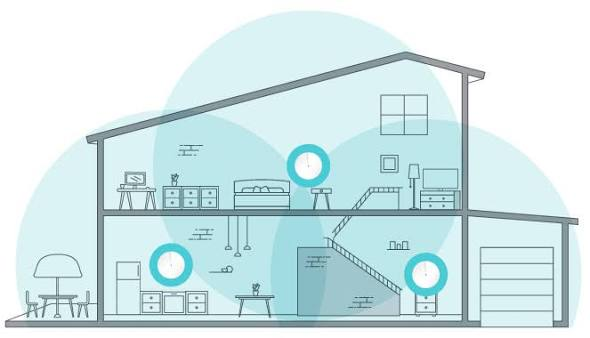
How does a mesh network work
Discover more:
-
What is an IP address, and how does it work?
-
How to find IP address on Windows, Mac, iPhone, and Android devices
4. Types of mesh networks: Architecture and deployment options
Mesh networks can be classified in several ways depending on how nodes communicate, how they are connected, and how clients access the network. The following types cover some of the most common concepts used when discussing mesh networking.
4.1. WiFi mesh network
A WiFi mesh network uses wireless access points or routers that communicate with one another to provide a unified wireless network. This is the type most home users encounter. Instead of depending on one router in a single location, multiple mesh points can be placed around a home, allowing devices to connect to a nearby point.
Wireless mesh is also used beyond homes. Enterprise and outdoor wireless deployments can use mesh access points to extend connectivity where running Ethernet to every access point is difficult or impractical. Cisco documents wireless mesh deployments in indoor, outdoor, campus, and metropolitan environments.

WiFi mesh network
4.2. Wired mesh network
A wired mesh network connects nodes using physical network links such as Ethernet or fiber. Because the communication paths do not depend entirely on wireless links, wired mesh networks can be useful where high reliability, predictable performance, or physical network redundancy is required.
A wired connection can also be used as a backhaul in some WiFi mesh systems. In this setup, the wireless nodes still provide WiFi access to users while Ethernet carries traffic between mesh points.
4.3. Full mesh topology
In a full mesh network, every node has a direct connection to every other node.
This structure provides a high level of redundancy because there can be multiple direct paths between devices. If one connection fails, another connection may remain available.
The trade-off is complexity. As the number of nodes increases, the number of required connections also increases, making full mesh more expensive and difficult to deploy and maintain.
4.4. Partial mesh topology
A partial mesh network connects some nodes to multiple other nodes while leaving other nodes with fewer direct connections.
This approach provides a balance between redundancy and cost. Organizations can create additional connections where they are most useful without connecting every node to every other node.
For larger networks, partial mesh is often more practical than full mesh because it reduces the number of physical or logical connections that need to be managed.
4.5. Hybrid mesh network
A hybrid mesh network combines mesh topology with other network topologies or connection methods. For example, a network may use a combination of star and mesh structures to provide centralized management in some areas while maintaining redundant connections in others.
Hybrid designs are useful when a single topology cannot efficiently meet all coverage, scalability, and reliability requirements. However, customized architectures can also increase design and maintenance complexity.
4.6. Infrastructure mesh architecture
An infrastructure mesh uses network infrastructure such as access points to create the mesh and provide connectivity to client devices.
In a wireless infrastructure mesh, some access points may have a direct wired connection to the network while other access points use wireless links to reach the wired network through neighboring mesh points. Cisco uses gateway/root and mesh access-point roles in its wireless mesh architecture. This architecture is useful when network administrators need to extend wireless coverage without running a wired connection to every access point.
4.7. Client mesh architecture
In a client mesh, client devices themselves can participate in forwarding traffic rather than relying only on dedicated infrastructure nodes.
This approach can be useful in specialized peer-to-peer or ad hoc networking environments where devices need to communicate directly and help relay traffic.
Client-based mesh designs are different from the typical home mesh WiFi system, where dedicated routers or access points form the mesh infrastructure while phones, laptops, TVs, and other devices act primarily as clients.
5. What are the applications of a mesh network?
Mesh networks are useful when connectivity needs to cover a large, distributed, or difficult-to-wire environment. Because nodes can relay traffic between one another, the network can extend beyond the coverage of a single access point.
Common applications include:
-
Security and surveillance: Wireless mesh can connect cameras and other monitoring equipment across large outdoor or distributed areas.
-
Public WiFi: Campuses, parks, resorts, offices, and other large spaces can use mesh access points to extend wireless connectivity.
-
Temporary networks: Mesh systems can provide temporary connectivity for outdoor events, construction sites, emergency operations, or other locations where permanent cabling is unavailable.
-
Enterprise and campus networks: Organizations can use wireless mesh to extend access-point coverage while reducing the need to connect every AP directly to wired infrastructure.
-
Smart home and IoT deployments: Mesh networking can connect distributed devices across a home or other environment.
-
Home WiFi: Consumer mesh systems can provide broader WiFi coverage across multiple rooms or floors.
Cisco documents wireless mesh as a way to extend networking beyond wired infrastructure through interconnected access points, while Google uses a mesh architecture to provide multiple WiFi points throughout a home.
These applications show why mesh networking is not limited to improving home WiFi. The same basic principle using interconnected nodes to extend and manage connectivity - can be adapted to very different environments.
6. What are the benefits of a mesh network?
The main advantages of mesh networking come from having multiple interconnected nodes rather than relying on one connectivity point.
-
Wider coverage: Multiple nodes can reduce dead zones and extend connectivity across larger spaces.
-
Seamless roaming: In well-designed wireless mesh systems, devices can move between access points while remaining connected.
-
Flexible expansion: Additional compatible nodes can be added when more coverage is required.
-
Better resilience: Some mesh systems can reroute traffic when a node or link becomes unavailable.
-
Centralized management: Managed mesh systems can allow multiple nodes to be configured and monitored as one network.
-
Better coverage for difficult layouts: Multiple access points can help cover multi-story buildings, long floor plans, and areas separated by walls or other obstacles.
For example, Google describes flexible coverage, self-healing, and multiple paths for data as key characteristics of its mesh WiFi system. Cisco likewise describes wireless mesh as providing scalability, central management, and mobility.
Mesh networking is therefore particularly useful when a single router or access point cannot provide reliable coverage across the entire area.
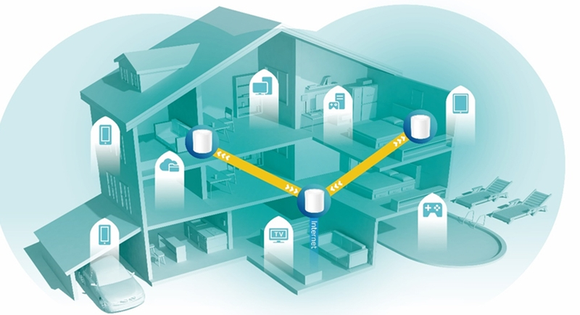
Benefits of a mesh network
Read more:
-
How to warm up IP address: Why new IPs need reputation building
-
Public IP address lookup: How to check and understand your IP details
-
How to improve IP score: A complete guide
7. What is a major disadvantage of a mesh network?
Mesh networking can solve coverage and resilience problems, but it also introduces additional equipment, connections, and configuration requirements.
-
Higher cost: A mesh system normally requires multiple nodes instead of a single router.
-
More complex setup: More nodes mean more placement, configuration, and troubleshooting considerations.
-
Node placement matters: Poorly positioned nodes may have weak connections to the rest of the mesh.
-
Wireless backhaul can affect performance: When nodes rely on wireless links, weak backhaul connections can limit the performance available to connected devices.
-
Compatibility limitations: Mesh nodes are not universally interchangeable across brands or systems.
-
Too many nodes can be counterproductive: Adding more access points does not automatically improve performance and can introduce unnecessary interference or complexity.
Home mesh systems also have their own limitations. For example, Google notes that home size, building materials, layout, and point placement can affect WiFi performance, and that adding too many points can degrade performance in some systems.
For this reason, a mesh network should be designed around the actual coverage and connectivity requirements rather than simply adding as many nodes as possible.
8. Conclusion
A mesh network connects multiple nodes so they can cooperate to provide network coverage and multiple communication paths. Depending on its design, a mesh can be wired or wireless, full or partial, and can support environments ranging from home WiFi to enterprise and outdoor networks.
The main benefits include wider coverage, scalability, mobility, and greater resilience. However, mesh networks can also cost more and require careful planning around node placement, compatibility, backhaul, and network management.
For home users, mesh WiFi can be a practical option when a single router cannot provide reliable coverage across the entire space. For larger or specialized deployments, the appropriate mesh architecture depends on the required coverage, redundancy, connection type, and operational needs.
9. FAQ
Is a mesh network faster than a regular router?
Not always. Mesh systems improve coverage and eliminate dead zones, but they cannot increase your total ISP bandwidth. However, you will get faster real-world speeds in areas where a traditional router's signal previously struggled.
Does a mesh network need a modem?
Yes. A mesh system manages your Wi-Fi, but it still requires a modem or ISP gateway to connect to the internet. The primary mesh node connects directly to your modem via Ethernet.
Can I add mesh WiFi to my existing router?
It depends on the system. Most mesh setups are designed to replace your current router, though some support Access Point or Bridge modes to work alongside it. Always check compatibility first - for example, Google Wifi only meshes with compatible Google/Nest devices.
Which is better: a Wi-Fi extender or a mesh system?
It depends on your coverage needs: Wi-Fi Extender: Best and most cost-effective for boosting signal to a single isolated room. Mesh System: Ideal for larger or multi-story spaces where you need seamless roaming under a single network name without manual reconnecting.
Read more

What is a mesh network and when should you use one?


What is an IP2 network? How it works, uses, and benefits

Explaining how to know if you have a DNS leak


How to know if you have a WebRTC leak: Reading your results

How to improve IP score: A complete guide

What is an IP fraud score? Reading the 0-100 scale