


If your IP score on IPFighter shows anything below "Good", it's easy to see the number and not know what to do with it. This guide walks you through exactly what your IP Score results mean from the overall percentage to the platform-by-platform breakdown and what steps to take depending on what's actually causing your score to be low.
1. How to improve IP score?
Your IP score reflects how clean and trustworthy your current IP address appears, based on factors like reputation history, connection type (residential, hosting, or proxy), and blacklist status. To improve it, you need to address whatever is actually causing the low score switching ISPs, avoiding flagged VPN/proxy IPs, or moving to a residential connection when your work requires a cleaner IP.
2. When should you check your IP score?
There are a few moments when checking your IP Score is especially worth doing:
-
Before important logins: Ahead of logging into important accounts such as ads platforms, banking, or social media.
-
After a network change: Right after switching ISP, VPN, or proxy provider.
-
When issues appear: As soon as you start seeing CAPTCHAs, blocks, or unusual account flags.
-
On a regular basis: If your work depends on a clean IP running ads, managing seller accounts, or automation.
In any of these cases, checking your score first gives you a clear starting point before you troubleshoot further.
3. How to check your IP score
Checking your score doesn't require any setup on your end. IPFighter runs the check automatically the moment you land on the homepage, and the whole process only takes two quick steps to get from opening the page to seeing your full results.
Step 1: Visit the IPFighter homepage
Just go to ipfighter.com, the tool automatically detects and scores your current IP. No input or button clicks needed to get started.
Step 2: Review your score and overview info
As soon as the page loads, you'll see several pieces of information at once:
-
IP score & IP scoreboard: Your overall score (%) plus separate scores per platform (TikTok, Google, Facebook, Instagram, Amazon).
-
Key connection info: Connection type, Residential IP status, Timezone/Language, WebRTC leak, DNS leak.
-
Full info table: IP Address, Country, City, ISP, Zip, Location, Proxy, Hosting.
That's everything you need to get your results, the next section breaks down what each of these actually means.
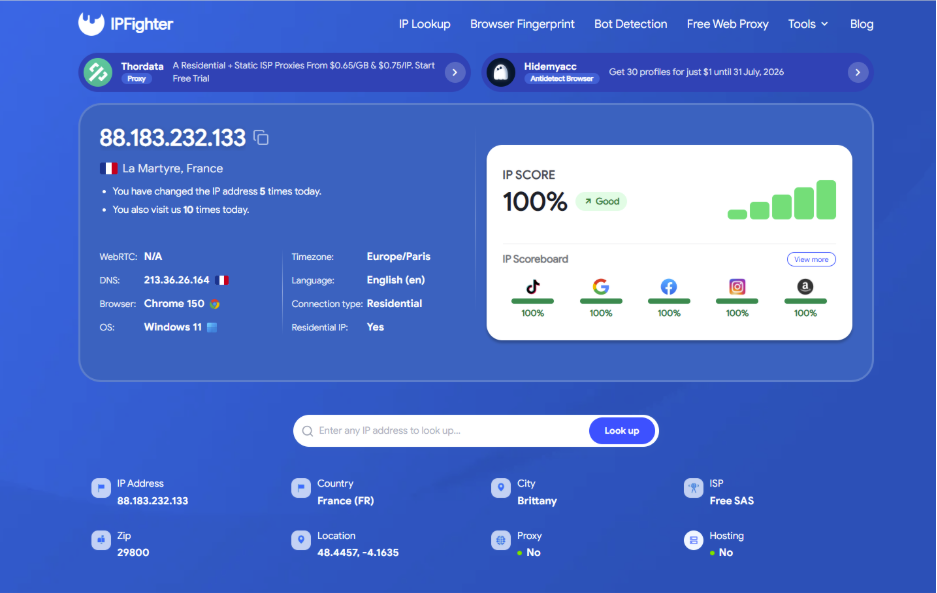
How to check your IP score
Discover more:
-
What is an IP address, and how does it work?
-
What is IP reputation? How IP purity shapes trust
-
A full guide to IPFighter Proxy Manager extension
4. Understanding your IP score results
This is where most of the useful information lives and where most people get stuck, because a percentage and a list of flags don't mean much without context.
4.1. IP score and what the rating labels mean
IPFighter groups your score into four bands, each with a different meaning for how your IP is likely to be treated:
|
Score range |
Label |
What it means |
|
80% and above |
Good |
Your IP shows no significant red flags |
|
40% – under 80% |
Needs improvement |
Some signals are hurting your reputation, but nothing severe |
|
20% – under 40% |
Poor |
Multiple issues are actively affecting how your IP is perceived |
|
Below 20% |
Critical |
Your IP is likely flagged, blacklisted, or heavily associated with abuse |
A score in the "Needs improvement" range isn't necessarily something urgent, it often just means you're on a datacenter or shared IP. A "Poor" or "Critical" score, on the other hand, usually points to something concrete you can act on: a blacklist entry, a leak, or a proxy/hosting IP being used for sensitive logins.
4.2. Why the IP scoreboard shows different numbers per platform
The IP Scoreboard (TikTok, Google, Facebook, Instagram, Amazon) shows a separate score for each platform, so you can see at a glance which specific platforms may treat your current IP differently. Here's how to make practical use of these numbers:
-
Focus on the platform that matters for your task: If you're only using this IP for one specific platform (running ads on Facebook, managing a TikTok account), check that platform's score directly instead of relying on the overall IP Score.
-
Find issues via score gaps: If your overall score looks fine but one platform is noticeably lower, that tells you the issue is specific to that platform worth digging into with a tool like /ip-lookup rather than assuming your whole IP is compromised.
-
Watch for changes over time: A platform score that drops after you change something (switching networks, changing behavior on that platform) is a more reliable signal than the number itself at a single point in time.
In short, treat each platform's score as an independent, practical signal rather than a single number to generalize from checking the one that matters to you will give a far clearer picture than the overall IP score alone.
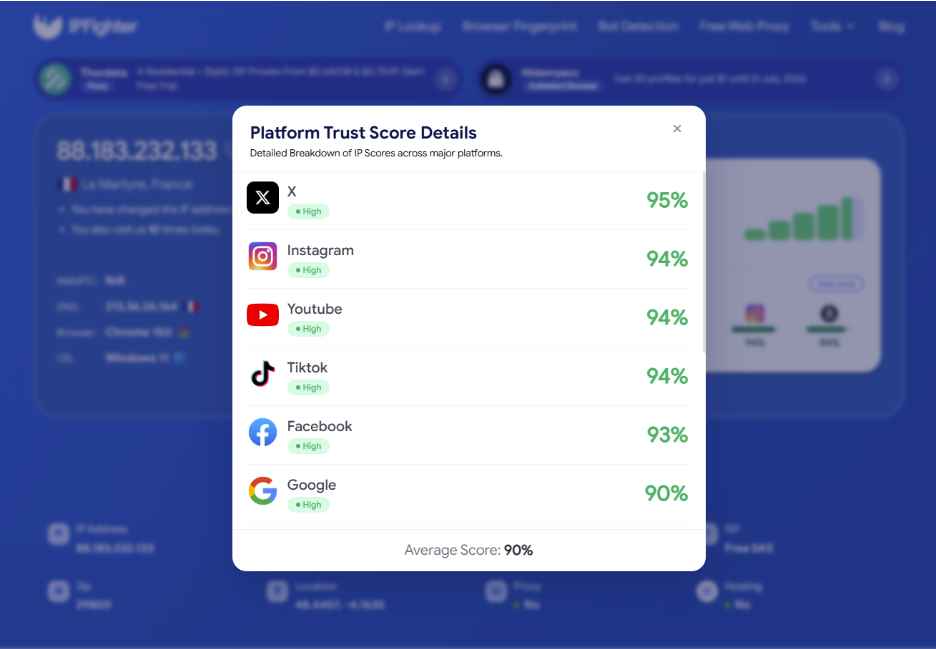
Scores on major platforms
4.3. Reading the "View details" breakdown
Clicking View details reveals the specific factors pulling your score down, and each one carries a different weight and a different meaning:
-
Non-residential IP: Your IP belongs to a datacenter or hosting provider rather than a home ISP. This is a moderate, structural factor: it lowers your score but isn't a "violation" it's simply how that class of IP is treated. For users who need a more natural connection profile, residential IPs from providers like Swiftproxy, SX.ORG, IPRoyal, etc, which offer ISP-based residential connections across global locations, can help avoid some of the limitations commonly associated with datacenter IPs.
-
Threat intelligence blocklist: Your IP appears in a global database tied to malicious activity (spam, port scanning, brute-force attempts). This is one of the heaviest-weighted issues, since it reflects actual reported abuse history rather than just IP type.
-
Timezone mismatch / Language mismatch: Your browser's reported timezone or language doesn't match your IP's geolocation. This is a lighter signal on its own, but combined with other flags it can suggest VPN or proxy use.
-
WebRTC leak / DNS leak: Your browser is exposing your real IP or DNS requests outside your VPN/proxy tunnel. These don't just affect your score, they defeat the purpose of using a VPN or proxy in the first place.
-
IP blacklisted (DNSBL): Your IP is listed on a DNS-based blacklist, commonly used to flag spam sources. Like the Threat intelligence blocklist, this is a heavier factor since it's based on reported behavior, not just IP classification.
Understanding which of these flags applies to you is the fastest way to know whether your low score is something serious or just a structural side effect of your connection type.
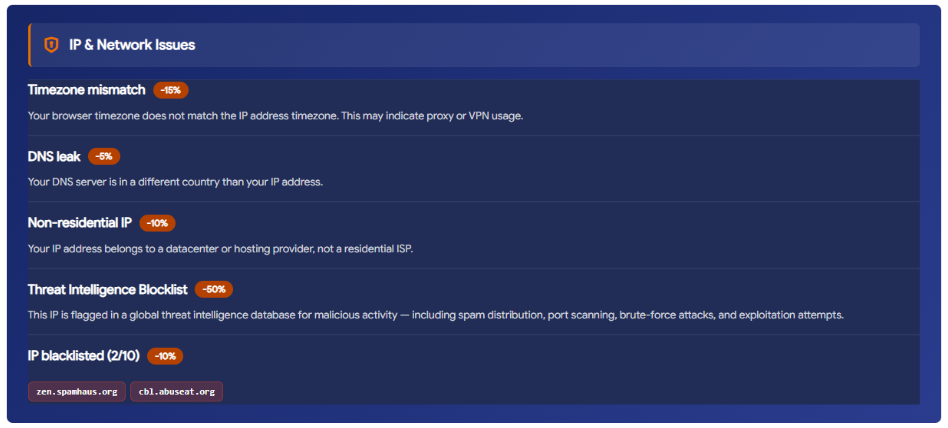
Factors affecting IP score
4.4. What in the info table actually affects your score
The IP details table lists a lot of fields, but not all of them are worth trying to "fix" if your goal is a higher score knowing which ones matter saves you from spending effort in the wrong place:
-
Country, city, zip, location: Information only describes where your IP is, but geography by itself doesn't lower or raise your score.
-
ISP: Mostly informational, though certain ISPs known for hosting/proxy services can indirectly correlate with a lower score.
-
Proxy and hosting: These two fields directly affect your score if either shows "Yes," it's effectively the same signal as the "Non-residential IP" flag in the details breakdown above.
So if you're looking to raise your score, Proxy and Hosting are the two fields to focus on. The rest of the table is there to give you context about your connection, not something to chase or change.
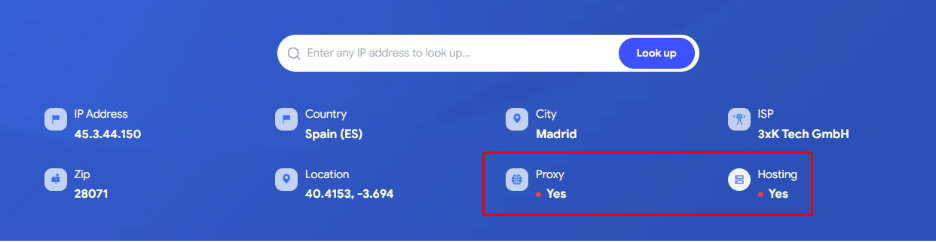
Proxy and hosting directly affect your IP score
5. Common IP score results and what they mean
A few specific patterns come up often enough that they're worth calling out on their own:
-
Score fluctuates between checks: This usually happens with a dynamic IP or rotating proxy, where your connection is reassigned to a new IP address frequently.
-
Datacenter IP scored low despite no misuse: This is a structural trait of that IP type, not a penalty for abuse; datacenter and hosting IPs are scored more conservatively by design.
-
Good score but still blocked on certain sites: That site likely maintains its own private blacklist or fraud system, separate from the general reputation databases IPFighter checks.
Each of these has a different fix, which is exactly what the next section walks through.
Read more:
-
What is Abuse IP? Understanding the mechanics of IP misuse
-
How to warm up IP address: Why new IPs need reputation building
-
DNS leak: The silent threat to your online privacy
6. What should you do next?
Once you understand where your score is coming from, here's how to respond to each situation:
-
If your score keeps changing (dynamic/rotating proxy): Re-check your IP on the IPFighter homepage whenever your score shifts unexpectedly, rather than relying on a single check. If your work needs consistency logging into accounts, managing multiple profiles consider switching to a fixed IP or a static proxy instead of a rotating one.
-
If your score is low due to a datacenter IP: This isn't something to "fix" it's a fixed characteristic of that connection type. If your work genuinely needs a higher score (running ads, managing social accounts), go back to the IPFighter homepage and check the Connection type and Residential IP fields. If they still show "Datacenter" / "No," that's your signal to move to a residential connection rather than trying to fix the current IP. Switching to real carrier networks is one of the highest-scoring options here, since these connections are treated as residential-type and are among the hardest for platforms to flag.
-
If your score is good but you're still blocked on specific sites: This won't show up in IPFighter's overall score, since each platform has its own evaluation system. Use the IP Scoreboard on the IPFighter homepage to check your score per platform instead of only looking at the overall number; this will tell you exactly which platform is rating your IP lower than the rest.
Whichever situation applies to you, the fastest way to confirm you're on the right track is to run the check again on the homepage and compare the new result to what you saw before.
7. FAQ
How long does it take to see results after improving my IP Score?
It depends on the cause. Fixing a leak or mismatch (WebRTC, DNS, timezone) can reflect on your next check almost immediately. Blacklist removal, on the other hand, depends on the blocklist provider's own update cycle and can take longer.
Does getting a new IP automatically improve my score?
Not always. A new IP only helps if it's actually a cleaner one. Switching to another datacenter or previously-flagged IP can leave your score just as low or worse.
If my score is low on one platform, does it affect other platforms too?
No. Each platform in the IP Scoreboard evaluates independently. A low TikTok score doesn't automatically pull down your Google or Amazon score.
Does using mobile data (4G/5G) help improve my score?
Often, yes. Mobile carrier IPs are generally treated as residential-type connections, which tends to score better than datacenter or hosting IPs though this still depends on whether that specific mobile IP has any prior abuse history.
How do I fix a timezone/language mismatch?
Check your device's system timezone and browser language settings, and make sure they match your actual location. If you're using a VPN or proxy, some tools let you set the browser's reported timezone/language to match the IP's location instead.
Read more
"Before we continue… Press & Hold": Why you see this check

Cloudflare human verification bypass extension: What to know
CAPTCHA vs reCAPTCHA: What’s the difference?

Why do I keep getting CAPTCHA? Here's what may be triggering it

What is a CAPTCHA? The check that separates people from bots
What is a mesh network and when should you use one?