

Every device connected to the internet has an identifier, often a public IP address. Understanding this IP address is crucial for tasks like setting up remote access, troubleshooting connectivity issues, or maintaining online privacy. This guide will walk you through checking, interpreting, and securing your public IP address with ease.
What is a public IP address?
A public IP address is a unique identifier assigned by your Internet Service Provider (ISP), enabling your device to communicate over the internet. It differentiates your network from millions of others and facilitates data exchange between your device and online services.
Public vs private IP addresses
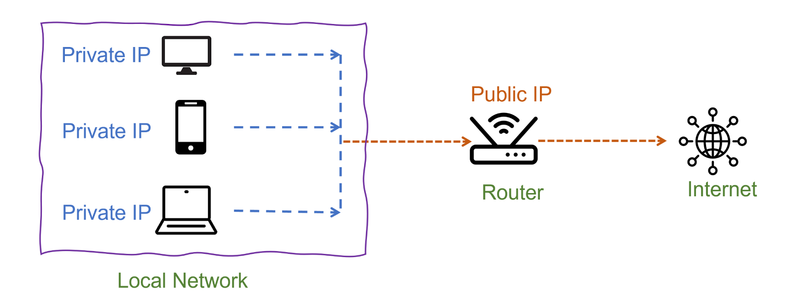
Every network operates with both public and private IP addresses, each serving a different purpose:
- Public IP address: Exposed to the internet and used for direct external communication.
- Private IP address: Assigned to devices within a local network and used for internal communication, without direct access to the internet.
For example, when you visit a website, the site detects your public IP and uses it to send data back to your device. Meanwhile, private IPs allow devices like phones, laptops, and smart TVs to communicate within your home network without being visible to the outside world.
Ranges of public IP addresses
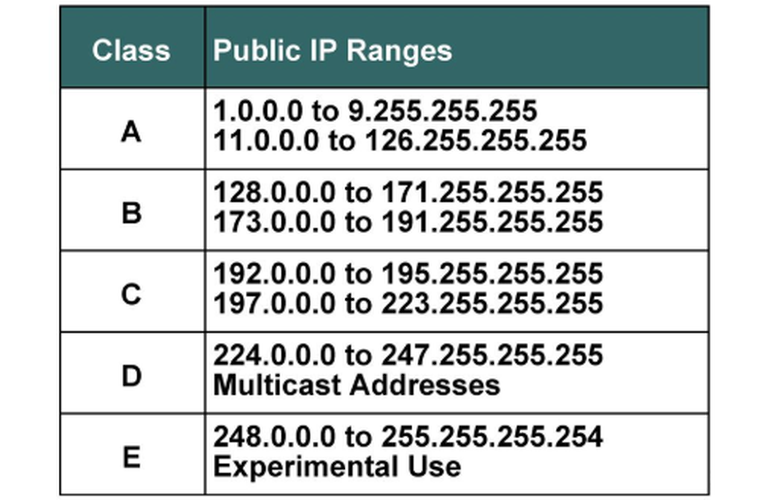
Public IPs fall into specific ranges defined by the Internet Assigned Numbers Authority (IANA). These addresses are distributed to ISPs, cloud services, and enterprises for internet connectivity. Some common IPv4 public IP ranges include:
- 1.0.0.0 - 9.255.255.255
- 11.0.0.0 - 100.63.255.255
- 126.0.0.0 - 223.255.255.255
Cloud providers like AWS, Azure, and Google Cloud also have dedicated public IP ranges for their servers and services.
Understanding these ranges helps network administrators manage security rules and users determine if an IP is legitimate or assigned to a known provider.
Why knowing your public IP address is important
Your public IP plays a crucial role in your internet experience. Here’s why knowing it matters:
- Security awareness: Exposed public IPs can be vulnerable to cyberattacks. Knowing yours helps detect unauthorized access.
- Troubleshooting: Checking your public IP aids in diagnosing network issues, especially with remote access or VPNs.
- Hosting & remote access: Essential for running servers, game lobbies, or remote desktop connections.
- Geolocation & privacy: Websites use your public IP to estimate your location, affecting content access, pricing, and restrictions.
Knowing these risks and uses, let’s see how to check your public IP.
How to check your public IP address
Checking your public IP is straightforward. Here are three reliable methods:
1. Using an online tool
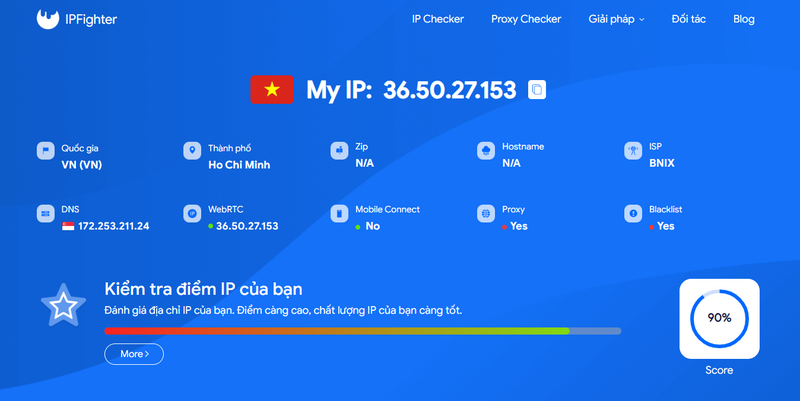
A quick and easy way is to visit a public IP lookup service like ipfighter.com. The site displays your current public IP, along with additional details such as your ISP and approximate location.
2. Using the command line
For those comfortable with the command line, here’s how to check your IP:
Windows: Open PowerShell and enter curl ifconfig.me
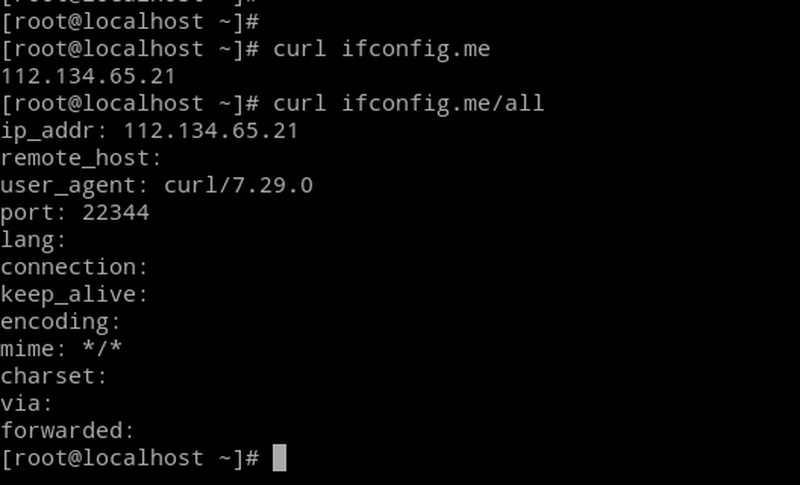
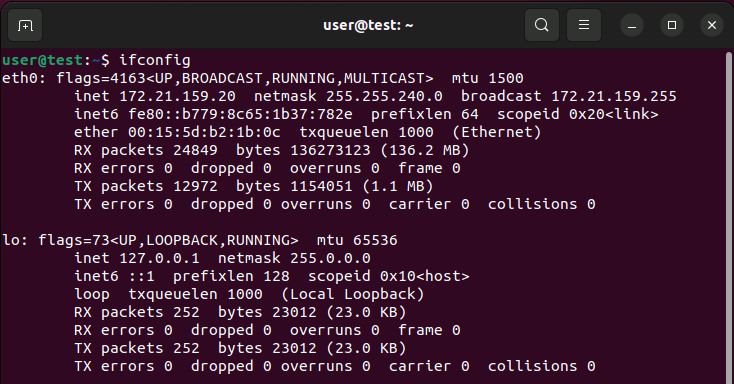
Mac/Linux: Open Terminal and run curl ifconfig.me
3. Checking your router’s interface
If you need to find your network’s public IP, log into your router’s admin panel. Look for a section labeled WAN Status or Internet Information, where your public IP is displayed.
Understanding the information associated with your public IP
When you check your public IP, you’ll often see additional details, such as:
- ISP (Internet Service Provider) - The company providing your internet connection.
- Geolocation data - An estimate of your physical location based on IP allocation records.
- Host name or reverse DNS - A human-readable version of your IP, often assigned by your ISP.
This information can help diagnose network issues but also raises privacy concerns. Websites and services can use your IP to track browsing activity or impose geo-restrictions.
How to change your public IP address
If you need to change your public IP address for security, privacy, or any other reason, here are some common methods:
1. Restart your modem/ router
Most ISPs assign dynamic IP addresses, which can change when you restart your modem. Unplug your modem for about 5-10 minutes (or longer for some ISPs), then reconnect to see if a new public IP is assigned.
2. Contact your ISP
If your ISP provides static IPs, you may need to request a change directly. Some ISPs charge a fee for this service.
3. Use a VPN or Proxy
A VPN (Virtual Private Network) routes your traffic through a different server, masking your actual public IP with one from the VPN provider. Similarly, proxy servers can provide an alternative public IP.
4. Tether through a mobile network
Using your smartphone as a hotspot may assign you a different public IP, as mobile networks use separate IP pools from traditional ISPs.
5. Switch networks
Connecting to a different Wi-Fi network or using a public hotspot will provide a new public IP address, as each network has its own assigned range.
Frequently asked questions
1. Can someone track my location using my public IP?
Yes, but only approximately. It reveals your ISP and general location, not your exact address.
2. How can I check if my public IP is blacklisted?
You can use online services like MXToolbox or IPFighter to see if your public IP is listed on any spam or security blacklists.
3. Can two devices have the same public IP address?
Yes, if they share a network. The router assigns private IPs while using one public IP.
4. Is it safe to share my public IP address?
Generally, no. Sharing your public IP can expose your network to potential threats.
Conclusion
Your public IP address is essential for internet connectivity, influencing security, privacy, and access. Knowing how to check, interpret, and manage it gives you greater control over your online experience. Hopefully, this guide has provided the insights you need to better understand and protect your public IP. Stay informed and stay secure!
Read more

What is a CAPTCHA? The check that separates people from bots

What is a mesh network and when should you use one?
What is an IP2 network? How it works, uses, and benefits
Explaining how to know if you have a DNS leak

How to know if you have a WebRTC leak: Reading your results
How to improve IP score: A complete guide