

Navigating the internet seamlessly relies heavily on a foundational technology known as the Domain Name System (DNS). Often referred to as the phonebook of the internet, DNS bridges the gap between human-friendly website names and the numerical IP addresses computers use to connect.
Cloudflare DNS stands out as a service designed to optimize this process, providing speed, security, and privacy benefits. This article dives into what makes Cloudflare DNS unique and how it works, addressing common user concerns along the way.
Understanding DNS
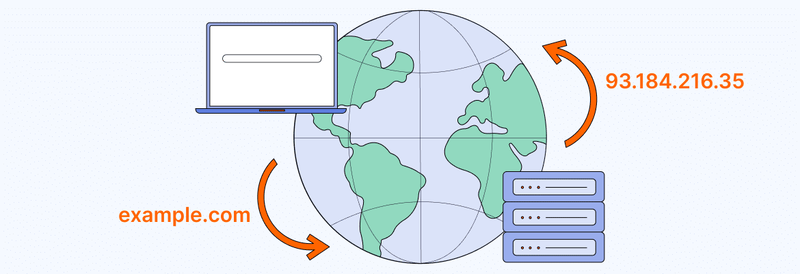
DNS is an essential component of internet infrastructure. Every time you type a website name like example.com, DNS translates that name into an IP address, such as 93.184.216.35, which your device uses to locate and load the website.
Without DNS, users would need to remember long strings of numbers instead of simple, memorable domain names. However, traditional DNS servers can be slow and may expose user data. This is where Cloudflare DNS offers a modern solution.
Overview of Cloudflare DNS
Cloudflare, a company known for its internet performance and security services, introduced Cloudflare DNS to address inefficiencies in traditional DNS systems. Their 1.1.1.1 DNS resolver, launched in 2018, quickly gained popularity for its emphasis on privacy and speed.
Unlike many public DNS services, Cloudflare DNS doesn’t log personal data or sell it to advertisers. It prioritizes user privacy by adhering to strict data retention policies, making it a trusted choice for individuals and organizations alike.
How Cloudflare DNS works
Cloudflare DNS operates by replacing your default DNS resolver, typically provided by your Internet Service Provider (ISP). When you configure your device or router to use Cloudflare’s DNS, all DNS queries are directed through their high-performance servers. Here’s a simplified breakdown of the process:
- DNS Query Initiation: When you enter a URL in your browser, your device sends a query to the configured DNS resolver.
- Query Resolution: Cloudflare’s DNS servers process the query, locate the corresponding IP address, and return the result to your device.
- Website Access: Armed with the IP address, your browser connects to the website’s server to load the page.
Cloudflare’s expansive network of servers ensures this process happens in milliseconds, enhancing the user experience.
Benefits of using Cloudflare DNS
Using Cloudflare DNS offers multiple benefits for internet users, ranging from faster speeds to enhanced security.
1. Speed improvements
Cloudflare DNS boasts some of the fastest response times globally. Its vast network of servers strategically positioned worldwide ensures queries are resolved quickly, regardless of your location. This translates to faster page loading and a smoother browsing experience.
2. Enhanced security
One of the standout features of Cloudflare DNS is its focus on security. It protects users from cyber threats such as:
- DDoS Attacks: By mitigating Distributed Denial of Service attacks, Cloudflare DNS ensures websites remain accessible.
- Phishing Sites: Cloudflare DNS prevents users from accessing known malicious websites.
3. Privacy protection
Cloudflare DNS doesn’t log identifiable user data, unlike many ISPs that monitor browsing activity. It also supports DNS over HTTPS (DoH) and DNS over TLS (DoT) protocols, encrypting DNS queries to prevent interception.
4. Reliability
With servers spread across multiple locations, Cloudflare DNS ensures high availability. Even during regional outages, the system reroutes queries to functioning servers, maintaining uninterrupted service.
Setting up Cloudflare DNS
Cloudflare DNS works seamlessly across computers and mobile devices, enhancing how they resolve domain names.
1. For individual devices
Here’s how you can set up Cloudflare DNS on popular devices:
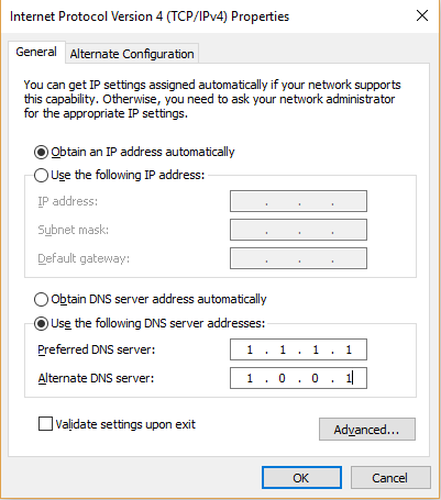
- Windows: Navigate to Network Settings > Change Adapter Options > Properties of your active network > Enter 1.1.1.1 and 1.0.0.1 as preferred and alternate DNS servers.
- macOS: Go to System Preferences > Network > Advanced > DNS tab > Add 1.1.1.1 and 1.0.0.1.
- Android/iOS: Download the 1.1.1.1 app from your app store for an easy setup.
2. For routers
To configure Cloudflare DNS on your router, access the router’s settings page (usually at 192.168.1.1), locate DNS settings, and replace the default addresses with 1.1.1.1 and 1.0.0.1. This change applies to all devices connected to the network.
Potential drawbacks and considerations
While Cloudflare DNS provides numerous advantages, it’s not without limitations:
- Limited Parental Controls: Unlike OpenDNS, Cloudflare DNS doesn’t offer extensive content filtering options.
- Configuration Required: Users need to manually set it up on their devices or routers.
- Compatibility: Some legacy systems may not fully support advanced features like DNS over HTTPS.
Understanding these considerations empowers you to choose a DNS service that matches your privacy preferences, performance expectations, and technical needs.
Frequently asked questions (FAQs)
1. Is Cloudflare DNS free to use?
Yes, Cloudflare DNS is completely free for individuals and businesses.
2. Will Cloudflare DNS make my internet faster?
In most cases, yes. Its global server network reduces DNS resolution times, speeding up browsing.
3. Does Cloudflare DNS work with all ISPs?
Cloudflare DNS is compatible with all ISPs. However, some ISPs may override custom DNS settings.
4. Can Cloudflare DNS block ads?
No, Cloudflare DNS doesn’t block ads. You’d need specialized services like AdGuard DNS for that.
Conclusion
Cloudflare DNS simplifies the way users interact with the internet, offering a blend of speed, security, and privacy. Whether you’re an individual seeking faster browsing or an organization aiming to enhance online security, it’s a reliable solution worth considering. Setting up Cloudflare DNS is straightforward and ensures a seamless, optimized internet experience for all users.
Read more

IPFoxy review: Are its pure rotating residential proxies worth it?


CatProxies review: What do its five proxy types offer?

Hidemyacc review 2026: Features, pricing and real fingerprint test results

Whitecloakproxy review: What to know before you buy

Geonix review: What makes its proxy services stand out?

ProxyWing review: Pricing, features, and real-world performance