

Running a DNS leak test and seeing a table full of server addresses can be hard to make sense of without knowing what to compare it against. This guide walks you through how to know if you have a DNS leak by reading IPFighter's DNS leak test results in detail, and what to do depending on what you find.
1. How to know if you have a DNS leak?
Use IPFighter's DNS Leak Test to compare the IP and ISP shown against your real internet provider, then check each row in the DNS server table against the ISP or VPN you're currently using. If any row matches your real ISP instead of your VPN or proxy, that row is exactly what confirms a leak.
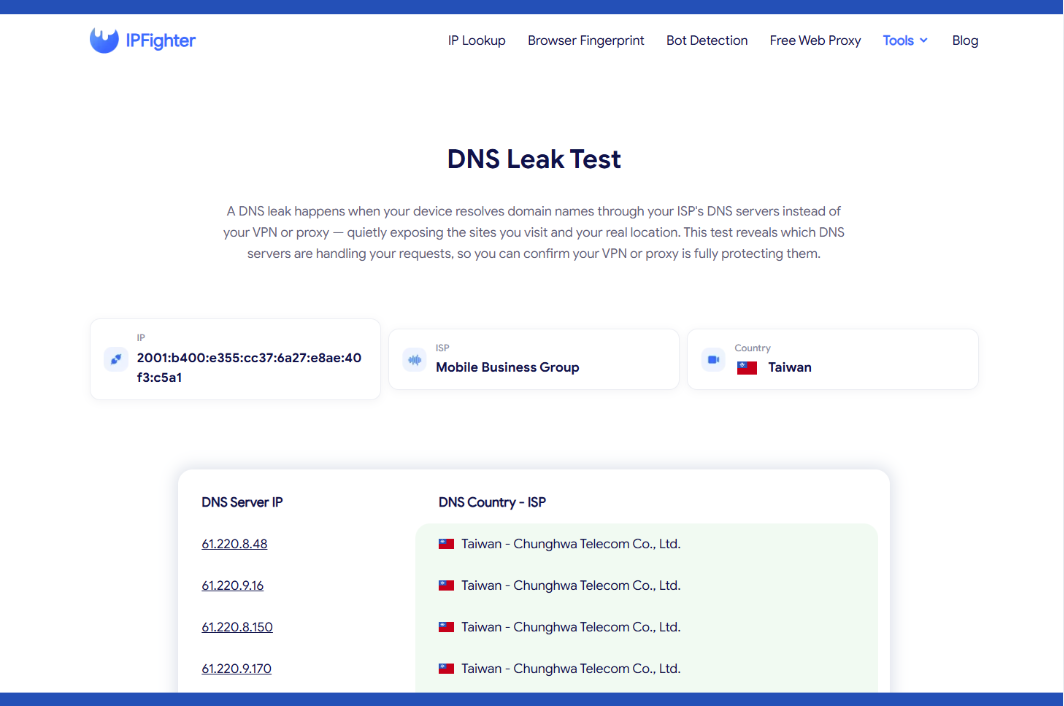
DNS leak test tool on IPFighter
Discover more:
-
What is DNS? How the DNS system works on the internet
-
DNS leak: The silent threat to your online privacy
-
How to flush DNS on Windows, Mac, and Linux in simple steps
2. When should you check for a DNS leak?
A DNS leak can go unnoticed for a long time if you only ever check once. There are a few moments when this check is especially worth running:
-
New connection: Right after connecting to a VPN or proxy, before doing anything sensitive.
-
New provider: After switching to a new VPN or proxy service, or a new device.
-
Unexpected detection: When you're getting flagged despite using a VPN or proxy.
-
Regular maintenance: Periodically, especially after updating your operating system or browser.
Running the check at any of these moments catches a leak before it actually costs you something, rather than finding out only after an account gets flagged or blocked.
3. How to run the DNS leak test
Getting a result takes no setup, since the test starts as soon as the page loads and runs automatically in the background. Within a few seconds, you'll have a full baseline and table ready to read.
Step 1: Visit the DNS leak test page
Go to DNS Leak Test. The tool automatically displays your current IP, ISP, and country.
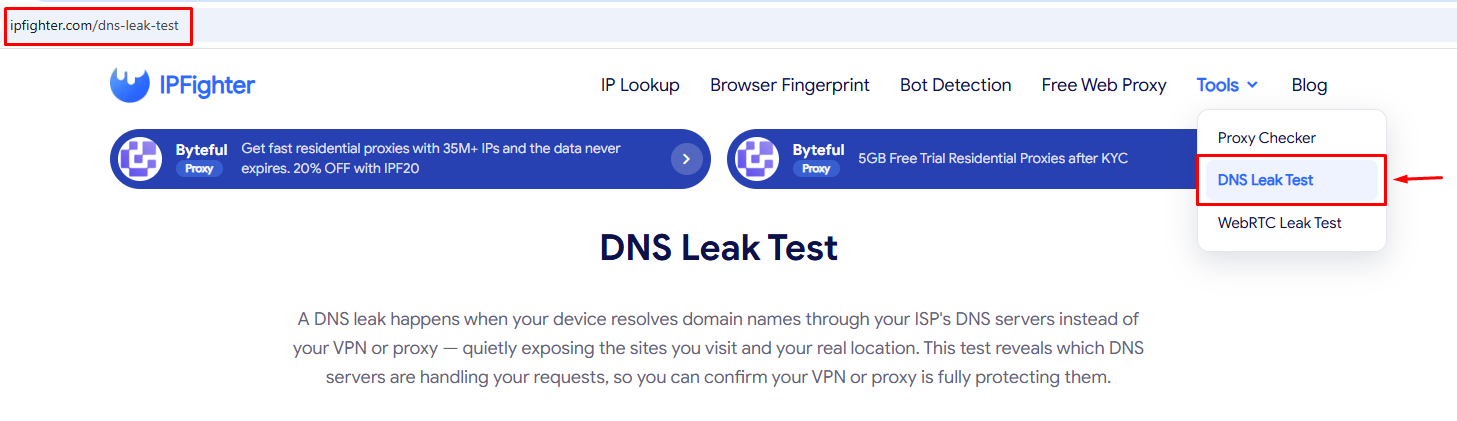
Visit the DNS leak test page
Step 2: Review the DNS server table
Below the baseline, you'll see a table listing DNS server IP and DNS country - ISP for every server the test detected.
The tool page already explains what a DNS leak is and why it matters, so the next section focuses entirely on how to read the results you're actually looking at.
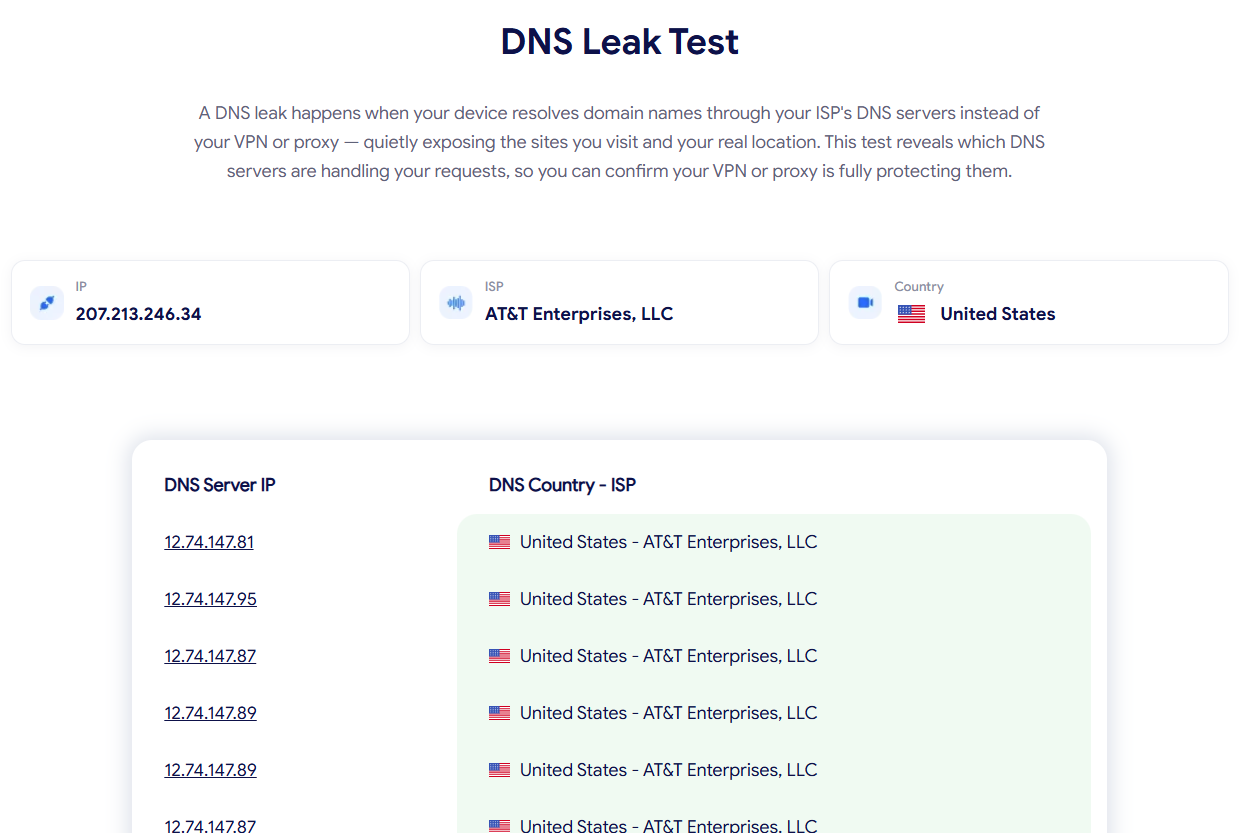
Review the DNS server table
4. Understanding your DNS leak test results
This is where the real value is once you have a baseline and a full table in front of you, here's how to read every part of it.
4.1. Reading your baseline (IP, ISP, Country)
Before looking at the DNS table, this baseline is what everything else in the results gets compared against. The IP shown can be either IPv4 or IPv6 depending on your connection, and it's worth paying attention to which version you're looking at, since one common cause of leaks is a VPN that only protects IPv4 traffic while IPv6 requests slip through unprotected.
4.2. Reading the DNS server table
The table lists every DNS server detected during the test, and it commonly includes more than one row:
-
DNS Server IP: The specific address of the server that handled a DNS request.
-
DNS Country - ISP: The country and provider that server belongs to.
Seeing multiple rows is normal on its own, since networks often use several DNS resolvers for redundancy. What matters is comparing each row against your baseline rather than assuming a longer table is automatically a problem, which the next section covers.
4.3. Comparing each row against your baseline ISP
This comparison is the actual test: if a row's ISP matches your real ISP while you're connected to a VPN or proxy, that row indicates a leak, since your DNS requests are reaching your real provider instead of staying inside the protected connection. If a row's ISP matches your VPN or proxy instead, that row is behaving exactly as expected, and there's nothing further to do for that particular server.
4.4. Why DNS country doesn't always have to match your VPN location
A DNS server's country doesn't need to line up exactly with where your VPN or proxy claims to be located. Some providers route DNS through infrastructure in a nearby country or region, so a VPN endpoint in one country legitimately using a DNS server in another isn't automatically a problem. The distinction that actually matters is whether the ISP behind that server belongs to your VPN or proxy provider, not whether the country is an exact match.
Here's how this plays out with two real results, both captured while a proxy connection was active:
Example 1, full match: The baseline showed one ISP, and every row in the table (9 rows total) matched that same ISP and country exactly, with no exceptions.
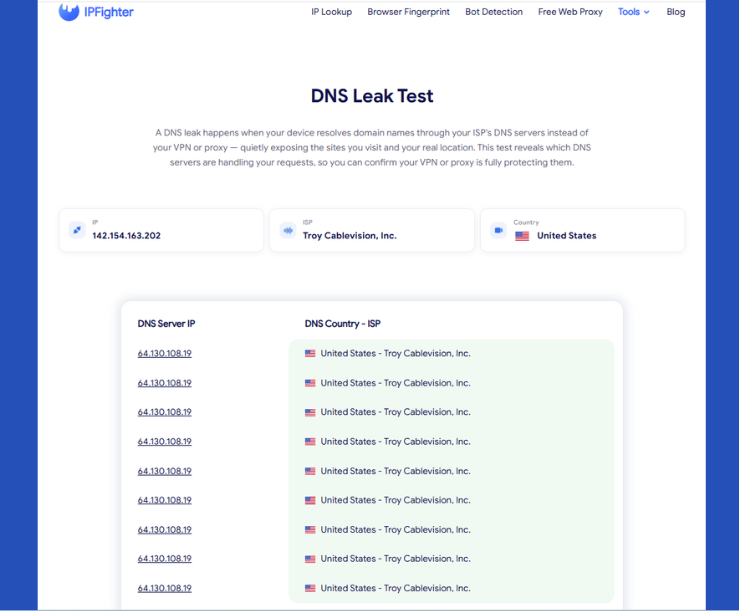
DNS leak test result example 1
Example 2, mixed rows: The baseline showed one ISP, but the table came back mixed: some rows matched that ISP, while several others showed a different provider, all still within the same country.
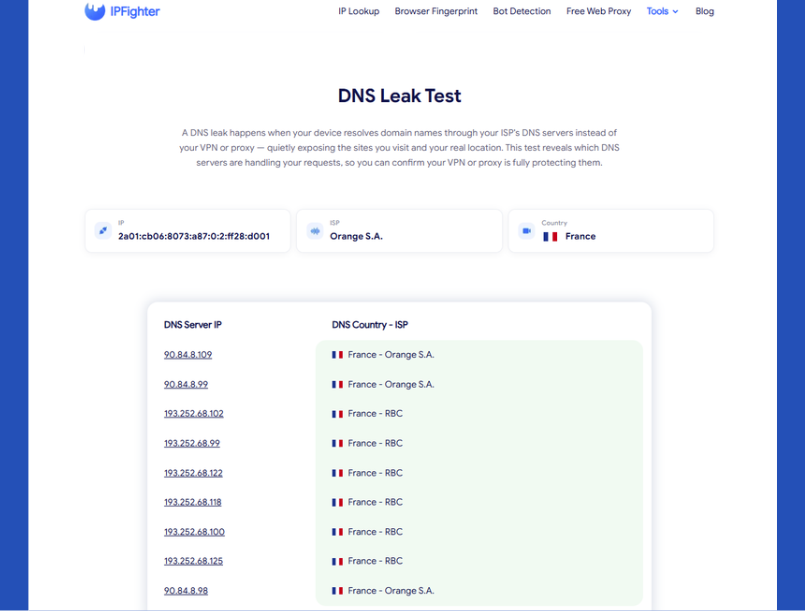
DNS leak test result example 2
Neither result can be labeled a leak or a clean result just by looking at it in isolation. What actually determines the answer is knowing which ISP belongs to the proxy being used at the time: a table full of matching rows only confirms consistency, and a table with a different ISP mixed in only confirms that a second provider is involved, not automatically that it's your real ISP. Reading the result correctly always comes back to knowing your own baseline first.
As a quicker cross check, the IPFighter homepage also includes a DNS leak field, which flags a leak at a glance without needing to read the full table.
5. Common DNS leak test results and what they mean
A single row rarely tells the whole story on its own, since a table can look mostly clean while still hiding one meaningful exception. A few patterns come up often enough to be worth recognizing on their own:
-
Full agreement across rows: Every row in the table belongs to your VPN or proxy provider.
-
Regional variation within the same provider: The DNS Country differs slightly from your VPN's location, but the ISP still matches.
-
A row matching your real ISP: One or more rows show your actual internet provider instead of your VPN or proxy.
-
Mixed rows from different providers: Some rows match your VPN, while others show a different ISP entirely, often tied to an IPv6 leak.
-
Mostly real ISP with a couple of public DNS rows: Most rows match your real ISP, while one or two show a well known public DNS provider (such as Google or Cloudflare) instead.
Each of these calls for a different response, which the next section walks through in the same order.
6. What should you do next?
Each pattern points to a different underlying situation, so the right response depends on which one matches your result. Here's how to respond to each pattern above, matched in the same order:
-
Full agreement across rows: No fix needed here, since every server is behaving as expected.
-
Regional variation within the same provider: No action needed. This reflects how your provider routes DNS, not a leak.
-
A row matching your real ISP: This is a real leak and needs attention. For a full walkthrough of how to fix it, see “How to fix a DNS leak”.
-
Mixed rows from different providers: Treat this the same as a confirmed leak until you verify which provider each row belongs to, since an unexpected ISP mixed in often points to an IPv6 leak specifically. The same guide above covers how to resolve this.
-
Mostly real ISP with a couple of public DNS rows: If you're not using a VPN or proxy, this is expected and needs no action, since your browser or system sometimes routes a few queries through a public resolver like Google's on its own. If you are using a VPN or proxy at the time, treat the majority of rows matching your real ISP as a leak and follow the same guide above.
Ready to check your own connection? Head back to DNS Leak Test and run a fresh check now.

How to fix a DNS leak
Read more:
-
What is WebRTC? Exploring its architecture, use cases, and benefits
-
DNS records - The ultimate blueprint for website & email routing
-
Understanding DNS forwarding for network optimization
7. FAQ
Why do I see rows from different ISPs even though I only use one VPN?
Some VPN and proxy providers operate DNS infrastructure through more than one underlying network, so seeing a couple of related providers isn't automatically unusual as long as they're all tied to your VPN service.
Does a DNS leak mean my VPN or proxy isn't working at all?
No. Your IP address and encrypted traffic can still be protected even if DNS requests are leaking, since DNS leaks and IP leaks happen through separate channels.
Should I test with the VPN on, off, or both?
Test with your VPN or proxy active, since the whole point is confirming it's protecting your DNS requests under real conditions, not comparing it against a disconnected state.
Can my mobile carrier cause a DNS leak differently than home Wi-Fi?
Yes. Mobile networks sometimes override DNS settings more aggressively than home routers, so it's worth testing on both connection types if you regularly switch between them.
Is one leaked row out of many still a serious problem?
Yes. Even a single row resolving through your real ISP is enough to expose which sites you visit through that request, regardless of how many other rows look clean. That kind of exposure isn't just an inconvenience: browsing history tied back to your real ISP can be enough for bad actors to piece together the personal details needed to open accounts or file claims in your name. It's worth pairing good leak hygiene with a plan for the worst case, since services offering identity restoration give you a dedicated case manager and reimbursement for the costs of untangling your credit and records if that ever happens.
Read more

What is an IP2 network? How it works, uses, and benefits


How to use web proxy safely: A practical guide


Explaining how to know if you have a DNS leak

How to know if you have a WebRTC leak: Reading your results

How to check browser fingerprint for spoofing signs with IPFighter

How to check if a proxy is working and read your results