

If you're trying to change your IP address or control how a website sees your connection, you've probably run into both proxies and VPNs as options. Understanding the difference between proxy and VPN matters because the two tools solve different problems, and picking the wrong one can leave you either under-protected or paying for features you don't actually need.
In this guide, IPFighter breaks down how each one works, where they diverge, and which option fits specific use cases.
1. Understanding proxies and VPNs
A proxy is a server that sits between your device and the website you're visiting, forwarding your request and returning the response. The website sees the proxy's IP address instead of yours, but the proxy typically only handles traffic from the specific app or browser you've configured it for.
If you want a deeper breakdown of how proxies work and the different proxy types available, IPFighter has a dedicated guide: What is a Proxy?
A VPN (Virtual Private Network) works differently. It creates an encrypted tunnel between your device and a VPN server, and by default it routes all of your device's internet traffic through that tunnel, not just one app or browser. The website you visit sees the VPN server's IP address, and your data is encrypted for the entire trip between your device and that server.
With these two definitions as a baseline, the rest of this guide compares proxies and VPNs directly across encryption, traffic coverage, IP handling, and speed, so you can see exactly where they overlap and where they don't.
Definition of proxies and VPN
Discover more:
-
How to enable VPN: Simple and effective methods for online security
2. Key differences between proxy and VPN
The easiest way to understand the difference between VPN and proxy is to compare their main characteristics.
|
Feature |
Proxy |
VPN |
|
Hides your IP |
Yes |
Yes |
|
Traffic coverage |
Usually specific app/browser |
Usually entire device |
|
Encryption |
Not typically provided by the proxy itself |
Yes |
|
Privacy protection |
Depends on proxy type/provider |
Generally stronger |
|
IP/location selection |
Often more flexible |
Usually server-based |
|
IP rotation |
Available with some proxy services |
Usually not a core feature |
|
Best for |
Specific apps, scraping, automation, geo-testing |
Privacy, security, whole-device traffic |
|
Setup |
Usually app/browser-specific |
Usually device-level |
It's worth noting that "proxy doesn't encrypt traffic" isn't an absolute rule. HTTPS already encrypts the connection between your browser and most websites regardless of whether a proxy is involved, and some proxy protocols or configurations do offer encryption-related features. The real distinction is that a proxy doesn't automatically wrap your entire connection in an encrypted tunnel the way a VPN does by default.
3. Encryption and security comparison
A VPN encrypts traffic between the device and the VPN server through its tunnel. This can provide an additional layer of protection when using untrusted networks, such as public Wi-Fi.
A proxy primarily forwards traffic and changes the apparent source IP. The level of security and privacy therefore depends more heavily on the proxy protocol, application, destination connection, and provider.
For this reason, a VPN is generally more suitable when the main goal is device-wide privacy and encrypted network traffic, while a proxy is often better suited to specific IP-routing requirements.
Encryption and security
4. Traffic coverage comparison
This is one of the more straightforward differences between the two. With a proxy and vpn, the path typically looks like this:
-
A typical proxy setup may look like: Device → App/Browser → Proxy → Website
-
A VPN setup generally works more broadly: Device → Encrypted VPN tunnel → VPN server → Internet
This means a VPN can route traffic from multiple applications on the device, while a proxy can be useful when you only want a particular browser, application, or profile to use a different IP.
For example, if you only need one browser profile to connect through a specific IP while keeping other applications on their normal connection, a proxy can provide more targeted control.
5. IP addresses and location comparison
Both proxies and VPNs can make a website see the IP address of an intermediary server instead of your real one. Where they differ is in flexibility. A VPN typically ties your IP to whichever server location you connect to from the provider's server list, so your choices are limited to the countries and cities the VPN operates servers in.
A proxy service often gives you more granular control, including options like:
-
Country: Choose the IP's country to match the region you need to appear in.
-
City: Narrow the IP down to a specific city for more precise geo-targeting.
-
ISP: Select IPs associated with a particular internet service provider.
-
IP type: Pick between residential, mobile, or datacenter IPs depending on the use case.
-
Rotation: Rotate through multiple IPs automatically for large-scale tasks.
-
Sticky sessions: Keep the same IP for a set duration when consistency matters.
Because of this level of control, a proxy tends to be better suited to workflows that need specific IP characteristics, while a VPN is generally sufficient when you just need to appear in a particular country without needing city-level or ISP-level precision.
6. Speed and performance comparison
It's tempting to assume a proxy is always faster than a VPN, but that's not a reliable conclusion. A proxy generally has less processing overhead since it isn't encrypting an entire device's traffic through a tunnel, while VPN encryption can add some latency.
That said, real-world speed depends heavily on server distance, network quality, the protocol in use, server congestion, and the provider's infrastructure. A poorly maintained, overloaded proxy can easily end up slower than a well-run VPN, so the type of tool matters less than the quality of the specific service you're using.
Difference between VPN and proxy
7. When should you use a proxy instead of a VPN?
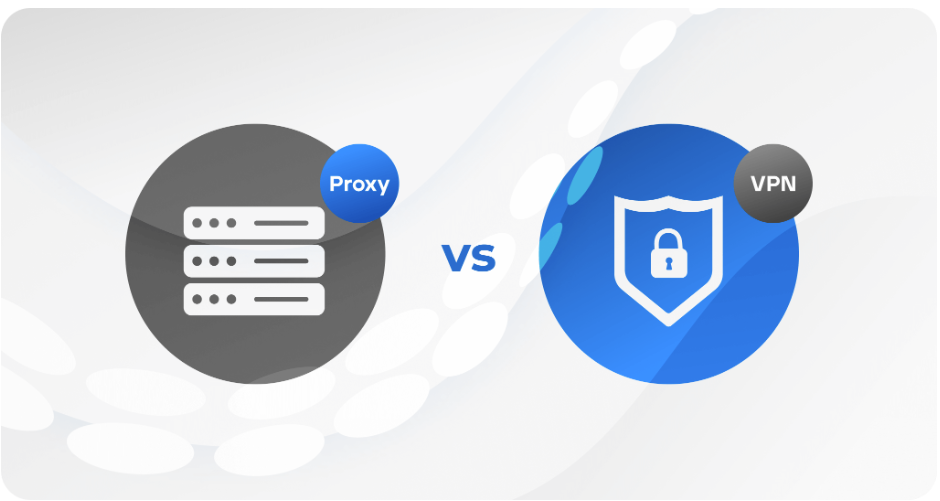
The following use cases lean more toward proxy, since they benefit from targeted, app-level control rather than whole-device coverage.
7.1. For changing the IP of a specific browser or app
A proxy offers more targeted routing, since it doesn't require sending your entire device's traffic through an intermediary. This is useful when only one application or browser profile needs a different IP while everything else on the device continues to use your regular connection.
7.2. For web scraping and data collection
Proxies typically offer access to multiple IP addresses along with rotation and sticky-session options, plus country or city targeting. These features make proxies better suited to high-volume, automated requests than a standard VPN connection, which usually isn't built for that kind of scale.
For teams that need proxies for web scraping, market research, or geo-specific testing, RapidProxy, Byteful, HighProxies, Thordata, etc can be relevant options to consider, especially when choosing a provider based on location coverage, session control, and stable proxy access.
7.3. For multi-account management
With a proxy, different accounts can be assigned different IP addresses, giving more granular control over sessions. This is particularly useful when combined with separate browser profiles or dedicated account-management tools, where keeping each account's connection isolated matters.
7.4. For geo-specific testing
Proxies make it easier to test how a website appears from different countries or cities, which is useful for comparing localized search results, pricing, or content availability. Residential, ISP, and mobile proxies can each provide different IP characteristics depending on exactly what the testing scenario calls for.
If you want to quickly configure a proxy on Chrome, you can also try the IPFighter Proxy Manager extension to set up and manage your proxy directly from the browser.
8. When should you use a VPN instead of a proxy?
The following use cases lean toward a VPN instead, since they call for protecting traffic across the whole device rather than a single app.
8.1. For online privacy and security
A VPN protects traffic across the entire device rather than a single app, with encryption built in as a core feature rather than an add-on. This makes it the more suitable option for general privacy needs and for use on public Wi-Fi, where an unencrypted connection is more exposed to interception.
8.2. For whole-device protection
When the goal is protecting everything leaving the device, not just one app, a VPN is the more practical option. Browser traffic, background app activity, and other connections can all be routed through the same encrypted tunnel, which isn't something a single-app proxy configuration is designed to do.
When should you use a proxy vs a VPN
9. Common misconceptions about VPNs and proxies
Several common assumptions can make it difficult to understand when each technology is appropriate.
-
"A proxy and VPN are basically the same": This isn't accurate. Both can change your visible IP address, but they differ significantly in encryption and traffic coverage, which affects what kind of protection you actually get.
-
"A proxy automatically makes me anonymous": Not quite. A proxy only changes how the destination sees your connection; it doesn't automatically protect your browser fingerprint, cookies, account identity, or other network-level signals that can still reveal who you are.
-
"A VPN hides everything from everyone": This claim goes too far as well. A VPN encrypts traffic between your device and the VPN server, but you still need to consider what your VPN provider can see, along with website tracking, cookies, logged-in accounts, and browser-level fingerprinting that a VPN doesn't address.
-
"All proxies are the same": They're not. HTTP, SOCKS5, residential, ISP, datacenter, and mobile proxies each have different characteristics, and choosing the wrong type for your use case can lead to poor performance or a higher chance of detection.
Understanding these differences can help you choose the right option based on whether your priority is device-wide privacy, targeted IP management, or a specific workflow such as scraping or geo-testing.
10. How to check whether your proxy or VPN is working properly
Simply connecting to a proxy or VPN does not necessarily mean that everything is configured correctly. Checking the connection can help identify issues before you use it for more demanding tasks. You can verify this quickly on IPFighter to determine it.
-
IP address: Check whether websites see the expected public IP instead of your original IP.
-
IP reputation: See how trustworthy or risky the current IP appears.
-
Proxy/VPN detection: Check whether the IP is identified as proxy or VPN infrastructure.
-
Geolocation: Confirm that the detected country or city matches the selected location.
-
DNS leaks: Check whether DNS requests are escaping the intended connection.
-
WebRTC leaks: Check whether your browser can expose additional IP information.
Beyond IP-level checks, it's also worth reviewing your browser fingerprint, since neither a proxy nor a VPN protects against fingerprinting on its own, as shown in the comparison table earlier. You can check this with IPFighter's own browser fingerprint tool, which shows how unique and identifiable your browser setup looks to websites regardless of the IP you're connecting from.
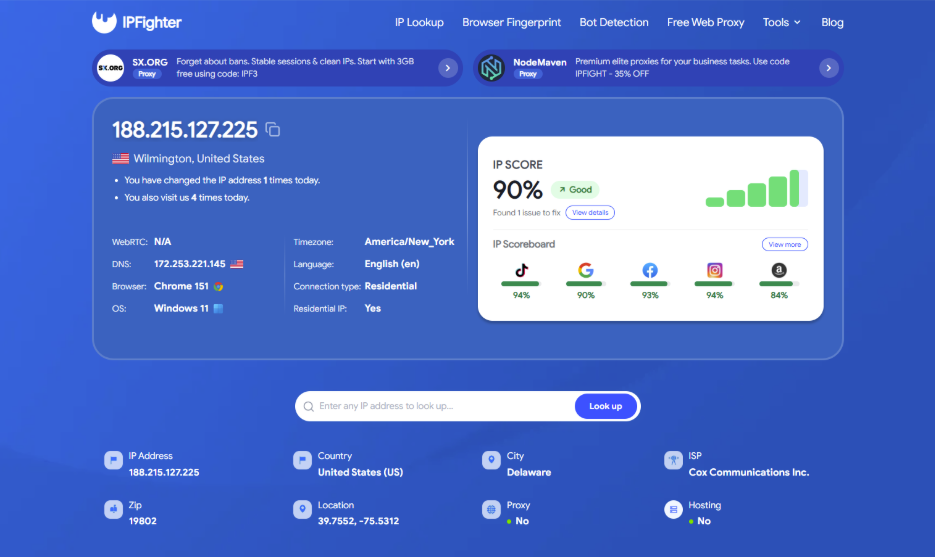
Check proxy or VPN on IPFighter
Read more:
-
How to check if a proxy is working and read your results
-
How to use web proxy safely: A practical guide
-
IP reputation check: How IPFighter scores your IP
11. Conclusion
VPNs are generally the better choice when you need device-wide privacy, encryption, and protection across your internet traffic. Proxies are more suitable when you need targeted IP control, location selection, rotation, or separate IPs for specific browsers and applications.
Neither option is universally better. The right choice depends on whether your priority is network privacy and security or flexible IP management.
Looking for a VPN or proxy? If you're ready to set one up, check IPFighter's proxy promo codes for discounts from proxy and VPN partners before you buy.
12. FAQ
What is the difference between a VPN and a proxy?
Both can hide your public IP address, but a VPN typically encrypts traffic and can cover the entire device, while a proxy usually routes traffic for a specific application or browser.
Is a VPN safer than a proxy?
A VPN is generally better suited to security because it provides an encrypted tunnel for network traffic. However, the actual level of protection depends on the VPN provider, configuration, and use case.
Does a proxy hide your IP address?
Yes. When properly configured, a proxy can make websites see the proxy server's IP address instead of your original public IP.
Is a proxy faster than a VPN?
Not necessarily. Proxy and VPN performance depends on factors such as server distance, network quality, congestion, protocol, and provider infrastructure.
Should I use a VPN or proxy for web scraping?
A proxy is generally more suitable for web scraping because proxy services can offer multiple IPs, rotation, geographic targeting, and session controls that are useful for large-scale data collection.
Can I use a VPN and proxy together?
Yes, it is technically possible to use both, depending on the configuration. However, combining them can increase latency and make troubleshooting more complicated, so it is not automatically better than using either option alone.
Read more

Best India proxy providers in 2026: Find the right Indian IP


Korean proxy service: How to choose one and compare the top providers
Ecommerce proxy: How online sellers use it and what to consider
ProxyCove review: How its traffic-based proxy service works

Best Chinese proxy providers: Compare China proxies
Social media proxy: What it is and how to choose one