

We tested 10 DuoPlus cloud phones running Android 15 Pro, Android 15 and Android 12B. All 10 passed as Android devices with a 100% Browser Fingerprint score and a 94% human score on Bot Detection, but 3 of the 10 static residential proxies they were supplied with showed up as datacenter connections, and DNS or WebRTC results mismatched on several devices.
Tested by Julian Vance · Test date: Nov 10, 2026 · Updated: Nov 20, 2026
IPFighter earns a commission if you buy through some links on this page. It does not affect our test results.
1. DuoPlus overview
DuoPlus is an Android cloud phone platform, launched in 2024, for running many mobile accounts and apps from one dashboard. The figures below are the provider's own, taken from DuoPlus's website and Help Center; where DuoPlus does not publish a detail, we say so.
|
Website |
duoplus.net |
|
Founded |
2024 |
|
Device type (provider claim) |
Real ARM hardware with a native ARM Android environment; physical versus virtualized ARM not independently verified |
|
Android versions |
10, 11, 12A, 12B, 15, 15 Pro |
|
Device specs |
4 GB RAM, 32 GB storage; CPU and GPU per version not disclosed |
|
Server locations |
Singapore and Hong Kong (per streaming documentation) |
|
Access |
Web browser, Windows, macOS |
|
Device profile settings |
Brand and model, resolution and DPI, GPS, SIM info, timezone, language, network mode; one-click reset |
|
Proxy |
HTTP, HTTPS, SOCKS5; custom, saved or integrated dynamic proxies; proxy billed separately |
|
Automation |
RPA (with Marketplace templates), API, ADB, Operation Synchronizer |
|
SMS |
Cloud Number add-on for verification codes on Android 12A and 15 |
|
Team features |
Super admin, sub-admin and member roles; device sharing by link and password |
|
Payment |
Card, Alipay, crypto |
|
Trial / refund |
1 cloud phone for 30 days with 30 minutes of startup time / no refunds after purchase |
2. Test results: DuoPlus performance at a glance
Across 10 cloud phones, DuoPlus looked convincingly like real Android devices to the browser checks, but the supplied proxies were less consistent than the phones themselves.
2.1. Test setup
We tested 10 DuoPlus cloud phones: 3 on Android 15 Pro, 5 on Android 15 and 2 on Android 12B, on Nov 10, 2026. DuoPlus pre-configured each device with a static residential proxy from FlashID for this review. Inside each cloud phone's built-in browser we ran IPFighter's IP Lookup, DNS Leak Test, WebRTC Leak Test, Browser Fingerprint and Bot Detection, then timed startup, measured network speed and checked TikTok and YouTube on 6 devices. Some proxy IPs appeared on two devices, so the sample is not 10 independent IPs.
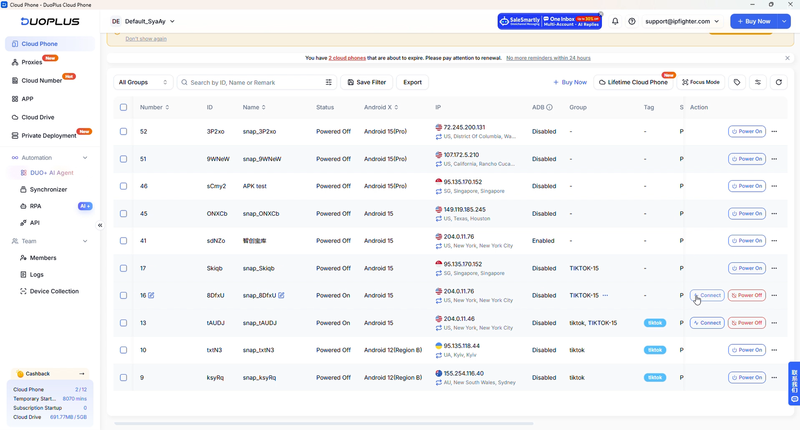
DuoPlus cloud phones selected for IPFighter's hands-on tests
2.2. Network & IP
|
Test |
Tool |
Result |
|
Detected IP matches configured proxy |
IPFighter IP Lookup |
10/10 matched |
|
IP reputation |
IPFighter IP Lookup |
80–100%; all rated Good |
|
Threat blacklist |
IPFighter IP Lookup |
10/10 clean |
|
TikTok / Facebook / Instagram score |
IPFighter IP Scoreboard |
55–94% / 48–93% / 53–94% |
|
Connection type |
IPFighter IP Lookup |
7 Residential, 3 Datacenter |
|
Timezone / language match |
IPFighter IP Lookup |
10/10 matched |
|
DNS |
IPFighter DNS Leak Test |
7 match, 3 mismatch |
|
WebRTC |
IPFighter WebRTC Leak Test |
4 match, 6 mismatch |
Every IP matched its configured proxy, rated Good on reputation and came back clean on blacklists. The concern is connection type: IPFighter classed 3 of the 10 as datacenter rather than residential, despite all being supplied as static residential proxies. Platform scores also varied widely, from 48% to 94%.
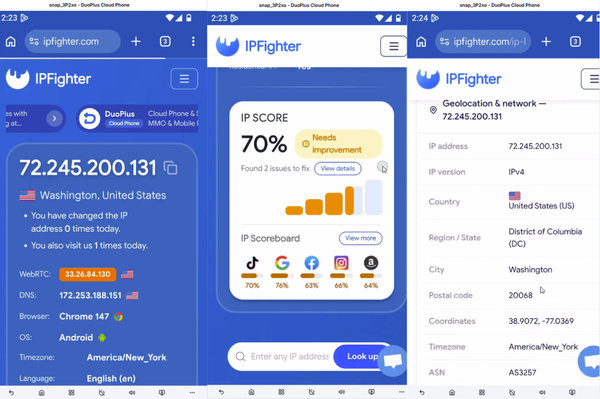
Proxy IP check on a DuoPlus Android 15 Pro cloud phone via IPFighter
DNS matched on 7 devices and WebRTC on 4. The 6 WebRTC mismatches showed addresses that differed from both the proxy IP and the device's own settings, so they do not prove a real-IP leak, but they are worth raising with the proxy provider.
2.3. Device fingerprint & bot detection
|
Test |
Tool |
Result |
|
Browser fingerprint score |
IPFighter Browser Fingerprint |
100% on all 10 devices |
|
Operating system |
IPFighter Browser Fingerprint |
Android on all 10 devices |
|
Fingerprint masking |
IPFighter Browser Fingerprint |
Not detected on all 10 devices |
|
WebGL renderer |
IPFighter Browser Fingerprint |
Varied, including Adreno, ARM and ANGLE labels |
|
Screen and touch signals |
IPFighter Browser Fingerprint |
Consistent with a real phone on all 10 devices |
|
Human score |
IPFighter Bot Detection |
94% on all 10 devices |
|
Bot checks passed |
IPFighter Bot Detection |
48 of 51 |
Every cloud phone scored 100% on the Browser Fingerprint test, was identified as Android, showed no fingerprint masking, and gave screen and touch signals consistent with a real phone. WebGL renderer labels varied between devices, with some identifying Qualcomm Adreno; renderer labels alone cannot tell physical hardware from a virtualised ARM setup.
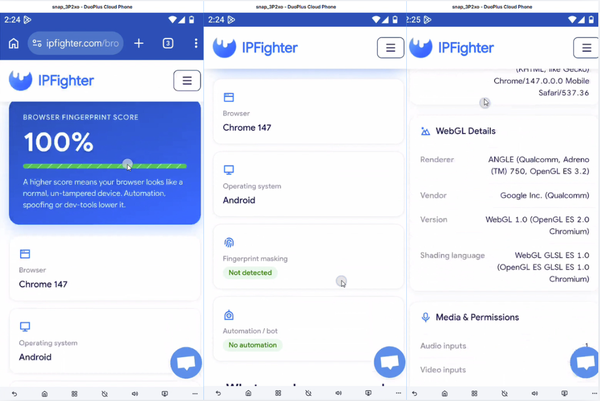
Browser fingerprint results for a DuoPlus Android 15 Pro cloud phone on IPFighter
Bot Detection returned the same result on all 10 devices: a 94% human score, with 48 of 51 checks passed. The three flags were chrome.runtime and plugins count in Headless & Environment, and MIME types in Browser Consistency, minor browser-level signs that the browser is running in a cloud environment.
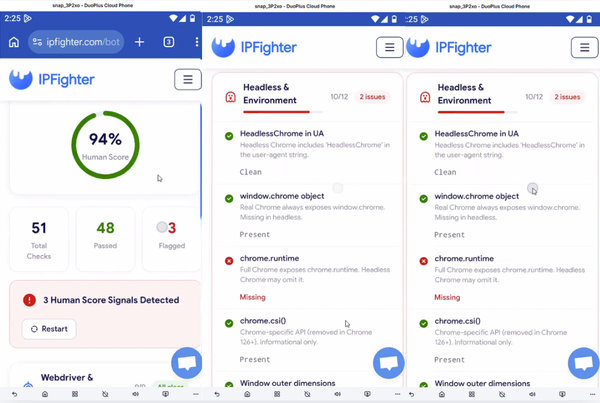
Bot detection results for a DuoPlus Android 15 Pro cloud phone on IPFighter
2.4. App-level authenticity
Device settings and browser signals lined up well. On an Android 15 Pro device configured as a vivo iQOO 12, DuoPlus matched the SIM carrier (T-Mobile USA), GPS, language (en-US) and timezone (America/New_York) to the US proxy, and IPFighter detected the same timezone and language. WebGL reported an Adreno 750 GPU, consistent with that phone model; Chrome's reduced user agent showed the generic "Android 10; K" string, which is normal on modern Android browsers.
We did not run separate app-level integrity checks such as Play Integrity or root detection in this test.
2.5. Speed & responsiveness
|
Test |
How we measured |
Result |
|
Boot time |
From startup until the device was usable |
1 min 17 s to over 4 min |
|
Download speed |
Speed test inside the cloud phone |
6.6–29 Mbps |
|
Upload speed |
Speed test inside the cloud phone |
29–140 Mbps |
|
App launch time |
Timed on TikTok and YouTube |
About 3–4 seconds |
|
Touch responsiveness |
Manual use |
Both Android 12B devices felt slower |
|
Proxy connection stability |
Observation during testing |
Intermittent drops on 3 devices |
Network speed inside the cloud phones was workable but varied, and because proxy locations differed we would not rank the Android versions by these figures. Apps opened quickly, in about 3–4 seconds, while startup time ranged widely and both Android 12B phones felt less responsive to touch. These are network speeds inside the device; we did not benchmark the remote screen stream separately.
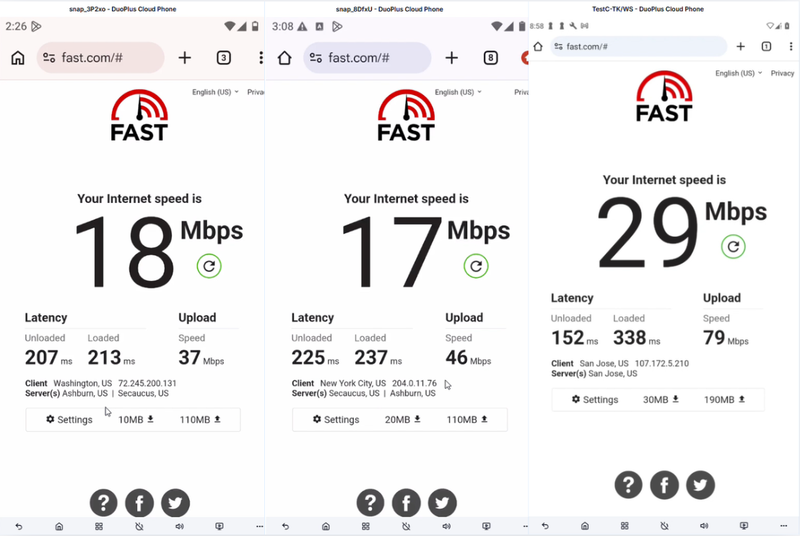
Speed test results inside DuoPlus cloud phones from three Android lines
2.6. App compatibility
We tested TikTok and YouTube on six devices, two from each Android configuration. Both apps installed and played content on all six. TikTok opened in about 3 seconds and loaded feeds without crashes, though some devices asked for login or verification, and one login hit a "maximum number of attempts" message that cleared after waiting. YouTube opened in 3–4 seconds and played normally once some devices updated the app or completed login. Facebook and Amazon also installed on the devices we tried.
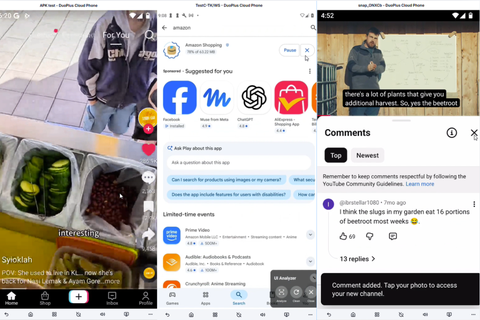
Opening TikTok and YouTube on a DuoPlus cloud phone
2.7. Automation: RPA & Operation Synchronizer
RPA. We ran the Marketplace template "AI-TikTok Account Warm-up (After 7 Days)" on three cloud phones, one each on Android 15 Pro, Android 15 and Android 12B. All three followed the workflow, which took about 6–7 minutes. The TikTok accounts need to be logged in beforehand, or login and verification steps interrupt the run. You can also build your own scripts.
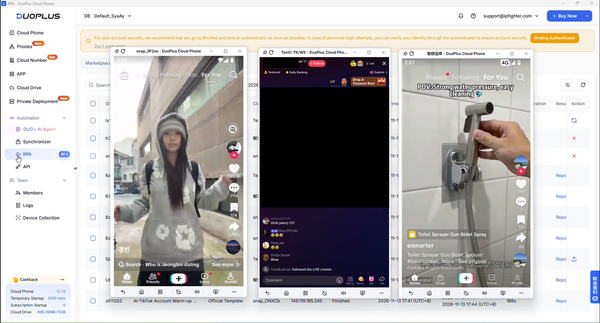
DuoPlus RPA running a Marketplace workflow across three cloud phones
Operation Synchronizer. Mirroring actions from a main device worked when two conditions were met: all devices ran the same Android version, and the target app sat in the same screen position on each one, since mirrored taps land by position. Secondary devices generally followed the main device, but occasionally missed an input.
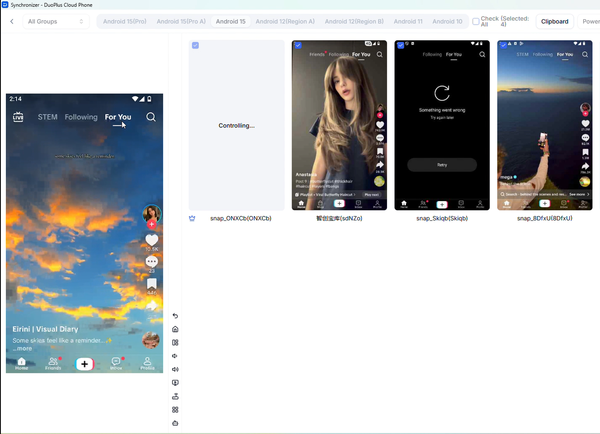
DuoPlus Operation Synchronizer mirroring actions across cloud phones
With several devices running automation at once, touch responses slowed and lag became more noticeable. Both tools save repetitive work, but larger device groups need preparation and monitoring.
3. Plans & pricing
DuoPlus charges separately for each cloud phone and for the time it is switched on, so the device price alone is not the full cost. Prices below were shown on DuoPlus's pricing page on November 10, 2026.
|
Plan / fee |
Price shown |
Billing unit |
Included |
Trial / refund |
|
Free trial |
$0 |
30 days |
1 cloud phone, 30 minutes of startup time |
— |
|
Cloud phone |
From $0.085 |
per device per month |
Price depends on quantity; page shows up to 95.75% off |
No refunds after purchase |
|
Startup time package |
$0.0042 |
per minute, per device |
Unlimited concurrent and total opens |
Same terms |
|
Monthly startup |
$16.91 |
per month |
No extra startup fees; concurrent devices limited by quantity bought |
Same terms |
Total cost = cloud phone subscription + startup time + proxy + optional add-ons such as Cloud Numbers. Proxies are billed separately by the proxy provider. The pricing page also showed 16,000 free startup minutes with its discounted device offer; check eligibility and validity at checkout.
IPFighter readers get 5% off cloud phone and startup plans with the DuoPlus promo code.
4. Pros & cons (based on our tests)
DuoPlus cloud phones looked like real Android devices and ran our test apps well; proxy consistency and multi-device responsiveness are the weak spots.
Pros
- Convincing devices: 100% fingerprint score, Android detected and no masking on all 10 cloud phones.
- Consistent device profiles: SIM carrier, GPS, timezone, language and GPU matched the configured phone and proxy.
- Apps work: TikTok and YouTube installed and played on all six devices tested, opening in about 3–4 seconds.
- Useful automation: a Marketplace RPA workflow ran on three Android versions, and Synchronizer mirrored actions across matching devices.
Cons
- Mixed proxy results: 3 of 10 "residential" IPs showed as datacenter; DNS mismatched on 3 devices and WebRTC on 6.
- Minor bot flags: 94% human score, with chrome.runtime, plugins count and MIME types flagged on every device.
- Uneven responsiveness: boot times up to 4+ minutes, slower Android 12B devices, and lag when automating several phones.
- Layered costs and no refunds: device, startup time and proxies are billed separately, and purchases are non-refundable.
DuoPlus is a capable cloud phone for app-based account work, provided you check each proxy and scale gradually.
5. Who should use DuoPlus?
DuoPlus suits users who run mobile apps across many accounts and want automation built in.
Good fit
- Social media and TikTok operators: devices passed as Android with consistent SIM, GPS and locale settings, and TikTok worked on every device we tried.
- Teams repeating the same app tasks: RPA templates and Operation Synchronizer cut manual work across devices on the same Android version.
- Users testing before committing: a 30-day trial with one cloud phone covers a first check.
Think twice if you are
- Relying on bundled or supplied proxies without checking them: 3 of our 10 supplied residential IPs showed as datacenter, so verify each IP with IPFighter IP lookup.
- Running large device groups at once: responsiveness dropped and inputs were occasionally missed when several phones worked simultaneously.
- Needing desktop browser profiles rather than mobile apps: an antidetect browser such as Hidemyacc or Vision Browser fits that workflow better.
Choose DuoPlus for app-based mobile account work; budget time to verify proxies and to grow device groups step by step.
6. Final verdict
Across 10 cloud phones, DuoPlus delivered convincing Android devices: 100% fingerprint scores, consistent device profiles, working TikTok and YouTube, and RPA and sync tools that held up in our tests. It is a strong option for app-based social media and multi-account work. The supplied proxies were the weak link, with 3 of 10 showing as datacenter and several DNS and WebRTC mismatches, and responsiveness dipped under multi-device automation, so verify proxies and scale up gradually.
7. FAQ
Is a DuoPlus cloud phone a real device or an emulator?
DuoPlus says its cloud phones run on real ARM hardware. Our tests could not confirm physical hardware versus virtualised ARM, but every device we checked was identified as Android, scored 100% on IPFighter's Browser Fingerprint test and gave screen, touch and GPU signals consistent with the phone model it was set to.
Do DuoPlus cloud phones pass bot detection?
Mostly. All 10 devices scored 94% human on IPFighter's Bot Detection, passing 48 of 51 checks. The same three checks were flagged on every device: chrome.runtime, plugins count and MIME types. These are browser-level signs of a cloud environment rather than automation traces.
Can I use my own proxy with DuoPlus?
Yes. DuoPlus supports HTTP, HTTPS and SOCKS5, with custom, saved or integrated dynamic proxies, and a cloud phone cannot go online until one is set. In our test, 3 of 10 supplied static residential IPs showed as datacenter, so check each IP's connection type with IPFighter IP lookup and give every device its own IP.
How much does DuoPlus really cost?
The total combines a device subscription (from $0.085 per device per month on the discounted offer), startup time ($0.0042 per minute, or $16.91 per month for monthly startup), the proxy and any add-ons such as Cloud Numbers. There is a 30-day free trial with one cloud phone and 30 minutes of startup time, and no refunds after purchase.
Read more
DuoPlus review: Convincing Android fingerprints, but mixed proxy and DNS results

IPPeak review: Clean, fast residential IPs with high latency and a weaker ISP result
LegionProxy review: 82.5% average IP score, but inconsistent city targeting
Aproxy review: Japan residential IP scores fell to 40%, while ISP speeds reached 200 Mbps
AstroProxy review: 90% IP scores, but slow speeds
FlashProxy review: Very fast and cheap, but low IP scores and DNS mismatches