

ISP, short for Internet Service Provider, acts as the bridge that connects you to the online world. To ensure a seamless online experience, having a stable and fast ISP network is essential. Therefore, understanding what is an ISP and carefully choosing the right Internet service provider is crucial for reliable connectivity.
Learn about internet service providers
Before going into details about ISPs, let’s explore some basic concepts related to Internet service providers.
1. What is ISP?
An ISP, or Internet Service Provider, is an organization or company that specializes in delivering ISP networks to individuals and businesses. These providers ensure that users can access the Internet efficiently and reliably. ISPs operate on various scales, ranging from small local companies to large multinational corporations.
ISPs typically offer a variety of services, including fiber optic connections, ADSL, mobile networks, and cable Internet. Each service type has its own advantages and disadvantages, allowing users to choose the option that best suits their needs.
2. What is an ISP network?
An ISP network refers to the physical and technical infrastructure that Internet Service Providers (ISPs) use to deliver Internet services. This infrastructure includes devices, servers, transmission lines, and other components essential for providing reliable Internet connectivity to users.
An ISP network is typically divided into several segments, including the core network, backhaul network, and last-mile network.
- The core network serves as the central hub where data is processed and exchanged between different ISPs.
- The backhaul network connects the core network to regional or local areas.
- The last-mile network is the segment that directly connects to end users, such as homes or offices.
By understanding the structure of an ISP network, users can better appreciate how Internet connectivity is delivered and maintained.
Commonly used ISP types
There are many different types of ISPs to serve users’ needs.
1. DSL
DSL (Digital Subscriber Line) is a technology that enables Internet connectivity through standard telephone lines. It is one of the most widely used methods for accessing the Internet, particularly in areas where fiber optic infrastructure is unavailable. DSL offers relatively high download speeds and greater stability compared to traditional dial-up connections.
However, the quality of the signal can diminish as the distance between the user’s home and the DSL station increases. This reduction in signal strength may impact Internet speeds, especially when multiple devices are connected simultaneously.
2. Cable
Cable Internet relies on a coaxial cable network to deliver Internet services to users. It is typically faster than DSL and provides higher download speeds. Additionally, cable networks tend to offer more stable bandwidth, making them a popular choice for both homes and businesses.
However, a key limitation of cable networks is that speeds can decrease during peak usage times when many users in the same geographic area are online simultaneously. This can be a challenge for those who require a consistently stable and reliable connection.
3. Fiber Internet
Fiber Internet, powered by fiber optic cables, is a cutting-edge technology that uses light to transmit data through optical fibers. This enables incredibly fast speeds and significantly greater bandwidth compared to DSL or coaxial cable connections. These advantages make fiber Internet ideal for activities that require high bandwidth, such as streaming HD videos, online gaming, and remote work.
However, fiber optic Internet does have some limitations, including high initial installation costs and limited availability in certain areas. Before choosing fiber Internet, it’s essential to check whether this service is offered in your location.
How do ISPs work?
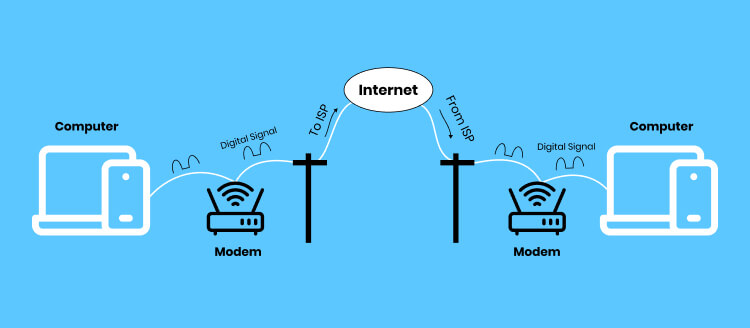
To better understand how ISPs work, we need to examine the process of connecting to the Internet from a user’s computer to the web server they want to access.
1. Connection process
When you enter a URL into your web browser, your computer sends a request to a DNS (Domain Name System) server to resolve the IP address associated with the domain name. Once the IP address is identified, your computer sends a request to that server to download the website’s content.
The ISP acts as an intermediary, facilitating the exchange of information between the user and the web server. By leveraging their network infrastructure, ISPs ensure that data is transmitted securely and efficiently.
2. Manage bandwidth and traffic
One of the primary responsibilities of an ISP is to manage bandwidth and data traffic to ensure that all users can access the Internet without lag or interruptions. To achieve this, ISPs may implement strategies such as bandwidth limitations, traffic management, or expanding their network infrastructure.
By monitoring network traffic, ISPs can identify and address potential issues before they impact user experience. This is particularly crucial during peak usage hours when many users are accessing the Internet simultaneously.
Services provided by ISPs
Beyond simply offering Internet connectivity, many ISPs now provide a range of additional services to enhance the user experience.
1. Email service
Most ISPs include free email services for users who sign up for an Internet account. These services allow users to communicate and share information without relying on third-party email providers. ISP email services often feature spam filters, cloud storage, and dedicated customer support.
2. Hosting and domain name
Many Internet Service Providers also offer hosting and domain registration services for individuals and businesses looking to build websites. This streamlined option saves users time and effort by consolidating services with a single provider, making website management and maintenance more convenient.
3. Television service
To broaden their offerings, some ISPs provide cable television or IPTV (Internet Protocol Television) services. Bundled Internet and television packages help users reduce costs while enhancing their home entertainment experience.
4. Network security
Lastly, many ISPs now offer network security services, such as VPNs (Virtual Private Networks) and antivirus software. These services help users protect their personal information and ensure secure web browsing.
Things to consider when choosing an ISP
Selecting an ISP involves more than just comparing prices. There are several key factors to consider to ensure the best Internet experience for your needs.
1. Speed and bandwidth
Internet speed is a critical factor when choosing an ISP. Depending on your usage, you may require high speeds for activities like streaming HD videos, online gaming, or remote work.
Additionally, bandwidth is equally important. If multiple devices in your household connect to the Internet simultaneously, ensure that the package you choose offers sufficient bandwidth to avoid interruptions.
2. Network coverage and stability
Another essential consideration is the ISP’s coverage in your area. Before committing to a provider, verify whether their services are available where you live. Network stability is also crucial. An unreliable connection can cause disruptions, especially during work or other online activities. Research reviews from other users to assess the reliability of the ISP you’re considering.
3. Customer service and technical support
Customer service and technical support are indispensable factors when evaluating an ISP. When issues arise with your Internet connection, prompt and effective support can make a significant difference. Check customer reviews for the ISPs you’re researching. Providers with excellent customer service can resolve technical issues efficiently and provide helpful guidance on choosing the right package.
4. Packages and prices
Lastly, pricing is an important consideration. Compare the monthly costs of different service packages offered by ISPs. Remember that the cheapest option isn’t always the best. Balance price with other factors like speed, stability, and customer service to make an informed decision.
Popular ISP providers in Vietnam
In Vietnam, there are many reputable Internet service providers such as:
1. ISP Viettel
As one of the largest ISPs in Vietnam, Viettel provides a wide range of services, including ADSL, fiber optic Internet, and mobile Wi-Fi. Viettel is renowned for its high Internet speed and network stability. In addition to Internet services, they offer extras such as television packages, network security, and attractive promotions.
2. ISP VNPT
VNPT (Vietnam Posts and Telecommunications Group) is one of Vietnam’s oldest and most trusted ISPs. They offer various Internet services, including ADSL, fiber optic Internet, and business network solutions. With extensive network coverage and consistently stable service, VNPT is a reliable choice for many users.
3. ISP FPT
FPT, although relatively young compared to other ISPs, has quickly become a leading provider. They specialize in high-speed fiber optic services with broad bandwidth, making them ideal for users with demanding Internet needs. FPT is also known for excellent customer service, frequently offering promotions and special deals for new customers.
Common problems with ISPs and how to fix them
When using Internet services, users often encounter common problems. Below is a list of typical issues and suggested solutions.
1. Internet speed problem
One of the most common problems is unsatisfactory Internet speed. If you feel like your Internet speed is slower than what you signed up for, try some of these steps:
- Check the device: Make sure your modem and router are working properly. Try restarting the device to see if speed improves.
- Check connection: Use an Ethernet cable to connect directly to the modem and test the speed. If the speed improves, the problem may lie with the router or Wi-Fi.
- Contact your ISP: If all of the above steps don’t help improve speeds, contact your ISP to check if there are any issues in your area.
2. Network connection error
Network connection errors are another common problem. To resolve this, follow these steps:
- Restart the device: Restarting the modem and router is a simple but often effective step in restoring connectivity.
- Check the wire connection: Ensure all cables are securely connected and undamaged.
- Check network status: Use your ISP’s app or website to see if there are any reported network issues in your area.
If the issue persists, contact your ISP’s customer service for further assistance.
Conclusion
The ISP market is diverse, with numerous providers competing to deliver better services. This gives users more options, but it’s crucial to choose a reputable provider with strong customer support to ensure a reliable Internet experience.
Read more
VPN checker: 4 signs your VPN is detected and how to check

What is a clean IP address and how does it work?
What is Scamalytics? 4 Fraud Score risk levels
DNS blacklist: How to check and remove your IP
Why Google says "Unusual traffic from your computer network"
Anonymous proxy detected: Causes and how to fix it