

Why does the same product show a different price, delivery cost, or stock level depending on where you look from? Online stores, marketplaces, and search engines often tailor what they show to the visitor's location, and many of them limit how many requests a single IP can send. An ecommerce proxy lets sellers and analysts see a store the way a buyer in another place would, and spread requests across several IPs.
In this guide, IPFighter explains what an ecommerce proxy is, what it is used for, which proxy types fit different tasks, how to choose and test one, and what to know about rules and risks before you start.
1. What is an ecommerce proxy?
An ecommerce proxy is a proxy server that online sellers, agencies, and analysts use to reach marketplaces, competitor stores, and search engines through a different IP address. Instead of your own public IP, the website sees the IP and location of the proxy.
The basic flow looks like this: Your device or tool → Ecommerce proxy → Store, marketplace, or search engine
The term describes how the proxy is used, not a special kind of technology. Residential, ISP, mobile, and datacenter proxies can all serve ecommerce, depending on the task. For example, a seller in one country may want to see how a competitor's product page looks to shoppers in another country, including the price, currency, shipping options, and availability. A proxy located in the target market makes that check possible, because many stores and marketplaces adjust what they show to the visitor's region.
An ecommerce proxy should not be confused with a reverse proxy. A reverse proxy sits in front of a website's own servers and handles incoming visitor traffic for caching, load balancing, or security, for example in a content delivery network or a web application firewall. An ecommerce proxy works in the opposite direction, because it sits between you and the websites you visit.
This article covers the second type. For a broader overview, check out our blog posts on these types of proxies:
-
What is a Proxy? Benefits, usage, and everything you need to know about proxies
-
What is a forward proxy? Understanding user-side traffic routing
-
What is a reverse proxy? A solution for website speed and security enhancement
Definition of ecommerce proxy
2. What are ecommerce proxies used for?
Ecommerce teams use proxies because the web shows different things to different visitors, and because a single IP that sends too many requests is often slowed or blocked. The main uses are listed below, and each depends on what the website and platform allow.
-
Price monitoring: Prices, discounts, and shipping costs can change by country or city, so a proxy in the target market shows what a local buyer sees instead of a cached or foreign version.
-
Competitor research: Checking many competitor pages from one IP can trigger rate limits, so spreading requests across several IPs keeps the research steady.
-
Product, review, and stock data collection: Catalogs, reviews, and stock levels span thousands of pages, and a proxy pool helps distribute the requests when you gather public data for your own analysis.
-
Search and ad checks by location: Search results, shopping listings, and ads vary by country and city, so a local IP lets marketers verify how their listings and campaigns appear.
-
Store checks from the buyer's view: Developers and store owners can confirm that currency, language, delivery options, and availability display correctly for shoppers in each market.
-
Permitted account management: Agencies and sellers who manage several storefronts may assign a stable IP to each workflow, when the marketplace allows it.
These uses do not mean that a proxy makes every ecommerce task acceptable. Marketplaces and stores set their own rules for automated access, data collection, and multiple accounts, so check them before you start. For the general technical side of collecting web data, see our guide on the web scraping proxy.
3. Which proxy type is best for ecommerce?
No proxy type is best for every ecommerce task. The right choice depends on how sensitive the target site is, how long a session must last, and how much data you need to collect. The table below compares the main types, and these are general tendencies that vary by provider.
|
Proxy type |
Typical characteristics |
Fits best |
|
Residential |
IPs associated with real home networks, usually billed per GB and often rotating |
Price monitoring, marketplace data collection, and competitor research |
|
ISP (static) |
Fixed IPs registered to an ISP and hosted on server infrastructure, usually fast and stable |
Repeated checks and permitted account workflows that need one consistent IP |
|
Mobile |
IPs from mobile carrier networks, usually more expensive |
Mobile ad checks and mobile first retail flows |
|
Datacenter |
IPs hosted in data centers, fast and low cost but easier to identify |
Bulk collection from low risk sites and testing your own store |
For most ecommerce data work, residential proxies are the usual starting point because their IPs look closer to ordinary shoppers. ISP proxies are a good fit when the same IP must stay in place, and datacenter proxies make sense when speed and cost matter more than trust.
4. How to choose an ecommerce proxy
Start with the task, then compare providers on the factors that affect your results. A proxy that works well for a few price checks may not hold up for a large product catalog or a long running monitoring job. Check these points before you choose:
-
Location accuracy: Choose a provider that supports the country, city, or even ZIP code you need, because regional prices and availability depend on the IP being recognized in the right place.
-
Session control: Check whether you can rotate IPs on every request, keep sticky sessions, or hold a static IP, depending on the task.
-
IP quality: Clean IPs with no proxy or blacklist flags are less likely to trigger CAPTCHAs, blocks, or distorted results.
-
Billing model: Product pages with images and scripts can be heavy, so plans billed per GB can become expensive when you check thousands of pages, while plans billed per IP are easier to budget for always on monitoring.
-
Concurrency: Large monitoring jobs send many requests in parallel, so check whether the provider limits simultaneous connections.
-
Protocol and tool support: Make sure the proxy supports HTTP(S) or SOCKS5 and works with your scraping tool, browser, or automation software.
-
Provider transparency: Look for clear information about how IPs are sourced, what the logging policy is, and what support and trial options exist.
Weigh these factors together instead of focusing on pool size or price alone. A cheap plan with poor location accuracy can give you wrong prices, which costs more than a better proxy would have. Before you commit to a provider, test the proxy as described in section 6.

How to choose an ecommerce proxy
5. Best proxy providers for ecommerce
The results below are for reference only, not a final ranking. If you want the full details, test screenshots, and more providers, read our guides to the best ISP proxy providers and the best residential proxy providers. The providers are IPFighter partners, and each was tested with a single IP, so results can differ for the IP you receive.
The table focuses on IP quality and on the Amazon trust score reported by IPFighter, because marketplace access is central to many ecommerce workflows.
|
Provider |
Type tested |
IP score (IPFighter) |
Amazon trust score |
Starting price |
Watch out for |
|
HydraProxy |
ISP |
90/100 |
84% |
$4 per IP |
Google placed the IP in Kansas, not New York, so check city level accuracy |
|
Proxys.io |
ISP |
90/100 |
84% |
$3 per IP |
Location is accurate at country level only, and upload speed is very low |
|
IPRoyal |
ISP |
85/100 |
77% |
$2 per IP for 24 hours, or $4 for 30 days |
Download speed was only 6.3 Mbps, and Google showed the US for a Netherlands IP |
|
CoProxy |
Residential |
87/100 |
82% |
£0.74 per GB |
Google showed Alicante while IPFighter showed Valencia, and ping was 413 ms |
|
Evomi |
Residential |
85/100 |
77% |
$0.99 per GB |
Proxy detection can vary between sessions |
Use the table to match a provider to your task. These quick picks summarize the results:
-
Best for stable seller or account access: HydraProxy and Proxys.io pair a 90/100 score and an 84% Amazon trust score with a fixed ISP IP, which suits workflows that need the same IP between sessions.
-
Best for low cost price monitoring: CoProxy has the highest Amazon trust score among the residential results (82%) at £0.74 per GB, while Evomi starts at $0.99 per GB.
-
Best for localized price checks: Evomi supports targeting down to the ZIP code and reached 83 Mbps download, which helps when you compare prices across small regions.
-
Best for a short trial: IPRoyal sells an ISP IP for 24 hours, which lets you test a marketplace page before you commit to a longer plan.
These picks are only a starting point, because the right provider still depends on your target sites, request volume, and budget. For mobile ad checks, mobile proxies are the usual fit, and our guide to the best mobile proxy providers lists tested options. You can also compare current discounts through IPFighter's proxy promo codes.
6. How to test an ecommerce proxy before you use it
Testing a proxy before you rely on it helps you spot quality, location, and speed problems early. For ecommerce, a wrong location can mean wrong prices, so it is worth checking more than whether the proxy connects. Follow these steps:
-
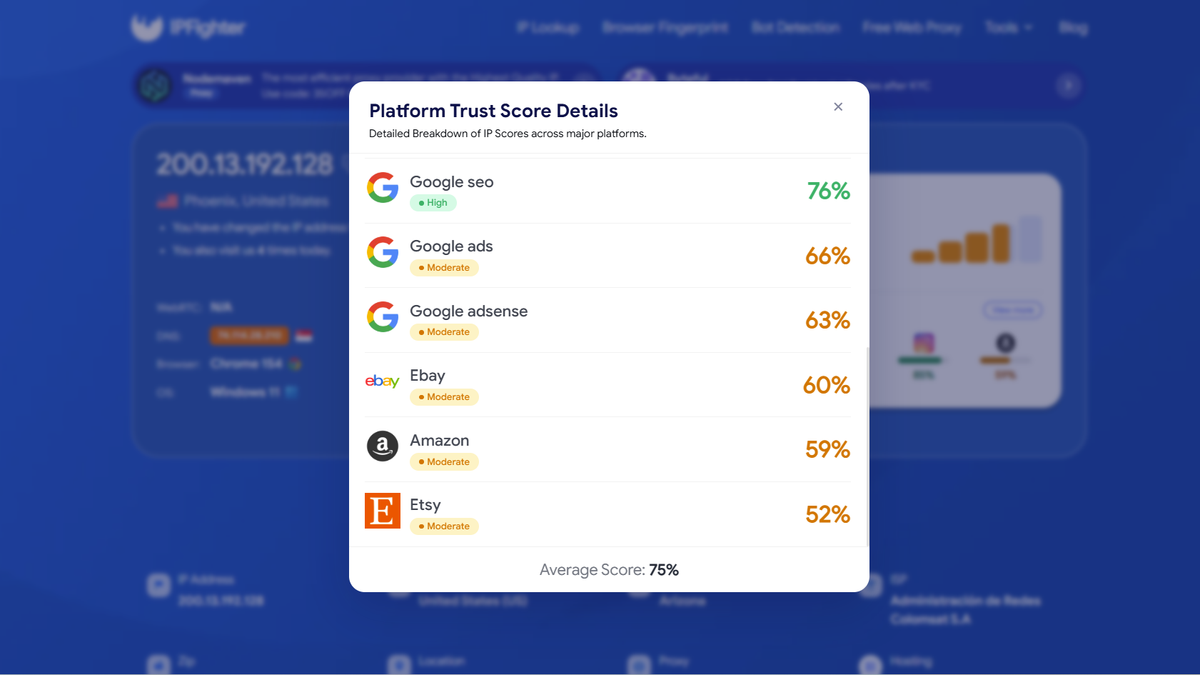
Run a quick quality check on IPFighter: Open the Proxy Checker and IP Lookup to confirm the IP, ISP, country, city, and connection type, and to see whether the IP is flagged as a proxy or listed on a blacklist. Review the IP score and the platform trust scores as well. See how to check if a proxy is working for how to read the results.
-
Check the speed: Run a speed test through the proxy to see download speed and latency, because slow connections make large collection jobs take longer.
-
Check the location on Google: Search from the proxy and look at the location Google shows at the bottom of the results, then compare it with the location IPFighter reports. City level differences are common, but the country should match.
-
Run a pilot on your target page: Open a real product page in the target market and check that the price, currency, language, and shipping options are what a local shopper would see. Note any CAPTCHAs, blocks, or empty results.
-
Repeat with more than one IP: Try a few IPs at different times, because results can vary between IPs and between sessions.
If the page shows the wrong currency or region, location accuracy is the most likely cause. If you meet frequent CAPTCHAs, the IP quality or the request pattern may be the problem.
Check proxy on IPFighter
Read more:
-
IP reputation check: How IPFighter scores your IP
-
How to check if a proxy is working and read your results
7. Is it legal to use a proxy for ecommerce?
Using a proxy is not illegal in most countries, but what you do through it can raise legal and contractual questions. This is general information, not legal advice. Keep these points in mind:
-
Marketplace and store terms: Many platforms limit automated access, scraping, or multiple accounts in their Terms of Service, and breaking them can lead to blocked access or suspended accounts even when no law is broken.
-
Robots.txt: This file tells automated tools which parts of a site the owner does not want crawled. It is not a law, but ignoring it can conflict with the site's terms and wishes.
-
Personal data: If the pages you collect include personal data, such as reviewer names or seller details, privacy laws may apply to how you store and use it.
-
Access controls: Do not use a proxy to get around logins, paywalls, or technical blocks that a site has set up to restrict access.
-
Public data: Collecting publicly visible information such as prices and product details is a very different matter from collecting private or restricted data.
Laws and platform rules differ between countries and sites, so check the rules that apply to your case. If you plan to collect data at scale, consider asking a qualified professional.
8. What are the risks of using an ecommerce proxy?
A proxy adds another layer between you and the website, so its quality and the way you use it affect your results. Poor choices can cost money and produce unreliable data. Watch for these risks:
-
Poor IP quality: Flagged or abused IPs lead to CAPTCHAs, blocks, and incomplete pages, which can distort the prices and stock levels you collect.
-
Inaccurate location: An IP that is recognized in the wrong city or country can show prices and availability for the wrong market.
-
Account restrictions: A marketplace may limit or suspend accounts that break its rules, and a proxy does not protect an account from that.
-
Unclear provider practices: Some residential networks have been abused. In a March 2026 public service announcement, the FBI warned that residential proxy networks can be used for fraud and that some IPs may be obtained without the device owner's consent, so choose providers that explain how their IPs are sourced.
-
Unexpected costs: Plans billed per GB can grow quickly when you scrape heavy pages, so estimate your traffic before you buy.
Free proxy lists add further risks, such as unreliable speeds and unknown operators, which makes them a poor fit for business data. Testing the IP first and choosing a transparent provider reduces most of these risks.
9. Conclusion
An ecommerce proxy is a practical tool for seeing prices, stock, search results, and ads the way buyers in other locations see them, and for spreading requests when you collect public data. It is not a separate technical proxy type, and it should not be confused with the reverse proxies that protect and speed up your own store.
Choose the proxy by task: rotating residential proxies for monitoring and data collection, static ISP proxies for workflows that need one stable IP, and mobile proxies for mobile specific checks. Compare providers by location accuracy, IP quality, and billing model, test the proxy before you rely on it, and follow the rules of the sites you work with.
Before you use a proxy for ecommerce, check its IP, location, and reputation with IPFighter. If you plan to buy one, visit IPFighter's Coupons Partner page to find available provider deals.
10. FAQ
Do I need a proxy for my online store?
Usually not for running the store itself. A proxy becomes useful when you collect data from other sites, check how your store looks in other markets, or run permitted location tests. For your own store's speed and security, a content delivery network or a reverse proxy is the more relevant tool.
Can I use a proxy for multiple seller accounts?
It depends on the marketplace's rules. Many marketplaces limit sellers to one account per business or require approval for more, and linking accounts can lead to suspension. A proxy does not override these rules, so read the platform's policy before you use one for account management.
Residential or datacenter proxies for ecommerce scraping?
Residential proxies are usually the safer choice for marketplaces and large retail sites, because their IPs look more like ordinary shoppers. Datacenter proxies are faster and cheaper, so they suit low risk sites, bulk collection where blocks are rare, and testing your own store.
Is a free proxy OK for ecommerce?
It is usually a poor choice for business use. Free proxies tend to be slow, unreliable, and shared by many users, and their operators are often unknown. For monitoring or account access, a paid proxy from a transparent provider is the safer option.
Is an ecommerce proxy the same as a VPN?
No. A VPN usually encrypts all traffic from your device, while a proxy typically routes traffic for a specific browser or tool. For ecommerce data work, proxies give finer control over IPs, locations, and sessions. See the difference between a VPN and a proxy for more detail.
Read more

Ecommerce proxy: How online sellers use it and what to consider

ProxyCove review: How its traffic-based proxy service works

Best Chinese proxy providers: Compare China proxies

Social media proxy: What it is and how to choose one

Proxy for trading: Can it improve your connection and privacy?
Anonymous Proxies review: What its proxy network offers