

Most proxy users are completely accustomed to strict time limits, constantly racing to consume their data allocation before it expires at the end of the billing cycle. But have you ever considered using a proxy network with zero expiration constraints? SimplyNode operates exactly on this flexible model, allowing creators to utilize their bandwidth at their own pace without arbitrary deadline pressures.
In this review, IPFighter explores SimplyNode’s pricing structure, core system features, and connection stability. Our testing will help you determine whether this provider is the right choice to support your online projects in 2026.
1. General information
Before diving deeper into the technical details, here is a quick overview of SimplyNode and its core specifications.
|
Field |
Content |
|
Website |
|
|
Country |
Netherlands |
|
Founded |
2024 |
|
Proxy types |
Residential proxies, mobile proxies (5G/4G/3G/LTE) |
|
IP pool |
8M+ ethically-sourced IPs |
|
Locations |
185+ locations worldwide |
|
Protocol |
HTTP / HTTPS / SOCKS5 |
|
Pricing model |
Pay-as-you-go (per GB) with no traffic expiration date |
|
Payment |
Cards, PayPal, Apple Pay, crypto payments, bank transfers |
|
Trial |
No free trials |
|
Refund |
Eligible within 14 days if bought via self-service, not paid with crypto, and used less than 20% of purchased traffic or 1 GB (whichever is reached first) |
|
Best for |
SERP scraping, web scraping, ad verification, social media, price monitoring |
Read more:
- Difference between datacenter and residential proxies
- What is a residential proxy ? Why websites trust these IPs
2. Proxy types available at SimplyNode
SimplyNode delivers specialized proxy solutions designed to match different levels of automation and account management. Instead of scattering its resources, the platform focuses on providing high-performing options tailored for specific data collection needs.
2.1. Mobile proxies (5G/4G/3G/LTE)
The mobile proxy infrastructure of SimplyNode routes your traffic through real mobile networks, making it highly effective at bypassing strict security systems.
- Pool size and coverage: Access to over 8 million ethically sourced mobile IPs across more than 185 global locations.
- Flexible session control: Users can choose between instant IP rotation on every request or maintain sticky sessions for up to 6 hours.
- Targeting precision: Full support for precise targeting at the country, city, and specific ISP or ASN levels without hidden fees.
- Connection protocols: Complete compatibility with HTTP, HTTPS, and SOCKS5 protocols for secure operations.
These mobile proxies are highly suitable for multi-accounting, ad verification, and web scraping tasks where avoiding CAPTCHAs and anti-bot systems is critical. By sharing cellular IP addresses with real mobile users through carrier-grade NAT, your automated tasks remain virtually indistinguishable from organic traffic.
The network maintains a documented 99.3% success rate, ensuring that large-scale data extraction projects experience fewer failed requests and minimal downtime.
2.2. Residential proxies
For projects that require extensive global coverage and multiple simultaneous connections, the residential proxy pool of SimplyNode provides a highly stable alternative.
- Pool size and coverage: Access to over 8 million ethically sourced residential IPs across more than 180 countries.
- Session control options: Support for instant IP rotation on every request or extended sticky sessions to maintain the same IP for longer tasks.
- Targeting capability: Pinpoint accuracy allowing users to filter proxy connections by country, city, or specific ISP.
- Session volume: Unlimited concurrent sessions, allowing you to open as many parallel threads as your workflow requires.
These residential IPs are sourced from real user devices who voluntarily share their connections, ensuring full compliance with industry standards. Because the traffic flows through authentic home networks, it easily bypasses strict anti-bot systems, blocks, and CAPTCHAs.
The system delivers a 99.3% success rate with quick response times. This high efficiency makes the network well-suited for heavy workloads like large-scale data scraping, price monitoring, and market research without causing connection timeouts.
3. Key features of SimplyNode proxies
The overall architecture of SimplyNode focuses heavily on practical functionality rather than visual presentation. While the platform adopts a minimalistic dashboard design, it delivers robust backend controls and system features built for large-scale automation.
- Vast global pool and specific routing: Access to over 50 million ethically sourced IPs, allowing users to build extensive scraping pipelines across multiple markets.
- Targeting depth and customizable sessions: Support for precise country, region, and city-level geo-targeting, alongside flexible configurations for rotating or sticky ports.
- Dual authentication and protocols: Complete compatibility with HTTP, SOCKS, and UDP protocols, allowing validation via either traditional username/password or IP whitelisting.
- System use restrictions: The proxy network enforces strict safety barriers, meaning these IPs cannot be used to access government websites, financial platforms, or select news services.
By prioritizing network capacity over unnecessary design embellishments, the provider keeps its system optimized for high concurrency operations. This straightforward approach eliminates technical clutter, allowing data teams to focus directly on extraction logic without paying for superficial features.
However, users should note that SimplyNode currently operates as a rotating-only service. If your automated tasks require dedicated or permanent static ISP connections, this provider will not fit that specific workflow requirement.
4. SimplyNode pricing overview
SimplyNode applies a transparent pay-as-you-go pricing structure based entirely on your total data consumption. The platform eliminates mandatory monthly subscriptions, meaning users only pay for the exact volume of traffic they purchase, with no expiration deadlines attached to the bandwidth.
Both plans utilize a tiered sliding scale where the cost per gigabyte automatically decreases as you buy more volume.
|
Proxy type |
Starting price (per GB) |
Lowest volume price (per GB) |
|
Residential proxies |
$4.00 |
$2.25 |
|
Mobile proxies |
$6.00 |
$4.25 |
Every plan unlocks full system features from day one, including complete access to the entire IP pool and granular location filtering tools. However, users should note that the listed rates exclude value-added tax (+VAT), which will be applied at checkout based on your region.
If you’re planning to buy proxies from SimplyNode don’t miss these SimplyNode promo code! You can get 25% for all SimplyNode service plans with IPFighter’s exclusive discount codes. Get your code now!
5. Performance test
To evaluate the overall performance of the service, IPFighter tested the proxy quality on IPFighter, checked the connection speed on Speedtest, and verified the IP location accuracy through Google Search.
Before starting the tests, the proxy first needed to be attached to the browser environment so the connection could be verified correctly during the testing process. Below are the preparation steps and the actual testing results.
5.1. Preparation
After obtaining the proxy information from SimplyNode, we used the IPFighter Proxy Manager extension to attach the proxy directly to the browser before starting the tests.
This tool allows users to quickly add, manage, and switch proxies inside the browser without complicated manual configuration.
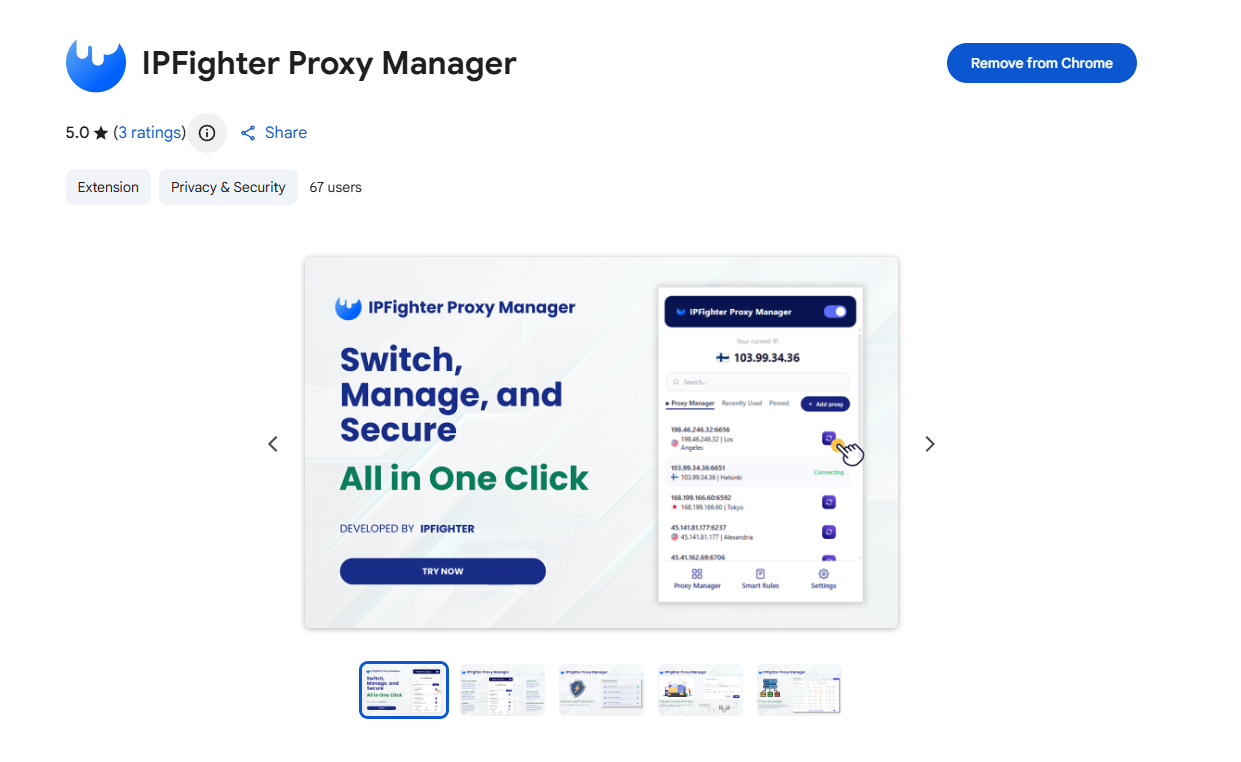
IPFighter Proxy Manager extension on Chrome
If you want a more detailed guide on how to use this tool, you can read here: A full guide to IPFighter Proxy Manager extension
5.2. Test results
After successfully configuring the proxy configuration inside our testing environment, we proceeded to evaluate the overall network quality, speed performance, and IP location verification accuracy.
To provide a comprehensive assessment of their entire infrastructure, we conducted real-time tests on both product categories offered by SimplyNode: Residential proxies and Mobile proxies.
Residential proxies
 Check proxy on IPFighter
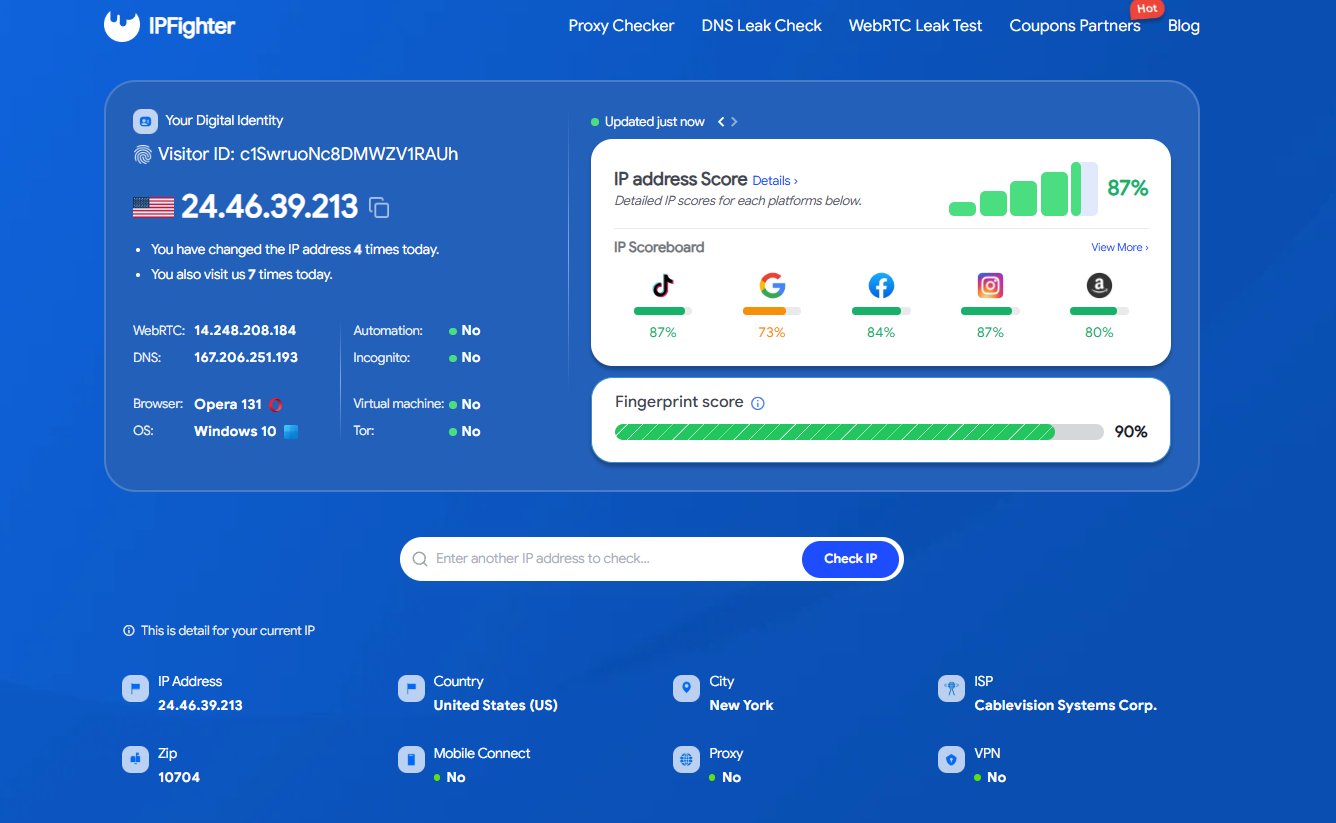
The IPFighter results for SimplyNode’s residential proxy show solid performance, with the tested IP address achieving an overall IP score of 87%. This indicates a decent level of cleanness and reliability. The proxy demonstrates steady performance across various social platforms, specially scoring 87% for both TikTok and Instagram, and 84% for Facebook, meaning these scores can be used as a good reference for compatibility with social media. The location information accurately displayed the United States, consistent with our setup. Crucially, "Proxy" was identified as "No", confirming that the residential connection blends in well with normal user traffic.
 Check proxy on Speedtest
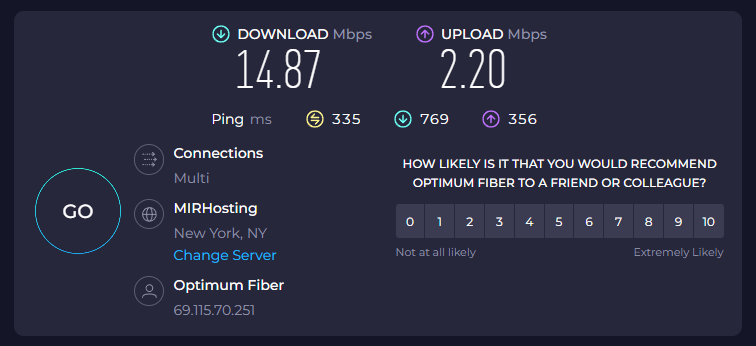
Moving onto speed evaluation with Speedtest, this residential IP recorded a ping of 335 ms. While relatively high, this latency is within the expected range for residential proxies. The download speed reached 14.87 Mbps, and the upload speed was 2.20 Mbps. This performance is entirely understandable since residential networks route through real home setups and cannot match the high-speed benchmarks of datacenter proxies. Therefore, this package is highly suitable for workflows that demand stable, long-term connections, making it an ideal fit for tasks like account creation, account farming, and social media management.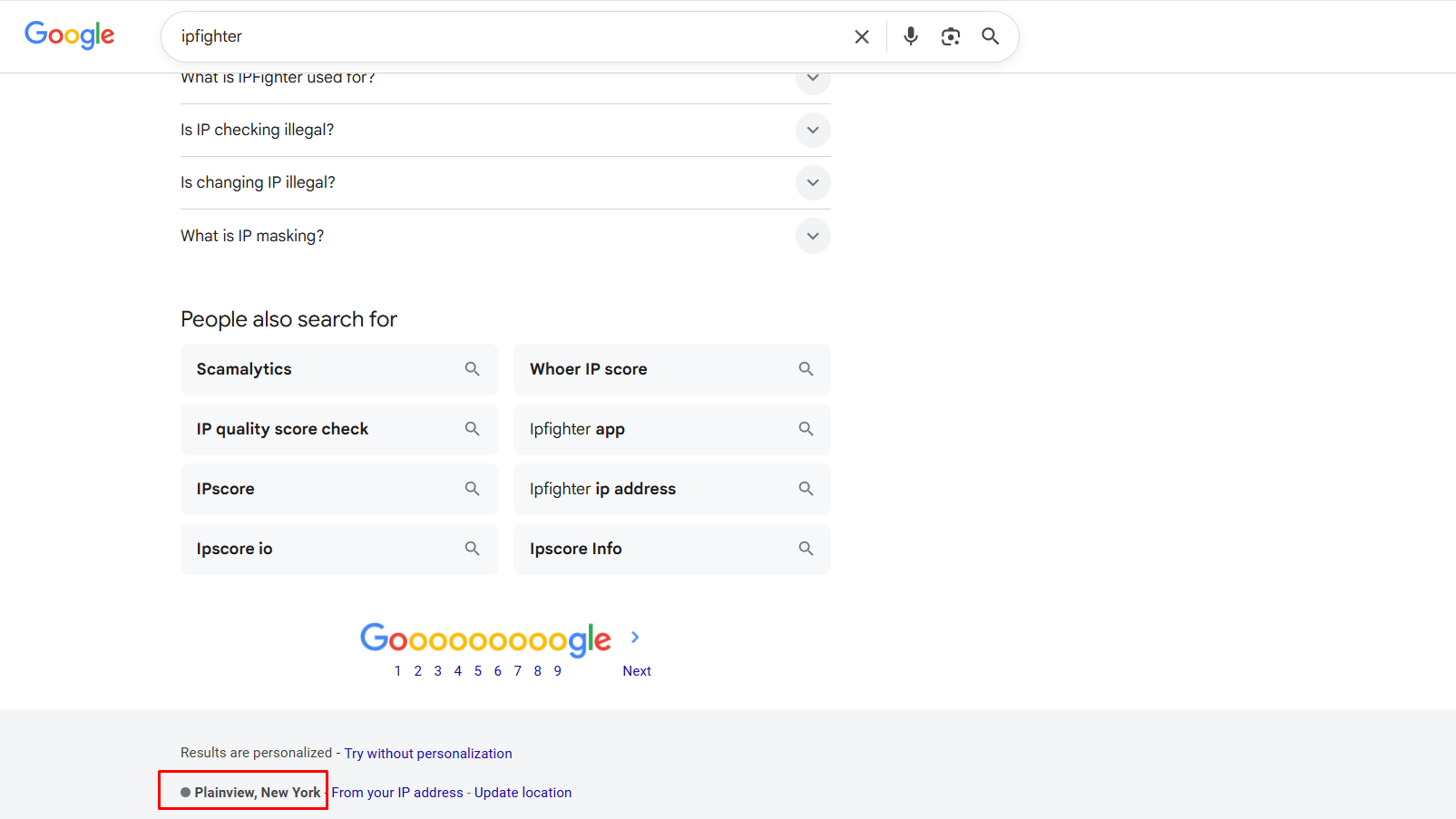
Check on the Google search bar
Finally, we quickly verified the proxy's location accuracy via a live Google search query. Scrolling down to the footer at the bottom of the search results page, the destination environment successfully localized for Plainview, New York, perfectly matching our United States setup.
Mobile proxies
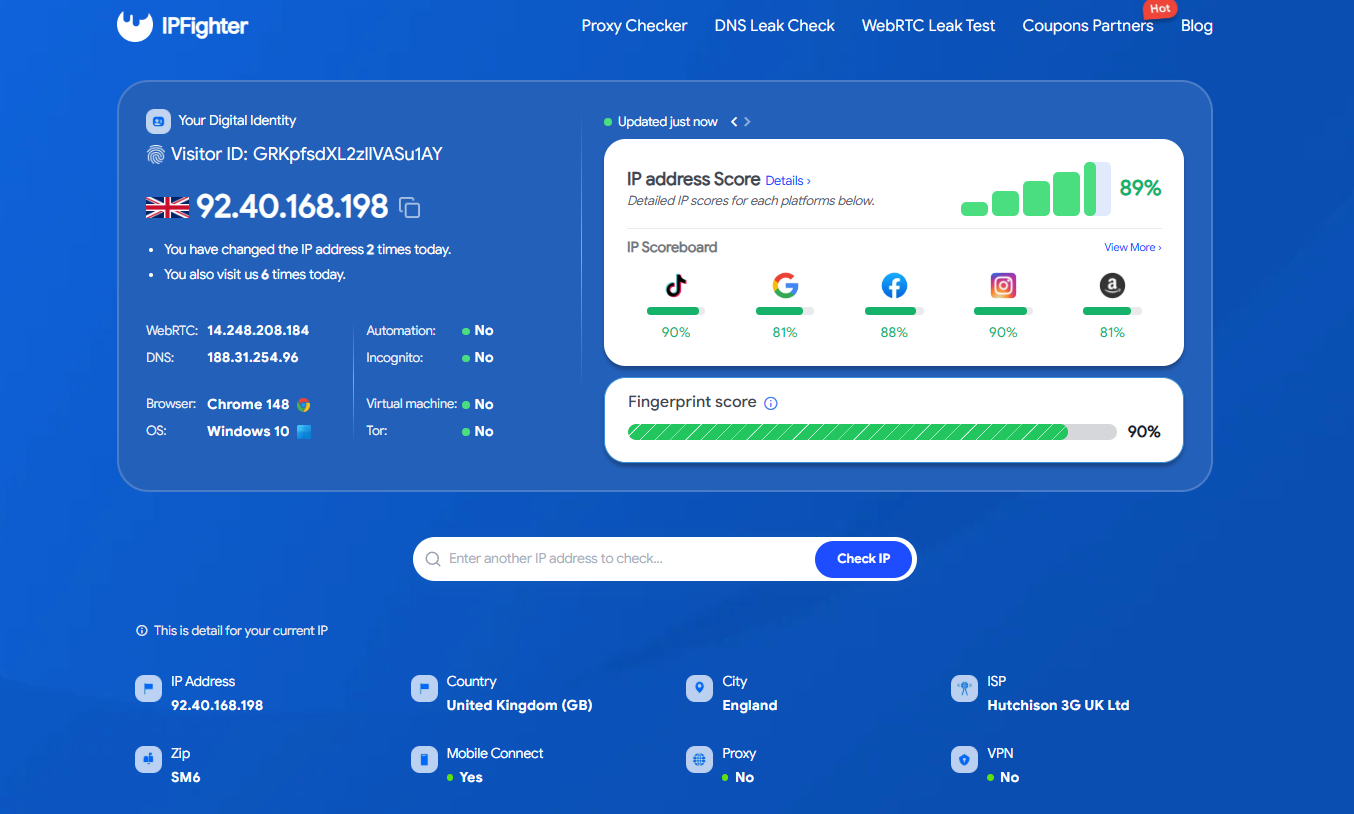 Check proxy on IPFighter
The IPFighter verification results for SimplyNode’s mobile proxy package demonstrate high-quality network integrity, achieving a strong overall IP score of 89%. This confirms an excellent level of connection cleanness and reliability. The proxy maintains consistent performance across major social networks, scoring 90% for TikTok, 88% for Facebook, and 90% for Instagram, making it a highly compatible reference for social media tasks. The location lookup accurately identified the United Kingdom, consistent with our setup. Crucially, "Mobile Connect" was flagged as "Yes" and "Proxy" was identified as "No", verifying that this is an authentic cellular connection that seamlessly blends with regular mobile traffic.
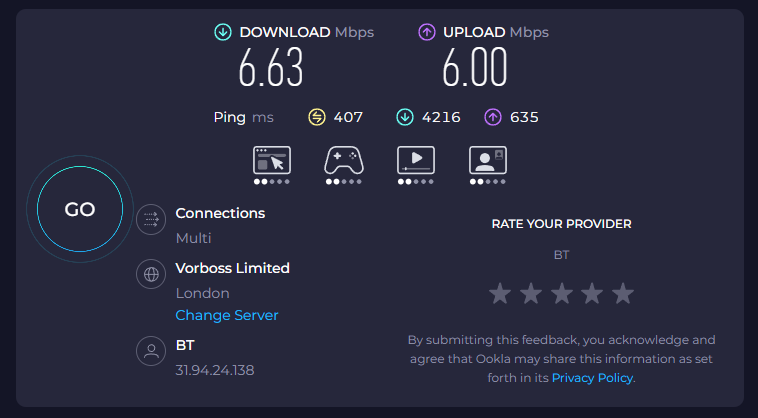 Check proxy on Speedtest
Next, we evaluated the active data rates using Speedtest. The mobile IP recorded a latency ping of 407 ms. While this latency is relatively high, it remains within the typical operating boundaries for international mobile proxy routing. The system delivered a download speed of 6.63 Mbps and an upload speed of 6.00 Mbps. Therefore, this mobile network is best suited for tasks like managing premium advertising accounts, creating bulk profiles, or conducting localized ad verification rather than data-heavy or high-speed operations.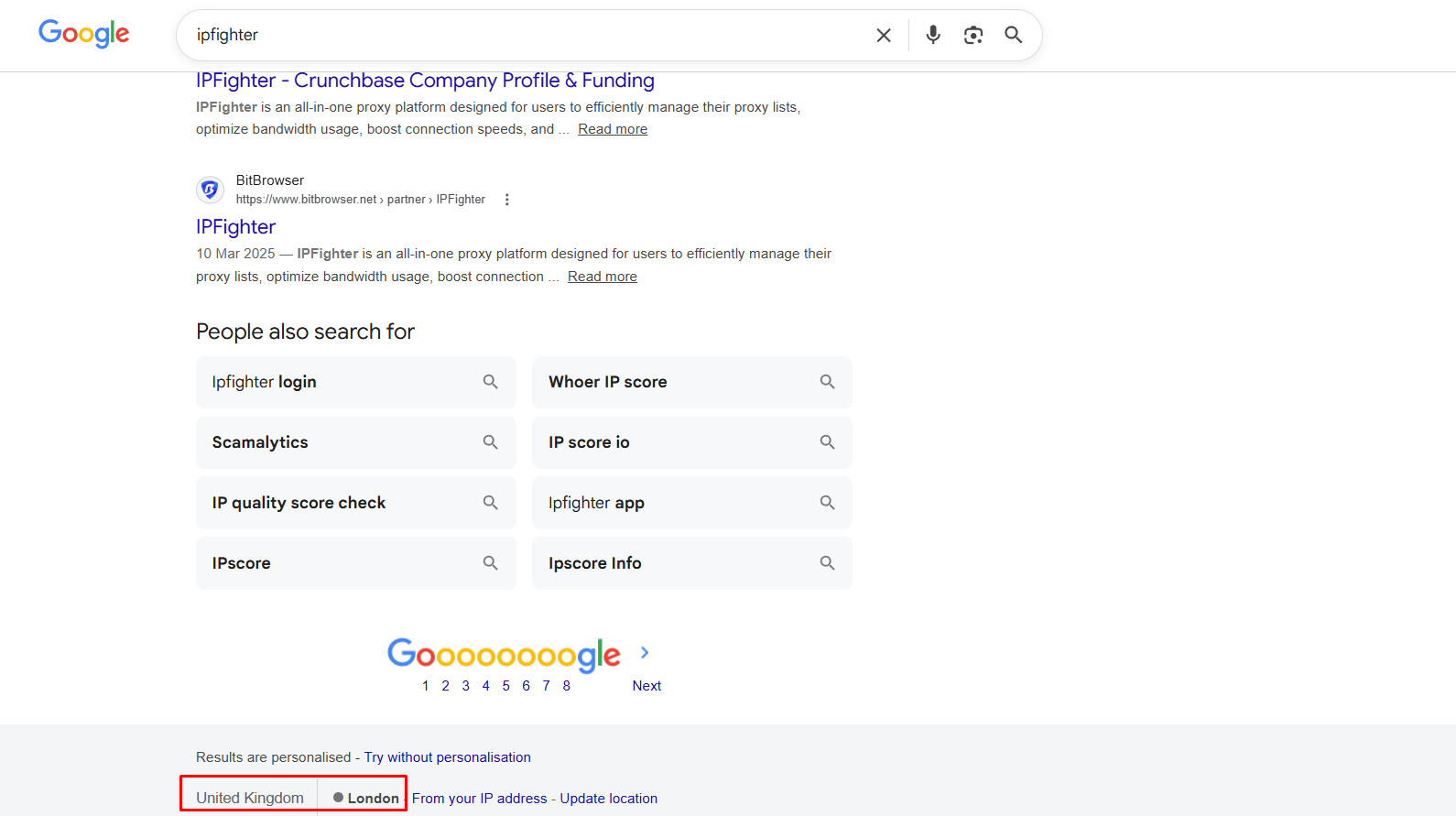
Check on the Google search bar
Finally, we quickly verified the proxy's location accuracy via a live Google search query. Scrolling down to the footer at the bottom of the search results page, the destination environment successfully localized for London, United Kingdom, perfectly matching our dashboard setup. This precise regional alignment shows that the mobile infrastructure easily passes strict geofencing and anti-bot systems, ensuring your localized automation and browsing tasks operate without regional detection risks.
6. How to get proxy from SimplyNode
The dashboard interface of SimplyNode is designed with a very simple layout, making it easy to track your data usage and complete the entire setup within a few steps.
Step 1: Monitor and purchase traffic
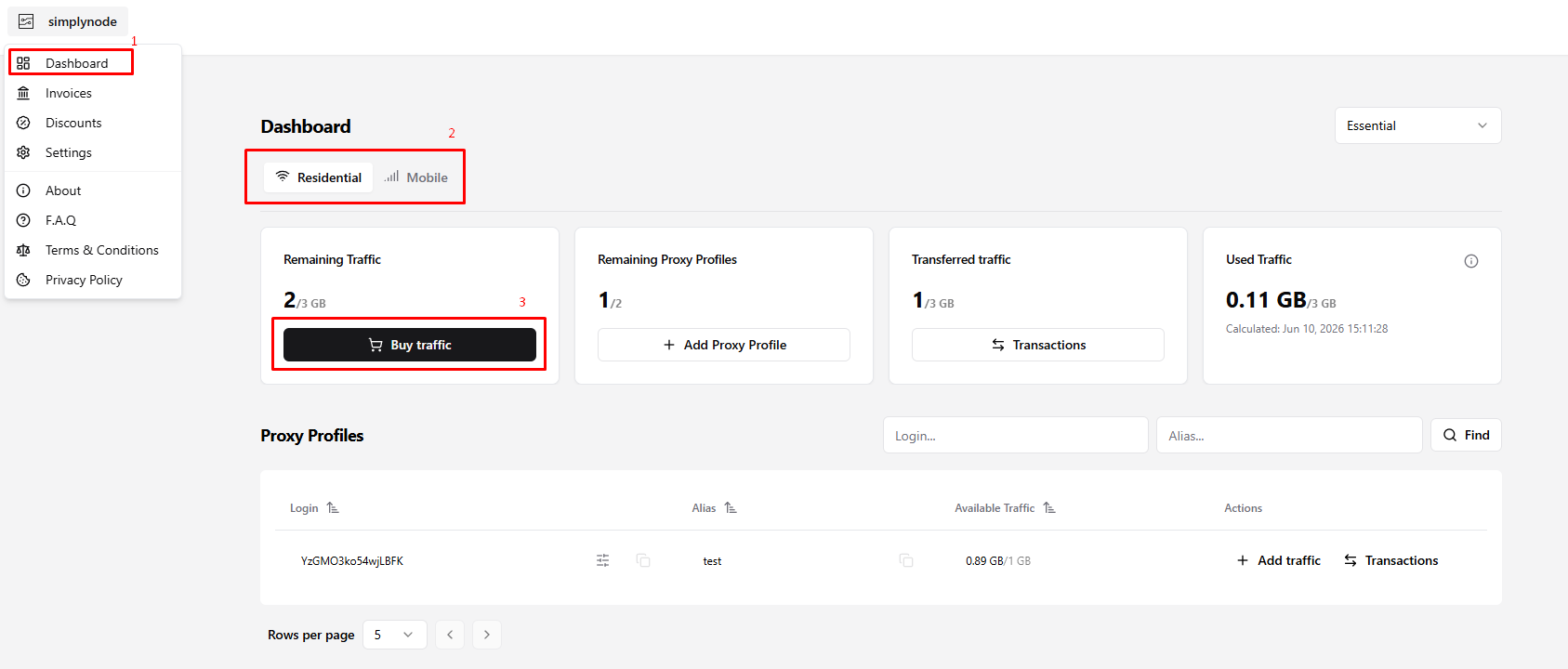 Buy traffic
Upon logging into the dashboard, the main interface displays clear status cards showing your remaining available traffic and your total data usage. To add more data to your account based on your workflow requirements, click the Buy traffic button inside the data metrics section and select your desired bandwidth package.
Remember to apply the 25% discount code before completing your payment. Get code here!
Step 2: Create a proxy profile with custom traffic limits
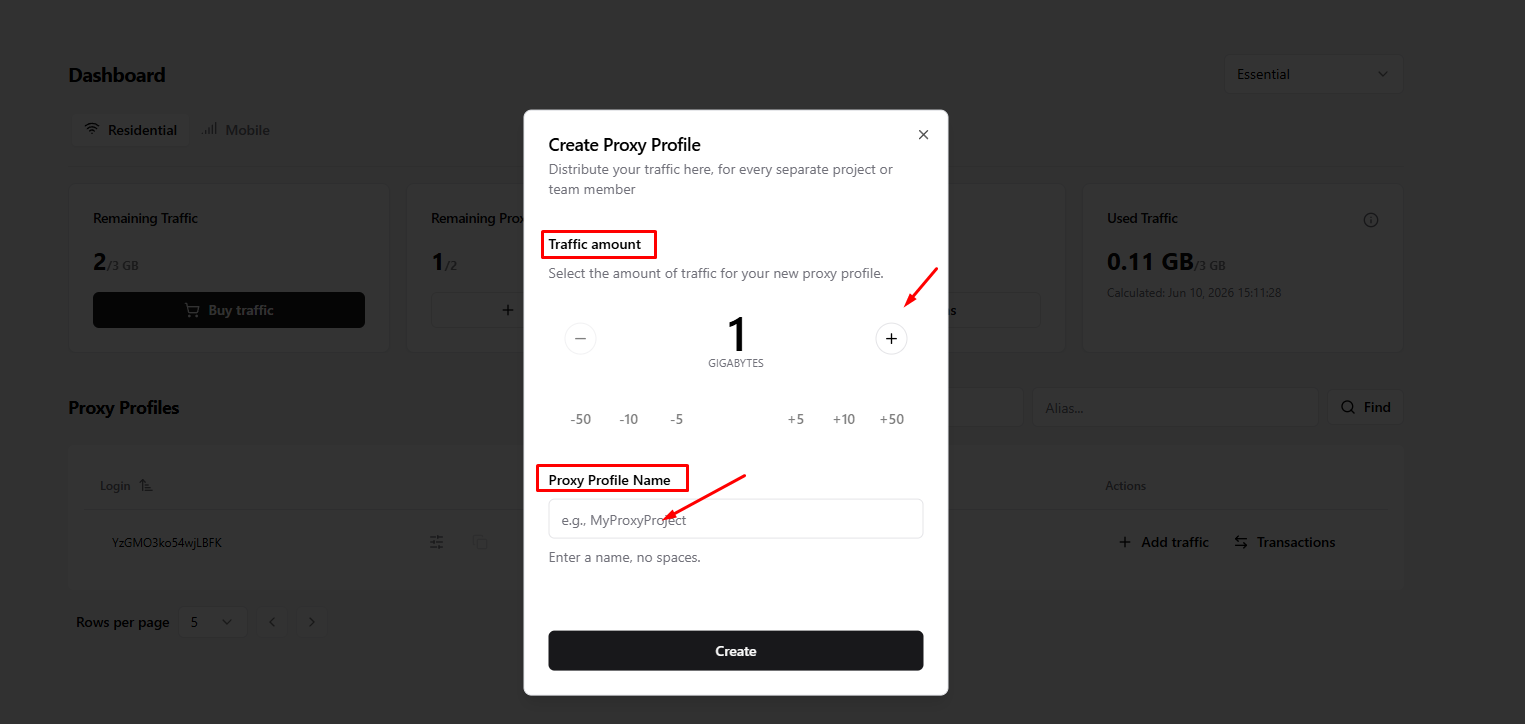
Create a proxy profile
Navigate to the proxy profiles section and click the Add Proxy Profile button to trigger the setup modal. You need to configure two main fields before launching your configuration:
- Traffic amount: Define the exact amount of bandwidth allocated to this specific profile.
- Proxy Profile Name: Enter a custom alias to organize your profile or track specific automated tasks.
This setting allows you to distribute your total purchased data into smaller packages, ensuring that a single automation setup or team member cannot accidentally consume your entire account balance.
Step 3: Configure settings in the proxy list generator
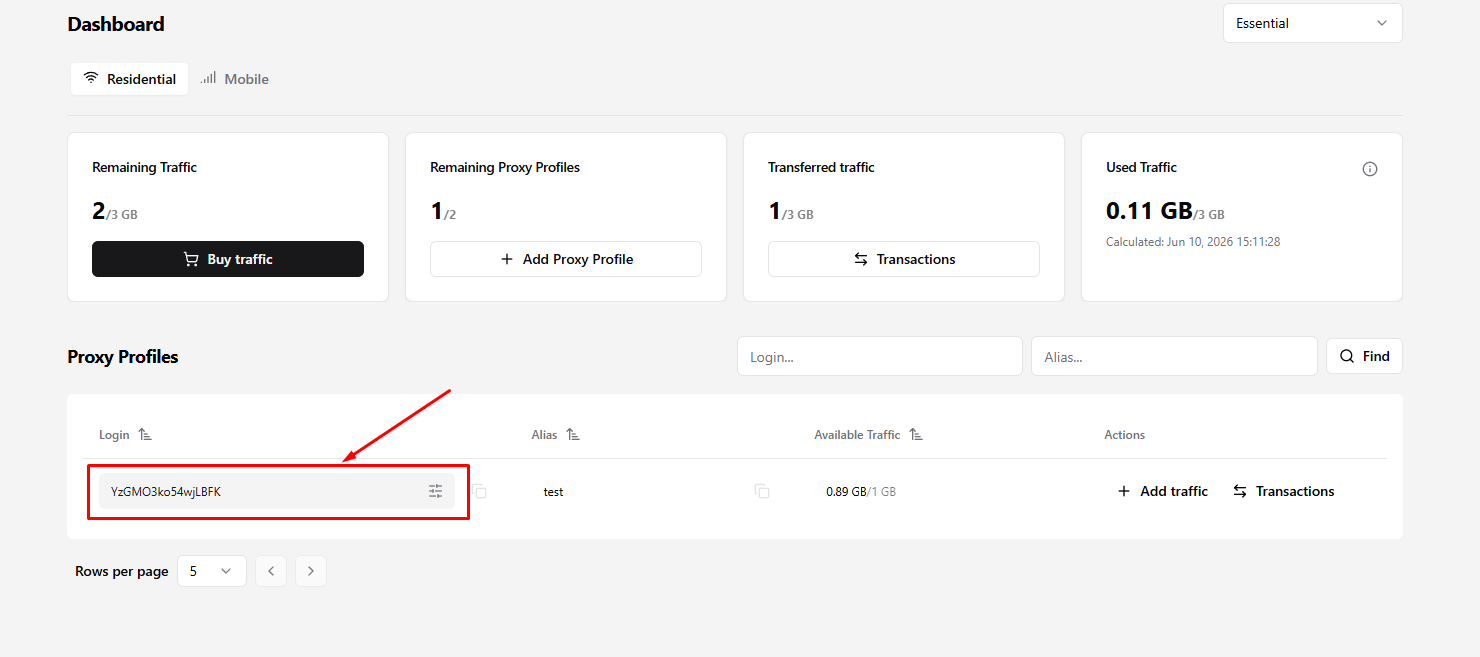 Configure proxy settings
Once the profile is generated, click on its login string to open the advanced configuration panel. To extract your proxy endpoint data, adjust the parameters inside the generator tool with the following details:
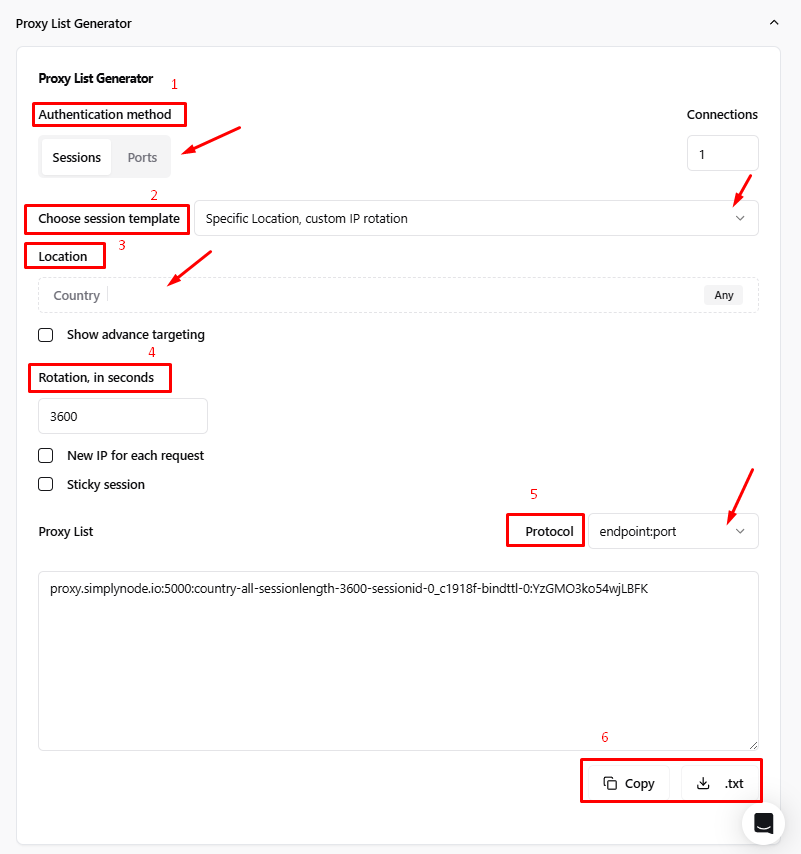 Configure settings in the proxy list generator
- Authentication method: Choose your preferred credential format based on your automation software requirements. Toggle the Sessions tab if you prefer a dynamic string that contains all routing parameters inside the username, or toggle the Ports tab to generate a clean, short string that targets a static server gateway port directly.
- Choose session template: Select one of the three operational modes depending on your specific automation needs:
-
Random location, new IP on each request: The system automatically selects a random country and rotates the IP address after every single request. This is ideal for short, rapid data scraping tasks.
-
Specific location, new IP on each request: Restricts the IP pool to a designated country while still forcing a new IP address for every request.
-
Specific location, custom IP rotation: Allows you to maintain a persistent connection for a custom duration. When selecting this option, an additional input field appears where you can define the maximum rotation time in seconds (up to 3,600 seconds, equivalent to 60 minutes).
-
- Rotation, in seconds: Below the seconds field, you can fine-tune the behavior by checking either New IP for each request or Sticky session to match your workflow requirements.
- Location: In the country field, you can leave it as Any to let the system fetch random global IPs, or pick a specific country. If your project requires hyper-local data, tick the Show advance targeting box to unlock specific dropdown menus for region, city, and ISP or ASN filtering. If these are left blank, the system defaults to any available node within that territory.
- Protocol: Choose your preferred display format from the protocol dropdown, supporting standard structures like endpoint:port alongside direct HTTP, HTTPS, or SOCKS protocols to ensure full compatibility with your automation stack.
Once the configuration matches your project requirements, scroll down to the final proxy list output field. You can instantly copy the generated string to your clipboard or download the complete setup as a clean “.txt” file for direct integration into your multi-accounting browsers or marketing tools.
7. Alternatives
If you are looking for similar proxy providers, here are some alternatives worth considering:
- CoProxy: A budget-friendly provider offering over 500 dynamic and sticky IPv4 proxies starting at just $1/month, fully supporting HTTP/Socks5 protocols with high-speed connections and 24/7 dedicated support.
- LightningProxies: A proxy provider offering residential, datacenter, IPv6, and ISP proxies across 195+ countries. It features a large global IP pool with fast response times, making it suitable for scraping, automation, browsing, and data collection tasks.
- Byteful: A provider offering static ISP, residential, and datacenter proxies built on a 100 Gbps network across more than 195 countries.
You can also check out reviews of our other partners here:
- Proxys.io review: Features, pricing, performance
- MoMoProxy review: Is this residential proxy provider worth using?
- ProxyOmega review - Should you make it your trusted proxy provider?
- What makes SX.ORG special? A comprehensive review from A to Z
- Choosing the right proxy: A detailed review of Quick Proxy in 2026
8. Conclusion
SimplyNode delivers clean connection pools and solid reputation scores, making it a reliable choice for online anonymity, deep geo-targeting, and multi-account management. Although the overall connection speed and latency metrics sit at an average level, the service remains fully adequate for routine tasks like account creation, account farming, and social media management, though it falls short for high-speed or heavy data harvesting operations.
However, no proxy provider achieves perfection, and network performance can still vary depending on the specific location and pool being assigned. Before utilizing any proxy package for critical workflows, you should always verify the connection purity and detection status through specialized tools like IPFighter to ensure it matches your exact project requirements.
Looking to save on your purchase? Visit the IPFighter page to grab a SimplyNode promo code and get up to 25% off.
9. FAQ
Which payment methods are accepted by SimplyNode?
SimplyNode supports standard international credit or debit cards, PayPal, Apple Pay, and various cryptocurrency options. For enterprises requiring direct bank wire transfers, custom arrangements can be processed by contacting their support desk via email.
Does SimplyNode provide a free proxy trial?
By default, SimplyNode does not offer automated free trials on the dashboard. Users can test the network infrastructure by purchasing the smallest 1 GB bandwidth package, which carries no expiration date. Alternatively, technical teams can email their specific use case requirements to request a manual trial evaluation.
What is the official refund policy of SimplyNode?
Users can request a refund within 14 days of their initial purchase under strict system conditions. The transaction must be completed via self-service, must not use cryptocurrency, and the account must have consumed less than 20% of the purchased data or 1 GB of traffic, whichever threshold is reached first.
Which server ports should users configure on SimplyNode?
The exact port configuration depends entirely on your setup inside the proxy list generator panel. Once you define your target location and authentication method, the SimplyNode dashboard will automatically output the designated proxy address and port number (such as port 5000 or 9000) to input into your software.
Are the residential proxies from SimplyNode static or rotating?
SimplyNode operates exclusively as a rotating network. The system does not provide dedicated or static ISP addresses, meaning all residential and mobile connections automatically refresh at designated intervals to maintain high anonymity levels.
Read more

IPFoxy review: Are its pure rotating residential proxies worth it?

CatProxies review: What do its five proxy types offer?

Whitecloakproxy review: What to know before you buy

Geonix review: What makes its proxy services stand out?

ProxyWing review: Pricing, features, and real-world performance

Floppydata review: A closer look at its proxy network