

LightningProxies has carved out a unique position in the alternative routing market by focusing heavily on operational data transmission speeds. Managing a foundational infrastructure that spans more than 20 million individual nodes, the provider attracts significant attention from developers and multi-accounting managers globally.
In this detailed review, IPFighter explores LightningProxies pricing plans, available proxy types, core network features, connection stability, and real-world performance to determine whether this network is the right fit for your automated projects in 2026.
1. General information
Before diving deeper into the details, here is a quick overview of LightningProxies and its core specifications.
|
Website |
|
|
Country |
Romania |
|
Founded |
January 2023 |
|
Proxy types |
Residential, Unlimited Residential, ISP, Datacenter, IPv6, Mobile |
|
IP pool |
More than 20 million IPs |
|
Locations |
195 countries for residential proxies, 250+ locations across the network |
|
Protocol |
HTTP / SOCKS5 |
|
Pricing model |
Pay as you go (Flexible options: per GB, per IP, or per Day) |
|
Payment |
|
|
Trial / refund |
Free trial via Live Chat | Refunds for Resi/Mobile/IPv6 if usage < 100MB & proven unusable |
|
Best for |
Web scraping, SEO tracking, Ad verification, Account management |
2. Proxy types available at LightningProxies
LightningProxies provides several types of proxies designed for different use cases. Below are the main proxy categories available on the platform.
2.1. Residential proxies
Residential proxies route automated software traffic through authentic household internet service provider nodes to simulate organic human behavior. The standout features of this provider's residential proxy are:
- Advertised proxy pool: The network advertises more than 20 million residential IPs in 195 countries.
- Protocols: HTTP and SOCKS5 connection support
- Authorization: User-pass authentication setup
- Rotation: Flexible automatic rotating and sticky sessions
- Filtering: Free country, state, and ISP geo-targeting infrastructure
We can see some features of these residential proxies. Next, we will explore the ISP proxies.
2.2. ISP proxies
ISP proxies bridge the gap between data center speeds and residential trust metrics, providing persistent connections that simulate real home internet subscribers. The standout features of this provider's ISP proxy are:
- Configuration: Forever static dedicated IPs starting with 1 IP minimum order
- Protocols: HTTP and SOCKS5 protocol infrastructure
- Network tiers: Powered entirely by worldwide Tier 1 and Tier 2 ISPs
- Session control: Premium subnets optimized with custom IP duration settings
- Filtering: Regional availability across more than 20 available countries
We can see some features of these ISP proxies. Next, we will explore the mobile proxies.
2.3. Mobile proxies
Mobile proxies route automated software traffic through real cellular networks, providing exceptional trust ratings for managing mobile application workloads. The standout features of this provider's mobile proxy are:
- Advertised proxy pool: More than 500,000 real 3G, 4G, 5G and LTE IPs are advertised across 50+ countries.
- Network support: High-trust IPs sourced directly from top 3G, 4G, and 5G mobile carriers
- Protocols: HTTP and SOCKS5 protocol layers
- Authorization: Flexible Whitelist or User-pass verification models
- Rotation: Adaptable automatic rotating and sticky configurations
- Filtering: Combined country and mobile ISP targeting fields
We can see some features of these mobile proxies. Next, we will explore the datacenter proxies.
2.4. Datacenter proxies
Datacenter proxies deliver high data transmission velocities by hosting automated tasks on robust, specialized corporate server networks. The standout features of this provider's datacenter proxy are:
- Advertised proxy pool: Dedicated fleet containing more than 15,000+ clean server IPs
- Protocols: HTTP and SOCKS5 configuration baselines
- Authorization: Whitelist and User-pass concurrent security options
- Performance metrics: Guaranteed 99.9% uptime with reliable IP configurations
- Rotation: Built-in automatic rotating and static session layouts
- Filtering: Regional sorting using country selection filters
We can see some features of these datacenter proxies. Next, we will explore the IPv6 proxies.
2.5. IPv6 proxies
IPv6 proxies utilize advanced internet protocol architectures to handle high-frequency automated scraping tasks on modern web architectures. The standout features of this provider's IPv6 proxy are:
- Configuration: High-performance infrastructure built on 2x /29 network subnet sizes
- Pool capacity: Billion-scale IP availability optimized for efficient public data extraction
- Protocols: Dual HTTP and SOCKS5 compatibility fields
- Authorization: Secure Whitelist or User-pass authorization tokens
- Rotation: Dynamic automated rotating and sticky network paths
- Filtering: Global coverage spanning across more than 15+ available countries
We can see some features of these IPv6 proxies. Next, we will explore the unlimited residential proxies.
2.6. Unlimited residential proxies
Unlimited residential proxies eliminate data tracking worries by offering authentic household connection gateways with zero capacity restrictions. The standout features of this provider's unlimited residential proxy are:
- Advertised proxy pool: Access matrix containing over 2M+ active residential IPs
- Authorization: Standard user-pass or source IP Whitelist architecture
- Capacity limits: Truly unlimited quantity proxy lists operating without thread restrictions
- Rotation: Standard sticky and rotating connection nodes
- Filtering: General country-level regional distribution layers
- Performance control: Custom bandwidth throughput packages configured at 200Mbps base limits
Overall, these diverse proxy types provide flexible choices for both scraping and stable account management. Beyond the network types, the platform also offers several built-in dashboard tools that help you control and customize your proxy settings easily.
Learn more about proxies:
- What is a Proxy? Benefits, usage, and everything you need to know about proxies
- What is bandwidth? Why does bandwidth affect website speed?
- What is a reverse proxy? A solution for website speed and security enhancement
3. Key features of LightningProxies
The provider offers an intuitive dashboard equipped with practical tools to manage your IP pools easily. Below are the core technical features available across the platform that you can configure for your projects.
- Flexible session control: You can choose between automatic rotating ports that change IPs per request, or sticky sessions to hold an IP for your tasks.
- Diverse sticky time lengths: Keep the same IP for 120 minutes on Residential plans, up to 24 hours on Mobile lines, or even weeks using static ISP profiles.
- Adaptable bandwidth models: The system offers metered gigabyte packages for Residential plans, alongside unlimited bandwidth setups for ISP and Datacenter configurations.
- Dual authentication modes: The dashboard supports both standard user-pass verification and IP Whitelisting for seamless passwordless logins.
- Granular geo-targeting filters: You can filter your proxies by country on static lines, or drill down deeper to specific states, cities, and ISPs on mobile and household networks.
- Optimized uptime and speeds: The platform provides high transmission speeds up to 1Gbps on server nodes, backed by a reliable 99.7% network uptime guarantee.
Overall, these built-in dashboard tools make it very straightforward for beginners to customize and control their IP configurations easily. Now that we know how these features work, let us move to the next section to examine the official packages and pricing structures.
4. LightningProxies pricing overview
The platform offers flexible pricing structures tailored to different usage needs, ranging from metered gigabyte packages to unlimited bandwidth models. Understanding how each proxy group calculates costs helps you select the most budget-friendly plan for your project.
4.1. Residential proxies
This network divides its plans into Regular and Enterprise tiers. As your bandwidth package grows, the price per gigabyte drops significantly to offer better value for large-scale tasks.
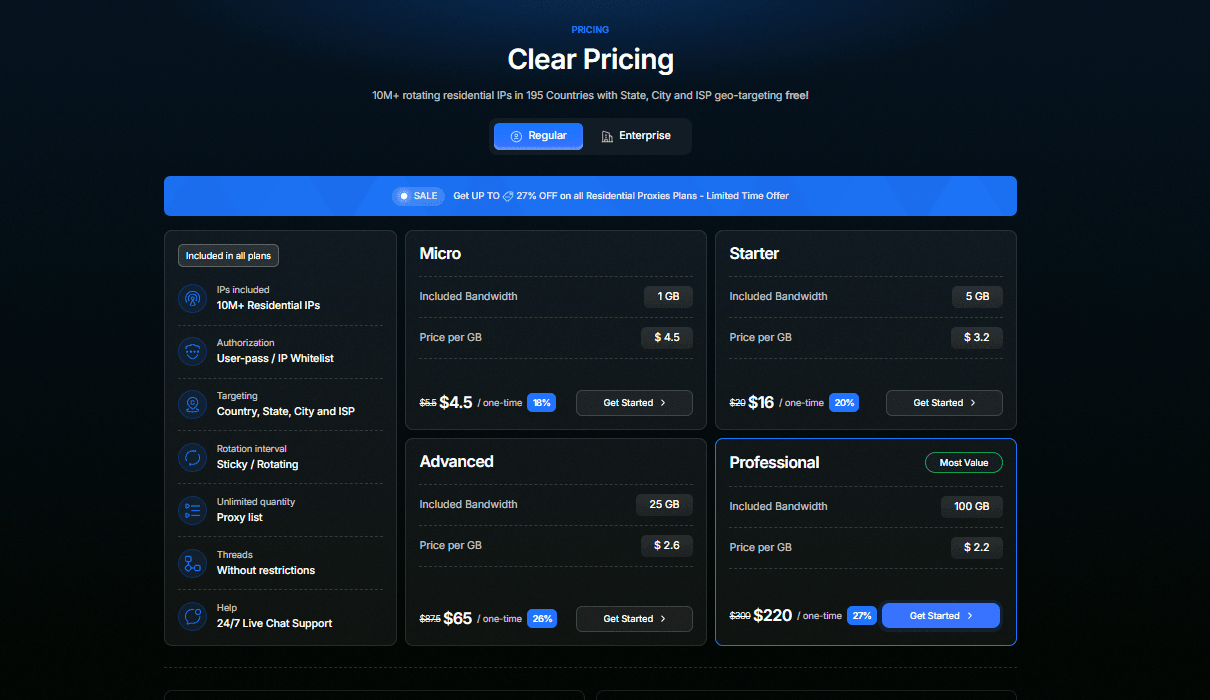 Residential proxies pricing
- Regular plans: Range from the Micro plan at $4.50 for 1 GB, the Starter plan at $16.00 for 5 GB, the Advanced plan at $65.00 for 25 GB, up to the Professional plan at $220.00 for 100 GB.
- Enterprise plans: Designed for high-volume scraping, starting from the Premium plan at $900.00 for 500 GB, the Master plan at $1,500.00 for 1,000 GB, the Elite plan at $3,750.00 for 3,000 GB, up to the Corporate plan at $5,500.00 for 5,000 GB.
We can see the data volume structures for household networks. Next, we will check the pricing for static ISP lines.
4.2. ISP proxies
ISP proxies do not charge by data consumption. Instead, the cost is calculated based on the specific number of dedicated IP addresses you purchase and your custom plan duration.
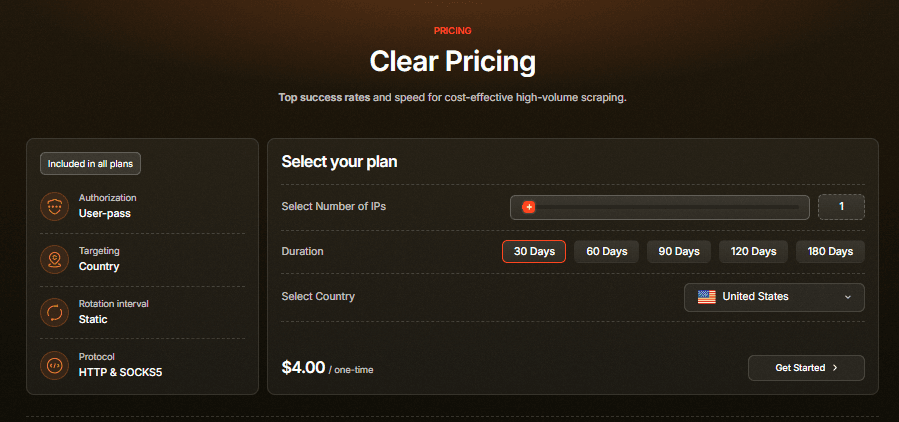 ISP proxies pricing
You can easily adjust your setup to purchase anywhere from 1 to 200 dedicated static residential IPs depending on your project scale. For instance, a single IP starts at $4.00 for 30 days, while scaling up to the maximum of 200 IPs will cost $500.00 as a one-time payment.
Additionally, the dashboard allows you to select your plan duration smoothly across multiple time frames, including 30 Days, 60 Days, 90 Days, 120 Days, and 180 Days. This flat-rate billing system makes it highly predictable for managing long-term static residential IPs. Next, we will explore the mobile carrier network rates.
4.3. Mobile proxies
Similar to household options, mobile packages are split into Regular and Enterprise structures based on gigabyte consumption, routing your automation through real cellular lines.
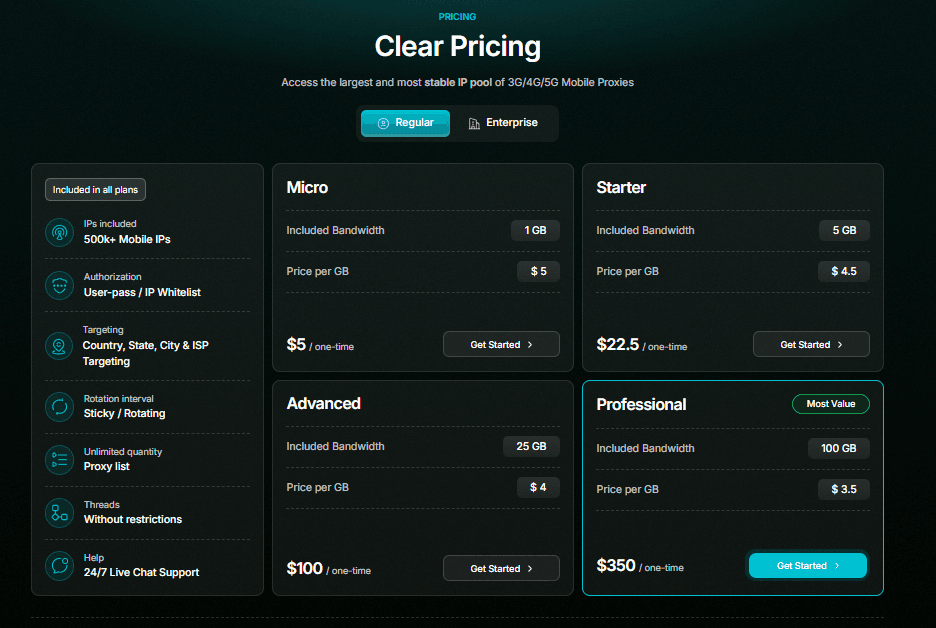 Mobile proxies pricing
- Regular plans: Range from the Micro plan at $5.00 for 1 GB, the Starter plan at $22.50 for 5 GB, the Advanced plan at $100.00 for 25 GB, up to the Professional plan at $350.00 for 100 GB.
- Enterprise plans: Built for massive mobile application scraping, running from the Premium plan at $1,250.00 for 500 GB, the Master plan at $2,000.00 for 1,000 GB, the Elite plan at $4,350.00 for 3,000 GB, up to the Corporate plan at $6,000.00 for 5,000 GB.
We can see the metered billing rates for cellular carrier nodes. Next, we will examine the customizable datacenter options.
4.4. Datacenter proxies
Datacenter plans provide a highly customizable structure where you can configure the runtime duration, the exact number of server nodes, and your data limits.
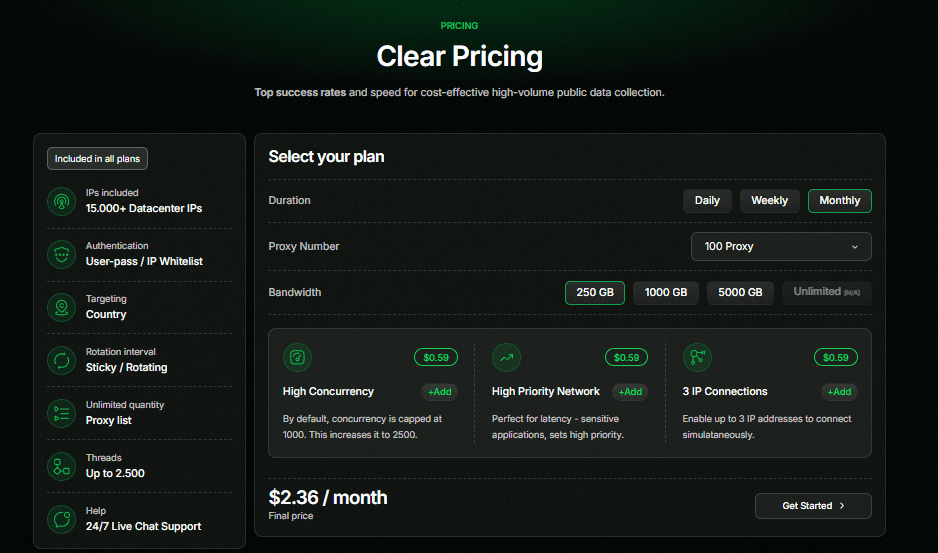 Datacenter proxies pricing
You can adjust your server packages using Daily, Weekly, or Monthly setup duration choices depending on your immediate campaign needs. For instance, a baseline monthly package for 100 dedicated server proxy nodes configured with a 250 GB bandwidth limit starts at $3.19 per month.
Additionally, you can boost your setup limits for an extra $0.80 fee per feature. This includes raising concurrent threads from 1,000 to 2,500, enabling high-priority networks, or connecting up to 3 authorized IPs simultaneously. Next, we will inspect the monthly IPv6 packages.
4.5. IPv6 proxies
IPv6 residential plans utilize monthly metered bandwidth packages. The pricing scales smoothly across multiple data tiers to fit various project sizes.
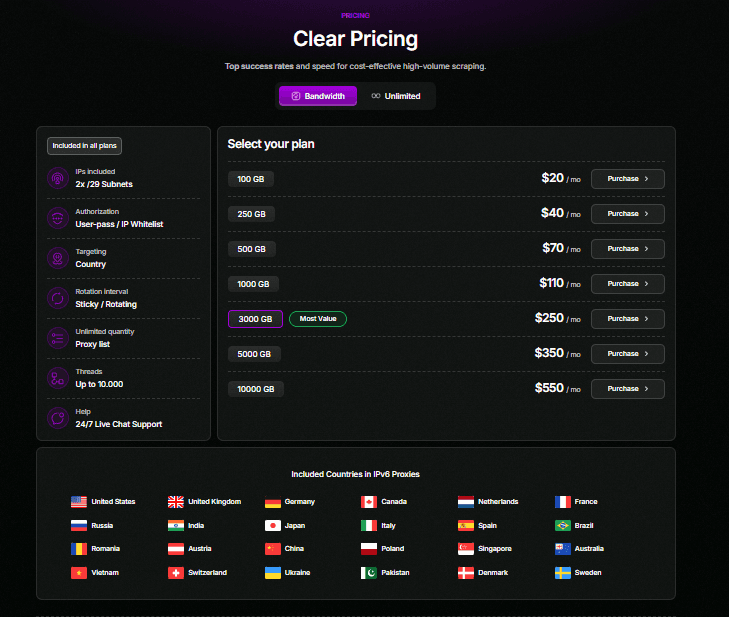
IPv6 proxies pricing
Entry-level tiers start from the 100 GB monthly plan at $20.00, the 250 GB plan at $40.00, the 500 GB plan at $70.00, up to the 1,000 GB plan at $110.00 per month. For larger operations, high-volume tiers range from the 3,000 GB plan at $250.00 and the 5,000 GB plan at $350.00, up to the largest 10,000 GB monthly plan at $550.00. Next, we will check the unmetered residential packages.
4.6. Unlimited residential proxies
The unlimited residential framework completely removes data tracking worries, calculating your costs using specific bandwidth speed limits instead of gigabyte limits.
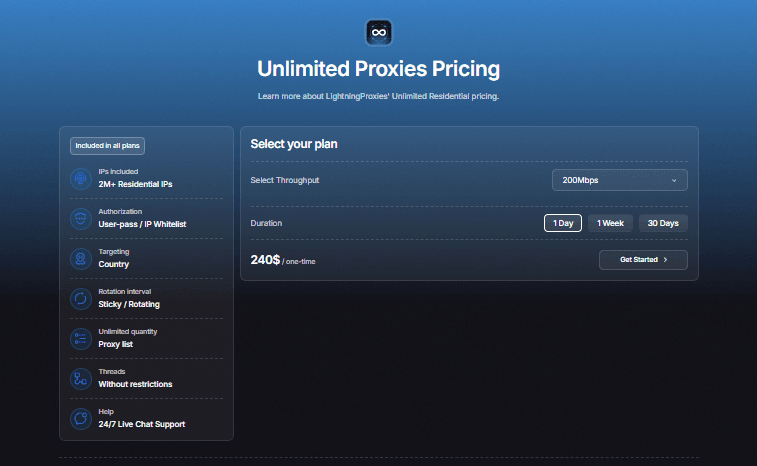
Unlimited residential proxies pricing
Pricing is determined solely by selecting your required connection speed tier, with throughput options starting from 200Mbps up to 1,000Mbps limits.
For the timeline, you can configure your setup options for 1 Day, 1 Week, or 30 Days. A standard baseline plan configuration featuring 200Mbps throughput for a 1 Day duration costs $240.00 as a one-time fee.
Overall, these diverse pricing models ensure that both individual automated testers and large-scale data extraction teams can find a cost-effective plan. After reviewing the pricing layout, let us proceed to the next section to evaluate the core pros and cons of using this provider.
If you’re planning to buy proxies from LightningProxies, don’t miss these LightningProxies promo codes! Get your code now!
5. Performance test
To evaluate the overall performance of the service, IPFighter tested the proxy quality on IPFighter, checked the connection speed on Speedtest, and verified the IP location accuracy through Google Search.
Before starting the tests, the proxy first needed to be attached to the browser environment so the connection could be verified correctly during the testing process. Below are the preparation steps and the actual testing results.
5.1. Preparation
After obtaining the proxy information from LightningProxies, we used the IPFighter Proxy Manager extension to attach the proxy directly to the browser before starting the tests.
This tool allows users to quickly add, manage, and switch proxies inside the browser without complicated manual configuration.
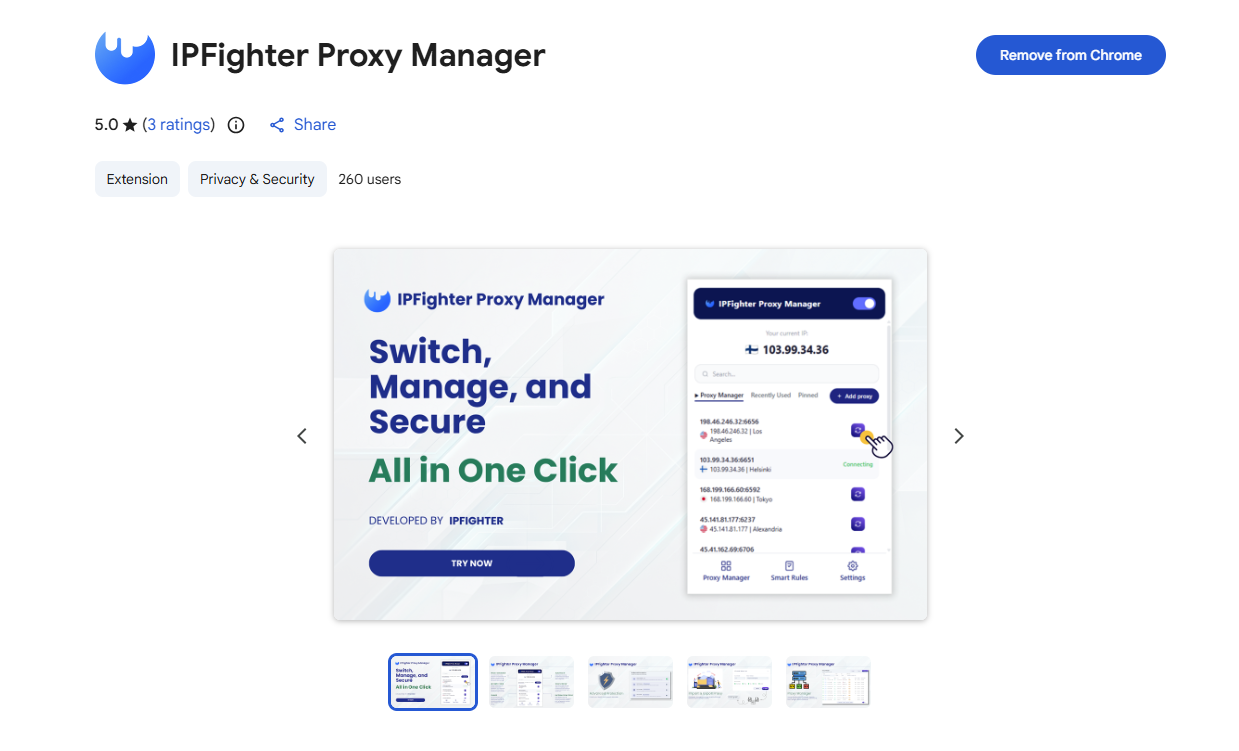
IPFighter Proxy Manager extension on Chrome
If you want a more detailed guide on how to use this tool, you can read here: A full guide to IPFighter Proxy Manager extension
5.2. Test results
After successfully configuring the proxy inside the browser, we proceeded to test the proxy quality, speed performance, and IP location verification tests.
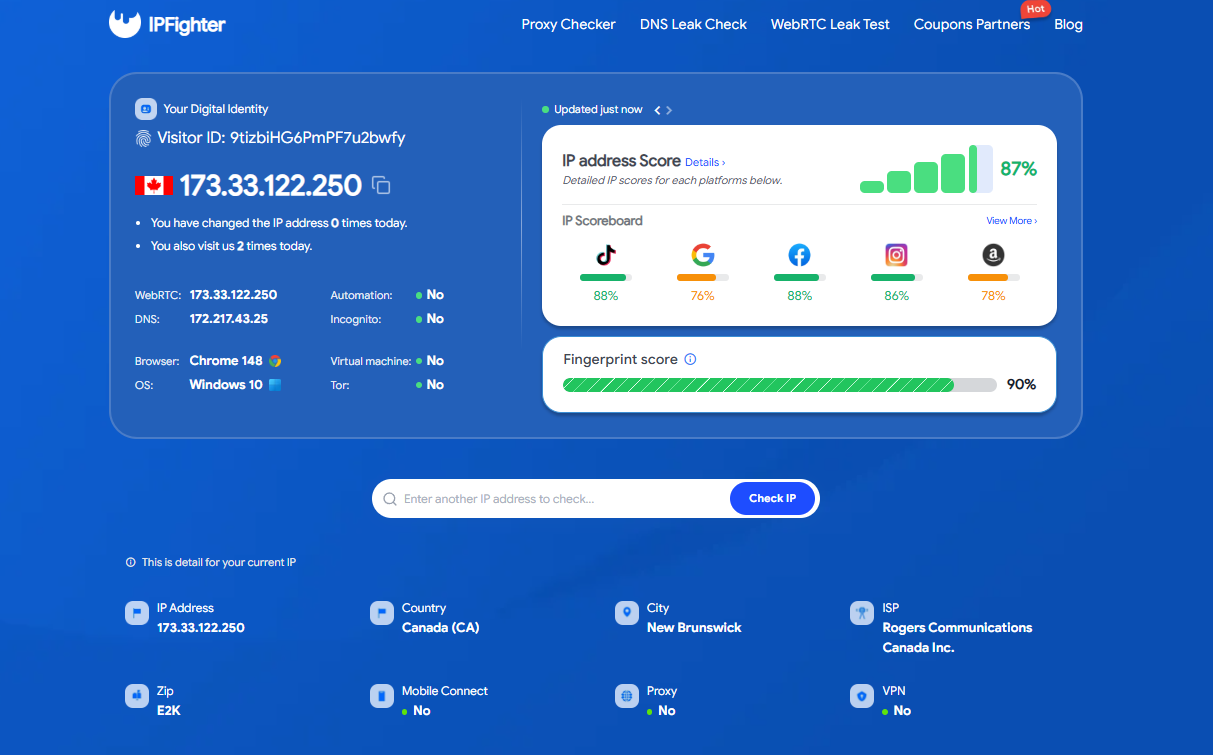 Check proxy on IPFighter
The IPFighter test results for LightningProxies’ residential proxy show solid performance, with the tested IP address achieving an overall IP score of 87%. This indicates a high level of cleanness and reliability. The proxy demonstrates steady performance across various social platforms, making these scores a good reference for high compatibility with major social networks.
Crucially, there is no WebRTC or DNS leak, ensuring your real network remains fully protected. The location information also accurately displayed at New Brunswick, Canada, which is completely consistent with our target setup. Finally, both "Proxy" and "VPN" indicators were identified as "No", confirming that this residential connection blends in with normal, organic user traffic.
 Check proxy on speedtest
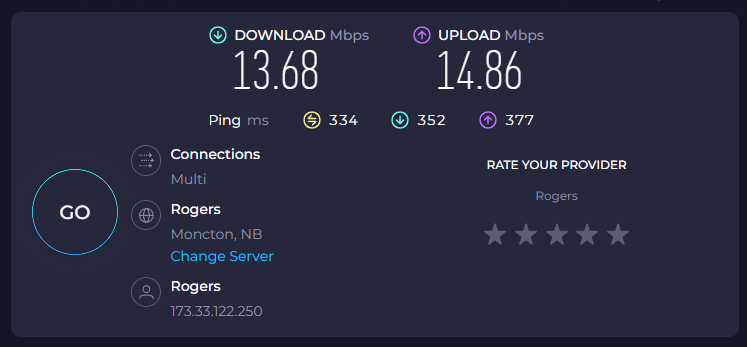
Moving onto the speed evaluation with Speedtest, this residential IP recorded a ping of 334 ms. While relatively high, this level of latency is within the expected range for residential proxies due to cross-border routing. The download speed reached 13.68 Mbps, and the upload speed was 14.86 Mbps. These figures indicate that the proxy performance is at an average level.
This capacity is suitable for basic tasks like account creation, account farming, and moderate automation workflows. However, due to the high latency and modest speed, it may cause minor delays during manual browsing and might not be the ideal choice for heavy, high-speed operations.
 Check on the Google search bar
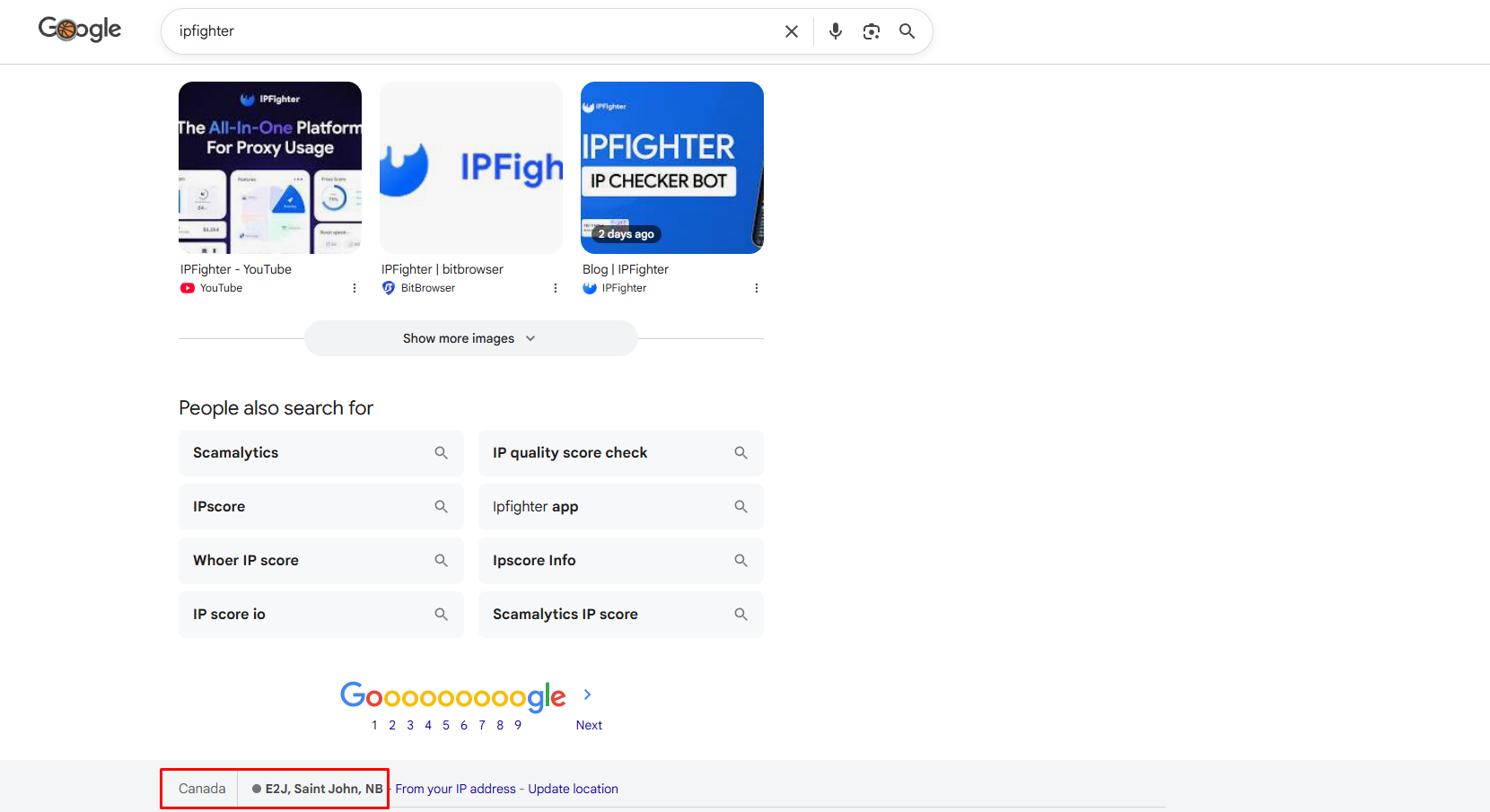
You can also quickly verify the proxy location by searching for a keyword on Google and scrolling to the bottom of the search results page. You should see that the results are localized for the selected region, and more importantly, the displayed location matches NB, Canada - confirming that the proxy IP is being recognized correctly.
6. How to get proxy from LightningProxies
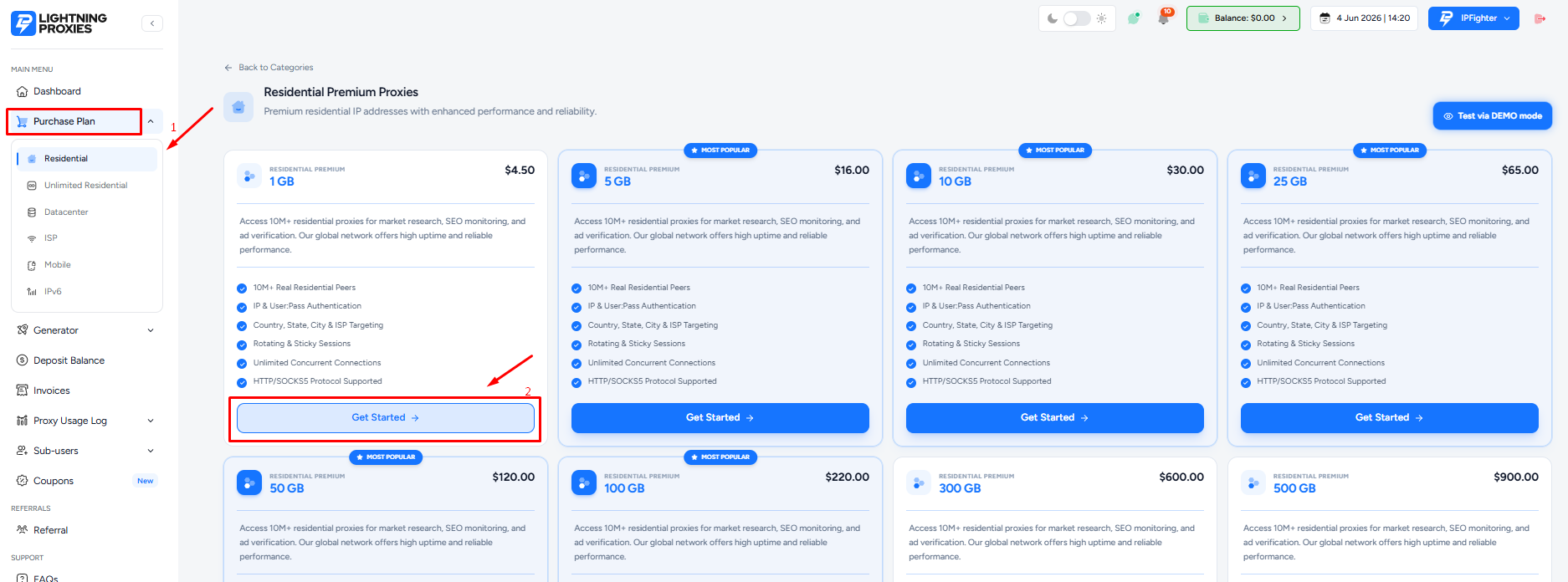
To get started with LightningProxies, log in to your dashboard and click “Purchase plan” on the left-side menu.
 Select and purchase the right proxy plan
From here, you can select your preferred proxy type along with the appropriate configuration settings (bandwidth, quantity, duration), and proceed to checkout.
During the checkout process, don’t forget to enter the exclusive IPFighter discount code to get the best deal. Get code here!
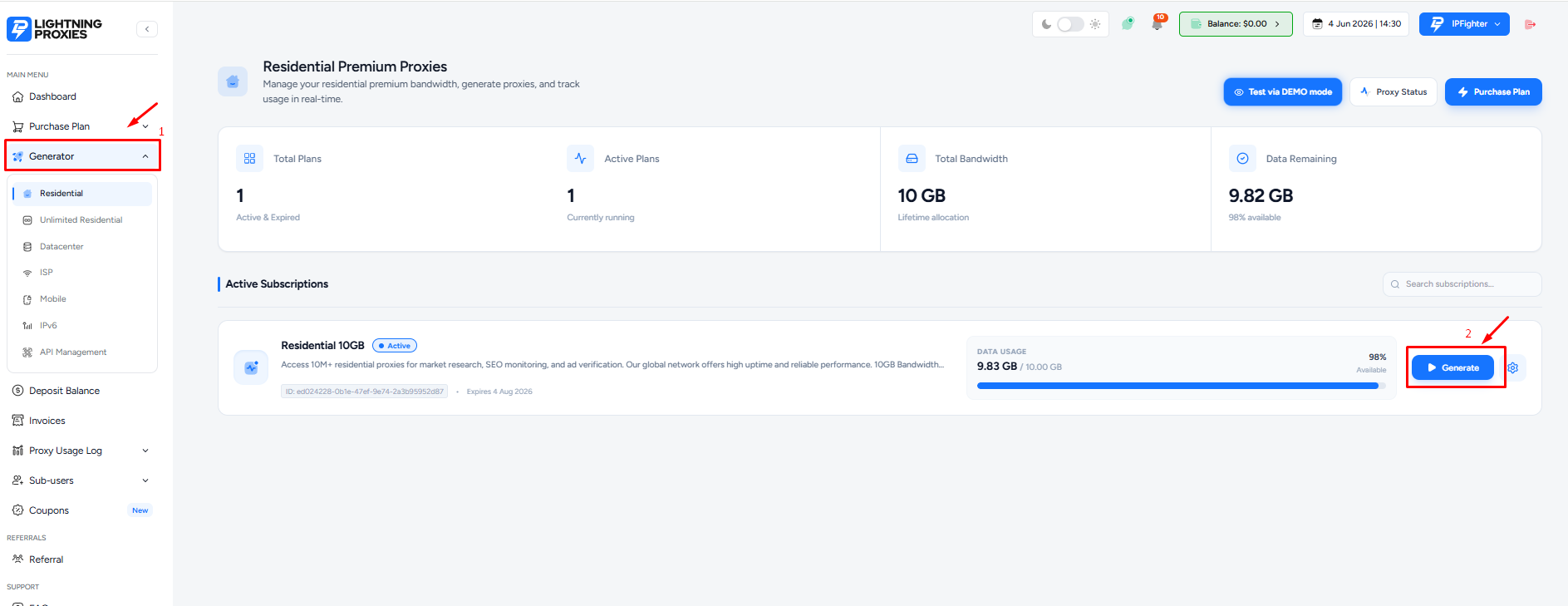
After completing the payment, head over to the Generator tab to configure your newly purchased proxy pool.
Click "Generate" to start setting up your proxy
The platform provides two flexible validation methods right at the top menu: User & Pass (using a username and password) or IP:Port (adding your device IP to the IP Whitelist). For this guide, we will proceed with the User & Pass authentication.
In the Proxy Configuration panel, there are several key settings and parameters you need to pay attention to:
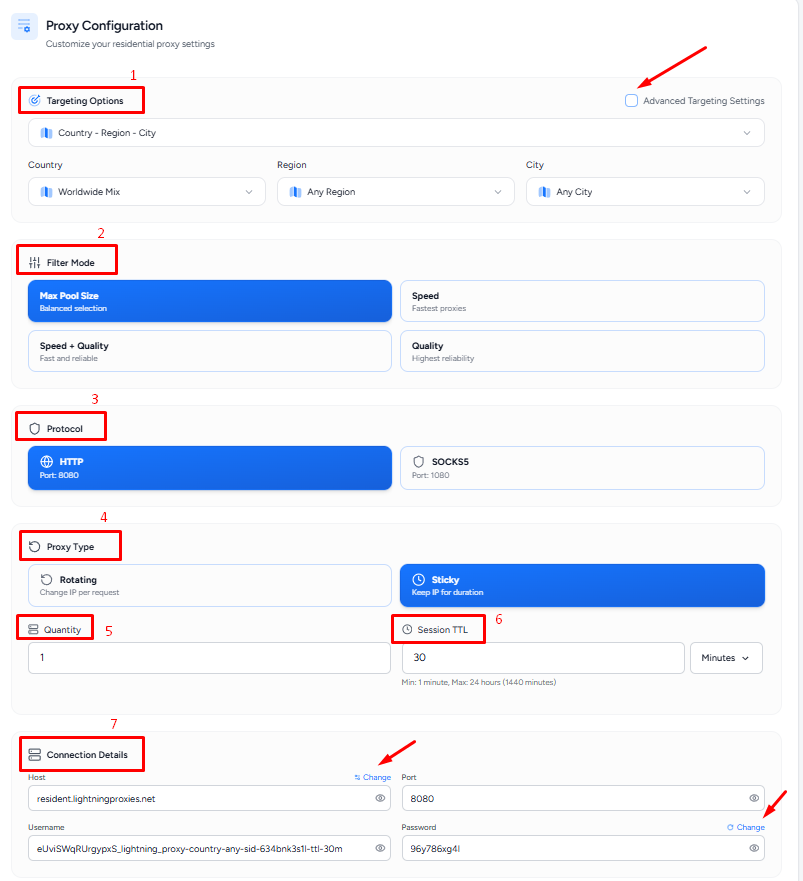 Configure your proxy settings
-
Targeting options: The default filter gives you two primary geo-targeting approaches: Country - Region - City or Country - ISP. Notably, if you need deep country-level precision, you can tick the “Advanced Targeting Settings” box to unlock precise filtering by specific ISPs and Zipcodes.
-
Filter mode: You can optimize the quality of your IP pool based on your specific campaign requirements:
-
Max Pool Size: Prioritizes selecting fields with the largest and most diverse pool of IP addresses.
-
Speed: Filters and extracts only the fastest responding IPs.
-
Speed + Quality: A balanced setup that maintains both fast transmission speeds and high IP cleanness or stability.
-
Quality: Extracts only the cleanest IPs to minimize the risk of hitting blacklists.
- Protocol: LightningProxies supports both widely used network protocols HTTP and SOCKS5 depending on the specific requirements of your tools and software.
- Proxy type & Session TTL: You can easily customize the rotation behavior of your proxies:
-
-
Rotating: The IP address automatically changes with every single request.
-
Sticky: The IP address remains static. You can manually enter your desired session holding time in the “Session TTL” field, such as entering 30 minutes to hold that specific IP for half an hour.
-
- Quantity: Simply enter the exact number of proxy lines you wish to generate into this field.
- Connection details: The system automatically synchronizes and displays all setup credentials (Host, Port, Username, and Password). From here, you can choose to switch your gateway location to Asia or Europe, or keep the default Global host to optimize your transmission layouts. Additionally, the platform allows you to customize and change your proxy Password directly within this panel.
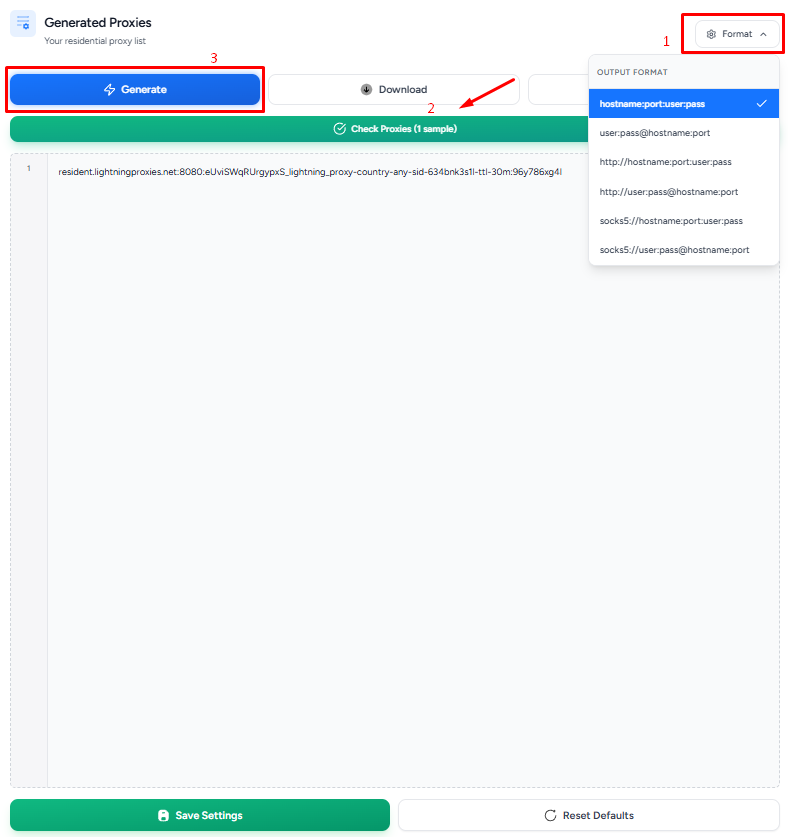
Select the format and proceed to get your proxy
Once you have finalized all configurations on the left side, move over to the “Generate Proxies” panel on the right. First, click on the “Format” button to choose the exact proxy credential structure you need. Next, a huge bonus for this dashboard is that LightningProxies allows you to check the live status of your proxy directly on the spot before deploying them.
Finally, hit the “Generate” button to create your proxy list. The system processes your request instantly; all that is left to do is copy the generated string and begin your tasks immediately.
7. Alternatives
If you are looking for similar proxy providers, here are some alternatives worth considering:
- MoMoProxy: A proxy provider offering fast and reliable residential proxies with a pool of over 150 million IPs across more than 200 locations, featuring a 0.48-second response time and a 1-GB free trial.
- CoProxy: A budget-friendly provider offering over 500 dynamic and sticky IPv4 proxies starting at just $1/month, fully supporting HTTP/Socks5 protocols with high-speed connections and 24/7 dedicated support.
- SimplyNode: A proxy service that unlocks data access with over 8 million IPs, offering rotating and sticky options alongside city-level targeting.
You can also check out reviews of our other partners here:
- Proxys.io review: Features, pricing, performance
- ProxyOmega review - Should you make it your trusted proxy provider?
- What makes SX.ORG special? A comprehensive review from A to Z
- Choosing the right proxy: A detailed review of Quick Proxy in 2026
8. Conclusion
With high-quality residential networks and solid trust scores, LightningProxies is a reliable choice for anonymity, deep geo-targeting, and multi-account management. Although its overall connection speed and responsiveness are just average, the service is adequate for tasks like account creation, account farming, and social media automation, though it falls short for high-speed or heavy data harvesting operations.
However, no proxy service is perfect, and IP quality can still vary depending on the specific location and package being assigned. Before using any proxy for important workflows, it is always recommended to check the IP reputation, speed, and detection status through tools like IPFighter to ensure it matches your project requirements.
Looking to save on your purchase? Visit the IPFighter page to grab a LightningProxies promo code and get up to 15% off.
9. FAQ
Is LightningProxies legit?
Based on what we could verify, yes. It has operated since 2023, publishes its terms and refund policy, offers 24/7 live chat and its residential IP passed our IPFighter check cleanly. IP quality can still vary by location and package, so test before you commit and start with a small plan.
What proxy types does LightningProxies provide?
LightningProxies offers residential, unlimited residential, ISP, datacenter, IPv6 and mobile proxies.
Does LightningProxies provide a free trial?
Yes, you can request a free trial through live chat for most products. ISP proxies are not covered by the trial, and a purchase made after a trial cannot be refunded.
Does LightningProxies offer refunds?
Only in limited cases. Residential, mobile and IPv6 plans can be refunded if you used less than 100 MB and can show the service is unusable for your use case, while datacenter, unlimited residential and ISP plans are non-refundable. Section 7 explains the technical issue clause.
How much does LightningProxies cost?
Residential proxies start at $4.50 per GB, mobile proxies at $5 per GB, ISP proxies at $4 per IP, datacenter proxies at $2 per day and unlimited residential proxies at $155 for the entry plan. IPv6 monthly plans start at $20. Prices can change during sales, so check the pricing page.
Is LightningProxies fast?
It depends on the product. The provider advertises up to 1 Gbps on datacenter nodes, while our residential test reached 13.68 Mbps download and 14.86 Mbps upload with a 334 ms ping, which is an average result for a residential proxy.
How can I test LightningProxies proxies before using them?
Attach the proxy to your browser, then run it through the IPFighter Proxy Checker and the IP Lookup to check the IP score, location and proxy detection, followed by the DNS leak and WebRTC leak tests.
Read more

IPFoxy review: Are its pure rotating residential proxies worth it?

CatProxies review: What do its five proxy types offer?
Hidemyacc review 2026: Features, pricing and real fingerprint test results

Whitecloakproxy review: What to know before you buy

Geonix review: What makes its proxy services stand out?
Floppydata review: A closer look at its proxy network