

The Internet Protocol (IP) is the backbone of communication between devices, making it possible to browse websites, send emails, and stream videos. IPv4, the most widely used version, has been fundamental to internet addressing for decades.
Even with the advent of newer technologies, it remains a critical part of modern networking. This article offers a beginner-friendly introduction to IPv4, covering its structure, functionality, limitations, and role in today’s internet infrastructure.
What is Internet Protocol?
1. Definition and purpose
The Internet Protocol (IP) is a set of rules governing how data is sent and received over the internet. It enables devices to identify and communicate with each other through unique addresses, similar to how postal addresses allow for the delivery of physical mail.
Every device connected to a network, whether a computer, smartphone, or smart appliance, requires an IP address to send and receive information.
2. Evolution of IP
IP protocols have evolved through multiple stages. The earliest versions set the foundation for modern networking. In the early 1980s, version 4 of the Internet Protocol was introduced, revolutionizing digital communication by standardizing how devices are addressed.
As internet usage grew, IPv4’s limitations, particularly its limited address space, became apparent. This led to the creation of IPv6, which provides a much larger pool of addresses. However, IPv4 remains widely used due to its deep-rooted adoption and compatibility with existing systems.
Introduction to IPv4
1. What is IPv4?
Version 4 of the Internet Protocol (IP) serves as the primary means of identifying devices on a network. It provides a structured way of assigning unique addresses to ensure proper data routing. An IPv4 address is a numerical label assigned to each device connected to a network that uses the protocol for communication.
2. Structure of IPv4 addresses
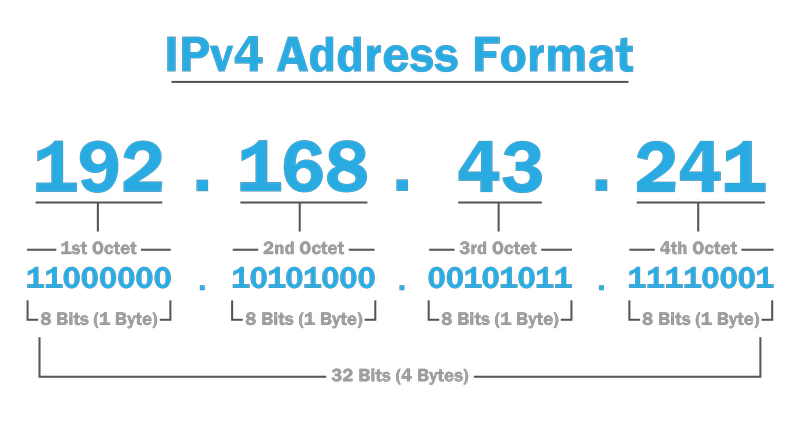
These network addresses are 32-bit numerical values, typically expressed in a dotted-decimal format. Each address consists of four octets (8-bit segments) separated by periods. For example: 192.168.43.241
Each octet can range from 0 to 255, resulting in approximately 4.3 billion unique IPv4 addresses. This format allows networks to efficiently assign and manage device identities.
3. Classes of IPv4 addresses
Network addresses in this protocol are categorized into five classes, each serving different purposes:
- Class A (1.0.0.0 - 126.255.255.255): Designed for large networks, with a small number of networks but many available host addresses.
- Class B (128.0.0.0 - 191.255.255.255): Used for medium-sized networks, offering a balance between network and host allocation.
- Class C (192.0.0.0 - 223.255.255.255): Commonly used for small networks, with many networks but fewer host addresses per network.
- Class D (224.0.0.0 - 239.255.255.255): Reserved for multicast groups, enabling one-to-many data transmissions.
- Class E (240.0.0.0 - 255.255.255.255): Reserved for future use and experimental purposes.
How IPv4 works
1. Packet structure
This addressing system operates by dividing data into packets for transmission. Each packet contains two main components:
- Header: Includes essential information such as the source and destination IP addresses, packet length, and checksum for error detection.
- Payload: Contains the actual data being transmitted, such as a web request or email content.
2. Routing mechanism
This protocol relies on routers to direct packets from the source to the destination. When a device sends data, it is broken into packets and assigned a destination IP address.
Routers analyze this address and forward the packets through the most efficient path until they reach their target. The process continues until the entire data set is delivered.
3. Subnetting
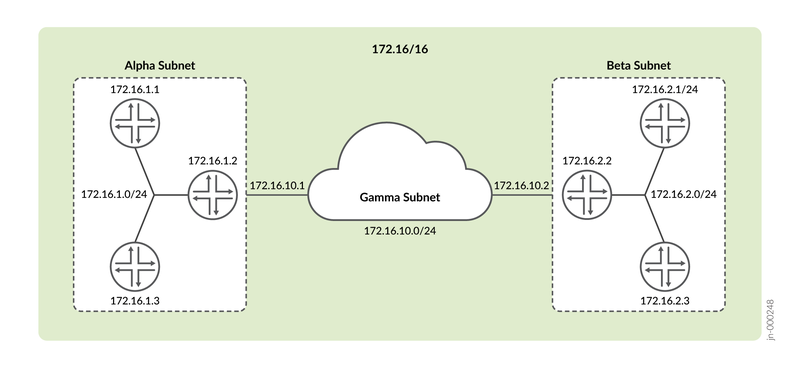
Subnetting is a technique used to divide a large network into smaller subnetworks (subnets). This enhances address efficiency and improves network security and performance. Subnetting allows organizations to allocate IP addresses more effectively and reduce congestion.
Limitations of IPv4
While this protocol has been essential for internet communication, it faces key challenges:
- Address exhaustion: With only 4.3 billion addresses, the growing number of devices has led to shortages. NAT helps by allowing multiple devices to share one public IP.
- Security risks: This protocol lacks built-in security, making it vulnerable to spoofing and cyberattacks.. Protocols like IPsec help enhance data encryption and authentication.
Even with these limitations, the traditional addressing system is still commonly used in many areas.
Common uses of IPv4 today
Despite the development of its successor, the older protocol remains widely used in various networking environments:
- Home networking: This protocol allows home routers to assign IP addresses using DHCP, ensuring seamless communication between devices.
- Business networks: Companies rely on it for internal and external connectivity, cloud services, and remote access. Private addresses are commonly used within local networks, with NAT enabling internet access.
- Internet infrastructure: Despite IPv6 availability, much of the global internet still runs on IPv4 to ensure compatibility with older systems.
This established networking standard continues to be essential in everyday internet operations.
Conclusion
IPv4 remains an essential component of internet communication, providing a structured way of addressing and routing data. Although its limitations, such as address exhaustion and security vulnerabilities, have prompted the adoption of IPv6, IPv4 continues to be widely used.
Understanding how IPv4 works is crucial for anyone interested in networking, as it forms the foundation of modern digital communication.
Frequently asked questions
1. Why is IPv4 still used if IPv6 exists?
IPv4 remains dominant due to its widespread infrastructure and compatibility. The shift to IPv6 is gradual and requires investment.
2. Can IPv4 and IPv6 coexist?
Yes, dual-stack technology allows both protocols to run together, enabling communication over both networks.
3. How do I find my IPv4 address?
Use ipconfig (Windows) or ifconfig (Linux/Mac) in the command prompt or terminal.
4. What happens when IPv4 addresses run out?
NAT, IP recycling, and IPv6 adoption help manage address shortages. IPv6 offers a much larger address space.
Read more
What is an IP fraud score? Reading the 0-100 scale

Mastering WebRTC control to prevent browser privacy leaks
What is a localhost IP? Understanding 127.0.0.1 in development
WebRTC leak: Why your real IP address may still be exposed
Understanding DNS forwarding for network optimization
DNS records - The ultimate blueprint for website & email routing