

Floppydata brings residential, mobile, and datacenter proxies together under one service, but how consistently do its IPs perform across different locations? Its pricing model and range of proxy options may simplify proxy management, while real-world IP quality, connection speed, and location accuracy still need to be evaluated separately.
In this Floppydata review, IPFighter examines the provider’s proxy types, pricing, key features, setup process, and performance. We also test 15 randomly selected IPs across five target countries to assess their IP quality, connection speed, blacklist status, proxy detection, and location consistency.
1. General information
Floppydata provides proxy infrastructure and related data-access tools for activities such as web scraping, SEO monitoring, price tracking, and ad verification. Its current website lists rotating residential, mobile, and datacenter proxies alongside static residential and static datacenter options. The provider also offers a web scraper and a cloud browser for proxy users.
|
Website |
https://floppydata.com/ |
|
Founded |
N/A |
|
Country |
Dubai, UAE |
|
Proxy types |
Rotating Residential / Mobile / Datacenter / Static Residential / Static Datacenter |
|
IP pool |
65M+ IPs in 195+ countries |
|
Protocol |
HTTP / HTTPS / SOCKS5 |
|
Pricing model |
Per GB / Per IP |
|
Payment |
Stripe, Paddle, PayPal, Cryptomus, Unlimit, or other payment partners |
|
Trial |
Floppydata does offer a risk-free $1 trial of proxy IPs. |
|
Refund |
Non-refundable for crypto top-ups, promo credits, or partially spent balances. Full refunds for unspent top-ups are granted within 7 days (or upon account closure) to the original payment method, minus gateway fees. |
|
Best for |
Web scraping, SEO monitoring, market research, ad verification, and workflows requiring different proxy types |
Discover more:
-
Best proxy providers in 2026: Compare top 6 services
-
What is a residential proxy? Why websites trust these IPs
-
What are static residential proxies? Features, benefits, and providers
2. Proxy types available at Floppydata
Floppydata offers both rotating proxies, which are designed to change IP addresses during use, and static proxies for workflows that need a consistent address. Its main distinction is that residential, mobile, and datacenter traffic can be purchased through one rotating-proxy product, while static residential and static datacenter IPs have separate pricing.
2.1. Residential proxies
Floppydata’s residential proxies route traffic through IP addresses associated with residential internet connections. They are intended for workflows where using residential-looking IPs and switching addresses can help distribute requests across a wider pool.
-
Network: Home broadband IPs assigned by internet service providers
-
Coverage: 195+ countries
-
Filtering: Country, state, city and ASN
-
Rotation: Per sticky, request or every 5-60 minutes
-
Protocols: HTTP, HTTPS, SOCKS5
The combination of residential IPs and rotation can suit web scraping, price monitoring, SEO tracking, and market research. However, individual IP quality and website acceptance can vary.
2.2. Mobile proxies
Floppydata's mobile proxies use IP addresses associated with mobile networks, including 4G and 5G connections. They are intended for workflows that require mobile network characteristics, such as mobile ad verification and website testing.
-
Network: 4G and 5G mobile IPs, according to the provider.
-
Coverage: 195+ countries
-
Filtering: Country, state, city and ASN
-
Rotation: Per sticky, request or every 5-60 minutes
-
Protocols: HTTP, HTTPS, SOCKS5
Mobile proxies can help with mobile-specific testing and location-sensitive research, but they are not automatically faster or more reliable than other proxy types. Check speed, latency, and location consistency for the specific IPs you plan to use.
2.3. Datacenter proxies
Floppydata's rotating datacenter proxies use IP addresses hosted on server infrastructure. They may suit workloads that prioritize throughput and cost, although some websites may identify datacenter traffic more readily.
-
Unlimited Bandwidth: Their proxies offer unlimited bandwidth, allowing for simultaneous streaming, browsing, and downloading without interruption.
-
Filtering: Country, state, city and ASN
-
Rotation: Per sticky, request or every 5-60 minutes
-
Protocols: HTTP, HTTPS, SOCKS5
Rotating datacenter proxies can be useful for bulk data collection and SEO monitoring when the target website accepts this type of connection. Floppydata also offers a separate static datacenter product for users who need fixed IPs.
2.4. Static residential proxies
Floppydata's static residential proxies, also described as ISP proxies, provide fixed IP addresses associated with internet service providers. They are designed for workflows where maintaining the same IP is more important than rotating frequently.
-
Bandwidth: Unlimited, according to the provider.
-
Bundles: 20, 50, or 100 IPs per month
-
Rotation: Static IPs intended to remain consistent during the subscription.
-
Protocols: HTTP, HTTPS, SOCKS5
This option is more appropriate when keeping the same address matters more than frequently changing IPs.
2.5. Static datacenter proxies
Static datacenter proxies provide dedicated, fixed IP addresses hosted on server infrastructure. They are designed for users who want a stable address and predictable monthly bandwidth costs.
-
Coverage: The provider lists locations including the United States, United Kingdom, Germany, France, and Hong Kong; availability may change.
-
Bandwidth: Unlimited, according to the provider.
-
Bundles: 20, 50, or 100 IPs per month.
-
Rotation: Static IPs that remain consistent during the subscription.
-
Protocols: HTTP, HTTPS, SOCKS5
Floppydata lists the United States, United Kingdom, Germany, France, and Hong Kong among the current static datacenter locations. Availability should be confirmed in the dashboard before purchasing.
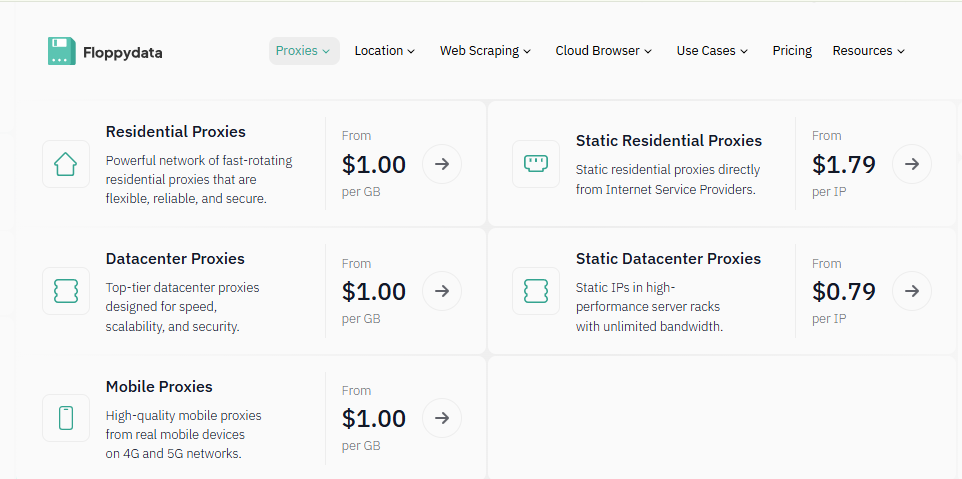
Proxy types available at Floppydata
3. Key features of Floppydata proxies
Floppydata combines several proxy types with supporting tools, which may be useful for teams that want to manage proxy traffic and data-access workflows from one provider.
-
Shared rotating-traffic balance: The provider advertises a single rotating-proxy product that can be used for residential, mobile, or datacenter traffic, with the ability to switch proxy type without purchasing a separate product.
-
Static IP options: Dedicated static residential and datacenter proxies are available for workflows that depend on IP consistency.
-
Multiple connection protocols: HTTP, HTTPS, and SOCKS5 are advertised across its proxy offerings. Check the product configuration for the exact protocol options available to your plan.
-
Web scraping tools: Floppydata offers a web scraper and managed data-access solutions in addition to its proxy products.
-
Cloud browser: The provider advertises a cloud browser for proxy users, with the browser tool itself available at no additional cost while proxy traffic remains chargeable.
-
Payment options: The pricing page lists Mastercard, Visa, PayPal, and more than 70 cryptocurrencies.
-
Support and account management: The website provides customer-support contact details and a dashboard for managing products and balance.
These features make Floppydata a multi-product proxy service rather than a provider focused solely on selling individual IP addresses. However, feature availability does not establish IP quality or location accuracy, which need to be checked against the requirements of each workflow.
4. Floppydata pricing overview
Floppydata currently lists three main price points: rotating traffic charged by gigabyte, static residential IPs charged monthly, and static datacenter IPs charged monthly.
|
Product |
Advertised starting price |
Pricing model |
Main consideration |
|
Rotating residential, mobile, and datacenter |
$1/GB |
Traffic-based |
One rotating product covers three proxy types |
|
Static residential |
$1.79/IP/month |
Monthly IP bundle |
Fixed IPs with unlimited bandwidth |
|
Static datacenter |
$0.79/IP/month |
Monthly IP bundle |
Dedicated fixed IPs with unlimited bandwidth |
The static residential page lists bundles of 20 IPs for $49/month, 50 IPs for $99/month, and 100 IPs for $179/month. The static datacenter page lists 20 IPs for $19/month, 50 IPs for $45/month, and 100 IPs for $79/month.
Before purchasing, check the checkout page for the current minimum order, billing period, location availability, and whether the selected traffic balance can be used across proxy types. Floppydata’s refund policy is conditional: requests generally must be made within three calendar days, use must remain below the stated threshold or the purchased product must be materially unused, and the service issue must be verified as originating on the provider’s side. Cryptocurrency purchases are excluded from external-wallet refunds under the published terms.
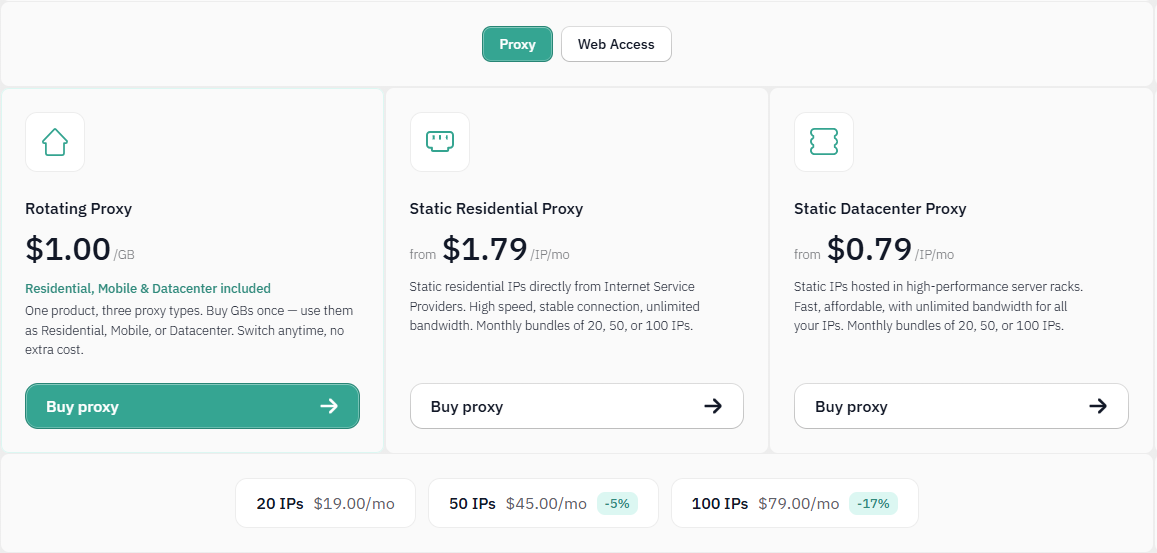
Prices for proxies plan at Floppydata
If you're planning to purchase proxies from Floppydata, don't miss the Floppydata promo code available on IPFighter. You can save on your proxy purchase with exclusive discounts while choosing the plan that best suits your needs.
5. Performance test
To evaluate the overall quality of Floppydata’s network, IPFighter tested the proxy quality on IPFighter, checked connection speed, and verified the IP location accuracy through Google Search.
5.1. Preparation
Before evaluating the proxy, we first added it to our browser using the IPFighter Proxy Manager extension. This extension makes it easy to import, manage, and switch between multiple proxies directly within your browser, eliminating the need for manual proxy configuration.
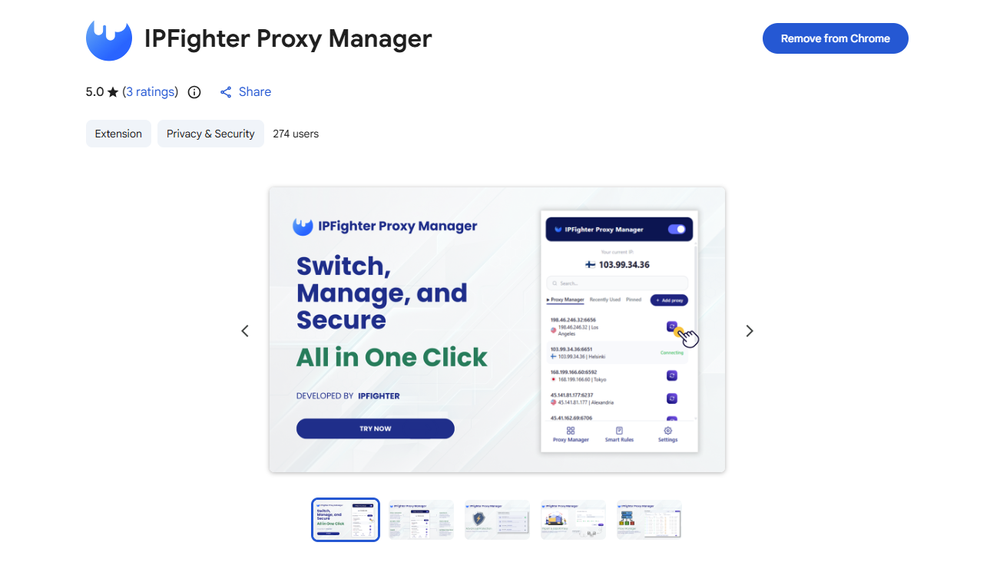
IPFighter Proxy Manager extension on Chrome
If you'd like to learn how to set it up, check out our detailed guide: A complete guide to the IPFighter Proxy Manager extension.
5.2. Test results
A provider’s advertised pool size and uptime do not tell the whole story. To assess the proxies more directly, IPFighter checked 15 randomly selected IPs: five residential, five mobile, and five datacenter proxies targeting the United States, Belgium, Japan, the United Kingdom, and Vietnam. Each IP address was assessed based on three criteria: IP quality (via IPFighter), connection speed (via Speedtest, Fast), and location consistency (via Google Search).
Residential proxies
The five residential tests were generally positive for proxy detection and blacklist status: all five IPs were not detected as proxies and were marked clean. However, performance and location consistency varied, especially for the Belgium and Vietnam entries.
|
Proxy location |
IPFighter |
Speed test |
Google Search |
Overall assessment |
|
Alabama, US |
Score: 70%; Proxy: Not detected; Blacklist: Clean; Timezone mismatch reported (American/New York) |
Download: 60.58 Mbps; Upload: 44.56 Mbps; Ping: 415 ms |
Daphne, Alabama, US; target: Alabama, US |
Clean IP with good download and upload speeds and reasonable regional consistency. The timezone mismatch should be checked against the browser and device settings. |
|
Flanders, Belgium |
Score: 90%; Proxy: Not detected; Blacklist: Clean |
Download: 5.98 Mbps; Upload: 5.13 Mbps; Ping: 432 ms |
Kortrijk, Belgium; target: Flanders, Belgium |
Clean IP with consistent country-level location, but slow speeds and high latency may limit performance-sensitive tasks. |
|
Chiba, Japan |
Score: 90%; Proxy: Not detected; Blacklist: Clean |
Download: 26 Mbps; Upload: 54 Mbps; Ping: 152–381 ms |
Kawaguchi, Saitama, Japan; target: Chiba, Japan |
Clean IP with reasonably strong speeds, but latency fluctuates and the detected city differs from the target area. |
|
Wales, UK |
Score: 90%; Proxy: Not detected; Blacklist: Clean |
Download: 11.96 Mbps; Upload: 14.33 Mbps; Ping: 258 ms |
Abergele, UK; target: Wales, UK |
Clean IP with moderate speeds and a detected location consistent with the stated region, though exact target-area accuracy is not confirmed. |
|
Ho Chi Minh City, Vietnam |
Score: 85%; Proxy: Not detected; Blacklist: Clean; IPFighter detects Tay Ninh Province |
Download: 155.82 Mbps; Upload: 78.27 Mbps; Ping: 110 ms |
Can Tho, Vietnam; target: Ho Chi Minh City, Vietnam |
Strong speed and low latency, but the detected locations differ across IPFighter and Google Search. Country-level consistency is present; city-level accuracy is less convincing. |
The residential sample shows a useful combination of clean blacklist status and no proxy detection, but connection quality is not uniform. The Vietnam IP delivered the strongest speed results in this group, while the Belgium IP was substantially slower. The Chiba and Vietnam entries also show that country-level location agreement does not necessarily mean that the selected city or region will match precisely.The residential sample shows a useful combination of clean blacklist status and no proxy detection, but connection quality is not uniform. The Vietnam IP delivered the strongest speed results in this group, while the Belgium IP was substantially slower. The Chiba and Vietnam entries also show that country-level location agreement does not necessarily mean that the selected city or region will match precisely.
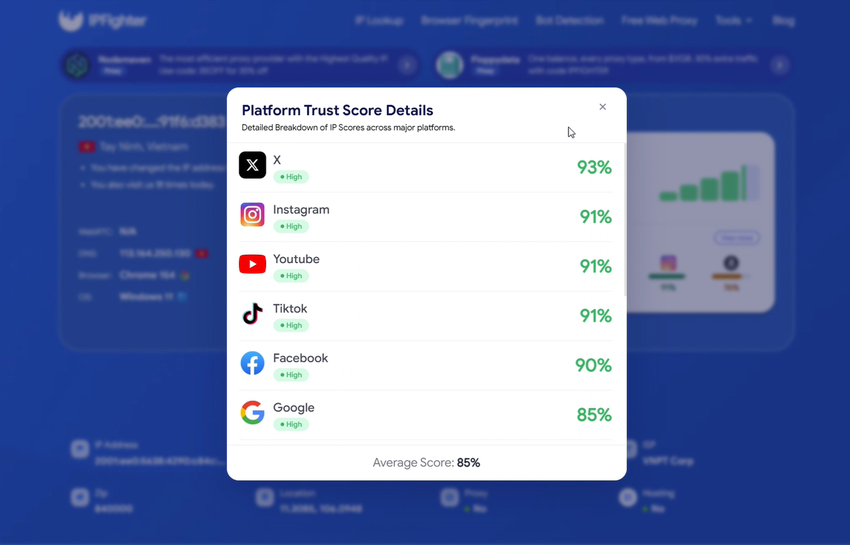
Vietnam residential IP test results
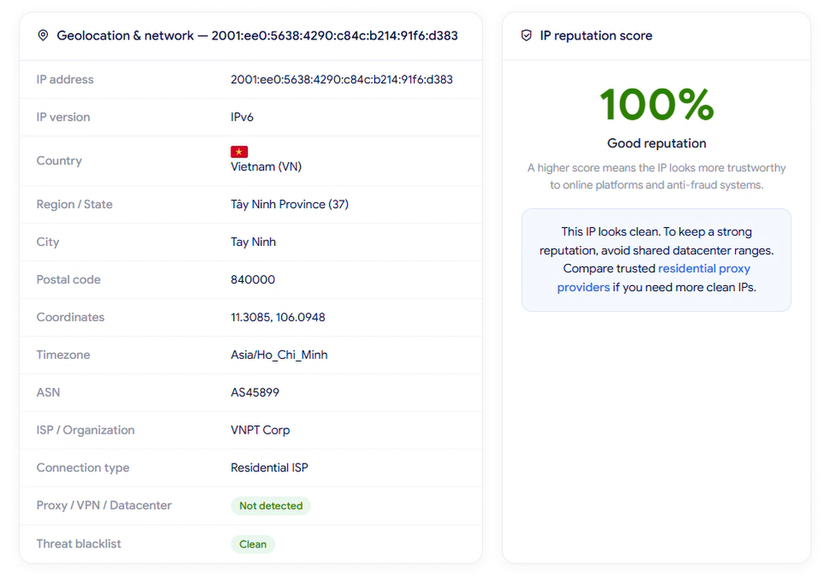
IP Lookup results on IPFighter
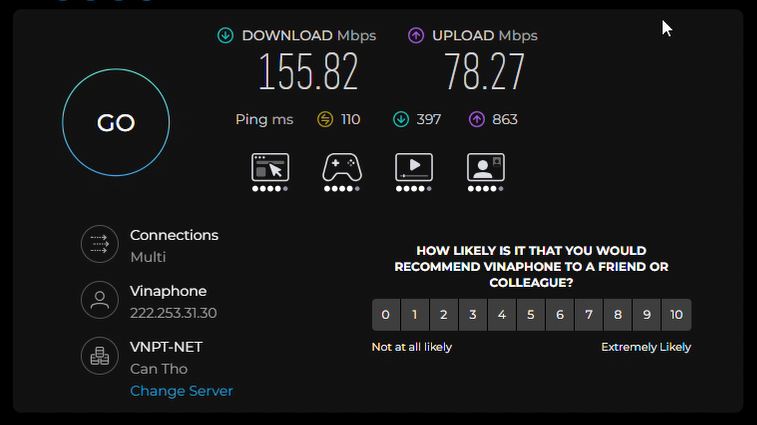
Check proxy on Speedtest
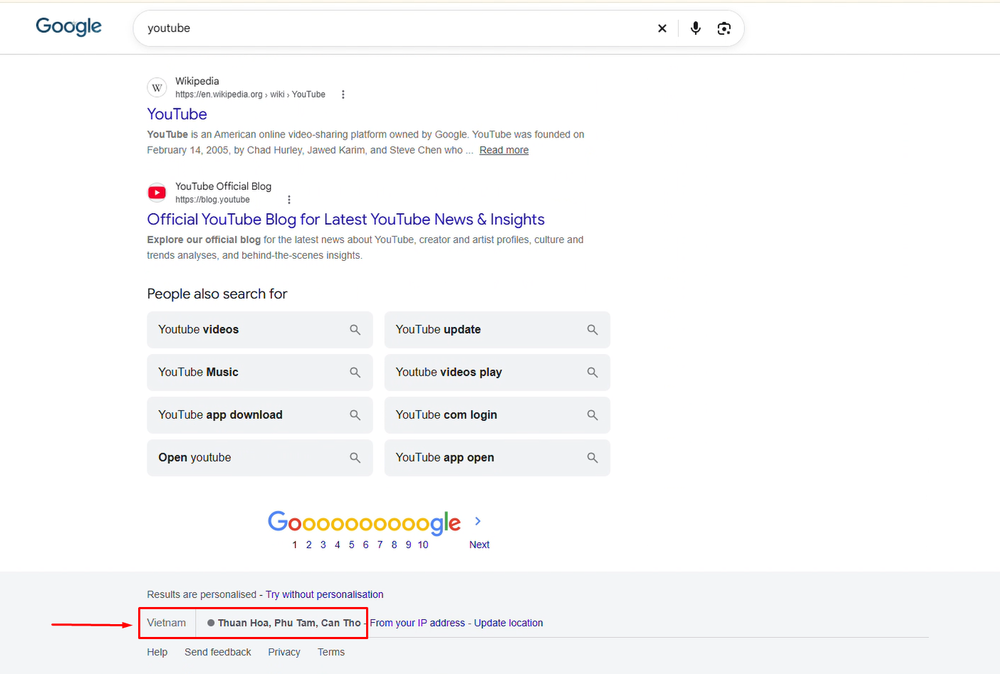
Check on the Google search bar
Mobile proxies
All five mobile IPs were marked clean on the blacklist and not detected as proxies. Yet the results show substantial differences in responsiveness, and one entry has a target-country inconsistency that should be corrected before drawing a firm conclusion.
|
Proxy location |
IPFighter |
Speed test |
Google Search |
Overall assessment |
|
California, US |
Score: 75%; Proxy: Not detected; Blacklist: Clean |
Download: 23.98 Mbps; Upload: 13.89 Mbps; Ping: 474 ms |
Sacramento, California, US; target: California, US |
Clean IP with usable speeds and a location consistent with the target state, although latency is high. |
|
Brussels-Capital, Belgium |
Score: 90%; Proxy: Not detected; Blacklist: Clean; IPFighter detects Vlaams-Brabant |
Download: 3.98 Mbps; Upload: 5.48 Mbps; Ping: 1,155 ms |
Antwerp, Belgium; target: Brussels-Capital, Belgium |
Clean IP, but very slow speeds and exceptionally high latency. IPFighter and Google Search also return locations outside the stated target region. |
|
Aomori, Japan |
Score: 90%; Proxy: Not detected; Blacklist: Clean |
Download: 49 Mbps; Upload: 69 Mbps; Ping: 176-421 ms |
Hirosaki, Aomori, Japan; recorded target: Brussels-Capital, Belgium |
Strong download and upload speeds, but the supplied target conflicts with the listed Japanese location. Verify the intended target before evaluating geolocation accuracy. |
|
Scotland, UK |
Score: 80%; Proxy: Not detected; Blacklist: Clean; IPFighter detects England; DNS test reports one US IP |
Download: 2.3 Mbps; Upload: 32 Mbps; Ping: 333 ms-3.5 s |
Stockton-on-Tees, UK; target: Scotland, UK |
Clean blacklist status, but low download speed, unstable latency, and location differences are concerns. The reported US DNS IP warrants further checking. |
|
Hanoi, Vietnam |
Score: 90%; Proxy: Not detected; Blacklist: Clean; IPFighter detects Hanoi |
Download: 3.5 Mbps; Upload: 33 Mbps; Ping: 172 ms-3.5 s |
Hanoi, Vietnam; target: Hanoi, Vietnam |
Location agrees at city level, but download speed is low and latency is highly unstable, which may affect demanding workflows. |
The mobile results vary considerably. The California IP had reasonable speed but high latency, while the Belgium and Hanoi IPs were much less responsive. The Hanoi IP showed the clearest city-level location agreement, but its unstable latency remains a performance drawback. The DNS result for the Scotland entry is also worth investigating: a DNS server appearing in another country does not, by itself, establish the cause or practical impact of a leak, so the result should be retested and interpreted alongside the actual DNS configuration.
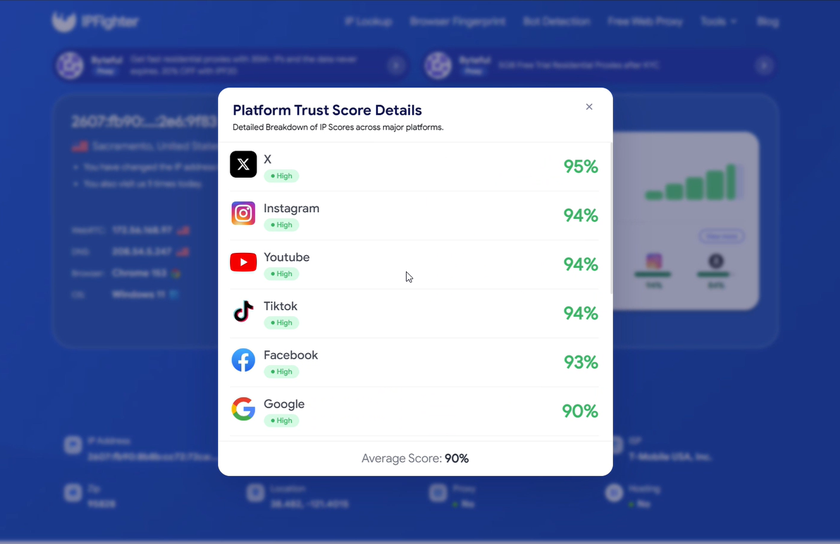
US mobile IP test results
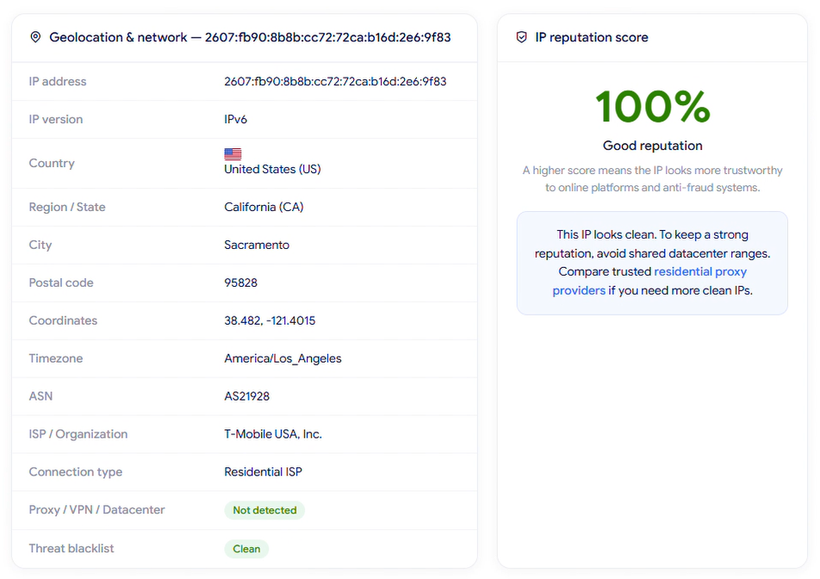
IP Lookup results on IPFighter
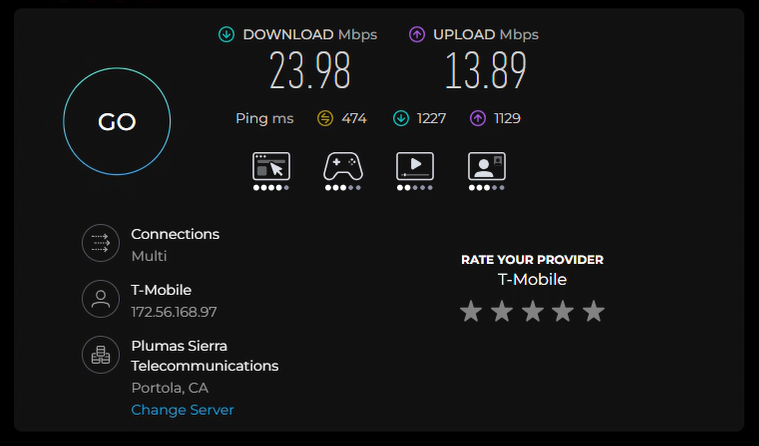
Check proxy on Speedtest
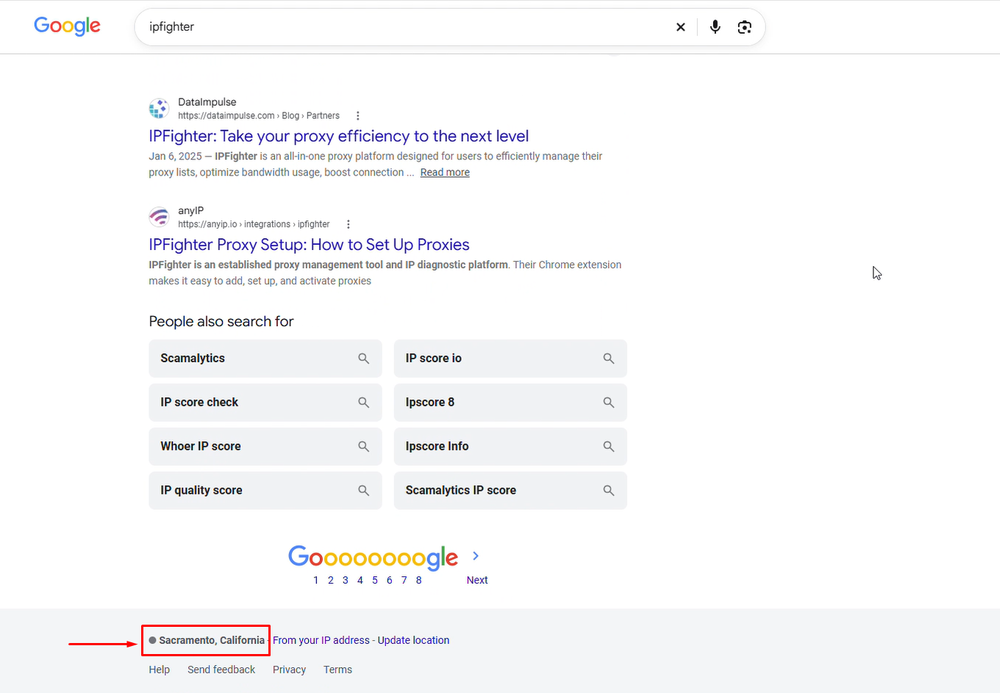
Check on the Google search bar
Datacenter proxies
The datacenter results were the most mixed in terms of IP reputation. Although all five entries were marked clean on the blacklist except the Osaka IP, four were identified as datacenter proxies by IPFighter. Two entries also reported DNS locations outside the intended proxy country, and the final Vietnam entry showed a notable discrepancy between its proxy location and Google Search result.
|
Proxy location |
IPFighter |
Speed test |
Google Search |
Overall assessment |
|
Texas, US |
Score: 80%; Proxy: Detected as datacenter; Blacklist: Clean |
Download: 13 Mbps; Upload: 30 Mbps; Ping: 329-882 ms |
Oneida County, New York; target: Texas, US |
Clean blacklist status, but the IP is identified as datacenter traffic. Latency fluctuates and Google Search returns a location in New York rather than Texas. |
|
Flanders, Belgium |
Score: 75%; Proxy: Detected as datacenter; Blacklist: Clean; DNS server detected in the US |
Download: 140 Mbps; Upload: 60 Mbps; Ping: 248–288 ms |
Zaventem, Belgium; target: Flanders, Belgium |
Strong speeds and relatively more manageable latency, but the IP is detected as datacenter traffic and the location does not confirm an exact match with the target area. The US DNS result warrants further investigation. |
|
England, UK |
Score: 80%; Proxy: Detected as datacenter; Blacklist: Clean |
Download: 40 Mbps; Upload: 23 Mbps; Ping: 411 ms92.3 s |
London, UK; recorded target: Texas, US |
Reasonable download speed, but latency is unstable. The recorded target conflicts with the listed UK proxy location, so the target should be verified before assessing geolocation accuracy. |
|
Osaka, Japan |
Score: 25%; Proxy: Detected as datacenter; Blacklist: Listed; DNS server detected in Germany |
Download: 51 Mbps; Upload: 51 Mbps; Ping: 137-189 ms |
Hirosaki, Aomori, Japan; target: Osaka, Japan |
Weak IP reputation and blacklist status despite balanced speeds and comparatively stable latency. The different Japanese region and Germany-based DNS result should be checked for location-sensitive or privacy-focused workflows. |
|
Ho Chi Minh City, Vietnam |
Score: 85%; Proxy: Not detected; Blacklist: Clean; DNS server detected in Canada |
Download: 250 Mbps; Upload: 68 Mbps; Ping: 155-246 ms |
New York, US; target: Ho Chi Minh City, Vietnam |
Excellent IP score and download speed, but mismatch between the intended Vietnamese location and Google's US result are concerns. The Canadian DNS result also warrants further investigation. |
The datacenter group highlights the difference between connection speed and IP quality. The Vietnam entry recorded the highest download speed in this group, but its low IPFighter score and US location result make it less convincing for workflows that require consistent Vietnamese geolocation. The Osaka entry also had a low score and a blacklist listing, despite reasonably stable speeds.
The DNS results should be treated as diagnostic signals rather than automatic proof that a proxy is unusable. A DNS resolver can be located separately from the proxy’s exit IP, but a geographically distant resolver or one inconsistent with the intended setup may be relevant to privacy or location-sensitive requirements. Retesting DNS behavior and confirming the resolver configuration would help establish whether the discrepancy affects the actual workflow.
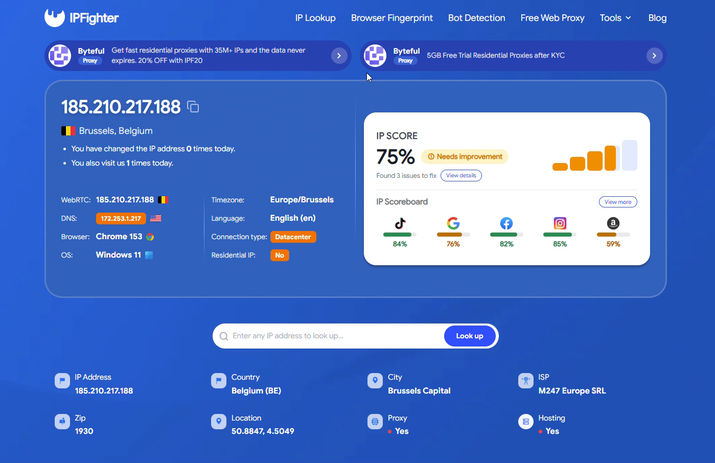
Belgium datacenter IP test results
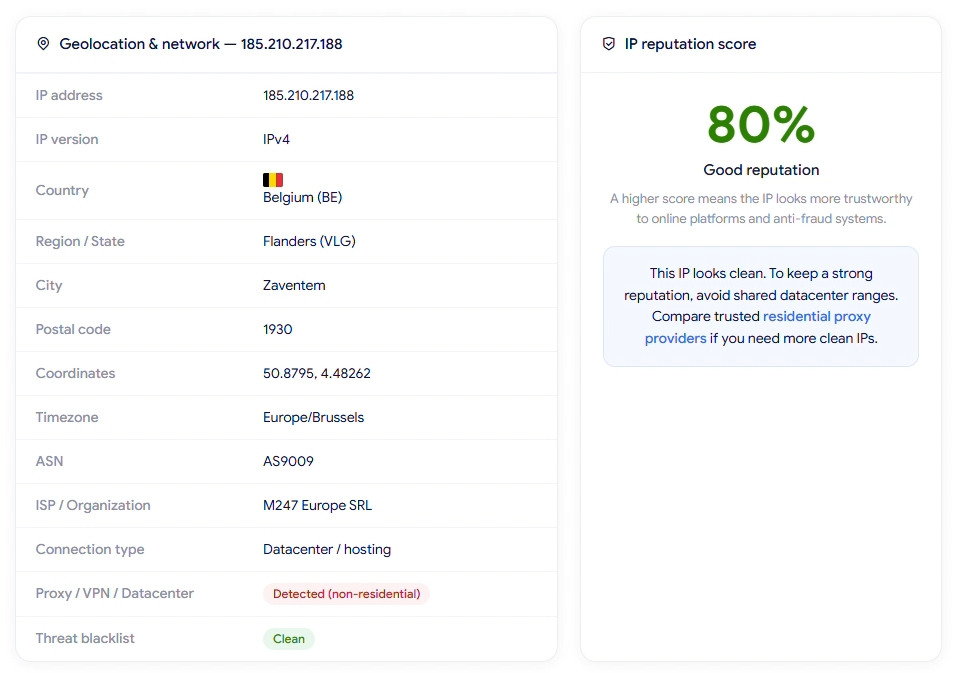
IP Lookup results on IPFighter
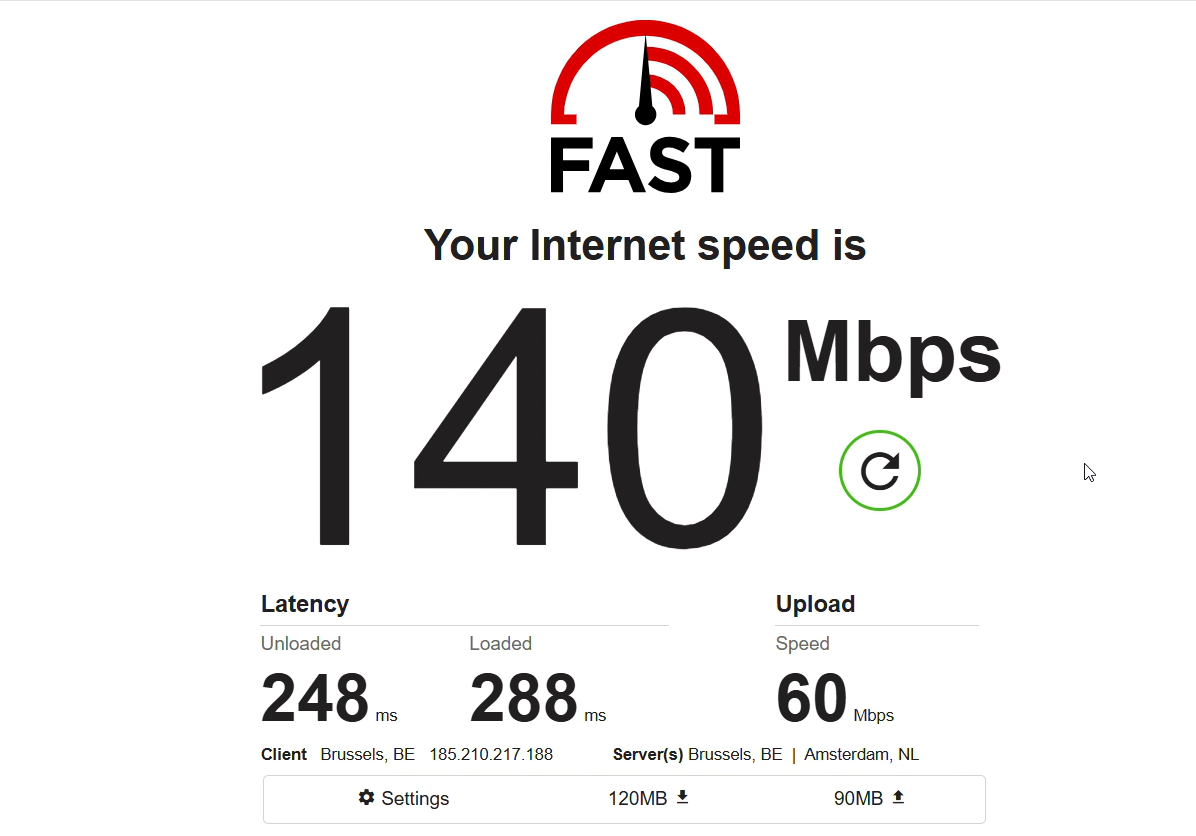
Check proxy on Fast
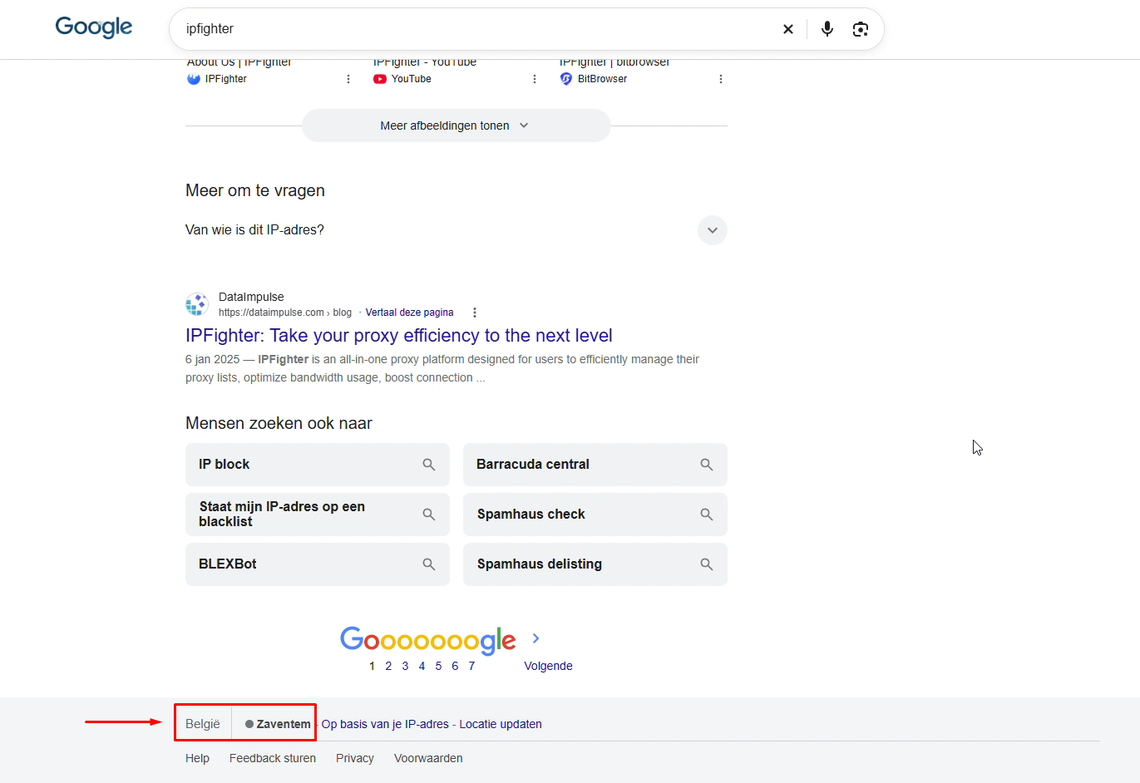
Check on the Google search bar
5.3. Overall performance findings
Across the 15 tested IPs, all five residential proxies and all five mobile proxies had clean blacklist status and were not detected as proxies by IPFighter. The datacenter group was more mixed: four IPs were identified as datacenter proxies, and the Osaka IP was listed on a blacklist with a low IP score. The Vietnam datacenter IP also had a low score despite being marked clean and not detected as a proxy, showing why no single indicator should be treated as a complete measure of IP quality.
Connection performance varied substantially by IP. The residential Vietnam IP delivered strong speeds and relatively low latency, while several Belgium and UK/Vietnam mobile entries had slow downloads or highly unstable ping. Datacenter speeds ranged from modest to very high, but faster throughput did not necessarily correspond to better reputation or location consistency.
Location results were generally more reliable at the country level than at the city or region level, but there were exceptions. Several IPs returned different cities or regions within the same country, while the supplied target fields for the Aomori mobile and England datacenter entries conflict with their listed proxy locations. Those entries should be verified before making a final judgment on location targeting.
Overall, the tests suggest that Floppydata’s results depend heavily on the individual IP and proxy category. Users should test representative IPs for their own target locations and pay attention to IP reputation, DNS behavior, and latency - not just raw download speed.
These results are based on randomly selected IPs during the testing process, so actual performance may vary depending on the specific IP, geographic location, network conditions, and time of use. Therefore, individual IPs may deliver different speeds, latency, and geolocation results in real-world use.
Read more:
-
Japan proxy: Find the right provider for Japanese IPs
-
Best proxy Vietnam providers: Compare 10 services
-
Best India proxy providers in 2026: Find the right Indian IP
6. How to get proxy from Floppydata
Getting started with Floppydata is relatively straightforward: create an account, choose a proxy plan, configure the required targeting and session settings, and generate the proxy credentials.
Step 1. Create or log in to your account
Visit the Floppydata website, sign up or log in with your email address and password. After successful login, you can access the dashboard and purchase a proxy plan.
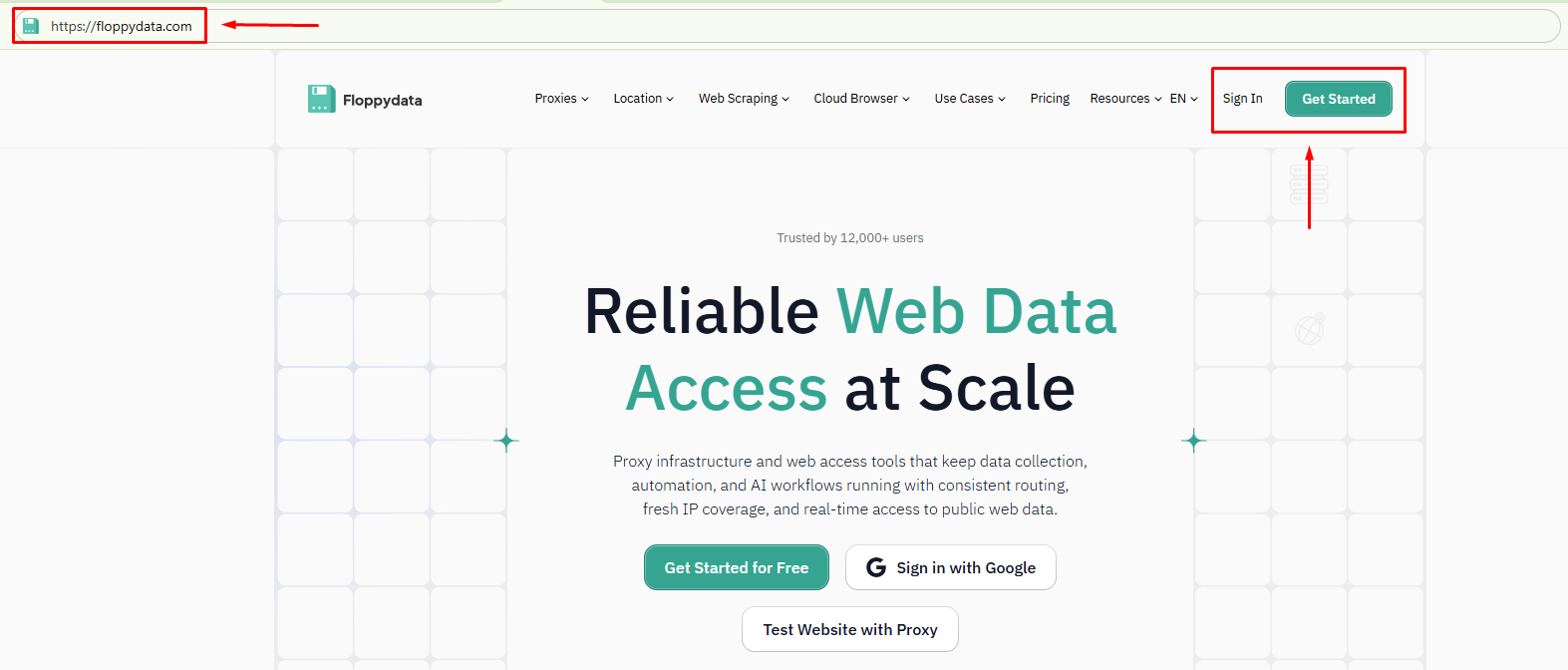
Create or log in to your account
Step 2. Purchase a proxy plan
After successfully logging into the Floppydata dashboard, you can select and purchase a proxy package that suits your needs.
Before completing your purchase, don't forget to check for Floppydata promotional codes with a get 30% extra traffic on your first Floppydata on IPFighter. Applying an existing discount code can significantly reduce your costs.
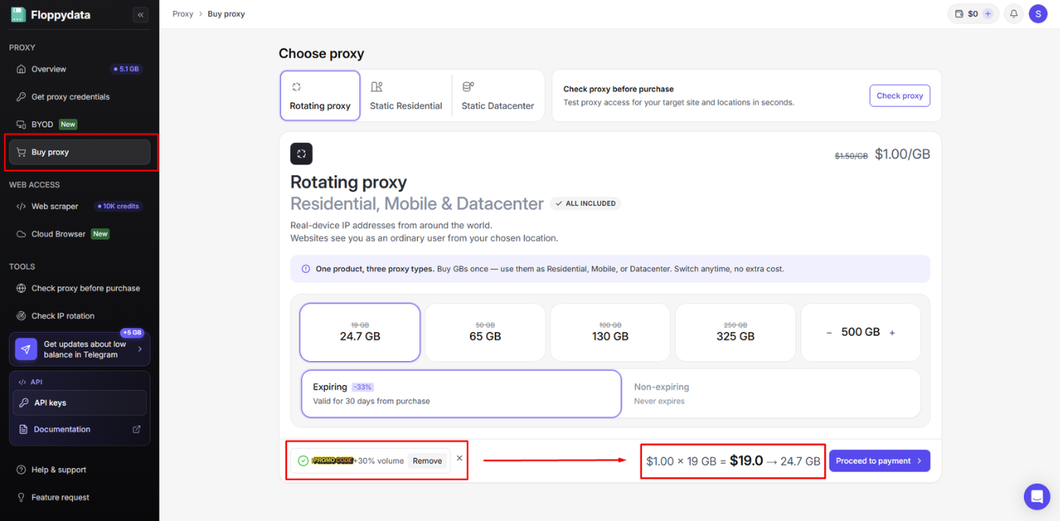
Purchase a proxy plan
Step 3. Configure your proxy
Once the service package is activated, open the "Get proxy credentials" section in the dashboard and configure the connection settings. Depending on the proxy type, you can select the country, state, city, and session type.
Step 4. Generate and copy your proxy
Once configuration is complete, copy the generated proxy credentials and enter them into your browser, scraping tool, automation software, or custom application.
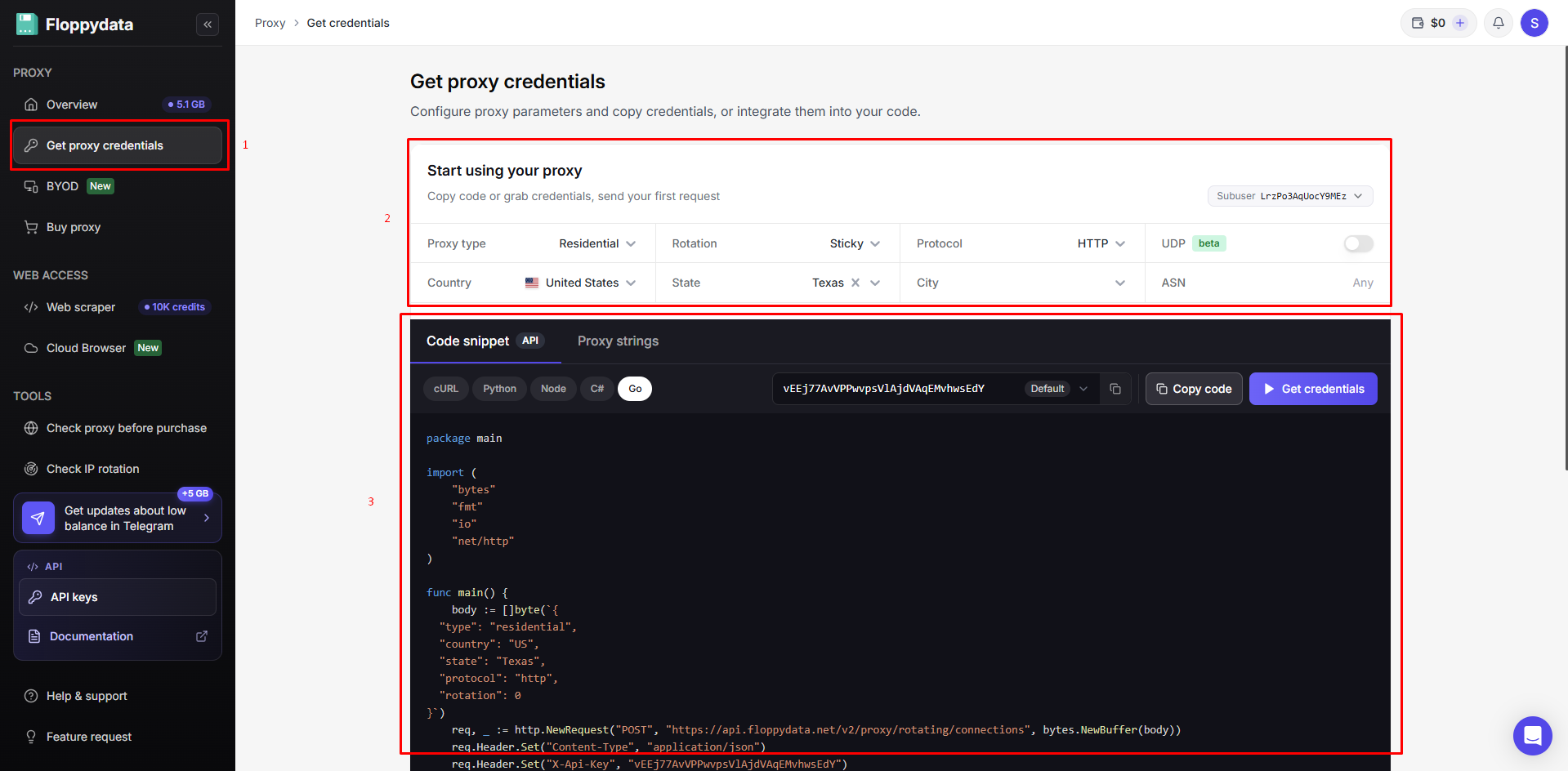
Generate and copy your proxy
7. Alternatives
Besides Floppydata, you can also consider other providers offering similar residential proxy services.
-
ProxyCove: Offers residential, mobile, and datacenter proxies with flexible rotation and traffic-based pricing, making it an option for users who want to compare different proxy types under one provider.
-
Anonymous Proxies: Provides a broad selection of connection options, including residential, mobile, datacenter, HTTP, SOCKS5, and Shadowsocks proxies, along with other network services.
-
RapidProxy: Focuses on residential proxies, with rotating, static, and unlimited residential options for workflows that require IP rotation or longer-lasting connections.
You can also check out reviews of our other partners here:
-
NodeMaven review: Exploring its proxy quality & performance
-
anyIP review: How do its residential and mobile proxies perform?
-
NiuProxy review: Is this affordable proxy provider worth using?
-
Mobileproxy.space review: Is its mobile proxy quality really good
8. Conclusion
Floppydata offers several proxy categories under one service, including rotating residential, mobile, and datacenter traffic, as well as static residential and datacenter IPs. Our tests found clean blacklist status and no proxy detection across the residential and mobile samples, while the datacenter results were more mixed. Speed, latency, IP reputation, and location consistency varied across the 15 tested IPs, so the results do not support treating every proxy in the network as equivalent.
These findings reflect only the randomly selected IPs tested at a specific time; performance and reputation may change by IP, location, and target website. Before using a proxy in a production workflow, check its IP quality, reputation, location, and potential leaks with IPFighter.
If you're planning to try Floppydata, check out the Floppydata promo code on the IPFighter page to get 30% extra traffic on your first Floppydata on IPFighter for your purchase.
9. FAQ
Does Floppydata offer residential, mobile, and datacenter proxies?
Yes. Its website lists rotating residential, mobile, and datacenter traffic through one rotating-proxy product, plus separate static residential and static datacenter products.
How much do Floppydata proxies cost?
The current pricing page lists rotating traffic from $1/GB, static residential proxies from $1.79/IP/month, and static datacenter proxies from $0.79/IP/month. Check the provider’s checkout page for current bundles and conditions.
Are Floppydata proxies undetectable?
No provider can guarantee that every proxy will avoid detection on every website. In this test, all residential and mobile IPs were marked as not detected by IPFighter, while four of the five datacenter IPs were identified as datacenter proxies.
Can Floppydata proxies provide accurate city-level geolocation?
The results varied. Some tested IPs were consistent with their target region, while others returned different cities or regions. Users who require city-level accuracy should verify individual IPs against their intended target location.
Does Floppydata offer refunds?
Floppydata’s published terms allow refunds to be considered under specific conditions, including a short request window, low usage or materially unused products, no previous refund, and evidence of a verified provider-side issue. Cryptocurrency purchases are excluded from external-wallet refunds. Review the current Terms of Service before buying.
Read more
Floppydata review: A closer look at its proxy network


Japan proxy: Find the right provider for Japanese IPs
Best proxy Vietnam providers: Compare 10 services

Best India proxy providers in 2026: Find the right Indian IP

Korean proxy service: How to choose one and compare the top providers

Ecommerce proxy: How online sellers use it and what to consider