

Having been in the proxy market for years, anyIP has built a diverse pool of residential and mobile IPs across multiple locations, giving users plenty of options for different use cases. But a large and diverse IP pool does not necessarily guarantee consistent proxy quality and performance.
In this review, IPFighter puts anyIP’s proxy network to the test, examining its features, pricing, IP reputation, and real-world performance to see how well its proxies hold up in practice.
1. General information
Before diving into the details, here's a quick overview of anyIP and its core specifications.
|
Website |
|
|
Founded |
2017 |
|
Proxy types |
Residential / Mobile proxies |
|
IP pool |
100M+ IPs in 38+ countries |
|
Protocol |
HTTP(S) / SOCKS5 |
|
Rotation |
Per-request or sticky sessions for up to 7 days |
|
Pricing model |
Subscription with unused traffic rollover |
|
Payment |
Credit card / Cryptocurrency |
|
Trial/refund |
Micro Plan serves as a trial option / Refunds available within 14 days of the initial purchase, excluding renewals. |
|
Best for |
Web scraping, automation, social media, and geo-targeted tasks |
Discover more:
- Best proxy providers in 2026: Compare top 6 services
- Best mobile proxy providers in 2026: Hands-on testing results
- Best residential proxy providers in 2026: Real-world tested
2. Proxy types available at anyIP
anyIP currently offers two main proxy types: Residential Proxies and Mobile Proxies. Both provide real-world IP addresses from household devices, but their network characteristics make them suitable for different use cases.
One of the unique features of anyIP is its combined residential and mobile pool – a single subscription gives access to both, giving users two products for a single monthly payment. You can then pick between residential-only, mobile-only, or mixed pools and use the bandwidth however you like.
2.1. Residential proxies
anyIP’s residential proxies use IP addresses associated with household devices that get their IPs from real Internet Service Providers, making them suitable for tasks that require a more natural-looking connection and flexible geographic targeting.
- Advertised combined proxy pool: 100M+ IPs
- Countries: 38+
- Filtering: Country, region, city, and ISP targeting
- Rotation: Rotating and sticky sessions up to 7 days
- Protocols: HTTP(S), SOCKS5
The residential proxy network is designed to provide flexible IP rotation while allowing users to maintain a specific IP through sticky sessions when needed.
2.2. Mobile proxies
anyIP also provides mobile proxies for users who specifically need IP addresses associated with mobile networks. These proxies can be useful for workflows where mobile IP identity is more relevant than a traditional residential connection.
- Advertised combined proxy pool: 100M+ IPs
- Countries: 50+
- Filtering: Country, city, and ASN targeting
- Rotation: Rotating and sticky sessions up to 7 days
- Protocols: HTTP(S), SOCKS5
With both residential and mobile options available through the same platform, users can choose the proxy type based on the IP identity and connection characteristics required for their particular workflow.
Proxy types available at anyIP
3. Key features of anyIP proxies
Beyond its residential and mobile proxy offerings, anyIP provides several features designed to give users more control over proxy sessions, locations, and authentication.
- Country, region, and city targeting: Select proxy IPs from specific geographic locations to support more precise geo-targeting.
- ISP & ASN targeting: Lets users target IPs associated with specific Internet Service Providers and carriers where supported.
- Rotation: Choose between automatically rotating IPs or maintaining the same IP for a specific session, depending on the workflow.
- IP whitelist authentication: Authenticate proxies by whitelisting trusted IP addresses instead of using usernames and passwords.
These features give users greater flexibility when configuring proxy locations and managing IP sessions, making anyIP easier to adapt to different use cases and proxy requirements.
4. anyIP pricing overview
anyIP offers the same pricing structure for both residential and mobile proxies, with four monthly plans based on included bandwidth. Each plan includes both proxy types, access to 38+ countries, and unlimited proxy IPs.
4.1. Residential proxies
The residential proxy plans range from a small 5 GB package for light usage to a 500 GB Enterprise plan for larger-scale operations.
- Micro: $25/month - 5 GB included, $5/GB for extra bandwidth
- Basic: $80/month - 20 GB included, $4/GB for extra bandwidth
- Pro: $300/month - 100 GB included, $3/GB for extra bandwidth
- Enterprise: $1,000/month - 500 GB included, $2/GB for extra bandwidth
All plans include both residential and mobile proxies, coverage across 38+ countries, and unlimited proxy IPs.
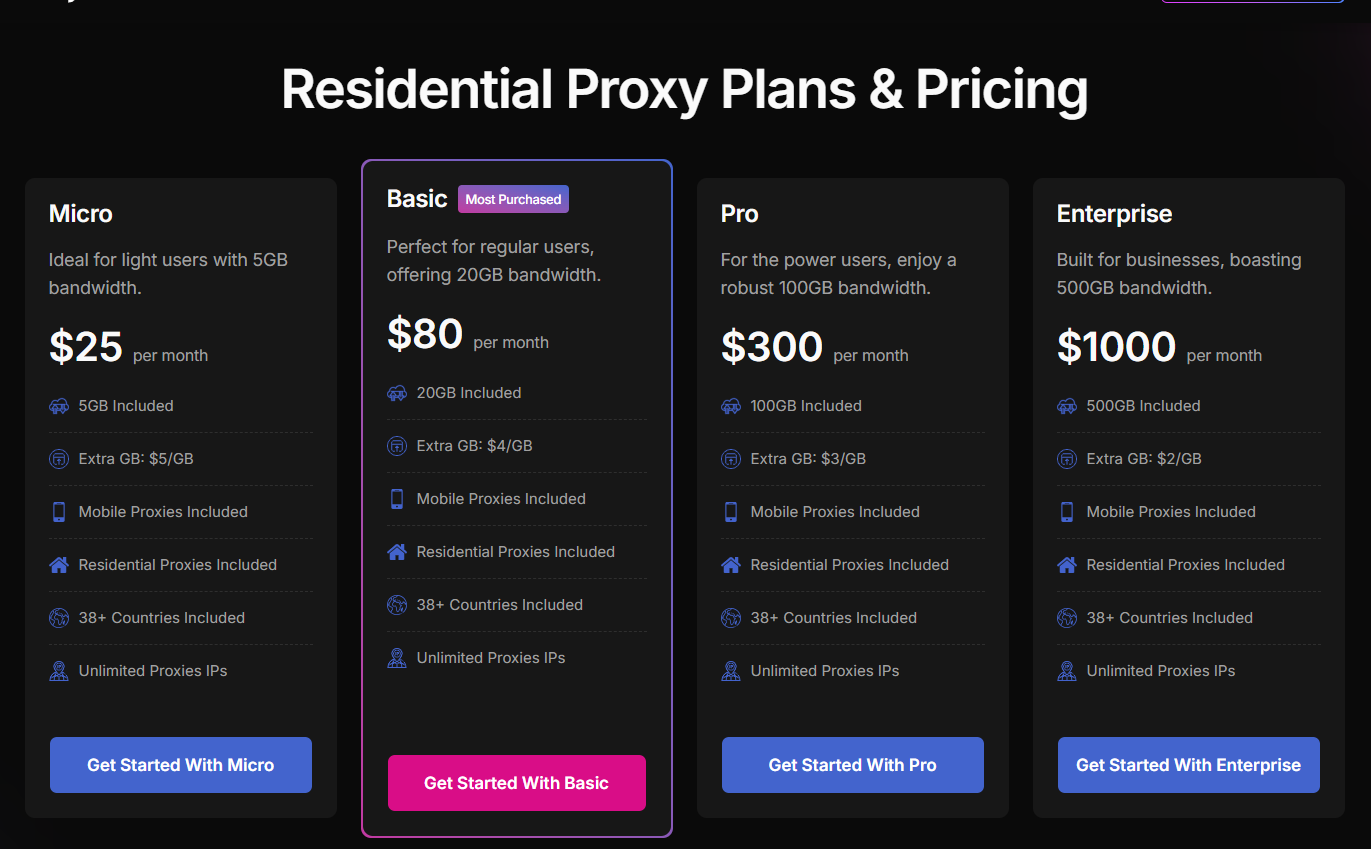
Prices for residential proxies plan
4.2. Mobile proxies
The mobile proxy plans follow the same pricing and bandwidth structure as the Residential plans, allowing users to access both proxy types without separate pricing tiers.
- Micro: $25/month - 5 GB included, $5/GB for extra bandwidth
- Basic: $80/month - 20 GB included, $4/GB for extra bandwidth
- Pro: $300/month - 100 GB included, $3/GB for extra bandwidth
- Enterprise: $1,000/month - 500 GB included, $2/GB for extra bandwidth
The basic plan is marked as “Most Purchased”, while the micro plan is positioned for light users and can also serve as the trial option. Overall, the pricing becomes more cost-effective at higher volumes, with the additional bandwidth rate dropping from $5/GB to $2/GB.
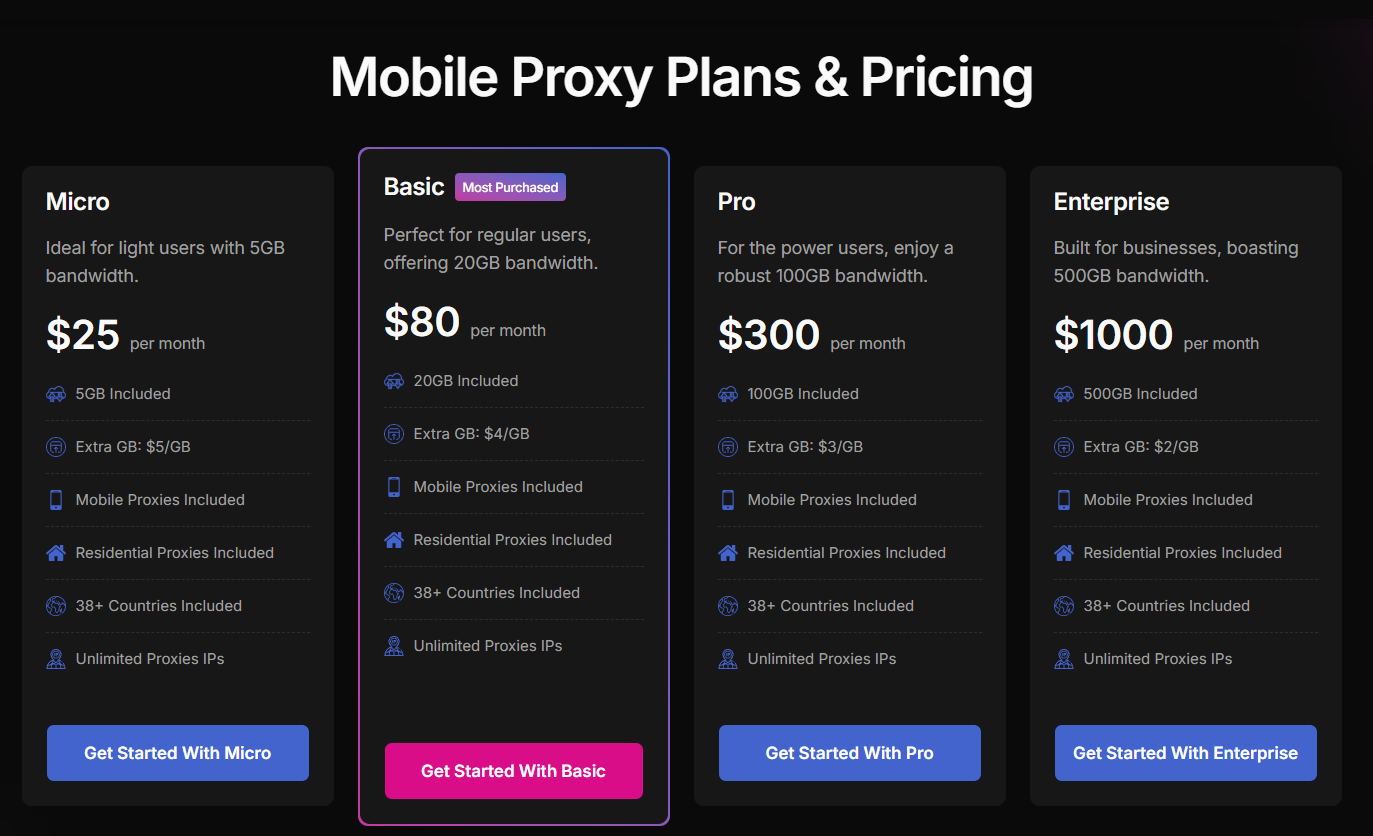
Prices for mobile proxies plan
If you're planning to purchase proxies from NodeMaven, don't miss the anyIP promo code available on IPFighter.
5. Performance test
To evaluate the real-world quality of anyIP's proxy network, we tested randomly selected IPs from both the residential and mobile proxy pools. The test will focus on IP quality, geolocation accuracy, connection speed, and overall usability.
We tested one of their residential and mobile proxy IP addresses using IPFighter, Speedtest, and Google Search.
5.1. Preparation
Before evaluating the proxy, we first added it to our browser using the IPFighter Proxy Manager extension. This extension makes it easy to import, manage, and switch between multiple proxies directly within your browser, eliminating the need for manual proxy configuration. anyIP also supports integration with IPFighter, making the setup process more straightforward.
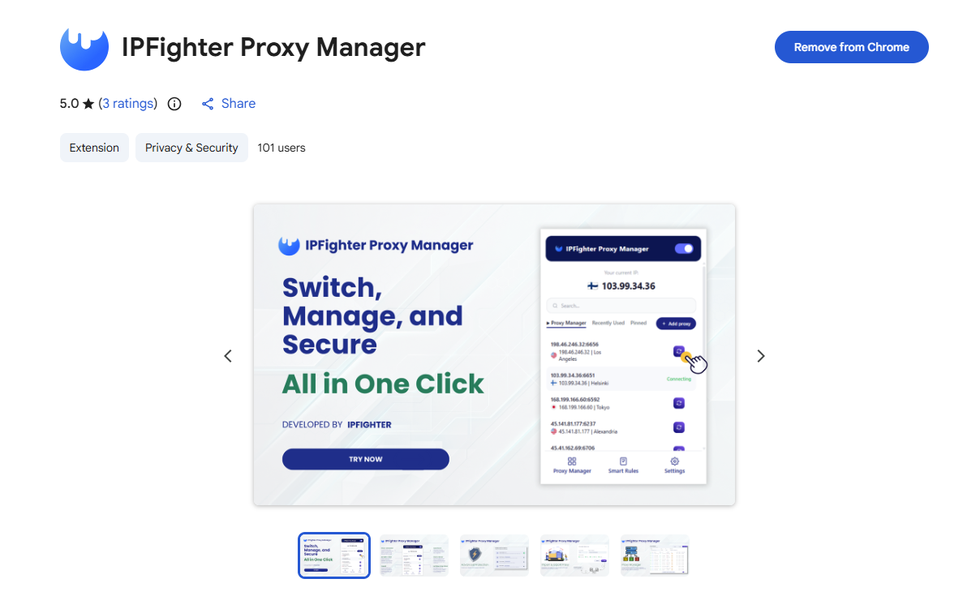
IPFighter Proxy Manager extension on Chrome
If you'd like to learn how to set it up, check out our detailed guide: A complete guide to the IPFighter Proxy Manager extension.
5.2. Test results
Residential proxies
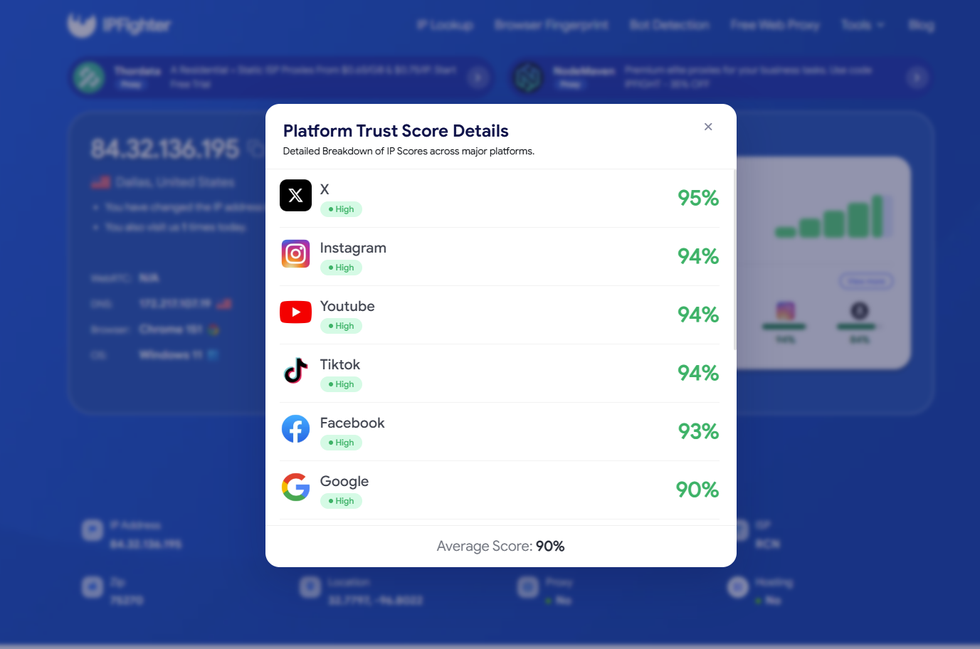
Some notable platform scores include 95% on X, 94% on Instagram, YouTube, and TikTok, and 93% on Facebook, while Google scores 90%. These figures represent some of the individual platform scores shown in IPFighter’s assessment, with the overall average score calculated by IPFighter at 90%. All platforms are rated “High”, indicating a strong and consistent reputation across popular online platforms.
IP scores on major platforms
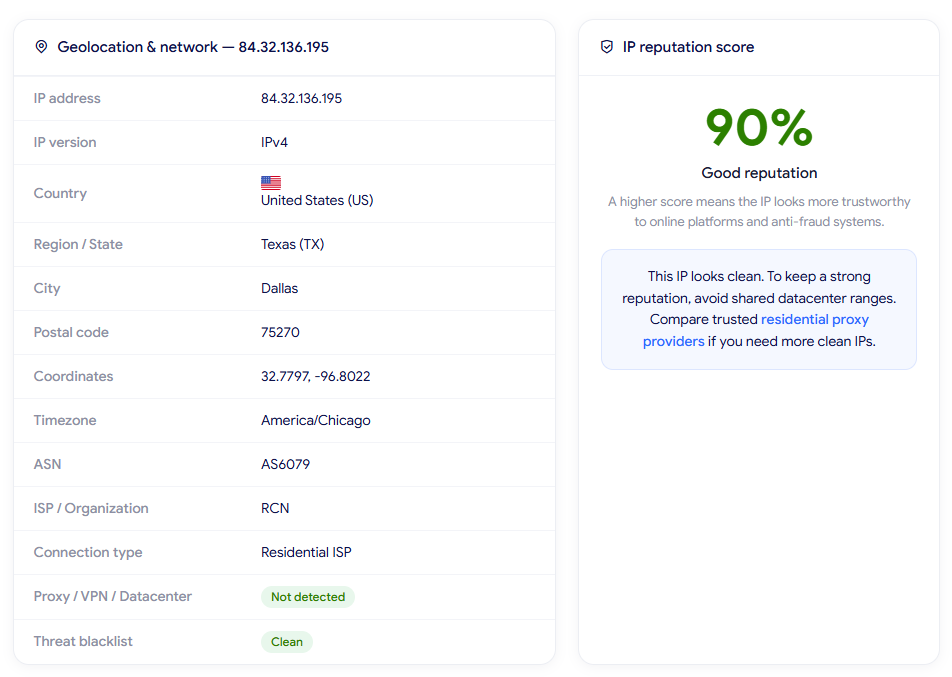
In the IP Lookup results, the IP is identified as a U.S. residential IP in Dallas, Texas, with RCN as the ISP and a Residential ISP connection type. The location matches the U.S. setup selected for the proxy. IPFighter detects no Proxy/VPN/Datacenter, and the IP is clean on the threat blacklist. With a 90% reputation score, the IP shows good trustworthiness and no major risk signals during testing.
IP Lookup results on IPFighter
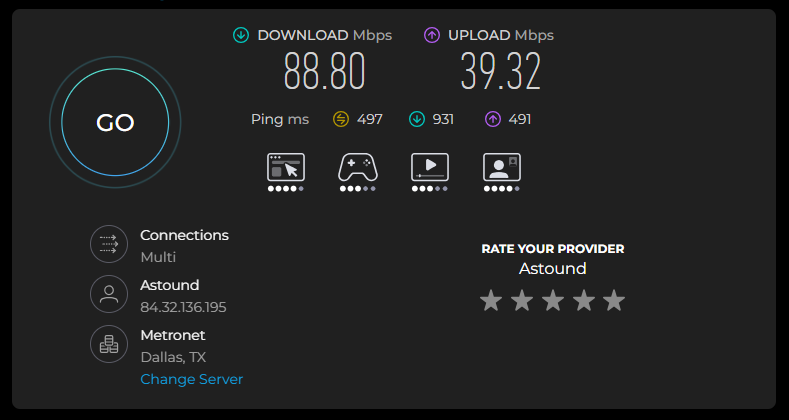
The randomly selected residential IP reached 88.80 Mbps download and 39.32 Mbps upload, providing sufficient bandwidth for regular browsing and proxy-based tasks. The ping was relatively high at around 497 ms, which may affect latency. During testing, the connection remained stable, and Google searches worked smoothly without noticeable interruptions.
Check proxy on Speedtest
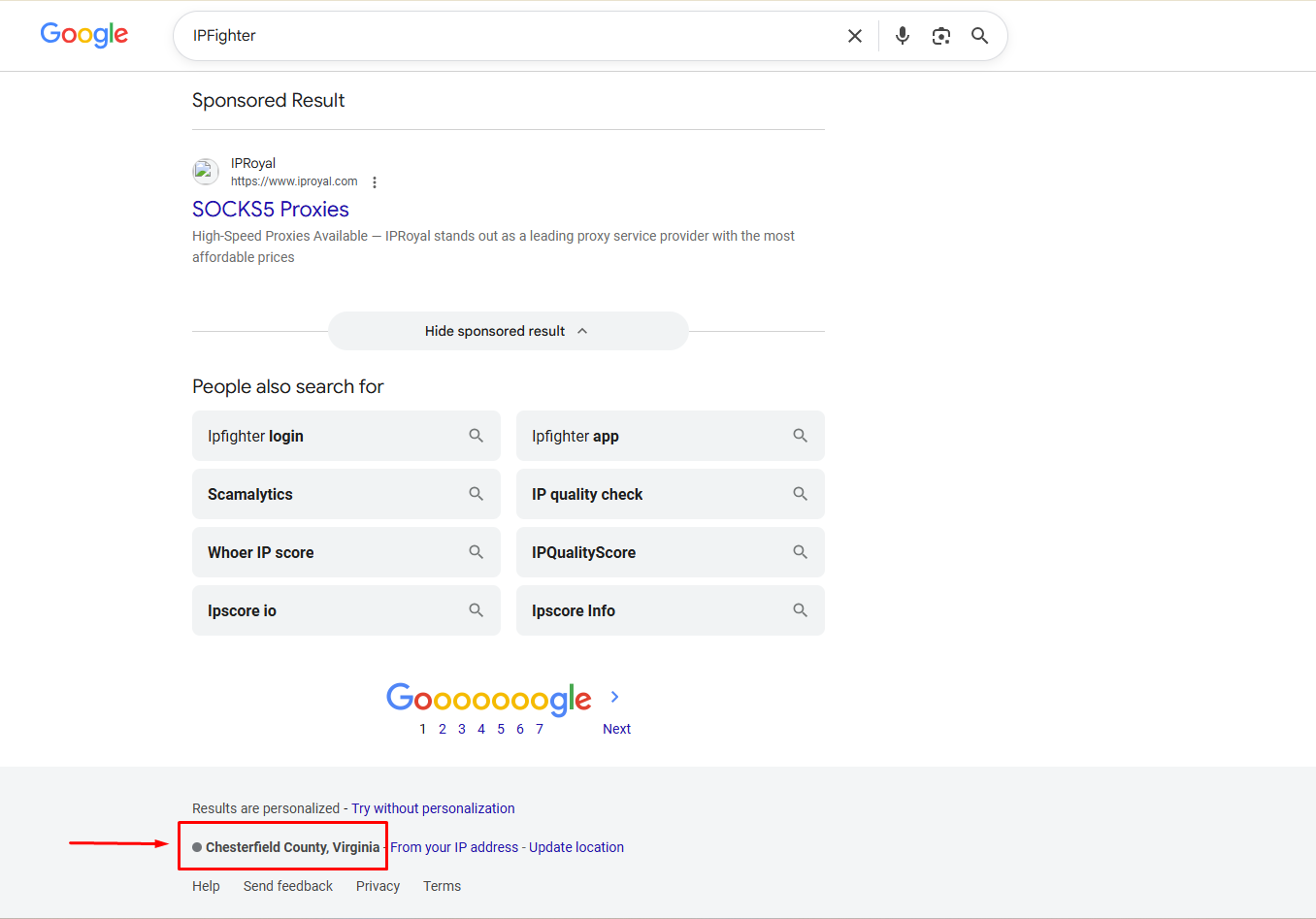
Finally, a quick check is performed by searching and viewing the location on Google. The results show the location as Chesterfield County, Virginia, US.
Since the proxy was configured to randomly select a U.S. city, the result remains within the targeted country, although the exact city differs from the location detected by IPFighter (Dallas, Texas). This suggests some variation in city-level geolocation across different detection services, while the U.S. country-level targeting is consistent.
Check on the Google search bar
Mobile proxies
Some of the platform scores include 95% on X, 94% on Instagram, YouTube, and TikTok, 93% on Facebook, and 90% on Google. These figures represent some of the individual platform scores shown in IPFighter’s assessment, while the overall average score calculated by IPFighter is 90%. All platforms are rated “High”, indicating a generally strong reputation and low risk of detection.
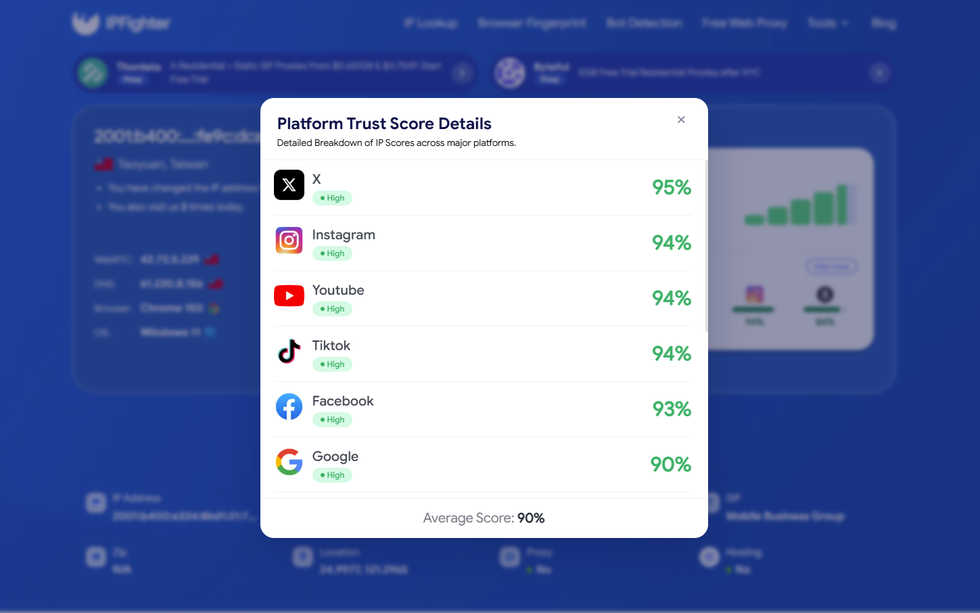
IP scores on major platforms
In the IP Lookup results, the IP is identified as a Taiwanese IPv6 residential IP, located in Taoyuan, and associated with Mobile Business Group. IPFighter also confirms that the IP is classified as a Residential ISP, with no Proxy/VPN/Datacenter detection and a clean threat blacklist status. Most notably, the IP received a 100% reputation score, indicating excellent IP quality and strong trustworthiness for online platforms and anti-fraud systems.
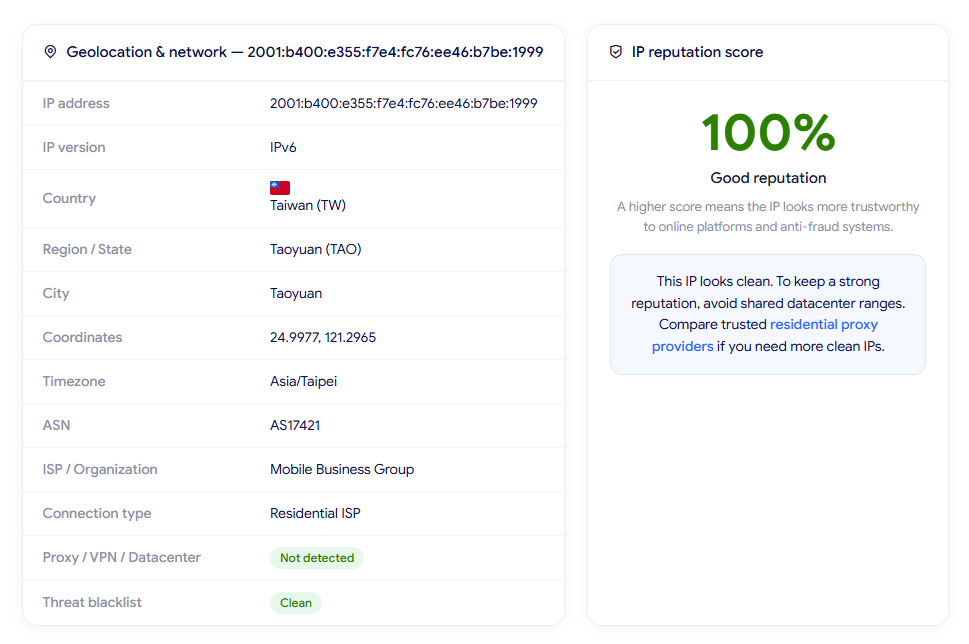
IP Lookup results on IPFighter
The randomly selected mobile IP reached 11.42 Mbps download and 13.47 Mbps upload, which is on the lower side but provides basic bandwidth for lightweight browsing and simple account management. The ping was relatively high at around 178 ms, typical for mobile routing. While it may struggle with high-definition streaming or heavy downloads, the connection remained stable for basic web tasks during testing.
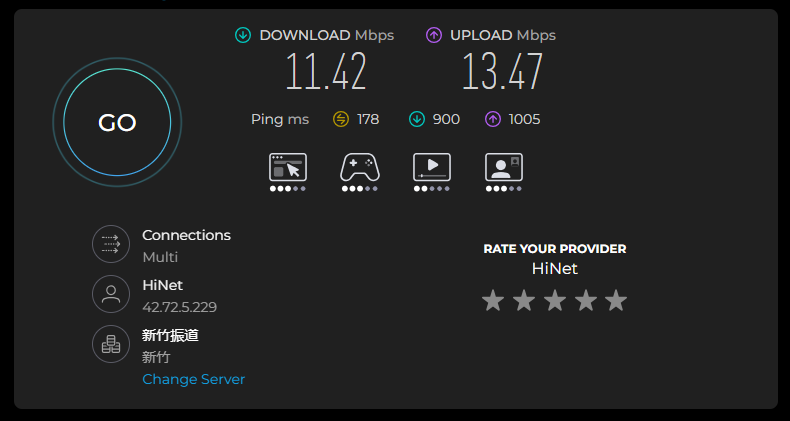
Check proxy on Speedtest
Finally, a location check was conducted via Google search, which detected the location as Zhongli District, Taoyuan, Taiwan. Because the proxy setup was set to full random mode, this result directly matches the location identified by IPFighter (Taoyuan, Taiwan). This indicates high geolocation consistency across different detection services at both the regional and city levels.
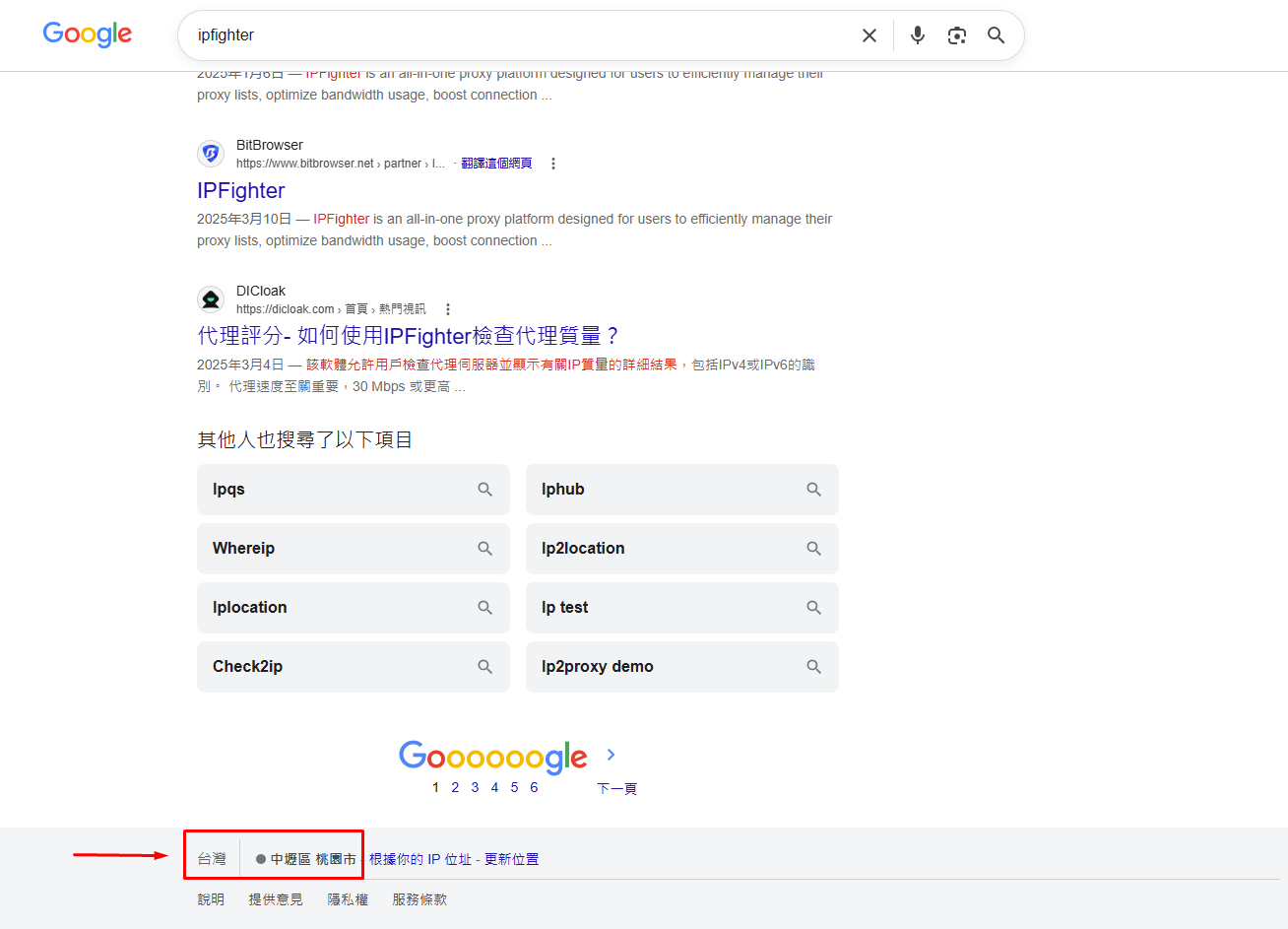
Check on the Google search bar
These results are based on randomly selected IPs during the testing process, so actual performance may vary depending on the specific IP, geographic location, network conditions, and time of use. As a result, individual IPs may deliver different speeds, latency, and geolocation results in real-world use.
Read more:
- How to improve IP score: A complete guide
- How to pass bot detection test and avoid getting flagged
6. How to get a proxy from anyIP
Getting started with anyIP is simple. After signing up or logging in, you can select a service plan, complete the payment, and retrieve your proxy credentials directly from the dashboard.
Step 1. Create or log in to your account
Visit the anyIP website, sign up or log in with your email address and password. After successful login, you can access the dashboard and purchase a proxy plan.
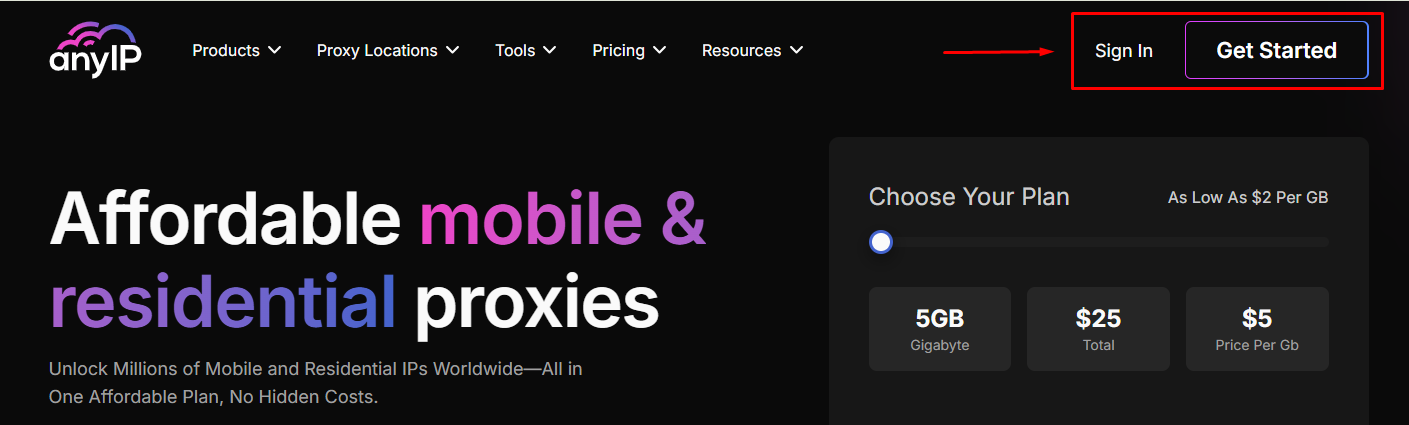
Create or log in to your account
Step 2. Purchase a proxy plan
After successfully logging in, you can select and purchase a proxy package that suits your needs on the dashboard.
Before completing your purchase, don't forget to check for anyIP promotional codes with a 5% OFF coupon code on IPFighter. Applying an existing discount code can significantly reduce your costs.
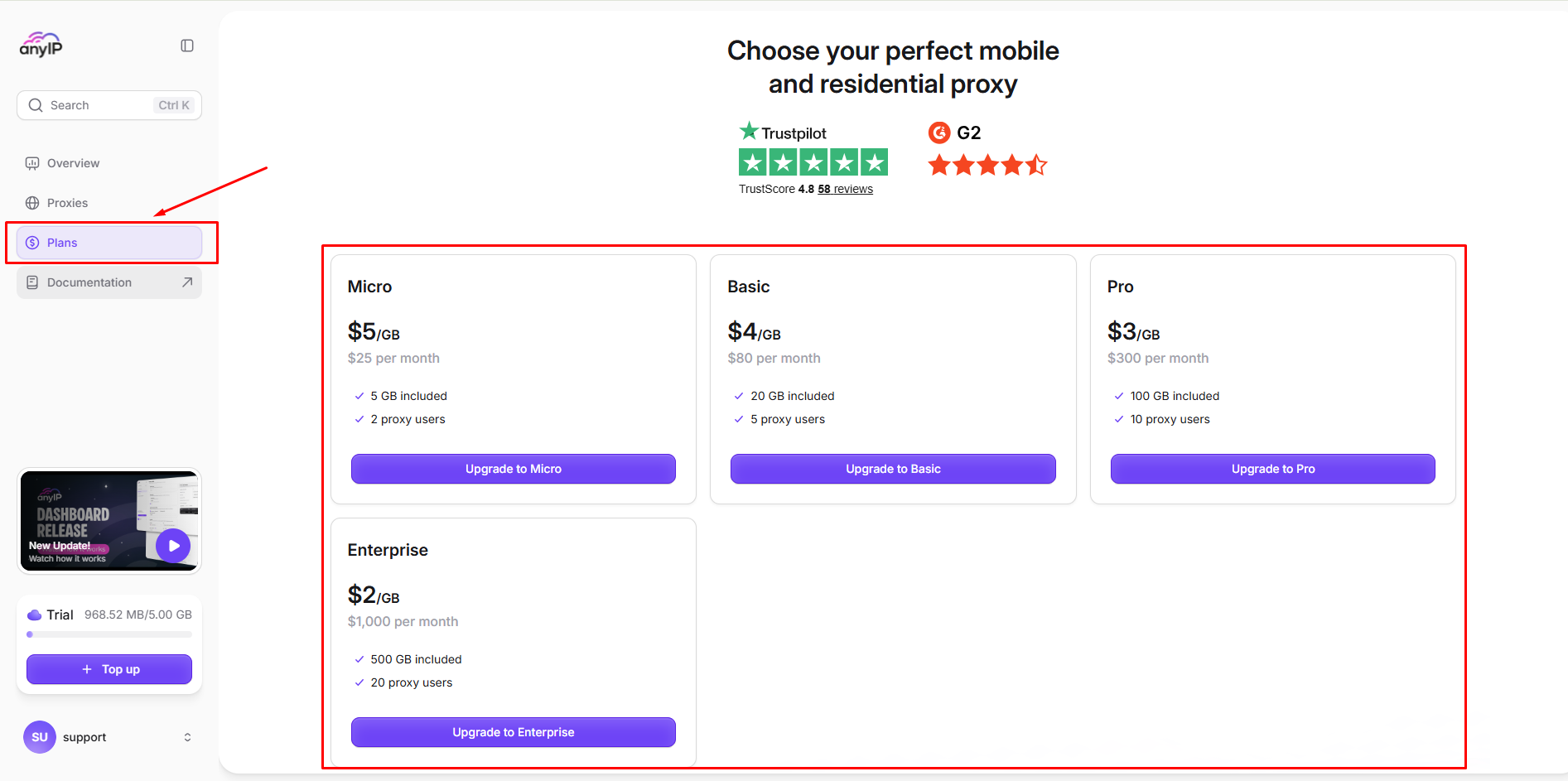
Purchase a proxy plan
Step 3. Configure your proxy
Once the payment is confirmed, access your anyIP dashboard and create your proxy configuration. You can customize the proxy according to your requirements, including location, session/rotation settings, and authentication. anyIP supports both username/password and IP authentication.
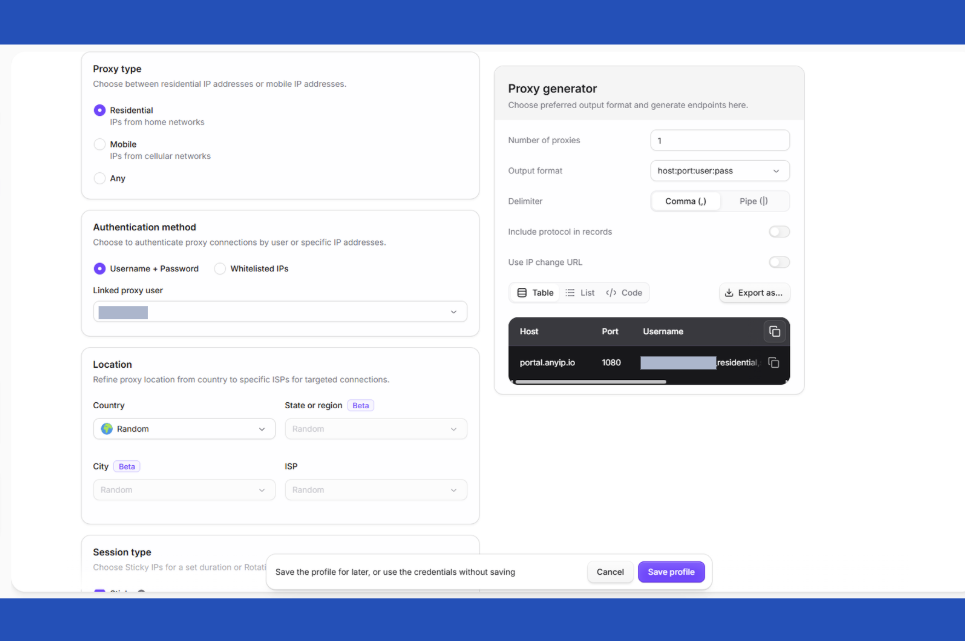
Configure your proxy
Step 4. Generate and copy your proxy
Once configuration is complete, AnyIP will generate a proxy list based on your selected settings. You simply need to access the "Proxies" section, where the details of your generated proxies are displayed; from there, you can select a proxy to use, copy it, or export the list.
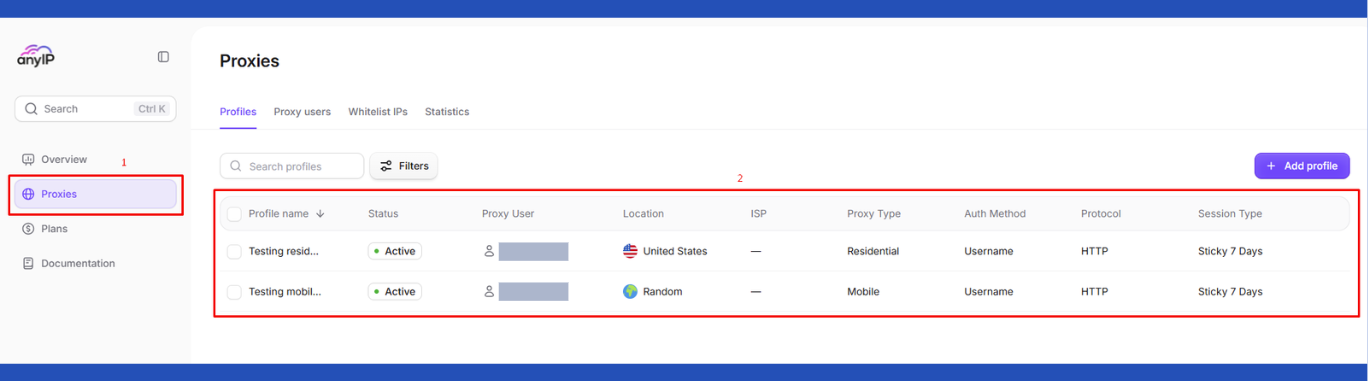
Generate and copy your proxy
7. Alternatives
Besides anyIP, you can also consider other providers offering similar residential proxy services.
- Mobileproxy.space: Focuses on mobile proxies while also offering residential and server proxy solutions for users looking for mobile IPs and flexible proxy configurations.
- NovProxy: Offers a large residential IP network and multiple proxy types, making it suitable for scraping, automation, and multi-account use.
- NiuProxy: Provides residential, mobile, ISP, and datacenter proxies with broad geographic coverage and flexible session options.
You can also check out reviews of our other partners here:
- SimplyNode review: A proxy provider with no traffic expiration
- MoMoProxy review: Is this residential proxy provider worth using?
- LightningProxies review: Is it worth your investment?
- Proxy-Seller review: Are the features as good as rumored?
8. Conclusion
Overall, anyIP is worth considering if you need residential or mobile proxies with flexible bandwidth plans and a straightforward setup. Our tests showed clean IPs, accurate country-level targeting, and generally reliable performance, although connection speed and latency can vary between individual IPs. Overall, anyIP is worth considering for users who value proxy quality and flexibility across different use cases.
If you're planning to try anyIP, check out the anyIP promo code on the IPFighter page to get up to 5% off your purchase.
9. FAQ
Is anyIP suitable for social media management?
Yes. Its residential and mobile proxies, combined with strong platform trust scores in testing, make anyIP a potential option for social media management and account-related tasks.
Can I use anyIP for web scraping?
Yes. anyIP can be used for web scraping where residential or mobile IPs are preferred. The available geographic coverage and proxy rotation options can also help adapt the setup to different scraping requirements.
Does anyIP provide a proxy trial?
While there’s no free trial, anyIP offers a Micro Plan that serves as a trial option, allowing users to test the service with a smaller 5 GB package.
Does anyIP support city-level targeting?
anyIP provides geographic targeting options, but the exact availability of city-level locations may depend on the proxy type and selected configuration. Users should check the available locations in the dashboard before purchasing if precise city targeting is important.
How reliable is anyIP's IP reputation?
Based on our IPFighter tests, the randomly selected IPs showed good to excellent reputation scores, with clean blacklist status and no Proxy/VPN/Datacenter detection. However, individual IP quality can vary depending on the IP and location.
Read more

Proxy for trading: Can it improve your connection and privacy?

Anonymous Proxies review: What its proxy network offers

Web scraping proxy: How to collect web data more efficiently

Can a gaming proxy improve your gaming experience? What to know

Proxy server for streaming: Can it improve your experience?

Rapidproxy review: A closer look at its residential proxy network