

Are you wondering what the ip fraud score is and how to read it? In this guide, IPFighter explains what an IP fraud score is, the factors that influence it, how to interpret different score ranges, why it matters for online activities, and how to reduce the risk associated with your IP address. You'll also learn where to check IP fraud score before using an IP for sensitive tasks such as account creation, automation, or web scraping.
1. What is an IP fraud score?
IP fraud score is a 0-100 rating that estimates how risky an IP address is: the lower the score, the cleaner the IP; the higher the score, the more likely it's linked to fraud or abuse, such as spam, bot traffic, or identity theft. The score is calculated by anti-fraud algorithms that analyze behavioral patterns and historical activity tied to that IP.
It's worth noting this isn't a fixed label an IP carries forever - it's a prediction, recalculated as new activity and signals come in.
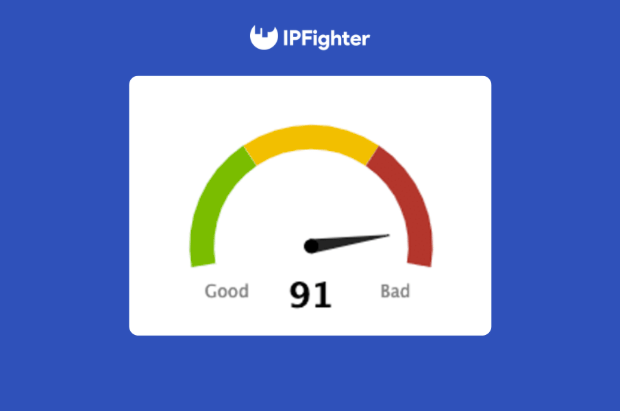
Definition of IP fraud score
2. Factors that determine the IP fraud score
Fraud detection providers don't publicly disclose the exact algorithms used to calculate an IP fraud score. However, most platforms evaluate a combination of historical, technical, and behavioral signals to estimate how risky an IP address is. Some of the most important factors include:
-
IP reputation history: An IP that has previously been linked to spam, phishing, bot activity, or other forms of abuse is more likely to receive a higher fraud score. Security platforms also compare IPs against various blacklists and abuse IP databases to identify suspicious histories.
-
Proxy or VPN usage: Websites often determine whether an IP belongs to a residential ISP, datacenter, VPN, or proxy service. Datacenter IPs generally carry higher risk because they are more frequently used for automation and large-scale scraping.
-
Network behavior: Unusual activity such as excessive requests, repeated login attempts, mass account creation, or bot traffic can significantly increase an IP's fraud score over time.
-
Geolocation consistency: whether the IP's location matches the billing or shipping address, or the account's usual activity location.
-
ASN and ISP reputation: The reputation of the network that owns the IP also matters. Residential ISPs typically have stronger reputations than cloud hosting providers, while IP ranges frequently associated with abuse are more likely to receive higher fraud scores.
On top of these core IP-level signals, some systems also factor in device and browser fingerprint consistency timezone, language, and browser fingerprint. It's important to be clear that this is a supplementary layer some anti-fraud systems combine with the IP score; it doesn't change the IP's own score by itself.
3. How to read an IP fraud score
There's no universal standard every platform runs its own algorithm and sets its own thresholds. But as a general guide, IP fraud scores are often read in bands. According to IPQS's public guidance on how these scores work:
-
75 and above: treat with caution and consider added verification
-
85 and above: likely suspicious behavior worth a stronger response
-
90 and above: strongly associated with abusive or malicious activity
These bands are starting points, not fixed rules. The right cutoff depends on what's at stake for the action being protected - a payment gateway will usually enforce a much stricter threshold than a page that just needs to load.
The same IP can also receive different treatment depending on the activity. For example, an IP that works normally for browsing may still be blocked during online payments because payment systems typically apply much stricter fraud thresholds.
It's also important to remember that fraud scores aren't always perfect. A high score doesn't necessarily mean the current user is malicious. Shared networks, public Wi-Fi, mobile carriers, or IPs previously abused by someone else can all increase an IP's fraud score.
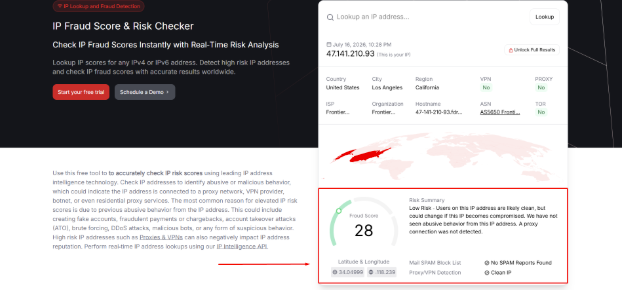
Check IP fraud score on IPQS
A quick real-world example: A recent fraud score check on a residential IP returned a score of 28/100, which falls into the "Clean IP" band from the table above. The accompanying risk summary backed that up the IP was flagged as low risk, with no history of abusive behavior and no spam reports on record. That's a comfortably safe result for sensitive tasks like payments or account management. It's also a good reminder of the point made earlier: a score like 28 is just a snapshot at the time of the check; it can shift later if the IP is compromised or ends up in different hands.
Discover more:
-
What is IP trust score? How to know if an IP is safe
-
How to warm up IP address: Why new IPs need reputation building
-
What is Abuse IP? Understanding the mechanics of IP misuse
4. Why does your IP fraud score matter?
When the IP you're using carries a high fraud score, you're the one who feels it first - not the business behind the platform:
-
Repeated CAPTCHA challenges every time you browse.
-
Sudden account checkpoints or extra verification when logging in.
-
Emails landing in spam instead of the inbox.
-
Payments are getting declined with no clear explanation.
-
Being unable to access certain services or platforms at all.
Behind these frustrations, businesses and platforms use fraud scores to automatically flag or block risky-looking connections instead of manually reviewing every request. That's efficient for them but if your IP happens to carry a bad score you didn't personally cause, you're the one left dealing with the friction.
5. How to check the fraud score of your IP
A few tools are commonly used across the industry to check an IP's fraud score, each with a slightly different focus:
-
IPQS lookup - specializes in fraud-score detection.
-
Scamalytics - focuses on scoring proxy and VPN risk.
-
Blacklist checkers like MXToolbox or Spamhaus - show whether an IP is listed on spam or abuse blacklists.
If you want a fuller picture in a single check connection type, blacklist status, and system consistency together, and completely free - one of the easiest ways is to check IP fraud score with IPFighter. When checking your IP, you can review several important indicators, including:
-
Fraud score and IP reputation: Get an overall assessment of how trustworthy your IP appears based on multiple risk signals.
-
Residential IP status: Verify whether your connection is using a genuine residential IP or another type of network, helping you determine if it appears more trustworthy to websites.
-
Proxy and VPN detection: Verify whether your connection is recognized as a proxy, VPN, residential IP, or datacenter IP.
-
Blacklist status: Check whether your IP appears on well-known blacklist databases that may negatively affect its reputation.
-
Browser consistency: Review whether your browser fingerprint, timezone, language, and other identifiers appear consistent with your IP location.
-
WebRTC and DNS leak tests: Identify leaks that could expose your real network information even when using a proxy or VPN.
It's important to note that IPFighter uses a trust-based scoring system rather than a traditional fraud score. This means a higher score indicates a cleaner, more trustworthy IP, while a lower score suggests that the IP has a higher level of risk or may exhibit fraud-related signals.
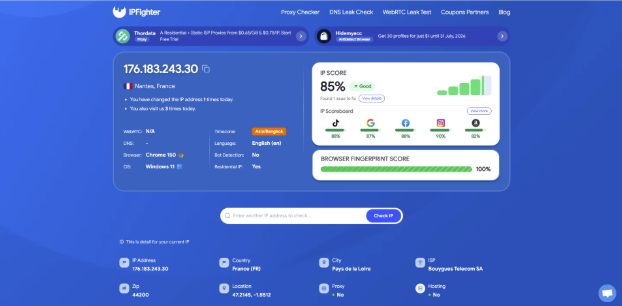
Check IP on IPFighter
6. How to improve your IP fraud score
Although you can't directly change an IP fraud score, you can reduce the risk factors that contribute to it. The following best practices can help improve your IP's overall trustworthiness and reduce the chances of being flagged by websites.
-
Use reputable residential proxies: Datacenter IPs or heavily reused IPs accumulate abuse history over time, which directly raises the fraud score. A clean, rotating residential IP pool avoids that baggage.
-
Avoid blacklisted IPs: Check an IP's reputation before buying or using a proxy - an IP that's already listed starts with a higher score regardless of how carefully you use it afterward. You can also run a top IP blacklist check to spot reputation issues early.
-
Prevent WebRTC/DNS leaks: This is a supplementary browser-side signal, not something that directly changes the IP's own score - but leaks can expose inconsistencies that some systems factor into their overall risk read of a session.
-
Keep your browser fingerprint consistent (timezone and language matching your IP's location): Same caveat as above, this doesn't alter the IP's score directly, but a mismatched fingerprint is an extra signal some anti-fraud systems combine with the IP score to flag a session as risky.
-
Avoid excessive automation: Spacing out requests and avoiding repetitive, machine-like patterns matters because bot-like behavior gets flagged and raises the risk profile associated with that IP over time.
-
Test your IP regularly: Reputation changes over time, so periodic checks catch a rising score early before it turns into CAPTCHA walls or blocks.
In many cases, the most effective solution isn't improving a high-risk IP but replacing it with a cleaner one. If you're using a datacenter IP with a poor reputation, switching to another IP or provider is usually faster than waiting for its reputation to recover. The main exception is a static IP you own, which may be removed from blacklists by submitting delisting requests to the affected services.

How to improve your IP fraud score
Read more:
-
What is an IP Address? Everything you need to know
-
What is IP reputation? How IP purity shapes trust
- How to improve IP score: A complete guide
7. Conclusion
A fraud score is just one signal among many that platforms use to evaluate a connection, but it has a very real, direct effect on how smoothly you can work online. Understanding how it's calculated and how to read it puts you in a better position to choose quality proxies and react correctly when CAPTCHA or blocks show up out of nowhere.
Before using an IP to create accounts, automate tasks, or scrape the web, make it a habit to check IP fraud score on IPFighter to confirm your connection is clean and ready for work.
8. FAQ
What is a good IP fraud score?
There's no single universal number, but scores under roughly 75 are generally treated as low-risk by most systems; the exact threshold still depends on the platform and the action involved.
Does a VPN increase my fraud score?
It can. VPN and proxy usage is one of the signals fraud-detection systems look for, and a detected VPN connection often nudges the score higher, especially if that VPN's IP range has been used for abuse before.
Are residential proxies better for fraud scores?
Generally yes. Residential IPs are tied to real ISPs and real households, so they tend to score lower (cleaner) than datacenter or heavily shared hosting IPs, which accumulate abuse history faster.
What fraud score gets you blocked?
There's no universal threshold, but as a general guide, scores of 85 and above are often treated as suspicious, and 90 and above is commonly blocked outright. The real-world cutoff depends on the action being protected - payment systems typically enforce stricter limits than simple browsing.
How is an IP fraud score different from an IP reputation score?
An IP reputation score reflects an IP's historical trustworthiness, while an IP fraud score estimates its current risk of being associated with suspicious activity. Although related, the two metrics aren't calculated in the same way.
Is the fraud score the same across every website or tool?
No. Each provider uses its own algorithms and scoring model, so the same IP may receive different fraud scores depending on the platform.
Do mobile or 4G IPs usually have better fraud scores?
In many cases, yes. Mobile IPs are often considered more trustworthy because they're shared by many legitimate users, although their scores can still be affected by previous abuse within the same IP range.
Read more

What is a CAPTCHA? The check that separates people from bots


What is a mesh network and when should you use one?

What is an IP2 network? How it works, uses, and benefits
Explaining how to know if you have a DNS leak


How to know if you have a WebRTC leak: Reading your results
How to improve IP score: A complete guide