

Oops! Your DNS leaks! How to deal with that?
If you’ve just got the DNS leakage notification from our check and have no idea what DNS means, what a DNS leak is, and how to fix it, it’s time to broaden your mind and keep yourself safe online.
What does DNS mean?
Domain Name System (DNS) translates the domain names (e.g. ipfighter.com) that humans can read into IP addresses (e.g. 117.62.35.130) that machines can read and the other way around.
What is a DNS leak?
A DNS leak means that your default ISP can track every step you go no matter whether you’re using a VPN or not.
When you connect to VPN, all of your online traffic including DNS queries go through an encrypted tunnel to your VPN provider’s DNS servers. But in some cases, your queries go to your default DNS server due to a few reasons such as having set up a VPN manually, using VPN services doesn’t own their DNS, or not offering adequate protection from leaks.
How to fix a DNS leak
There are two possible ways that may help you fix a DNS leak.
1. Change your DNS server and get a static IP
Why shouldn’t you use your ISP provider’s DNS server?
As we mentioned above, your default ISP can spy on your activities and behaviors and collect your data on the Internet. In some cases, DNS provided by your ISP can be slow because of huge usage and doesn’t have strong encryption.
So what are the solutions here?
There are some best free, public, and security-centric DNS servers such as Google Public DNS, OpenDNS, and Cloudflare that may help you get safer and higher security.
These addresses below may be useful for you if using public DNS servers.
Google Public DNS
- Preferred DNS server: 8.8.8.8
- Alternate DNS server: 8.8.4.4
OpenDNS
- Preferred DNS server: 208.67.222.222
- Alternate DNS server: 208.67.222.220
Cloudflare
- Preferred DNS server: 1.1.1.1
- Alternate DNS server: 1.0.0.1
Below is an example of how you can change your default DNS server into a new DNS server on a Windows 10 computer. In case you use another operating system, search for how to change DNS on your OS.
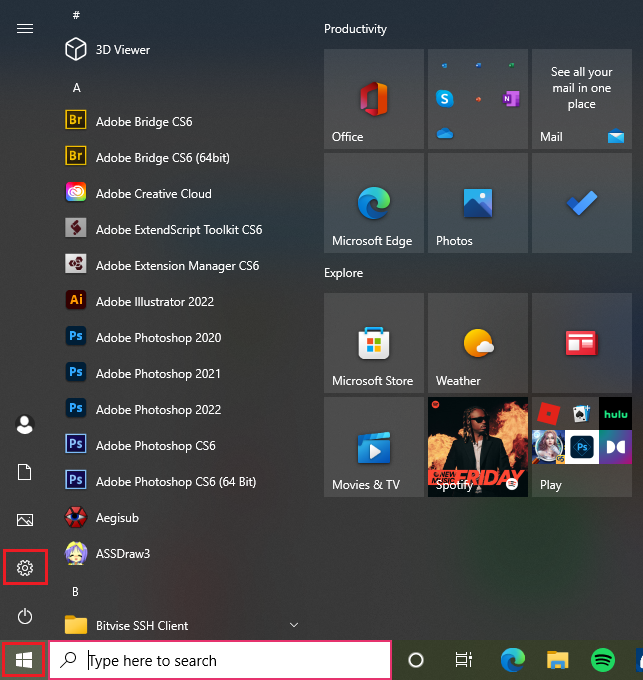
1. Open Windows Start Menu
2. Click Settings
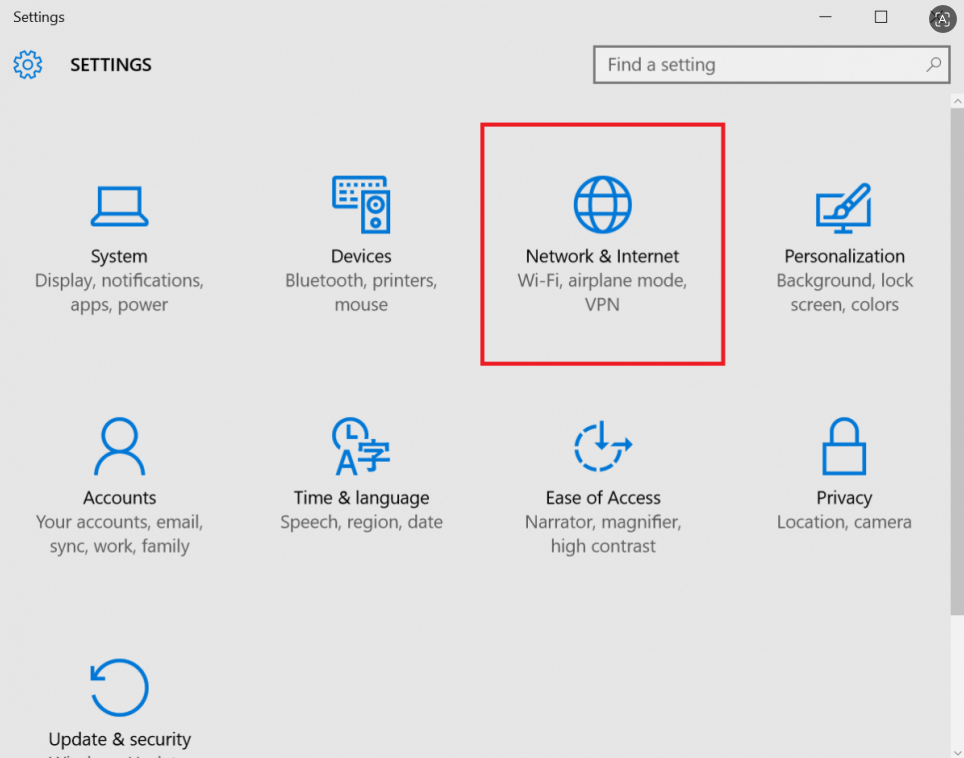
3. Select Network & Internet
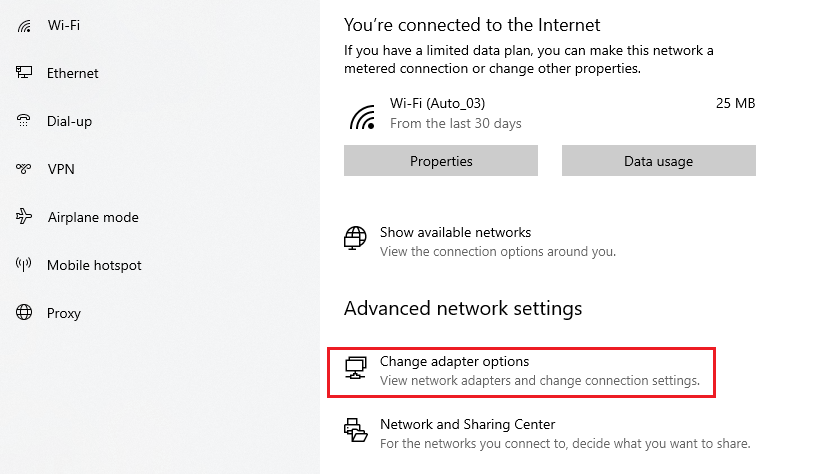
4. Click Change adapter options
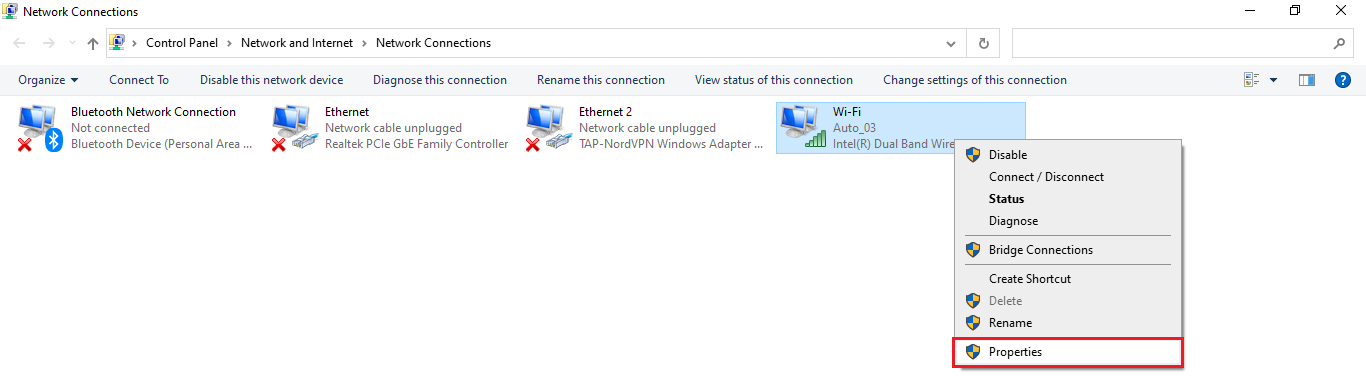
5. Click on the connection you want to change the DNS server for
The network connection that you’re using is displayed by green bars while others that you’re not connected to are displayed by red X. Choose the connection you want to change the DNS for. If you’re connected via Wi-Fi, select Wi-Fi. If you’re connected via Ethernet, select it.
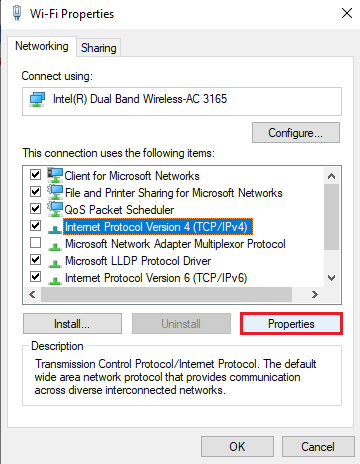
6. Select Properties
7. Select Internet Protocol Version 4 (TCP/IPv4)
8. Click Properties
9. Select Use the following DNS server addresses
10. Enter a new DNS server (e.g. Google Public DNS).
Add the alternate DNS server if you want.
11. Click OK
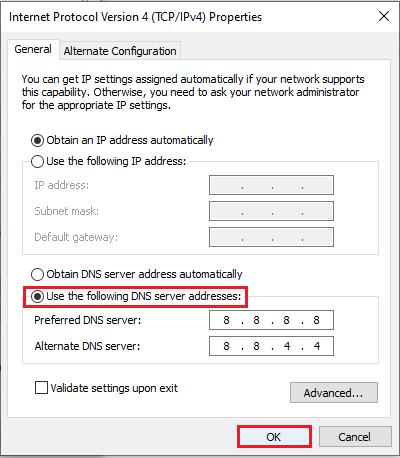
Doing the same process as this if you use Internet Protocol Version 6.
Easy to follow, right?
However, it’s not enough to stay safe. Getting a static IP which is a single fixed one. So your request including the DNS request will route to this IP address. So, the website just knows the address of this IP and doesn’t know about the real sender who is you. Then, you will be safe.
2. Use VPN
VPN (Virtual Private Network) can hide your IP address and encrypt all your Internet traffic. When you connect to VPN, all your queries will go over an encrypted tunnel, thereby, the ISP, hackers even governments can not track you.
There are some popular VPN services such as NordVPN, ExpressVPN, ProtonVPN,… that you can take a look at. NordVPN is best recommended for you from our experience using it. This is the guide on how to set up a NordVPN manually.
Just remember to configure the VPN service you choose accurately to avoid leaking DNS. Make sure that you use only the DNS server that the VPN service provides to you when connecting to your VPN. Use the latest version.
Better than that, you can find a VPN client with built-in DNS leak protection. Best solution!
Read more

What is a CAPTCHA? The check that separates people from bots


What is a mesh network and when should you use one?

What is an IP2 network? How it works, uses, and benefits
Explaining how to know if you have a DNS leak

How to know if you have a WebRTC leak: Reading your results

How to improve IP score: A complete guide