

With residential, mobile, and datacenter proxies under one network, does ProxyCove offer the flexibility users actually need, or does its performance vary behind the advertised coverage? With 195+ countries, flexible IP rotation, and traffic that does not expire, the provider offers several features that may appeal to users with different proxy requirements.
In this ProxyCove review, IPFighter takes a closer look at its proxy types, pricing, key features, setup options, and network performance. We also test selected IPs to examine their quality, connection speed, and location consistency in real-world use.
1. General information
Before diving into the details, here's a quick overview of ProxyCove and its core specifications.
|
Website |
|
|
Founded |
2020 |
|
Proxy types |
Residential / Mobile / Datacenter proxies |
|
IP pool |
20M+ IP addresses in 195+ countries |
|
Protocol |
HTTP / HTTPS / SOCKS5 |
|
Pricing model |
Pay per GB |
|
Payment |
Cryptocurrencies / CryptoBot / Promo codes |
|
Trial |
Offer a trial period with a minimum amount of $1.5 |
|
Refund |
Non-refundable for unused traffic; refunds are granted solely for verified ProxyCove-side technical issues upon support review. |
|
Best for |
Parsing and data collection, SEO and position monitoring, multi-accounting, etc. |
Discover more:
-
Best proxy providers in 2026: Compare top 6 services
-
What is a mobile proxy? Why users choose mobile IPs
2. Proxy types available at ProxyCove
ProxyCove currently offers three main proxy categories: residential, mobile, and datacenter. Each is positioned for different workloads, from scraping and SEO monitoring to social media management and high-speed automation.
2.1. Residential proxies
ProxyCove's residential proxies use IP addresses associated with home internet providers and are positioned for tasks where IP reputation and geographic diversity are important. The provider advertises more than 20 million residential IP addresses across up to 195 countries.
-
Advertised proxy pool: 20M+ residential IPs
-
Coverage: 195+ countries
-
Filtering: Country, ASN, city, zip targeting
-
Rotation: Per request or every 1-120 minutes
-
Protocols: HTTP, HTTPS, SOCKS5
The provider positions residential proxies for web scraping, SEO monitoring, social media, market research, and other tasks that may require residential IP addresses.
2.2. Mobile proxies
ProxyCove's mobile proxies use IP addresses from real 4G/5G mobile operators. They are marketed primarily for social media, multi-accounting, parsing, and workflows where mobile IPs may be more suitable than datacenter addresses.
-
Network: 4G/5G mobile IPs
-
Coverage: 195+ countries
-
Filtering: Country, ASN, city, zip targeting
-
Rotation: Per request or every 1-120 minutes
-
Protocols: HTTP, HTTPS, SOCKS5
Users can configure IP rotation from one minute upward or switch the IP after each request. ProxyCove also provides standard connection strings for HTTP/HTTPS and SOCKS5.
The combination of mobile IPs, flexible rotation, and broad geographic coverage makes this option more relevant to social media management, account-based workflows, and location-sensitive testing.
2.3. Unlimited residential proxies
Datacenter proxies are ProxyCove's lowest-priced option and are positioned around speed and automation. The provider offers both IPv4 and IPv6 addresses, along with static and dynamic operating modes.
-
Advertised proxy pool: 5M+ IP addresses
-
Coverage: 195+ countries
-
Filtering: Country, ASN, city, zip targeting
-
Rotation: Static, 1-120 minutes, or per request
-
Protocols: HTTP, HTTPS, SOCKS5
Static datacenter proxies are intended for workflows that need a consistent IP, while dynamic rotation is positioned for scraping, automation, and larger-scale request distribution.
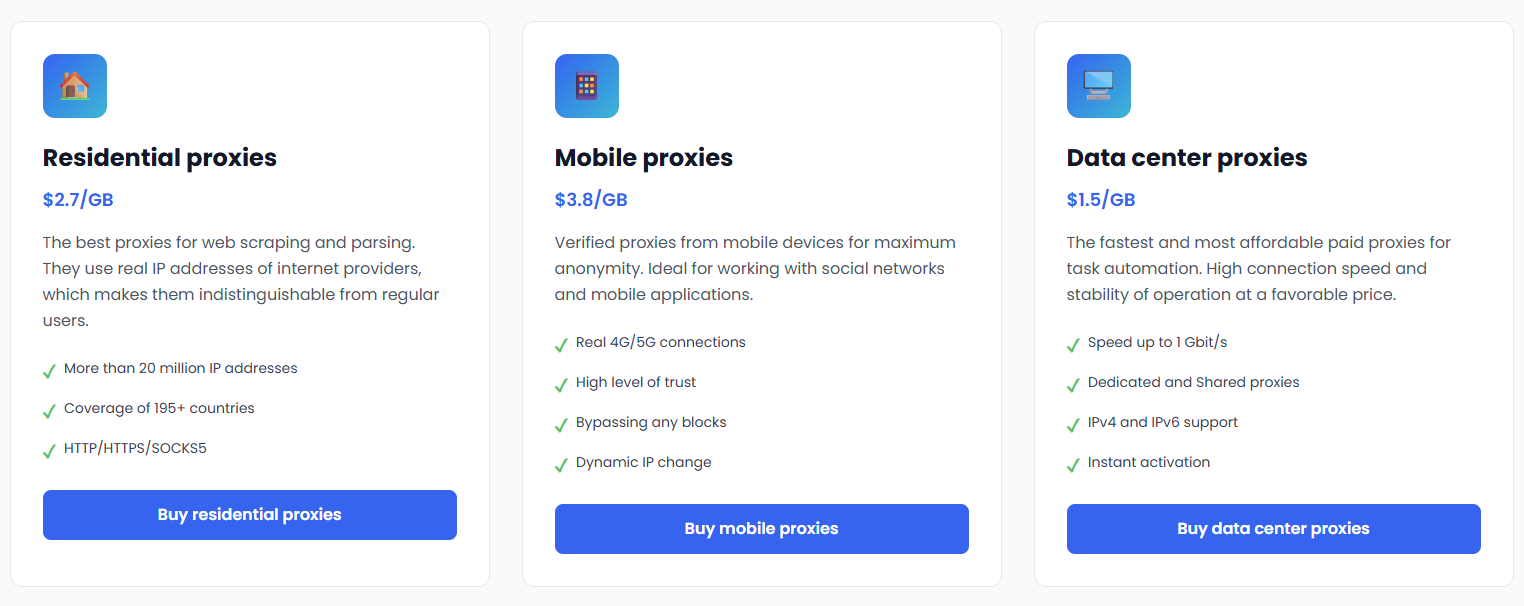
Proxy types available at ProxyCove
3. Key features of ProxyCove proxies
ProxyCove combines traffic-based billing with flexible rotation, geo-targeting, and multiple integration options. Some of the main features include:
-
Geo-targeting: Country and, where supported, city-level targeting are available.
-
Non-expiring traffic: Purchased traffic remains available without a monthly expiration.
-
Flexible IP rotation: Users can rotate an IP after every request or configure intervals from 1 to 120 minutes.
-
API integration: ProxyCove provides a REST API for account creation, pricing, locations, balance management, and proxy purchases.
-
Telegram management: Proxy management and account-related functions are also available through Telegram.
-
Real-time usage information: The provider says users can monitor traffic consumption through its platform.
The API uses standard HTTP requests rather than requiring a dedicated SDK, which may make it easier to integrate proxy purchasing and management into custom workflows.
4. ProxyCove pricing overview
ProxyCove uses a relatively simple traffic-based pricing model. There are no standard monthly proxy plans on the current pricing page, and the minimum purchase is 1GB.
|
Proxy type |
Price |
Minimum purchase |
|
Residential proxies |
$1.50/GB |
1GB |
|
Mobile proxies |
$2.70/GB |
1GB |
|
Datacenter proxies |
$3.80/GB |
1GB |
Traffic does not expire, so users do not need to consume their purchased balance within a monthly billing period. ProxyCove also states that there are no automatic renewals or recurring subscription charges under its traffic-based model.
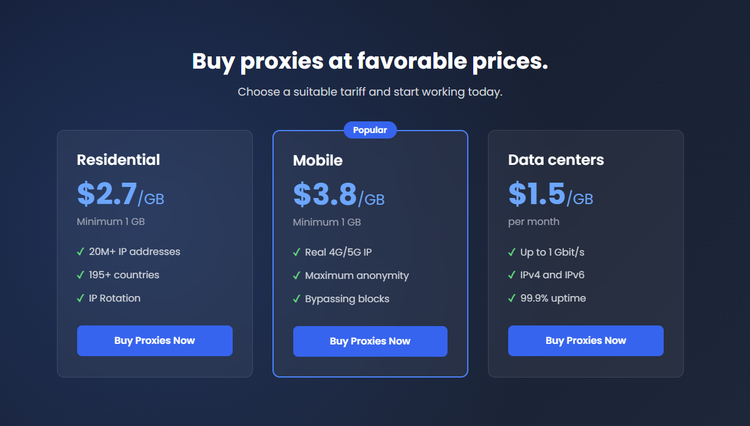
Prices for proxies plan at ProxyCove
If you're planning to purchase proxies from ProxyCove, don't miss the ProxyCove promo code available on IPFighter. You can save on your proxy purchase with exclusive discounts while choosing the plan that best suits your needs.
5. Performance test
To evaluate the overall quality of ProxyCove’s network, IPFighter tested the proxy quality on IPFighter, checked the connection speed on Speedtest, and verified the IP location accuracy through Google Search.
5.1. Preparation
Before evaluating the proxy, we first added it to our browser using the IPFighter Proxy Manager extension. This extension makes it easy to import, manage, and switch between multiple proxies directly within your browser, eliminating the need for manual proxy configuration.
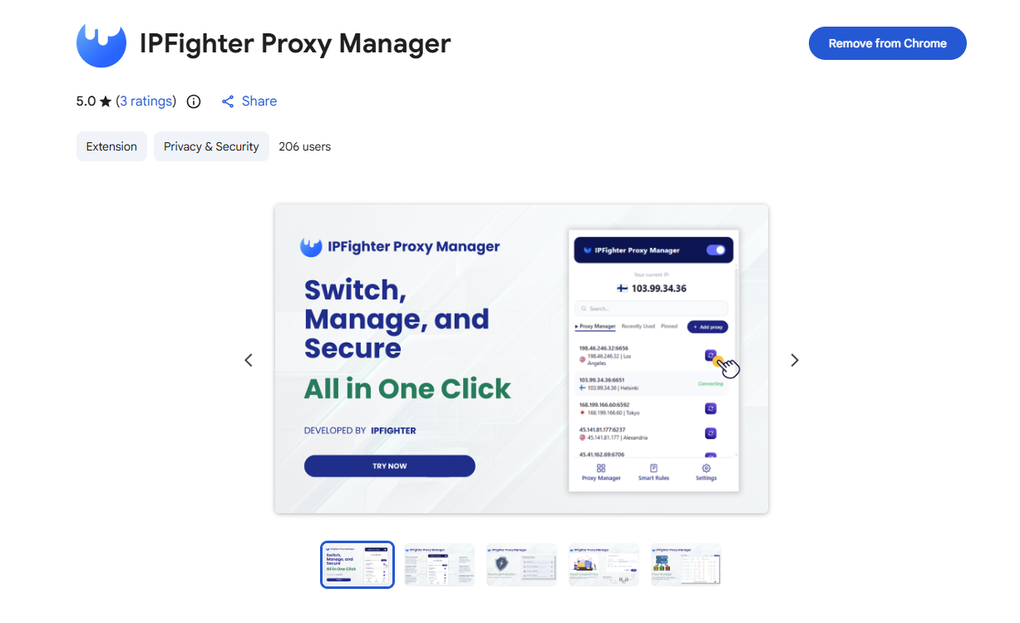
IPFighter Proxy Manager extension on Chrome
If you'd like to learn how to set it up, check out our detailed guide: A complete guide to the IPFighter Proxy Manager extension.
5.2. Test results
To evaluate ProxyCove’s network from various angles, we tested residential and data center IP addresses across several countries. Each IP address was assessed based on three criteria: IP quality (via IPFighter), connection speed (via Speedtest), and location consistency (via Google Search).
Residential proxies
IP quality
First, regarding the test results from IPFighter, the residential proxy from ProxyCove achieved high trust scores across all major platforms displayed on the homepage. It reached an impressive average score of 90% (Good), with Platform X scoring highest at 95%, closely followed by Instagram, YouTube, and TikTok at 94%, Facebook at 93%, and Google at 90%.
All platforms rated the IP status as "High," indicating excellent reputation and minimal risk of detection across key social media channels and search engines. (Note that these are just some of the main platforms evaluated on IPFighter; you can visit the site directly for a more detailed check).
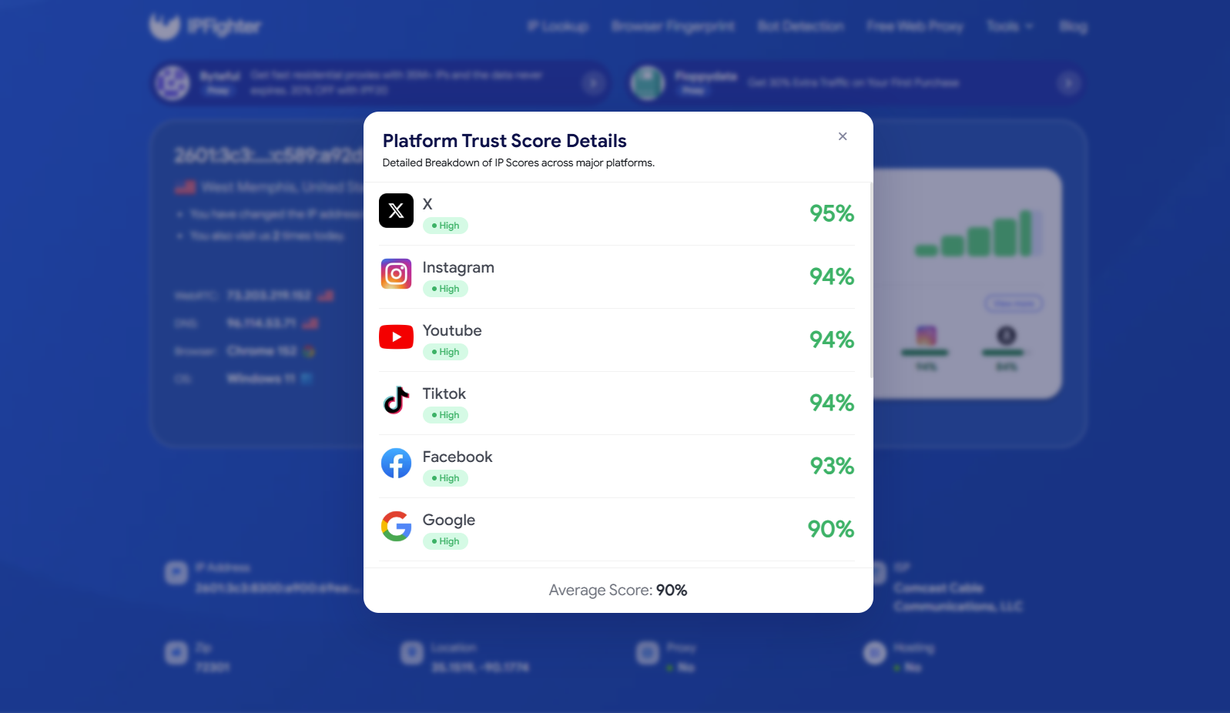
IP scores on major platforms
Switching to the detailed IP Lookup page, the address is confirmed as an IPv6 residential IP located in West Memphis, Arkansas, US. It operates under Comcast Cable Communications (AS7922) with the connection type classified as Residential ISP. Remarkably, the IP reputation score reached a perfect 100% (Good reputation) - an ideal score for building maximum trust with anti-fraud systems.
Additionally, the Proxy / VPN / Datacenter check returned "Not detected" and the Threat blacklist status remains "Clean," confirming that the address appears fully genuine with no connection-type red flags or blacklist concerns.
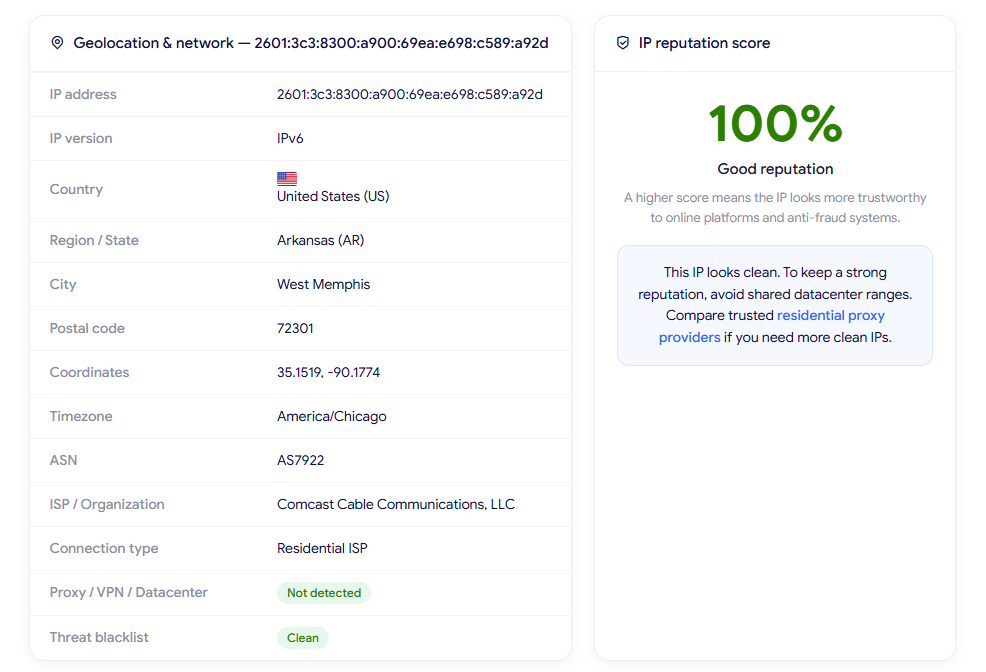
IP Lookup results on IPFighter
Speed and latency
Checking speed on Fast.com shows a functional performance profile, delivering a download speed of 6.3 Mbps and a strong upload speed of 37 Mbps. While the download bandwidth is relatively modest, the generous upload speed makes it particularly suitable for tasks involving data submission, content publishing, and multi-account asset management.
Regarding latency, the unloaded ping is around 386 ms, jumping to 865 ms under load, which is expected for long-distance residential connection routing (from the US to local testing devices).
Fairly evaluating its overall performance: for a standard residential proxy, these metrics offer a practical balance. It easily covers daily web browsing, account nurturing, social media posting, and automated workflows where IP clean status and high trust matter far more than raw downloading throughput. As always, real-world speeds will vary depending on target server locations, carrier routing, and network traffic at the time of testing.
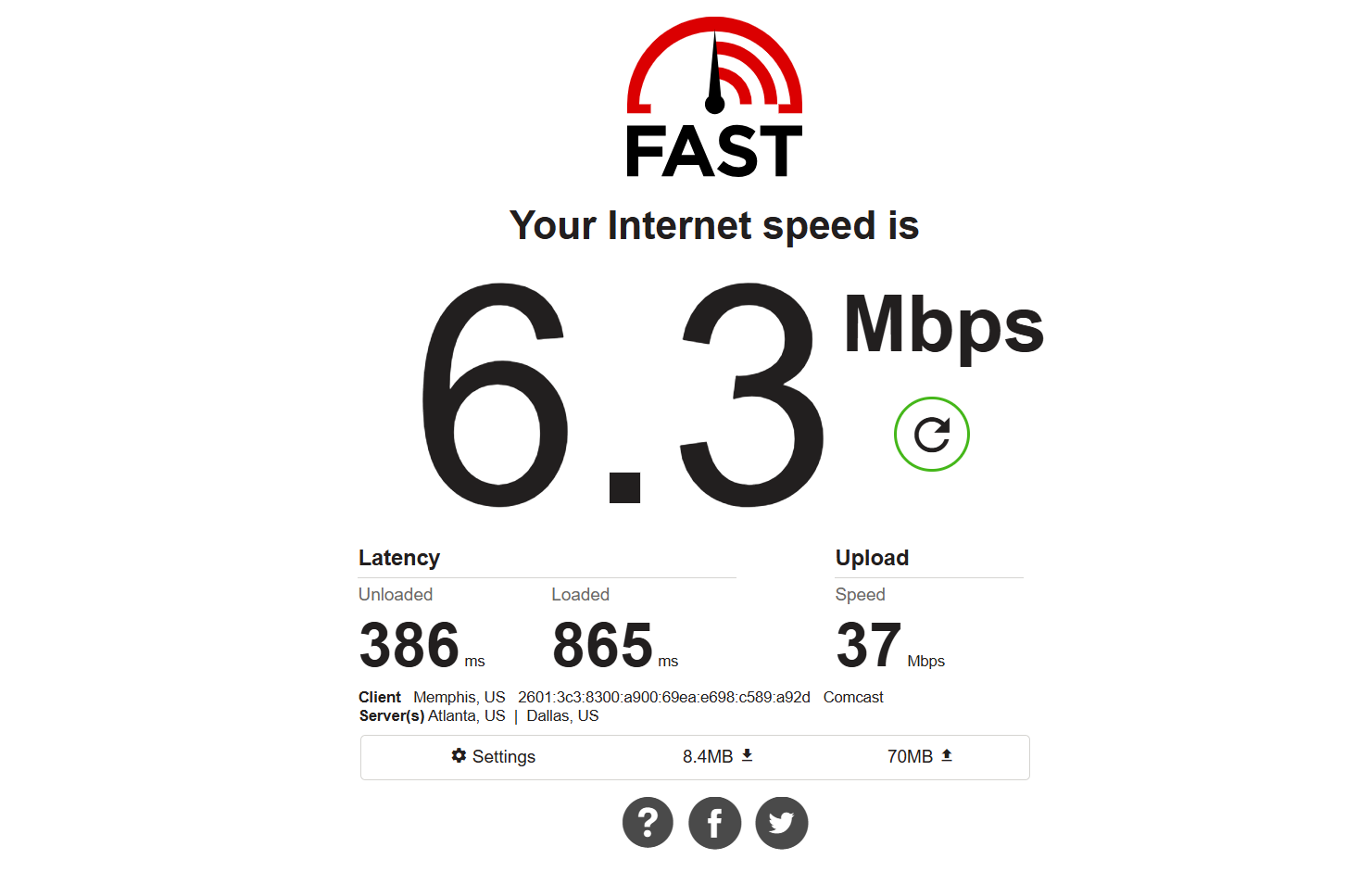
Check proxy on Fast
Location check
Finally, a quick location check via Google search identified the IP in Memphis TN, Tennessee, United States. Since our initial setup was targeted at the national level (US only), this result perfectly matches our configuration. The slight variation between Memphis, Tennessee (on Google) and West Memphis, Arkansas (on IPFighter) is completely normal for residential IPs due to regional ISP routing across state lines. This strong geolocation consistency at the national level ensures search engines recognize the IP naturally, maintaining account stability and realistic search behavior.
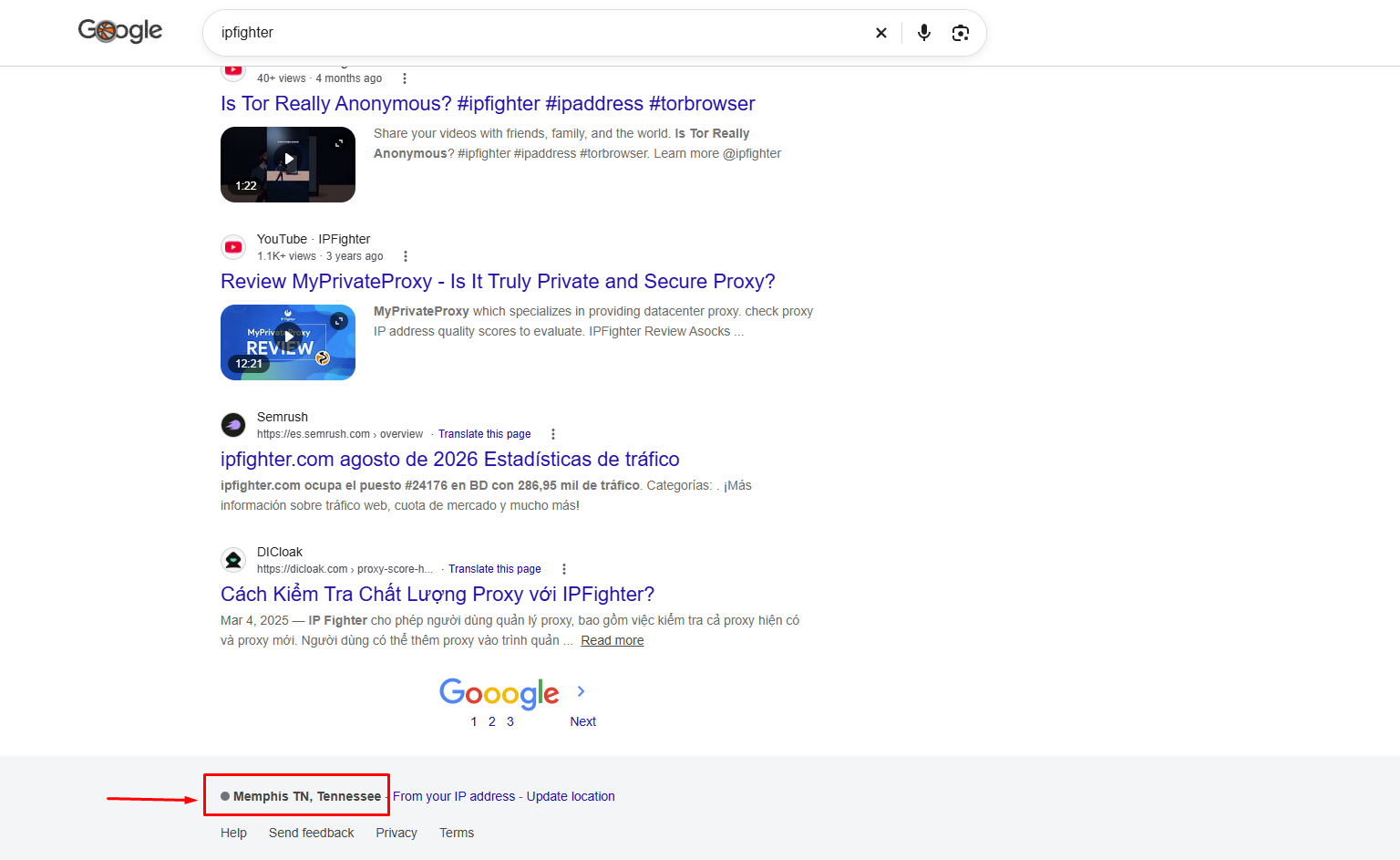
Check on the Google search bar
Datacenter proxies
IP quality
The two randomly selected datacenter IPs showed different IP quality results. The Japan IP received a 70/100 IPFighter score and an 80/100 IP reputation score, with timezone mismatch and a DNS leak detected in Qatar. The timezone mismatch may be related to the system or browser configuration rather than the proxy itself, as the proxy changes the IP address but does not necessarily control the device's configured timezone.
The DNS result is also worth putting into context: DNS servers used by networks and providers can sometimes be located in nearby regions rather than exactly within the selected country, so a DNS server detected in Qatar does not necessarily indicate a major location issue for a Japan-targeted IP. A DNS result pointing to a geographically distant region, such as another continent, would be more concerning.
The Germany IP performed better, scoring 85/100 for IP quality and 95/100 for IP reputation. A DNS leak was detected in Balan, which is geographically close to Germany, so the result may reflect the way DNS infrastructure is distributed around neighboring regions rather than a significant proxy location issue.
Speed and latency
Connection performance varied significantly between the two tested IPs. The Japan IP delivered 259.28 Mbps download and 37.16 Mbps upload with 146 ms ping, providing substantially stronger overall performance. The Germany IP recorded 6.5 Mbps download, 21 Mbps upload, and 556.5 ms ping, indicating considerably slower download speeds and much higher latency. This suggests that connection performance can differ noticeably between individual datacenter IPs and locations.
Location check
The Google Search check showed consistent country-level location results for both IPs. The Japan IP was detected in Japan, while the Germany IP was detected in Germany, matching the respective target countries.
Overall, the tested IPs showed accurate country-level location detection, while IP quality and connection performance varied between locations. The Japan IP provided significantly better speed and lower latency, whereas the Germany IP recorded higher IP and reputation scores but substantially slower connection performance.
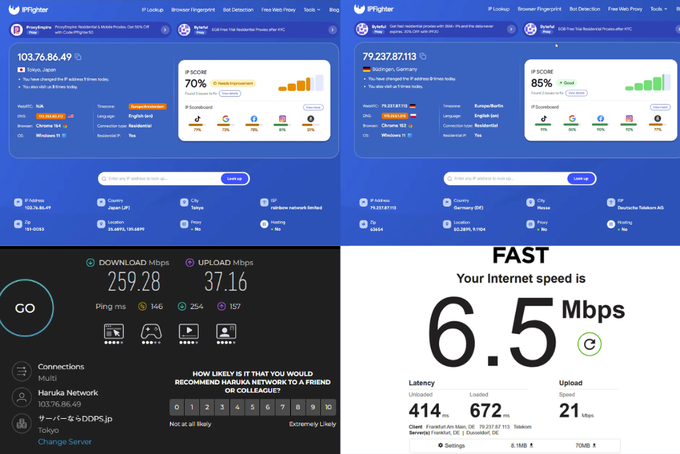
Test results for 2 datacenter IPs
These results are based on randomly selected IPs during the testing process, so actual performance may vary depending on the specific IP, geographic location, network conditions, and time of use. Therefore, individual IPs may deliver different speeds, latency, and geolocation results in real-world use.
Read more:
-
IP reputation check: How IPFighter scores your IP
-
How to use web proxy safely: A practical guide
-
How to check if a proxy is working and read your results
6. How to get proxy from ProxyCove
ProxyCove provides connection details directly through the personal account after purchasing traffic. Users can select the proxy type, location, traffic amount, and rotation settings before obtaining the connection credentials.
Step 1. Create or log in to your account
Go to the ProxyCove dashboard and create an account or log in. After activation, you can access the available proxy plans and trial options.
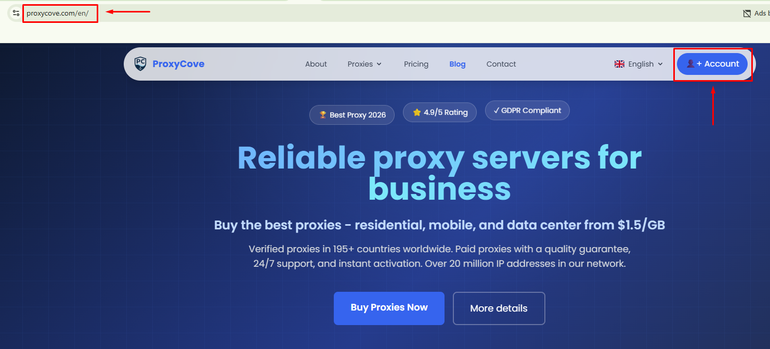
Create or log in to your account
Step 2. Purchase a proxy plan
After successfully logging into the ProxyCove dashboard, you can select and purchase a proxy package that suits your needs in the "Buy Proxies" section. Here, you need to select the country, asn, city, zip and desired amount of traffic and rotation.
Before completing your purchase, don't forget to check IPFighter for a ProxyCove coupon code to get a $1.30 bonus credit. Applying an existing discount code can significantly reduce your costs.
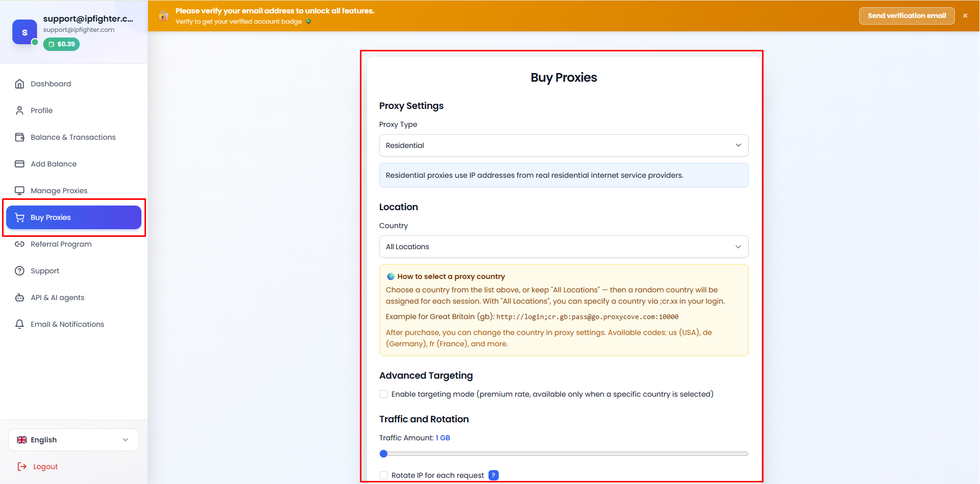
Purchase a proxy plan
Step 3. Get your proxy credentials
Once the order is activated, the proxy credentials become available through the dashboard under "Manage Proxies". Depending on the setup, users can connect via HTTP(S), SOCKS5, or Saperate components.
The proxy can then be added to a browser, proxy manager, automation tool, or antidetect browser.
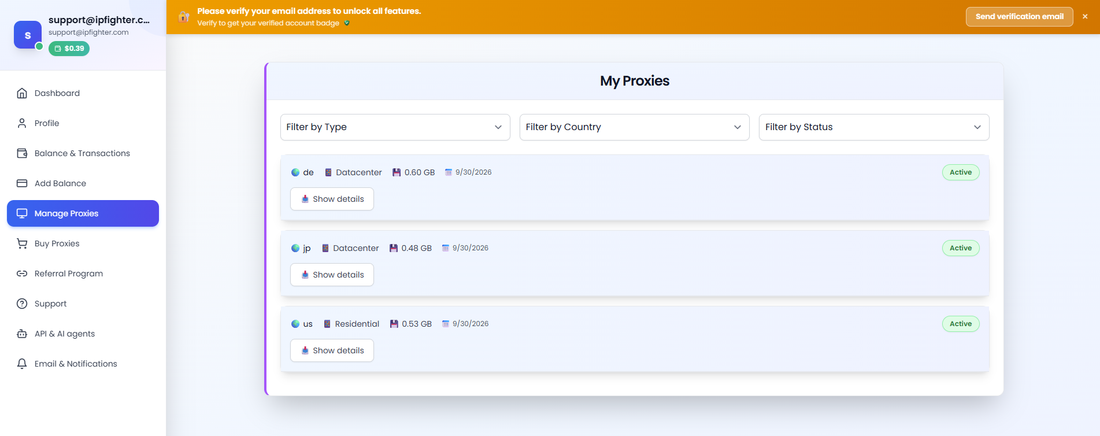
Get your proxy credentials
7. Alternatives
Besides ProxyCove, you can also consider other providers offering similar residential proxy services.
-
ProxyEmpire: Offers residential, mobile, and datacenter proxies, making it a flexible alternative for users who need multiple IP types and targeting options.
-
NodeMaven: Provides residential, mobile, and ISP proxies, suitable for workflows that require different proxy types within one service.
-
NiuProxy: Offers residential and mobile proxies, giving users flexibility across location-based and data-focused tasks.
You can also check out reviews of our other partners here:
-
Rapidproxy review: A closer look at its residential proxy network
-
711Proxy review: Is it the right proxy provider for your needs?
-
Byteful review: An AI-driven proxy network powered by Smartpath technology
-
Sx.org review: A closer look at its global proxy network
8. Conclusion
Overall, ProxyCove offers high-trust, clean IP profiles with reliable country-level targeting across its proxy network. While datacenter performance and residential speeds vary based on location and network load, non-expiring bandwidth and flexible routing make it a solid choice for most use cases.
Before using a proxy, you can check its IP quality, reputation, proxy detection status, and potential leaks with IPFighter's proxy and IP checking tools. For users looking to compare providers or reduce proxy costs, visit Coupons Partners to find promo codes and offers from IPFighter's partner proxy providers.
If you're planning to try ProxyCove, check out the ProxyCove promo code on the IPFighter page to get a $1.30 bonus credit for your purchase.
9. FAQ
How much do ProxyCove proxies cost?
ProxyCove currently lists datacenter proxies at $1.50/GB, residential proxies at $2.70/GB, and mobile proxies at $3.80/GB. The minimum purchase is 1GB, and the provider says purchased traffic does not expire.
Does ProxyCove support SOCKS5?
Yes. ProxyCove supports HTTP, HTTPS, and SOCKS5 connections across its proxy products.
How often can ProxyCove change the IP?
Users can enable rotation after every request or configure an interval from 1 to 120 minutes, depending on the proxy setup.
Does ProxyCove offer city-level targeting?
Yes, ProxyCove states that city-level targeting is available for supported locations. Availability can vary by proxy type and location, so the available cities should be checked in the account before purchase.
Does ProxyCove offer a free trial?
No, ProxyCove does not offer a completely free trial. However, users can start testing their services with a paid trial period available for a minimum amount of $1.5.
Read more

Ecommerce proxy: How online sellers use it and what to consider

ProxyCove review: How its traffic-based proxy service works

Best Chinese proxy providers: Compare China proxies

Social media proxy: What it is and how to choose one

Proxy for trading: Can it improve your connection and privacy?
Anonymous Proxies review: What its proxy network offers