

The IPFighter IP checker bot is a free Telegram bot that brings IPFighter's IP and trust-score checks straight into your chat window, so managing and verifying your proxies is now faster than ever, directly inside your favorite messaging app. If you've been searching for a Telegram IP address finder, the IPFighter IP checker bot covers that exact use case - plus trust scoring that a plain IP finder won't give you. You can check IP information and view trust scores without ever opening a browser tab.
1. What is the IPFighter IP checker bot?
The IPFighter IP checker bot is a free automated assistant built directly inside Telegram to help you check proxy and IP address details instantly. Instead of using heavy software, you can simply chat 1-on-1 with @ipfighter_ip_checker_bot for personal use, or install it into your team group chats. This tool serves as a fast, convenient way to verify your connection status without ever leaving your messaging application.
By sending your IP or proxy data to the bot, you can immediately perform the following actions:
- Check connection info: Find out the exact country, city, internet service provider (ISP), and network type of any IP address.
- View separate trust scores: See how safe your IP is on specific major platforms like Google Ads, Facebook, TikTok, or Amazon.
- Detect hidden risks: Scan the network instantly to see if the IP is flag-marked as a VPN, a public proxy, or listed on a blacklist.
- Test multiple proxies at once: Paste a whole list of network lines into the chat to check them simultaneously instead of typing them one by one.
These trust scores are calculated using the same underlying scoring logic behind IPFighter's IP reputation check - the bot simply brings that same analysis into Telegram, so you get consistent results whether you check from the website or from chat.
Using this bot eliminates the daily frustration of constantly switching back and forth between your active workspace and browser lookup websites. If a provider sends you a list of proxies on Telegram, you no longer need to copy them over to a browser tab to see if they are working. You can test them immediately at the exact place you receive them, saving you time and keeping your daily online operations running smoothly.
Read more: A full guide to IPFighter Proxy Manager extension
2. Why should you use IPFighter IP Checker bot?
This bot gives you clear advantages over traditional web checkers by turning network data into simple, actionable information. You can easily use the following features to protect your online accounts:
- Platform trust scores: Review precise reputation scores for strict networks like Google Ads, Amazon, Facebook, and TikTok before logging in.
- Proxy and VPN flags: Identify immediately if your connection routes through a standard proxy, a VPN, or an unsecure Tor network.
- Blacklist alerts: Scan server records instantly to see if the IP address is present on mail blacklists or suspicious networks.
- Bulk proxy testing: Use the /batch command to test a long list of proxies at once instead of wasting time checking them one by one.
- Mobile convenience: Check proxy details instantly on your phone inside your daily chat app when you are away from your computer.
Together, these features turn the IPFighter IP checker bot into a lightweight but complete risk-screening layer you can rely on before ever exposing an account to a bad IP. Checking your proxies is simple when you know the right commands - let's look at the exact steps to operate the bot.
3. How to use IPFighter IP checker bot?
Setting up your assistant requires no complex API integrations or coding knowledge. Follow these clear steps to turn your Telegram app into a powerful risk analysis center.
3.1. Use the bot in a private 1-on-1 chat
- Step 1: Search for @ipfighter_ip_checker_bot on Telegram or click the official link.
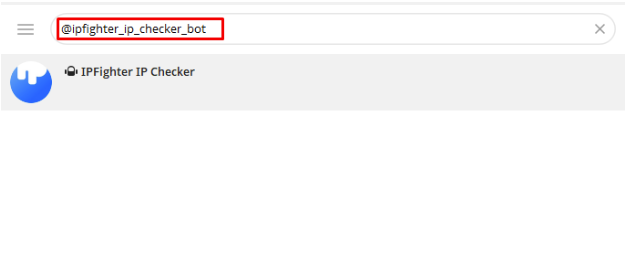
Search IPFighter IP checker bot on Telegram
- Step 2: Click the /start button in the chat window to initialize the system.
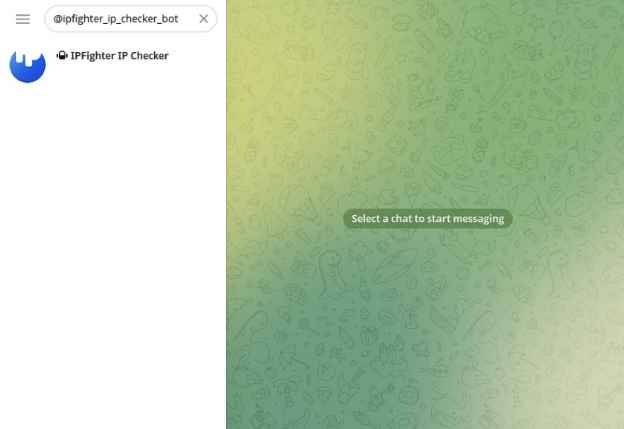
Click “start” to get started
- Step 3: Type the /help command to view the complete directory of active commands.
With that, the bot is fully active and ready to check any IP or proxy you send it.
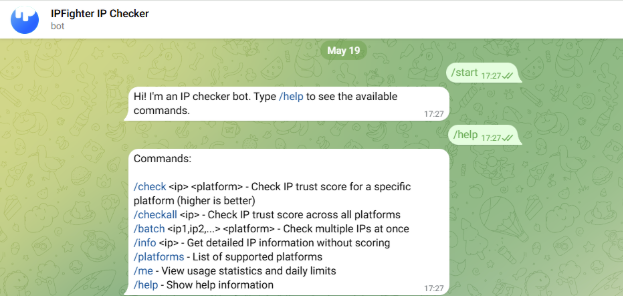
Type “/help” to view the list of available commands
3.2. Add the bot to your team group chat
To share the tool with your team members, simply open the bot profile and click the "Add to Group" button. Once you select your target group, the bot is ready to use. The steps to operate the bot inside your group are exactly the same as in the private 1-on-1 chat. All members can now type commands and view proxy results together in the shared space.
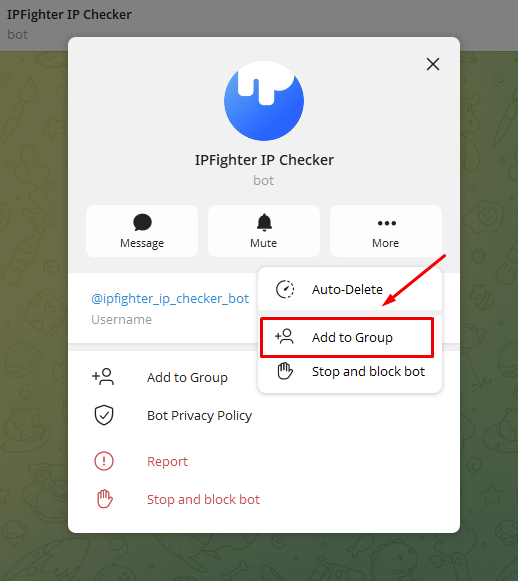
Add bot to your group
3.3. Command syntax directory
To help you interact with the automated system efficiently, we have compiled the exact syntax for each operational task. Review the reference table below before launching your queries:
|
Command |
Syntax example |
Core function |
|
/checkall |
/checkall 104.167.19.210 |
Run global reputation check on all platforms |
|
/check |
/check 104.167.19.210 facebook |
Check IP score on one specific platform |
|
/batch |
/batch ip1,ip2 amazon |
Bulk-check multiple IPs for a platform |
|
/info |
/info 104.167.19.210 |
Get geo-location and ISP data without scores |
|
/platforms |
/platforms |
View all supported platforms |
|
/me |
/me |
View personal usage and daily limits |
With just these six commands, you can cover nearly every routine proxy-screening task without ever leaving Telegram. To achieve the highest level of multi-account safety, integrating this bot with your browser setup is highly recommended.
4. Conclusion
Managing your proxies does not have to be a slow and frustrating task. By bringing platform trust scores, bulk screening, and mobile convenience directly into your messaging app, the IPFighter IP checker bot helps you filter out bad networks before they can harm your work. If you want to keep your daily operations completely safe and efficient, make sure to experience the IPFighter IP checker Telegram bot today.
5. FAQ
Is the IPFighter IP checker bot free to use?
Yes, the bot is completely free to access and use for all Telegram users.
Where can I see my remaining daily check limits?
You can type the /me command inside the chat at any time to view your personal account statistics and current daily usage boundaries.
How many IP addresses can I test at the same time using the bulk feature?
You can test multiple IP addresses simultaneously by using the /batch command and separating each address with a simple comma.
What should I do if the bot returns a low trust score for my proxy?
If the bot flags your connection as high-risk or detects a blacklist issue, you should replace that proxy immediately to protect your accounts.
Can other people see my network data if I add the bot to a team group chat?
Only the active members inside that specific Telegram group chat can view the test results, making it safe for team collaboration.
Read more

How to use web proxy safely: A practical guide


Explaining how to know if you have a DNS leak
How to know if you have a WebRTC leak: Reading your results

How to check browser fingerprint for spoofing signs with IPFighter

How to check if a proxy is working and read your results

How to pass bot detection test and avoid getting flagged