

Your iPhone’s IP address is essential for network connections, and knowing how to find it helps with troubleshooting, security, or setting up a VPN. In this guide, we’ll show you how to find IP address on iPhone in just a few taps – covering both private (local) and public (external) IPs, with simple steps anyone can follow, and even show you how to change your IP address when needed.
What is an IP address?
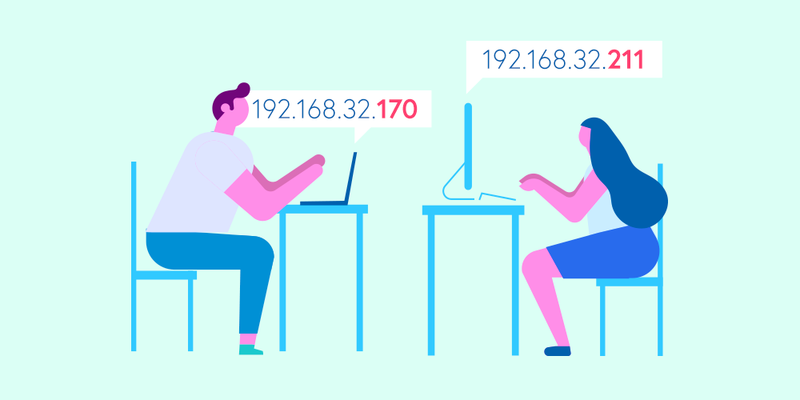
An IP (Internet Protocol) address is a unique string of numbers assigned to your device when it connects to a network. Think of it as a digital home address that helps devices communicate over the internet.
There are two main types of IP addresses:
- Private IP address: Assigned by your router to devices within a local network (e.g., home Wi-Fi).
- Public IP address: Assigned by your internet service provider (ISP) and used for communication outside your network.
Understanding the difference between these two is crucial when trying to find your iPhone’s IP address.
How to find IP address on iPhone
Depending on what you need, you can check either your private IP (assigned by your Wi-Fi network) or your public IP (provided by your ISP). Here’s how.
1. How to find your iPhone’s private IP address
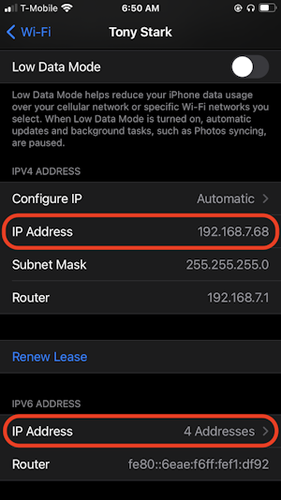
- Open Settings: Tap on the gear icon to enter your iPhone’s settings.
- Select Wi-Fi: This will show the available networks.
- Tap on the Connected Network: A list of details will appear.
- Find the IP address: Under the “IPv4 Address” section, you’ll see your private IP address.
This is the local address assigned by your router. It usually looks something like 192.168.x.x or 10.x.x.x.
2. How to find your iPhone’s public IP address
Unlike your private IP, the public IP is assigned by your ISP and can change over time.
Method 1: Using a web browser
- Open Safari, Chrome, or any browser on your iPhone.
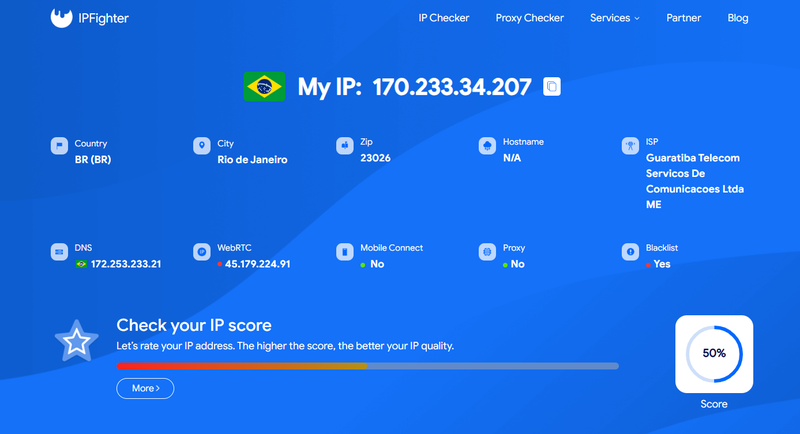
- Go to a site like ipfighter.com.
- Your public IP address will be displayed at the top of the page.
Method 2: Checking your router’s admin page
If you want more details about your connection:
- Log in to your router’s admin page (usually
192.168.1.1or192.168.0.1). - Look for the “WAN” or “Internet” section.
- Your public IP address will be listed there.
Your public IP may change periodically, especially if you have a dynamic IP from your ISP.
How to change your IP address on iPhone
Sometimes, you may want to change your IP address for privacy reasons or to troubleshoot connectivity issues. Here’s how you can do it.
1. Changing your private IP address
Your private IP address is assigned by your router, so to change it:
- Reconnect to Wi-Fi: Forget the network in settings and reconnect.
- Restart your router: This might assign new local IPs to connected devices.
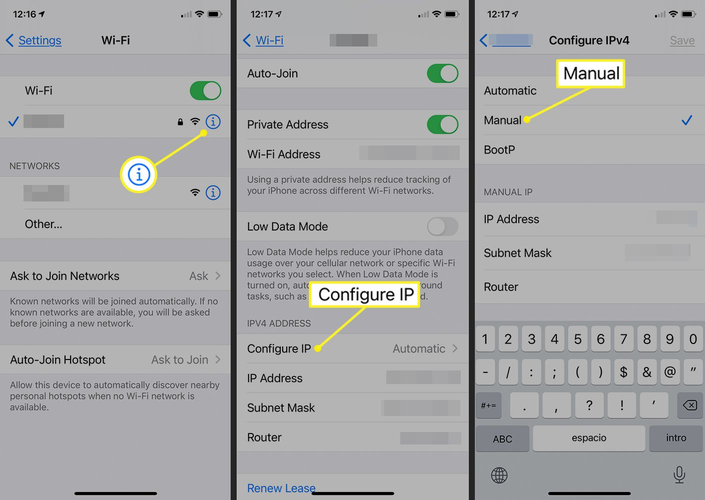
- Use manual IP configuration: Set a static IP in Wi-Fi settings.
2. Changing your public IP address
You can change your public IP address in several ways, depending on your ISP and connection type. Here are some common methods:
- Restart your router: Some ISPs assign a new IP when you do this.
- Use a VPN/Proxy: A VPN masks your real IP and provides a new one from a different location.
- Switch to cellular data: Turning off Wi-Fi and using mobile data gives you a different public IP.
- Contact your ISP: If you need a new public IP, your ISP may be able to assign one.
A VPN or proxy is the best option if you need a quick and reliable way to mask your real IP.
Why your iPhone’s IP address matters
You might wonder why finding your IP address is important. Here are some key reasons:
- Troubleshooting network issues: Identifying conflicts or connectivity problems.
- Configuring network devices: Setting up smart home gadgets that require IP settings.
- Enhancing security: Monitoring access to your network.
- Bypassing restrictions: Some networks block access based on IP addresses.
Knowing your IP address can be useful in a variety of situations, from basic troubleshooting to improving online privacy.
How to protect your IP address
If privacy is a concern, here are some ways to protect your IP address:
- Use a VPN/Proxy: Encrypts your connection and assigns a different IP.
- Avoid public Wi-Fi: Open networks can expose your IP and personal data.
- Check your IP regularly: Keep an eye on changes that might indicate suspicious activity.
- Restart your router periodically: Some ISPs assign a new IP on reboot.
By taking these steps, you can enhance your online privacy and reduce the risk of IP-based tracking or attacks.
Conclusion
Finding and managing your IP address is essential for troubleshooting, security, and online privacy. If you’re wondering how to find your IP address on an iPhone, you can easily check it in the device settings or by visiting an IP-checking website. Should you need to change your IP, options like restarting your router, switching networks, or using a VPN make the process simple.
By understanding how your IP works, you can take better control of your online experience and ensure a safer, more private connection. Happy browsing and stay secure!
Read more
Why do I keep getting CAPTCHA? Here's what may be triggering it

What is a CAPTCHA? The check that separates people from bots
What is a mesh network and when should you use one?
What is an IP2 network? How it works, uses, and benefits
Explaining how to know if you have a DNS leak

How to know if you have a WebRTC leak: Reading your results