

When you want to protect your personal information online, bypass regional restrictions, or hide your IP address, one indispensable application is Shadowrocket. This powerful tool enables users to effortlessly set up proxy and VPN connections. This article will clearly explain how to use Shadowrocket to change your IP address and maximize the application’s potential.
What is Shadowrocket?
Shadowrocket is a robust proxy application that enables users to change their IP address and encrypt their internet connection. This tool stands out for its versatility, allowing users to select from various protocols such as Shadowsocks, V2Ray, and more, while seamlessly integrating with external proxy or VPN providers. With Shadowrocket, you can browse anonymously, safeguard your personal information, and access region-restricted websites or services.

Benefits of changing your IP address with Shadowrocket
Using Shadowrocket to change your IP address provides numerous advantages, especially for enhancing security and bypassing regional restrictions on the internet:
- Protect personal information: By using a proxy or VPN through Shadowrocket, your real IP address is concealed, preventing tracking and ensuring privacy.
- Access region-restricted content: Many websites, services, or applications block access based on location. Shadowrocket allows you to change your IP address to simulate a different location, enabling access to restricted content.
- Enhanced security: Shadowrocket employs encryption protocols that safeguard data transmitted over your network, ensuring it remains secure and private.
- Optimize network access speed: If your connection is slow due to network congestion or service provider limitations, Shadowrocket lets you switch between proxy or VPN servers to find the most efficient one for improved speed.
How to use Shadowrocket to change IP address
For beginners, setting up Shadowrocket might seem a bit complex. However, by following the steps below, you’ll discover that changing your IP address is easier than ever.
1. How to install Shadowrocket
Step 1: Purchase a Proxy or VPN
Before you can change your IP address with Shadowrocket, you’ll need proxy or VPN credentials. Proxies or VPNs enable you to connect via intermediary servers to modify your IP address. Depending on the protocol you plan to use (e.g., V2Ray, Shadowsocks, Trojan, SOCKS5), you can purchase these services from various vendors.
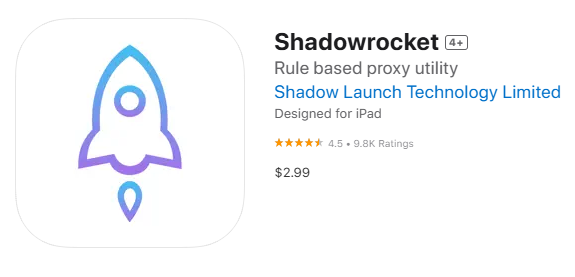
Step 2: Download the Shadowrocket Application
- Visit the App Store: Since Shadowrocket is an iOS application, access the App Store on your iPhone or iPad.
- Search for Shadowrocket: Use the search bar and enter the keyword “Shadowrocket.”
- Download and Install: Tap the download button and wait for the installation process to complete.
2. How to change IP address with Shadowrocket
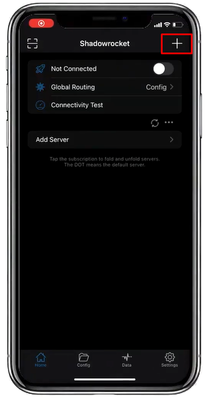
Step 1: Open the Shadowrocket app on your iOS device. To add a new server, tap the “+” symbol in the top-right corner of the screen.
Step 2: Select the Type field to choose your desired proxy protocol (e.g., Shadowsocks, V2Ray, SOCKS5, etc.)
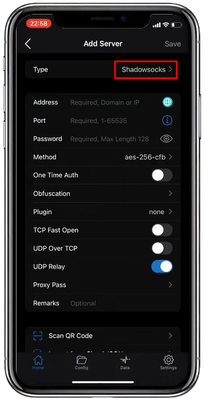
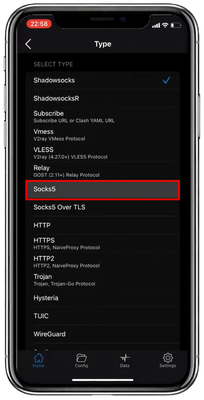
Step 3: Go back to the previous screen and enter the required configuration details, such as the server address (IP), port, and login credentials (if necessary). Once complete, tap Save to store the server information.
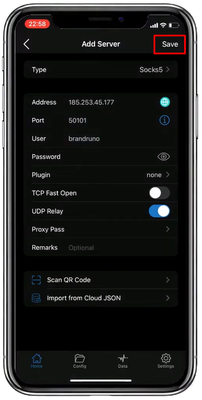
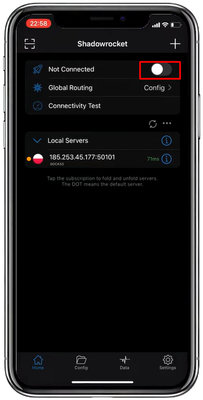
Step 4: After saving, toggle the switch to enable the proxy or VPN connection. Shadowrocket will now start changing your IP address.
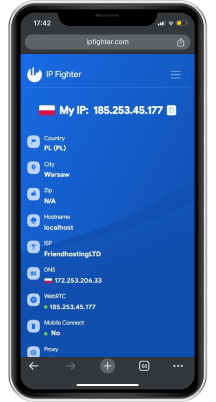
Step 5: Verify your new IP address by using the app’s built-in feature or visiting an IP-checking website, such as ipfighter.com.
How to optimize speed with Shadowrocket
Changing your IP address not only enhances security but can also improve your connection speed if optimized correctly.
- Use custom DNS: To boost browsing speed, customize the DNS settings within Shadowrocket. Popular options like Google DNS or Cloudflare DNS often provide better performance compared to default DNS settings.
- Configure automatic server switching: Shadowrocket allows you to enable automatic server switching. If one server becomes slow or overloaded, the app will seamlessly switch to another pre-configured server, ensuring a stable and uninterrupted connection.
Some common errors and how to fix them
While using Shadowrocket, you may encounter some common issues. Here’s how to address them:
- Unable to connect:
Check the configuration details of your proxy or VPN to ensure they are entered correctly. Additionally, try switching to a different DNS or restarting your network connection. - Connected but cannot change IP:
If the connection is successful but your IP address remains unchanged, verify that you have selected the correct server in the application. If the issue persists, check the status of the proxy or VPN service you are using.
Shadowrocket FAQ
- Is Shadowrocket supported on Android?
Currently, Shadowrocket is only available for iOS devices (iPhone and iPad). For Android users, alternative apps like v2rayNG or NapsternetV can be used instead. - Is Shadowrocket safe?
Shadowrocket is highly secure when used with reputable Proxy or VPN providers. The app supports robust encryption protocols to protect your data and privacy while browsing the web. - Where can I purchase a Proxy or VPN to use with Shadowrocket?
You can purchase Proxy or VPN services from trusted providers like 911.re, Proxy6, and others. Always choose reputable suppliers to ensure security and optimal performance.
Conclusion
Shadowrocket is a powerful application that makes it easy to change your IP address and safeguard your online privacy. With the detailed instructions in this article, you can now install and use Shadowrocket effectively. Good luck!
Read more

IPFoxy review: Are its pure rotating residential proxies worth it?

CatProxies review: What do its five proxy types offer?
Hidemyacc review 2026: Features, pricing and real fingerprint test results
Whitecloakproxy review: What to know before you buy

Geonix review: What makes its proxy services stand out?
Floppydata review: A closer look at its proxy network