

The internet is growing faster than ever, and the old system that assigns addresses to devices - IPv4 - is running out of space. To solve this, IPv6 was introduced, offering a vastly larger address pool along with enhanced security and efficiency. But what is IPv6, and why is it essential for the future of the internet?
More importantly, how can you check if your device supports this next-generation internet protocol, and what should you do if it doesn’t? In this guide, IPFighter will break down the basics of IPv6, show you how to run a simple connectivity test, and ensure your network is ready for the future.
Understanding IPv6
1. What is IPv6?
IPv6 (Internet Protocol version 6) is the most recent version of the Internet Protocol, created to replace IPv4 due to the rapid growth of internet-connected devices. While IPv4 offers only 4.3 billion addresses, IPv6 expands this to 340 undecillion-a virtually limitless supply. This ensures that every device can have a unique IP address, eliminating the need for workarounds like Network Address Translation (NAT).
Beyond just a larger address pool, this upgraded system introduces several key improvements:
- More efficient routing with simpler address hierarchies.
- Built-in security through mandatory IPsec encryption.
- Seamless auto-configuration, reducing manual setup.
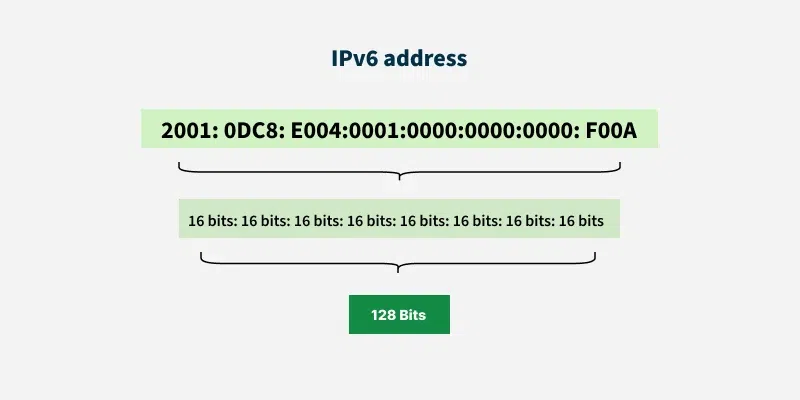
2. Structure of IPv6 addresses
IPv6 uses a 128-bit address format, written in hexadecimal and separated by colons.
Address format
Each address consists of eight groups of four hexadecimal digits, separated by colons. Example:2001:0db8:85a3:0000:0000:8a2e:0370:7334
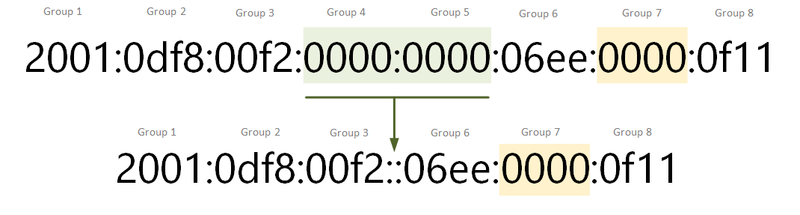
Shortening addresses
To improve readability, the system allows address compression:
- Omitting leading zeros -
2001:0db8:0000:0000:0000:ff00:0042:8329becomes2001:db8:0:0:0:ff00:42:8329. - Using
::for consecutive zeros -2001:db8:0:0:0:ff00:42:8329can be further shortened to2001:db8::ff00:42:8329.
3. Types of IPv6 addresses
This advanced protocol introduces three main types of addresses, improving efficiency and scalability.
- Unicast addresses (One-to-One): Identifies a single device in a network.
- Multicast addresses (One-to-Many): Allows communication with multiple devices simultaneously, replacing IPv4’s broadcast mechanism.
- Anycast addresses (One-to-Nearest): An address assigned to multiple nodes, with the closest one responding-useful for load balancing and redundancy.
Advantages of IPv6
Although IPv6 has been around for years, many networks still rely on IPv4. Here’s why making the switch matters:
- Address exhaustion: IPv4 is running out of addresses. IPv6 eliminates the need for NAT, reducing complexity and improving performance.
- Stronger security: Built-in IPsec encryption makes IPv6 more secure against cyber threats.
- Efficient routing: A simplified packet structure speeds up data transmission and reduces network overhead.
- Future-proofing: Major ISPs and tech companies are adopting IPv6. Ensuring compatibility now prevents issues later.
Switching to IPv6 is essential for a scalable, secure, and efficient internet, ensuring long-term connectivity and compatibility.
Disadvantages of IPv6
While IPv6 offers significant benefits, it is not without its challenges. Here are some of the key drawbacks:
- Limited support in some networks: Many websites and applications still rely solely on IPv4, and some platforms do not yet fully support IPv6, leading to compatibility issues.
- Migration challenges: Transitioning from IPv4 to IPv6 requires significant infrastructure updates, which can be costly and time-consuming for ISPs and enterprises.
- Inconsistent ISP support: Some internet service providers do not offer IPv6 connectivity, requiring users to rely on IPv6 transition technologies like tunneling, which can introduce latency and performance issues.
Despite these challenges, ensuring proper IPv6 implementation is crucial. The next step is to test IPv6 connectivity to verify support and compatibility.
Testing IPv6 connectivity
Checking whether your device or network supports IPv6 is easier than you might think. Here’s how you can test it:
1. Using online tools
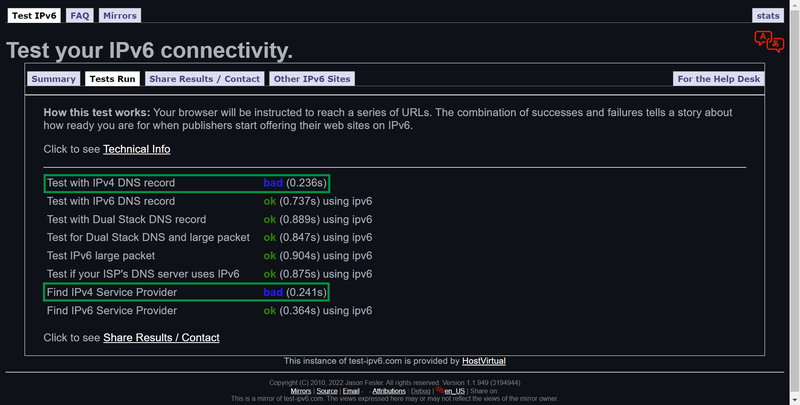
The quickest way to check compatibility is through online testing services. Open a web browser and visit:
- test-ipv6.com: This tool checks whether your connection is using IPv6 and provides recommendations.
- ipv6-test.com: Displays your current IP address and gives detailed insights into your connectivity status.
2. Checking IPv6 on Windows
To manually verify support on a Windows device, follow these steps:
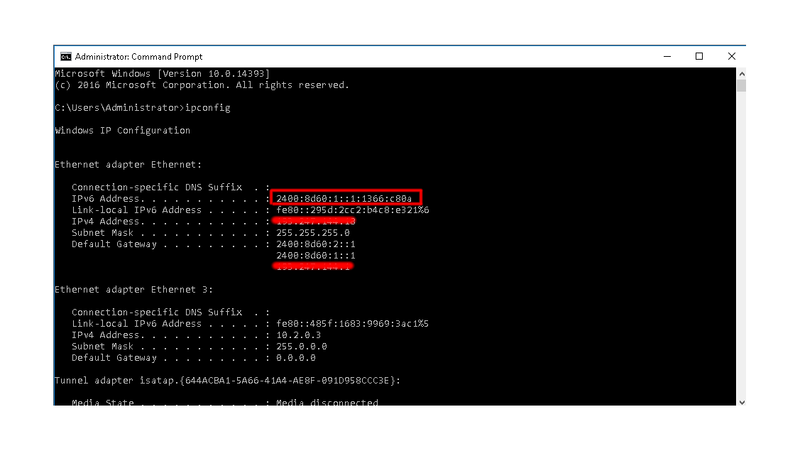
- Open the Command Prompt (Press
Win + R, typecmd, and hit Enter). - Type
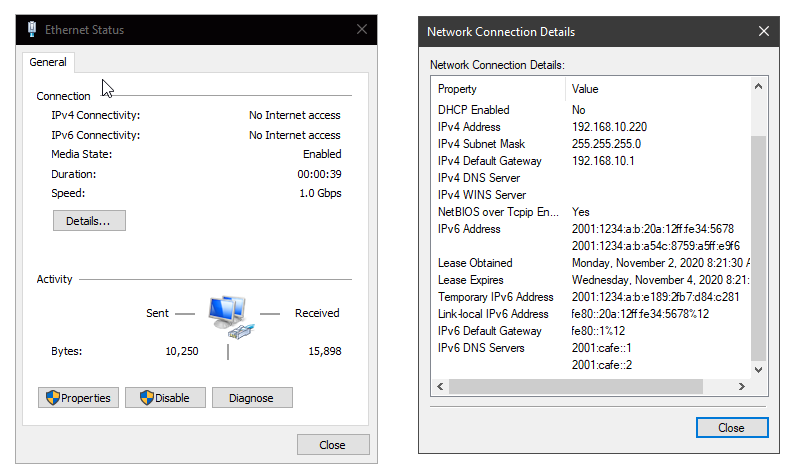
ipconfigand press Enter. - Look for the section labeled Ethernet adapter or Wi-Fi adapter. If you see an IPv6 address (e.g.,
2001:db8::1), your system supports IPv6.
3. Checking IPv6 on macOS
- Open System Preferences and go to Network.
- Select your active internet connection (Wi-Fi or Ethernet).
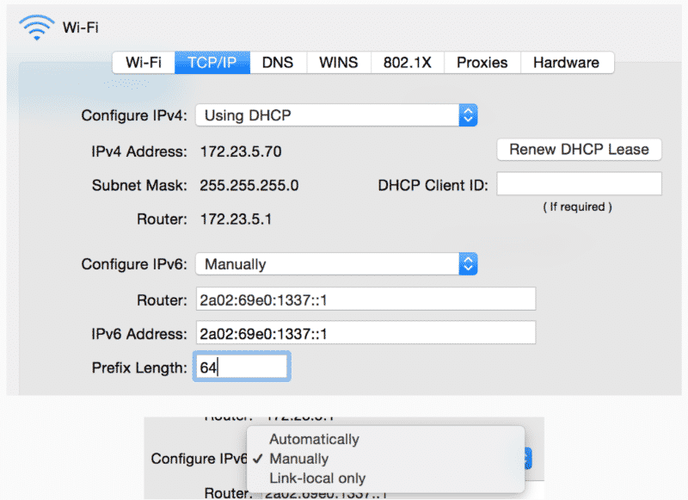
- Click Advanced, then navigate to the TCP/IP tab. If you see an IPv6 address, your Mac is IPv6-enabled.
4. Checking IPv6 on Linux
- Open a terminal window.
- Type
ip -6 addr showand press Enter. - If you see an IPv6 address, your system supports IPv6.
Ensuring IPv6 compatibility
When setting up an internet connection, service providers typically include both IPv4 and IPv6. However, IPv6 isn’t always enabled by default. If you want to use IPv6 on your network, follow the guide below.
1. Enabling IPv6 on Windows
- Open Control Panel > Network and Sharing Center.
- Click Change adapter settings.
- Right-click your active connection and select Properties.
- Check the box next to Internet Protocol Version 6 (TCP/IPv6).
- Click OK and restart your computer if necessary.
2. Enabling IPv6 on macOS
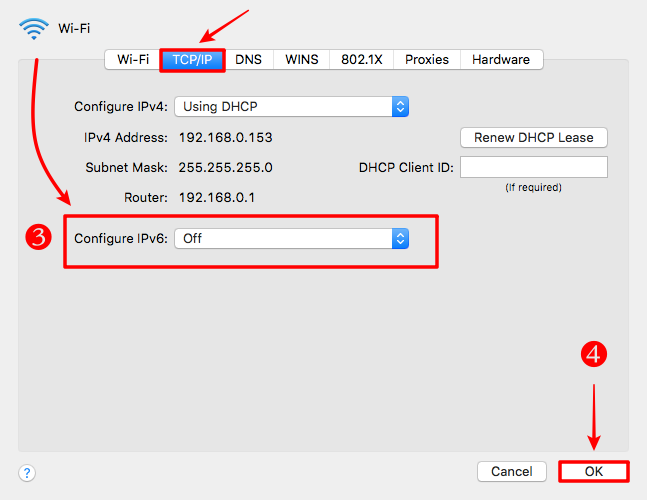
- Go to System Preferences > Network.
- Select your network connection and click Advanced.
- In the TCP/IP tab, set Configure IPv6 to Automatically.
- Click OK and restart your Mac if needed.
3. Configuring IPv6 on routers
- Log into your router’s admin panel (usually at
192.168.1.1or192.168.0.1). - Find the IPv6 Settings section (varies by router model).
- Enable IPv6 and select Auto Configuration if available.
- Save changes and restart your router.
Common issues and troubleshooting
Even with IPv6 enabled, you might run into issues. Here’s how to resolve them:
- ISP doesn’t support IPv6: Not all internet providers offer IPv6 yet. Check with your ISP to see if they support it, or consider using a tunnel broker service like Hurricane Electric’s TunnelBroker.net to access IPv6.
- Incorrect network configuration: Ensure your router has IPv6 enabled and is set to distribute IPv6 addresses to connected devices.
- Websites don’t support IPv6: Some websites still use IPv4 only. You may need to rely on dual-stack networks that support both IPv4 and IPv6.
- Firewall or security software blocks IPv6: Some security tools disable IPv6 by default. Check your firewall settings to ensure IPv6 traffic isn’t blocked.
Conclusion
IPv6 is the future of the internet, providing more addresses, better security, and improved network efficiency. Ensuring your connection supports IPv6 will help you stay ready for modern applications and services.
If your network isn’t IPv6-ready yet, enabling it on your device or router is usually straightforward. And if your ISP doesn’t support it, there are alternative solutions available. We hope this guide has helped you understand what is IPv6, why it’s important, and how to check your connectivity. Best of luck with your setup!
Frequently asked questions
1. Do I need to switch to IPv6 right now?
Not necessarily, but it’s recommended as more networks transition to IPv6. Staying prepared ensures seamless connectivity in the future.
2. Can I use both IPv4 and IPv6?
Yes, most networks support dual-stack mode, allowing both IPv4 and IPv6 to work simultaneously.
3. Why is my IPv6 test failing?
Your ISP may not support IPv6, or your router might not be configured correctly. Check your network settings and enable IPv6 if needed.
4. Does IPv6 improve internet speed?
Not directly, but it can reduce latency and improve efficiency in some cases.
Read more

What is a CAPTCHA? The check that separates people from bots

What is a mesh network and when should you use one?
What is an IP2 network? How it works, uses, and benefits
Explaining how to know if you have a DNS leak

How to know if you have a WebRTC leak: Reading your results
How to improve IP score: A complete guide