

| Aspect | WebSocket | WebRTC |
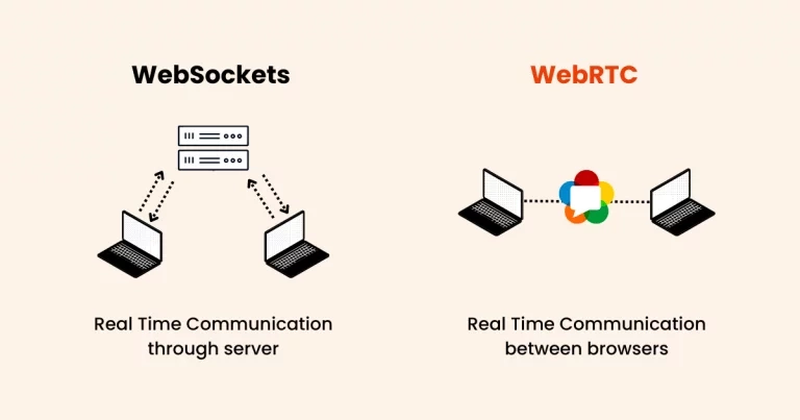
| Communication model | Operates on a client-server model where all communications pass through a central server. | Uses a peer-to-peer model, enabling direct communication between devices |
| Data types supported | Ideal for transferring text and binary data. | Optimized for media streams such as audio and video, in addition to general data. |
| Latency and performance | Designed for low-latency communication; excels in frequent small data transfers. | Designed for low-latency communication; excels in real-time media transmission for streaming. |
| Scalability | Easily scalable through centralized servers. | Scaling can be complex due to the need to manage multiple peer-to-peer connections. |
| Best use cases | - Real-time data apps (e.g., stock market trackers, live sports scoreboards) - Collaborative tools (e.g., synchronized document editors) - Notifications and alerts (e.g., email updates, system monitoring) |
- Multimedia communication (e.g., video calls, remote work tools) - Content delivery (e.g., high-quality streaming platforms) - Peer-to-peer apps (e.g., file-sharing tools) |
The way we connect online has been transformed by real-time communication technologies. Whether you’re crafting a video call app, a multiplayer game, or a live chat platform, selecting the right solution can make all the difference.
Two standout options in this space are WebSocket and WebRTC. While WebSocket excels at establishing smooth two-way communication between a client and a server, WebRTC is designed for peer-to-peer media streaming. This article dives into the comparison of WebSocket vs WebRTC, highlighting their key differences, ideal use cases, and tips for selecting the best fit for your project.
What is WebSocket?
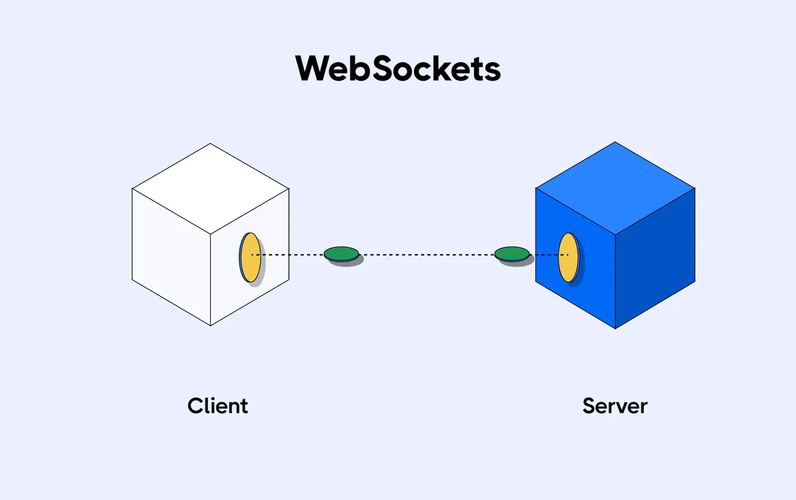
WebSocket is a communication protocol that enables full-duplex interaction between a client and a server over a single TCP connection. Unlike traditional HTTP, which requires multiple requests to transfer data, WebSocket keeps the connection open, allowing continuous two-way communication.
1. Advantages of WebSocket
- Persistent connection: The connection remains open, reducing latency and making real-time data exchange seamless.
- Low latency: WebSocket excels at handling rapid data transfers, making it ideal for scenarios that demand near-instant updates.
- Text and binary support: It’s versatile, capable of transmitting text-based data and binary formats like JSON or images.
2. Disadvantages of WebSocket
- Server load: Persistent connections can increase server resource usage, especially at scale.
- Limited media support: Unlike WebRTC, WebSocket is not optimized for audio and video streaming.
- Complexity in security: Ensuring secure WebSocket implementation requires careful configuration to avoid vulnerabilities.
What is WebRTC?
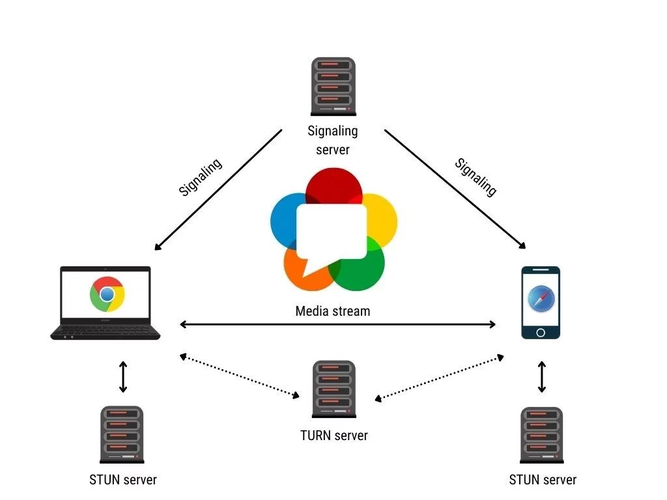
WebRTC (Web Real-Time Communication) is an open-source project that facilitates peer-to-peer communication for audio, video, and data sharing. Unlike WebSocket, which uses a client-server model, WebRTC connects devices directly, reducing the need for intermediaries.
1. Advantages of WebRTC
- Peer-to-peer connectivity: Devices communicate directly, minimizing latency and reducing server load.
- Optimized for media: WebRTC’s design excels in real-time audio and video transmission.
- Cross-platform compatibility: As a browser-native API, WebRTC works seamlessly across most modern devices.
2. Disadvantages of WebRTC
- Complex scalability: Managing multiple peer-to-peer connections can be challenging for large-scale applications.
- Signaling dependency: WebRTC requires a separate signaling mechanism, often implemented with WebSocket.
- Higher initial setup complexity: Setting up and configuring WebRTC connections can be more involved compared to WebSocket.
- IP leaks: WebRTC can unintentionally reveal a user’s real IP address, which compromises privacy. Extra measures, such as WebRTC leak prevention tools, are necessary to mitigate this risk.
WebSocket vs WebRTC: Key differences explained
Gaining a clear understanding of WebSocket vs WebRTC can help you make the right choice for your project. Here’s a comparison table summarizing the key differences and use cases of WebSocket vs WebRTC:
Integrating WebSocket and WebRTC
In some cases, using WebSocket and WebRTC together can unlock unique advantages. For example, WebSocket can handle signaling in WebRTC applications. Signaling is the initial communication required to establish a peer-to-peer connection, including sharing session descriptions and network information.
When integrating websocket and webrtc, keep the following in mind:
- Define roles clearly: Use WebSocket for signaling and WebRTC for media or data transfer.
- Optimize resource use: Ensure the server and peer-to-peer components work harmoniously without overloading your infrastructure.
Security considerations
Both WebSocket and WebRTC have robust security measures, but they require proper implementation to mitigate risks.
1. WebSocket
- Encryption: Always use secure protocols like WSS (WebSocket Secure) to protect data in transit.
- Authentication: Implement strong authentication mechanisms to prevent unauthorized access.
2. WebRTC
- Built-in security: WebRTC uses DTLS (Datagram Transport Layer Security) and SRTP (Secure Real-Time Protocol) to encrypt media streams.
- Firewall and NAT Traversal: Use STUN (Session Traversal Utilities for NAT) and TURN (Traversal Using Relays around NAT) servers for seamless connection establishment.
Conclusion
Deciding between WebSocket vs WebRTC largely depends on the requirements of your project. WebSocket is ideal for transferring small data packets quickly and efficiently, while WebRTC excels in handling real-time audio and video communication through its peer-to-peer capabilities.
By thoroughly understanding the distinctions and use cases of WebSocket vs WebRTC, you can ensure your application is both high-performing and tailored to your goals. Wishing you success!
Read more
IPFoxy review: Are its pure rotating residential proxies worth it?
Shared and blacklisted IPs frequently disrupt multi-account setups, prompting IPFoxy to enter the market with a bold promise: pure, non-reused proxies engineered for maximum stealth. Backed by a global network of over 90 million IPs across 200+ countries, this provider positions itself as a cost-effective, enterprise-grade choice for both digital marketers and web scrapers.
But does IPFoxy actually deliver clean connections under real-world workloads, or is its "pure IP" promise just another marketing gimmick? In this review, IPFighter will break down IPFoxy’s features, pricing, and put its rotating residential proxies to the test to see if this provider is worth your investment. Show more

CatProxies review: What do its five proxy types offer?
Success in proxy-dependent tasks relies on balancing IP authority, network speed, and pricing rather than raw pool size alone. CatProxies addresses these varying requirements by offering residential, mobile, ISP, and datacenter proxy solutions with flexible session controls.
In this CatProxies review, IPFighter examines the provider's proxy offerings, key features, pricing, and setup workflow. We also perform hands-on tests across its Standard and Premium Residential networks to evaluate IP quality, speed, and location accuracy in real-world scenarios. Show more
Hidemyacc review 2026: Features, pricing and real fingerprint test results
Running several accounts on Facebook, Amazon, TikTok or ad platforms from one computer is easy to start and hard to keep alive. Platforms link accounts through browser fingerprints, cookies and network signals, and one linked account can drag the rest down with it.
A multi-accounting browser solves this by giving every account its own isolated browser profile. Hidemyacc is one of the tools built for this job. In this review, we look at what Hidemyacc offers, what it costs, and how a fresh profile actually performs when we run it through IPFighter’s fingerprint and leak tests. Show more
Whitecloakproxy review: What to know before you buy
High-trust mobile connections are crucial for bypassing strict security filters, making dedicated 5G lines a game-changer for digital operations. White Cloak Proxy specializes in this approach, offering dedicated 5G mobile proxies with unlimited bandwidth, automated provisioning, and flexible plans starting at $8 per day. But does its performance and IP quality match the needs of demanding proxy users?
In this WhiteCloakProxy review, IPFighter examines the provider's proxy offering, key features, pricing, setup process, and performance testing. We also look at its refund policy and compare White Cloak Proxy with alternative providers to help you decide whether its dedicated mobile network suits your requirements. Show more

Geonix review: What makes its proxy services stand out?
With a diverse proxy lineup covering residential, mobile, ISP, and datacenter proxies, backed by more than 10 years of experience, does Geonix actually deliver the quality it claims? With more than 15 million IPs across 200+ countries and locations, the provider offers a wide range of proxy options and features for different use cases.
In this review, IPFighter takes a closer look at Geonix’s proxy types, key features, pricing, setup process, and real-world performance to help you determine whether Geonix is the right fit for your needs. Show more
Floppydata review: A closer look at its proxy network
Floppydata brings residential, mobile, and datacenter proxies together under one service, but how consistently do its IPs perform across different locations? Its pricing model and range of proxy options may simplify proxy management, while real-world IP quality, connection speed, and location accuracy still need to be evaluated separately.
In this Floppydata review, IPFighter examines the provider’s proxy types, pricing, key features, setup process, and performance. We also test 15 randomly selected IPs across five target countries to assess their IP quality, connection speed, blacklist status, proxy detection, and location consistency. Show more